Actionbar Stats HUD - Player Kills, Mob Kills, Deaths, Blocks & Playtime Counter
- By
Track real-time kills, mob kills, deaths, blocks & playtime on your actionbar HUD! Pure survival friendly & custom world ready for Bedrock 1.21+.
1000108765.jpg
1000108766.jpg
Description
Actionbar Stats Tracker for Minecraft Bedrock (1.21+)
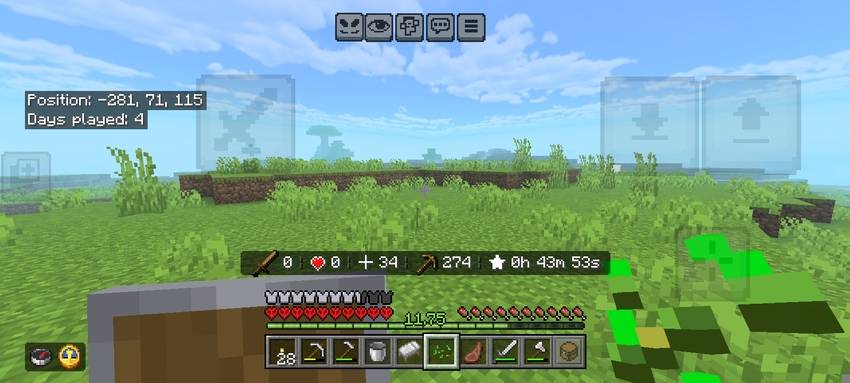
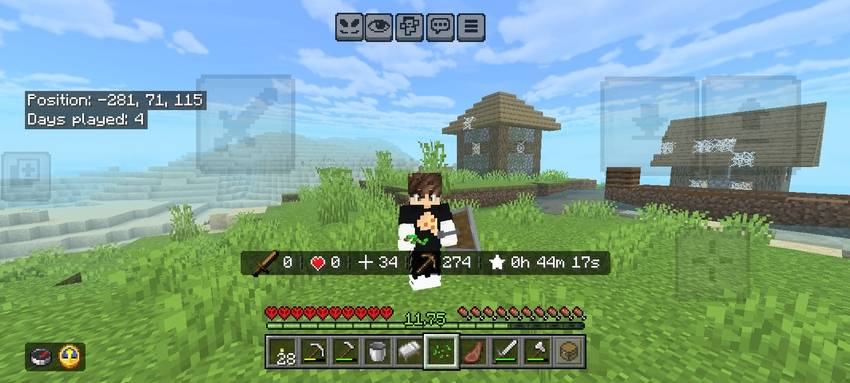
Actionbar Stats Tracker is a lightweight, real-time HUD addon built for Minecraft Bedrock (1.21+). It seamlessly tracks your essential gameplay stats and displays them directly above your hotbar using native, high-resolution Minecraft font icons.
Pure Survival friendly — track your combat records, mining progression, and playtime in real time without cluttering your screen or opening any menus!
⚡ Key Highlights
- Pure Survival Friendly: Works smoothly in survival worlds without interfering with normal gameplay.
- Zero Lag & Optimized: Ultra-fast, lightweight script loops that run smoothly even on low-end devices.
- Vanilla Glyph Icons: Uses clean, built-in Minecraft UI symbols instead of ugly plain text.
- Real-Time Playtime Clock: Tracks hours, minutes, and seconds automatically from the moment you join.
- Map Maker & Realm Ready: Easy command toggle to hide the default UI and build custom scoreboard setups.
🎮 HUD Display & Glyph Icons Guide
The HUD appears directly on your actionbar and displays five live statistics:
- Red Sword Glyph (
\uE109): Player Kills — Counts how many players you have defeated in PvP. - Dark Red Heart Glyph (
\uE10C): Deaths — Total times your player has died in the world. - Gold Crosshair / Target Glyph (
\uE017): Mob Kills — Tracks hostile, neutral, and passive mobs eliminated. - Green Pickaxe Glyph (
\uE108): Blocks Mined — Total blocks broken during gameplay. - Yellow Star Glyph (
\uE107): Playtime — Displays active world time inXh YYm ZZsformat.
🛠️ In-Game Commands & Customization
If you are using this pack on a custom realm, adventure map, or mini-game server, you can toggle the default actionbar HUD whenever you want:
Disable Default HUD: Run:
/function stats_ui_disableAdds thehide_stats_bartag to all players and clears the actionbar. The scoreboard continues to record stats in the background, allowing server owners and map makers to display them using custom command blocks.Enable Default HUD: Run:
/function stats_ui_enableRemoves the tag and immediately restores the default actionbar HUD display.
📊 Scoreboard Objectives (For Custom Commands)
All data is stored inside standard Bedrock scoreboard objectives. You can integrate them into your own command block setups:
kills— Player vs Player kills countdeaths— Player death countermob_kills— Total entity/mob killsblock_mine— Broken blocks counterhour— Hours playedmin— Minutes playedsec— Seconds played
📥 Installation Guide
- Download the
.mcpackfile. - Click or tap to open it; Minecraft will automatically import the addon.
- Open your World Settings -> Behavior Packs -> Activate Actionbar Stats Tracker.
- Launch your world and enjoy your new stats HUD!
👤 Credits & Info
- Creator: PlayZerMc (PawanBhai333519)
- Pack Type: Behavior Pack / Addon
- Minecraft Version: Bedrock / MCPE 1.21.0+
Actionbar Stats HUD - Player Kills, Mob Kills, Deaths, Blocks & Playtime Counter Team

Owner