
xScreenshot 2026-11-20 at 11.19.20â¯AM.png
Description
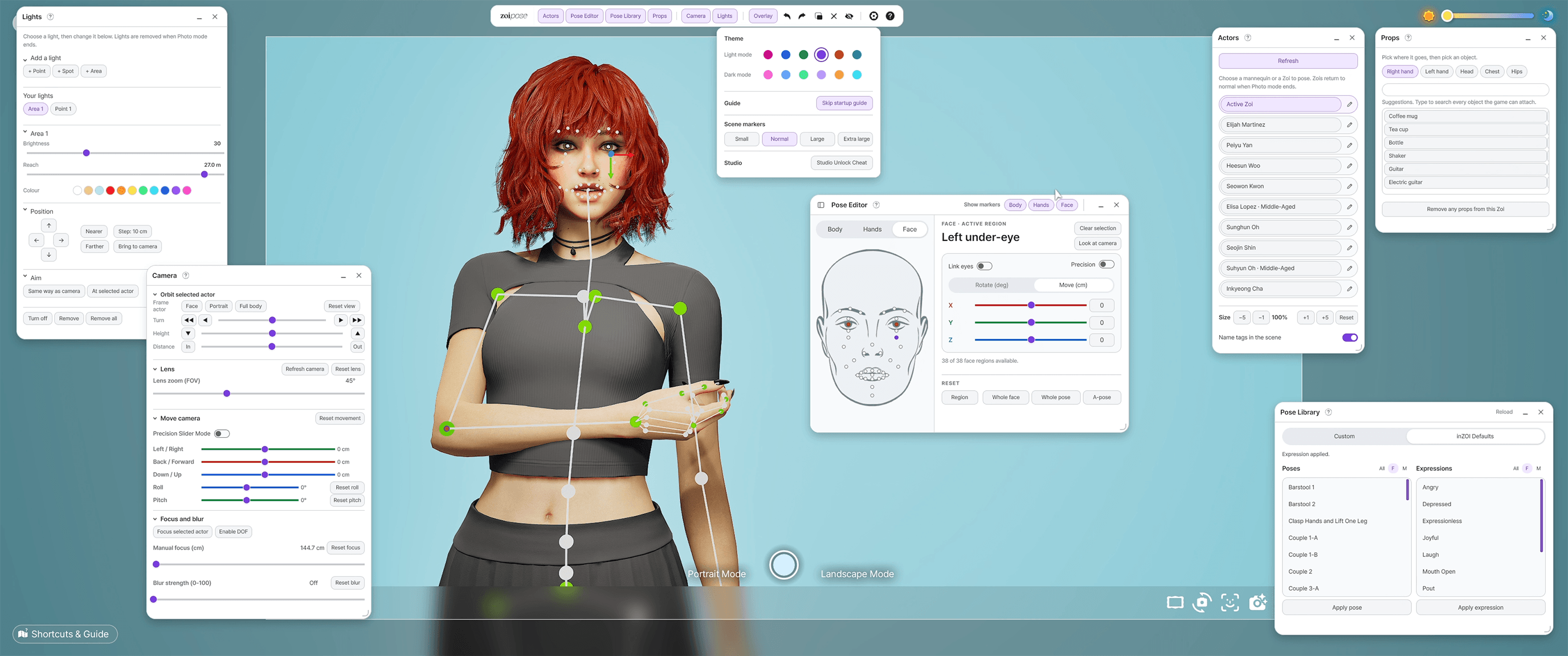
ZoiPose turns inZOI's Photo mode into a posing studio.
Select any Zoi in the scene, or a Studio Mannequin, and pose them joint by joint with handles drawn right on the character. Shape hands and faces, put a guitar or a coffee mug in their hand, add your own lights, and frame the shot with one click. When you leave Photo mode, your Zois go back to what they were doing.
What's new in 2.0
- Pose Zois, not just mannequins. Your active Zoi, your household and Zois nearby, at every age from newborn to senior. No mannequin needed.
- Props. Search every object the game can attach and fit it to a hand, the head, chest or hips.
- Lights. Up to eight point, spot and area lights that you place and aim.
- Orbit and framing. Face, Portrait and Full body buttons, and a camera that circles your actor.
- Undo and Redo, A-pose, Flip pose, Pin in place.
- A redesigned interface with a new toolbar, compact panels and a rewritten Guide.
Main features
Posing
- Body, Hands and Face. Pose body and hand joints and 38 face regions.
- Handles on the character. Rotation rings and move arrows are drawn in the game world, stay visible through the body, and light up under your pointer.
- Move with IK. Drag a hand or foot and the arm or leg bends to follow. A Bend slider swings the elbow or knee.
- Mirror pairs, Pin in place, Link finger, Link eyes.
- A-pose, Flip pose and scoped resets for a joint, a limb, a face region or the whole pose.
- Undo and Redo.
- Precision mode for fine dragging and typed values.
- Look at camera aims the head and eyes at the lens.
Actors
- Any Zoi in the scene, by name, with age groups shown.
- Click a name tag above someone's head to select them.
- Several actors at once. Switch between them and each keeps its edits.
- Studio Mannequins keep their pose after you leave Photo mode.
- Size scales the selected actor.
Props and lights
- Props: search by name, attach, then fit with Move, Turn and Size sliders.
- Lights: brightness, reach, colour, a four-way move pad, and aim at the camera's view or at your actor.
Camera
- Frame actor: Face, Portrait, Full body.
- Orbit around the selected actor with buttons or sliders, and Reset view.
- Lens zoom, camera movement, pitch and roll.
- Manual focus and background blur, with Focus selected actor.
Pose Library
- Browse the game's poses and expressions, fitted to the selected actor.
- Save your own poses and expressions.
- Apply parts of a pose: Body, Arms, Legs, Hands or Face.
- Share pose files with other players.
Your workspace
- 12 themes, six light and six dark.
- Panels that fold, resize to fit, and remember where you put them.
- An in-game Guide with a page for every panel. The ? beside any window title opens the right page.
- Ctrl + Shift + H hides or restores all ZoiPose UI.
Start posing
- Load your household and enter Photo mode. The ZoiPose toolbar appears at the top.
- Open Actors and pick a Zoi, or click the name tag above anyone in view.
- Open Pose Editor, choose Body, Hands or Face, select a joint, and drag the rings or arrows on the character.
- In Camera, press Face, Portrait or Full body to frame them. Add Lights and Props to finish the scene.
Want a figure that keeps its pose? Studio Mannequins, lights and special effects unlock automatically when your household loads. In Build mode open Furniture → Space → Other → Studio, place a Studio Mannequin, and use Select Appearance to copy a Zoi. If the Studio catalog is missing, use Settings → Studio Unlock Cheat.
Saving and sharing
In Pose Library → Custom, choose Save Pose to store the starting body pose, your body and face edits, and the expression. Save Expression keeps the face on its own.
Export a custom entry and share the whole .zoipose.cfg file from:
Documents/inZOI/Mods/InGame/ZoiPose_42194E40/pose_exchange
To receive a pose or expression, copy the file into that folder and open Pose Library, or use Import Pose / Import Expression. Importing adds an entry without applying it, and never replaces an existing name without asking.
Known limitations
- ZoiPose works in Photo mode in the world. It does not appear in the photo mode inside Create a Zoi, because the game does not show mod panels there.
- Zois return to normal when Photo mode ends. Only Studio Mannequins keep a pose.
- Props work on Zois only. Mannequins cannot hold them.
- A Zoi in a crib, on a seat or being carried can be posed but not moved.
- A framing button can stop short when a wall or large object is between the camera and the actor.
- Position, size, props, lights and camera settings last for the Photo session and are not saved in pose files.
- Animated poses cannot be captured. Some rigs, clothing and presets may give unexpected results.
Requirements
- inZOI with mods enabled.
- No other mods required.
AI disclaimer
ZoiPose was developed with assistance from AI tools. The mod is created and maintained by forkliftfreak.
Version 2.0 changelog
See the full list in the changelog tab or file. In short:
Pose Zois as well as mannequins, at every age, with no mannequin required.
Props, Lights, Orbit and framing.
Undo and Redo, A-pose, Flip pose, Pin in place, Mirror pairs, Bend.
Handles drawn in the game world, smoother IK, 38 face regions with on-face markers and Move arrows.
Mannequins keep their pose after Photo mode.
Redesigned toolbar and panels, new icons, and a rewritten Guide.
Smaller download and lighter on memory.
ZoiPose Team
