MealRun (Bliss Bay only)
- By
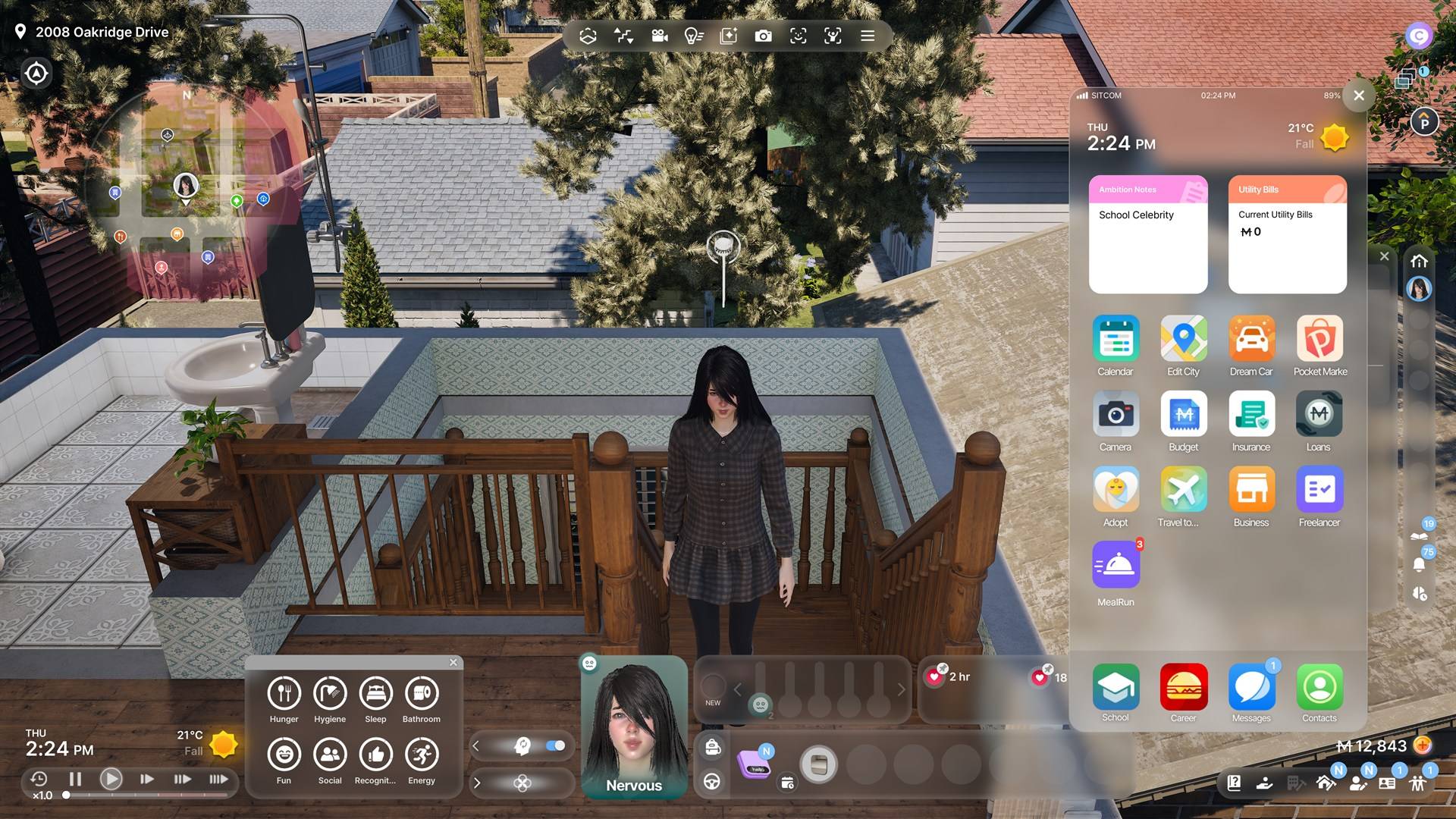
1_home.jpg
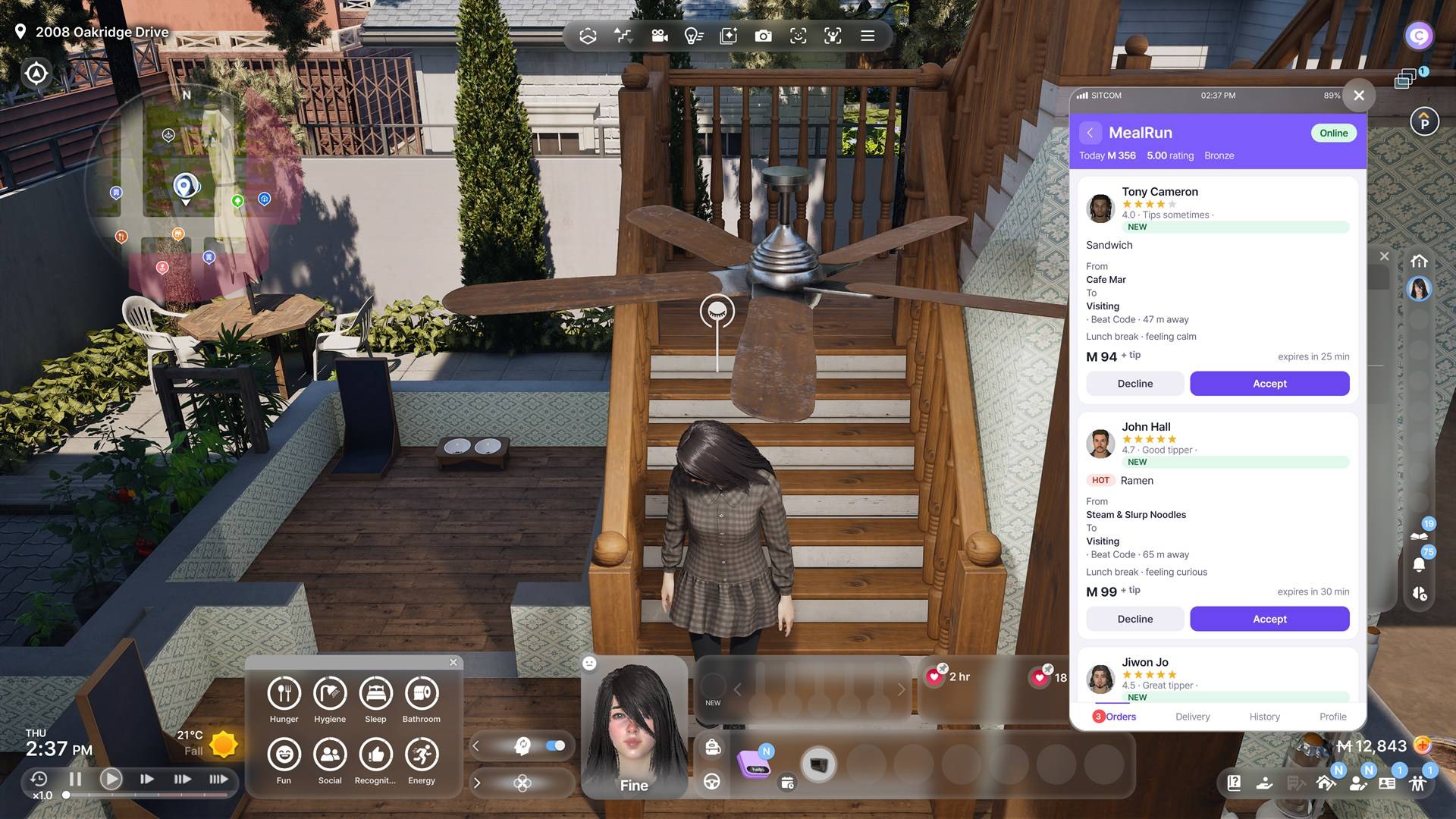
2_offer.jpg
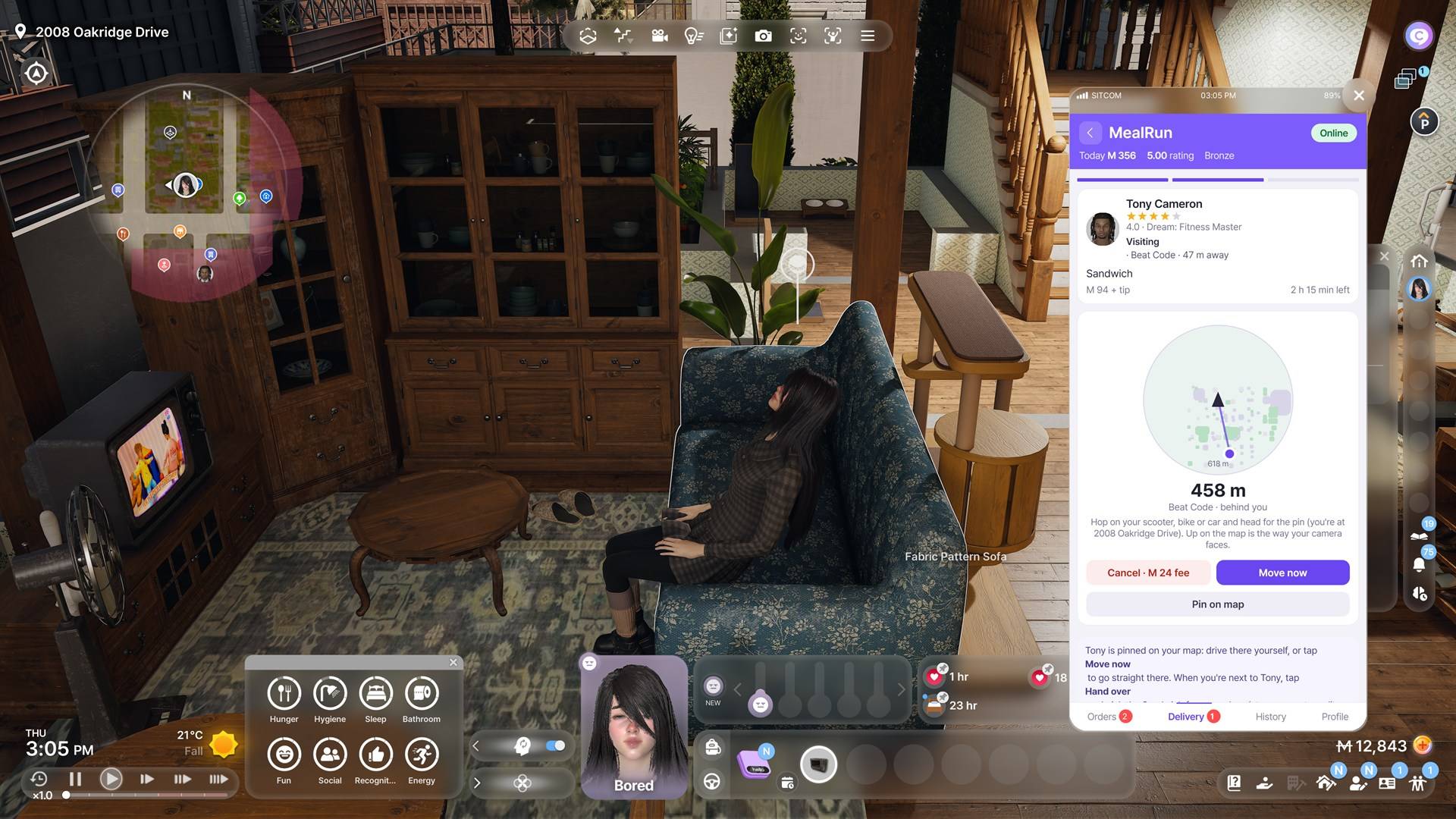
3_delivery.jpg
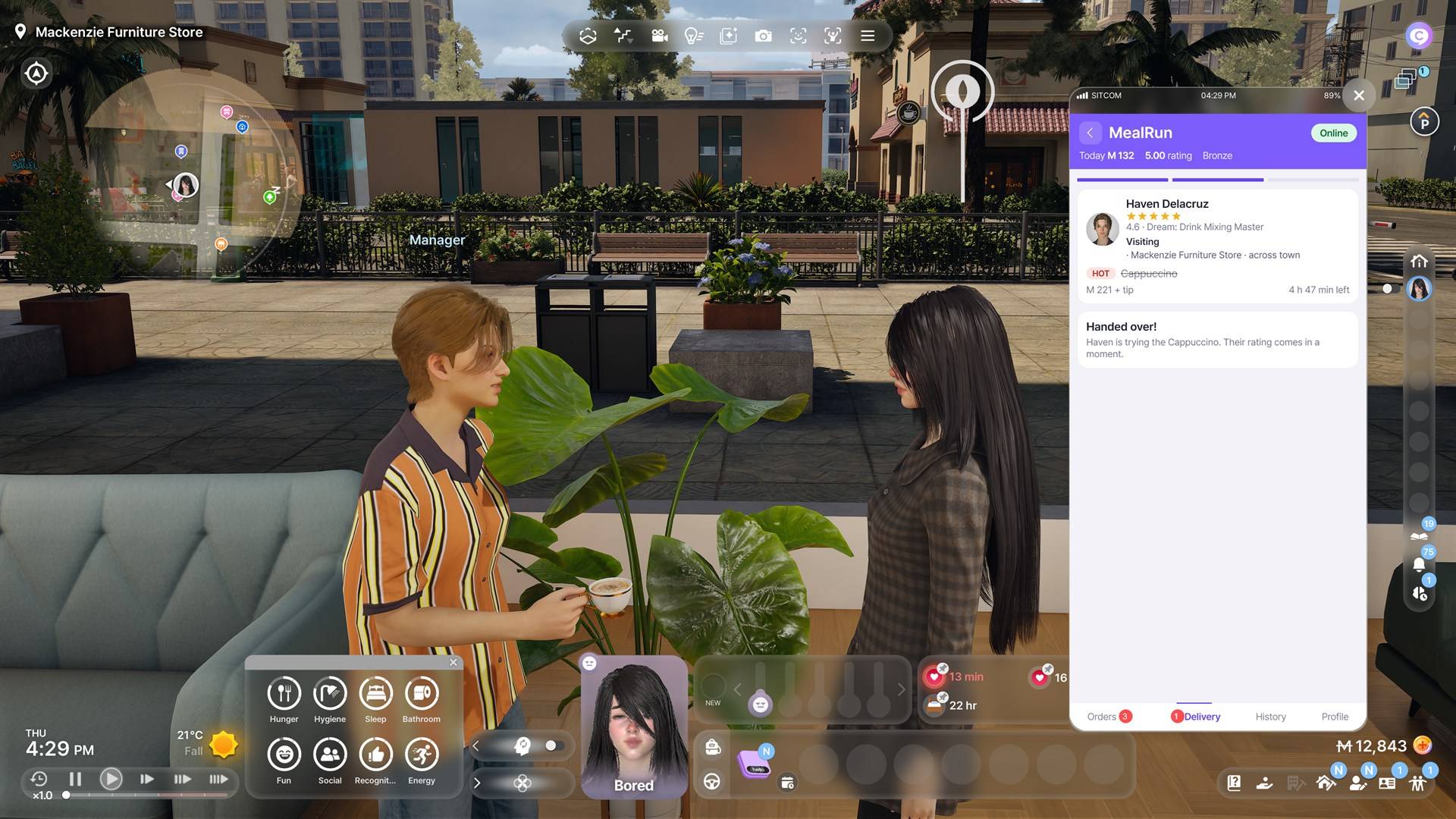
4_eating.jpg
5_history.jpg
Description
**MealRun** adds a delivery app to your Zoi's phone. Go online and the town gets hungry: Zois out and about in Bliss Bay order a meal, a dessert or a drink, and it's your job to get it to them.
Orders aren't random. What a customer asks for comes from the game itself:
- **Hungry** Zois order a proper meal (or breakfast in the morning).
- Everyone else picks a bite, a dessert, a hot drink or a cold one, depending on their **mood**, the **weather** and the **time of day**. A tired Zoi wants something hot, a sad one fancies something sweet, and on a hot afternoon cold drinks sell.
- **Kids** get a kid-friendly menu. Babies and toddlers don't order.
- Nearly 100 base-game dishes and drinks, from invented local shops. No alcohol.
### How to play
1. Open your phone and tap the **MealRun** icon. It finds its own spot next to your other apps, including other mods' apps.
2. Tap **Go online**. Offers come in from Zois in public places around town. Each shows the customer, what they want and why, the distance and the pay.
3. **Accept** an order, then tap **Collect**: the dish goes straight into your Zoi's bag.
4. Find your customer. They're **pinned on the game's own minimap**, and the app shows a direction arrow and the distance. Drive or walk there yourself, or tap **Move now** to go straight there.
5. Next to them, tap **Hand over** and give them the dish. They **eat or drink it on the spot**.
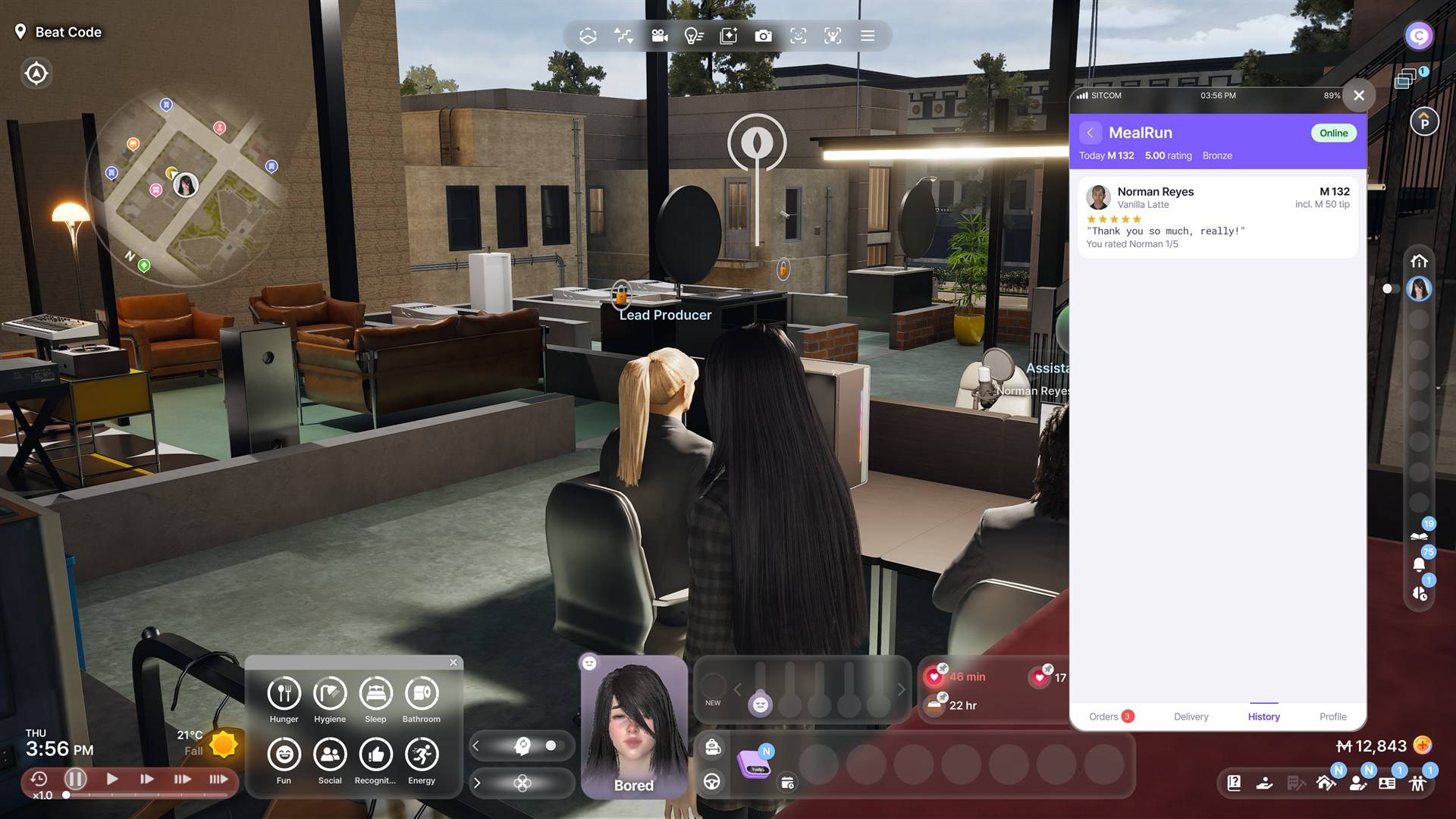
6. Get paid. The customer's rating comes from how they actually feel about it (the game's own moods), plus a tip if they're happy. You rate them back.
Earnings go into your **MealRun wallet**. Tap **Cash out** on the Profile tab to move them into your household's money.
### More
- **Courier profile**: deliveries, on-time rate, earnings, acceptance rate and a courier level (Bronze, Silver, Gold, Platinum).
- **Delivery history for each Zoi** you play.
- **Zoi pictures** on orders, history and your profile.
- **Customers can cancel**: if they fall asleep, get busy, head home or leave, they cancel and you get half the pay. It doesn't count against you. If **you** cancel after accepting, there's a small fee. A cancelled dish is removed from your bag.
- **A refused hand-over isn't counted**: if the customer doesn't take the dish, try again.
- **Couriers must be teens or older.**
- **No pop-ups** by default. Turn game notifications on in Profile > Settings if you want them.
### Requirements and compatibility
- **Mod version:** 1.0.1
- **Made for game version:** 20261027.16617.W
- **Town:** Bliss Bay. MealRun knows the positions of all of Bliss Bay's places; other towns aren't supported.
- **No cheats needed:** MealRun works with the game's cheats switched off.
- A Lua script mod made with the inZOI ModKit. No game files are replaced.
- Tested alongside Bubbly, OnlyZois, ZoiWorks Pets, Organized Crime, Alimony, Park Anywhere, Life Controller and Needs Decay Slider.
### Known limits
- **Pictures** appear after your first save with MealRun installed. A Zoi who first turned up after your last save shows their initials until you save again.
- Cash out shows the game's own "cheat applied" message, because it uses the game's money command. It's only a notice: your game's cheats stay switched off.
- If another mod's app is opened without tapping its phone icon (a hotkey or a notification), MealRun's icon may stay visible on top of it until you close and reopen the phone.
- If another mod draws its own phone icon outside the phone's grid, use Profile > Settings > **Phone icon spot** to nudge MealRun's icon one or two spots along.
### Under the hood
MealRun is a Lua script mod with a phone-app front end:
- **The phone app** (ModKit UI) runs the orders, the map tracker, ratings, wallet and history, and talks to MealRun's Lua scripts through the ModKit's config bridge.
- **Lua on the client side** relays the app's requests into the simulation and finds where MealRun is installed, so Zoi pictures work from any install folder.
- **Lua in the simulation** does the in-world work with the game's own systems:
- Collect creates the dish in your Zoi's bag with the game's own script command (the same one the game's scripted events use to hand out items).
- Customers are pinned on the game's minimap through its minimap manager.
- A cancelled order's dish is taken back out of your bag (or your hands) and removed.
- If the simulation script stops listening after a save load, the app notices and reconnects it on its own.
- Customer moods, needs and reactions come straight from the game, so every rating reflects how that Zoi really feels.
MealRun is a fan-made mod. It isn't official inZOI content and isn't affiliated with or endorsed by KRAFTON.
## Changelog
### 1.0.1
- Fixed: when MealRun was installed from CurseForge, its simulation script couldn't reconnect after a save load. Collect then showed the "cheat applied" notice, the customer wasn't pinned on the minimap, and a cancelled dish stayed in your bag until the game was restarted. It now reconnects on its own.
- Fixed: after switching to another Zoi, MealRun showed the previous Zoi's last "rated you" card (and "cancelled" note). Each Zoi now only sees their own.
### 1.0.0
- First release.
MealRun (Bliss Bay only) Team