BuildFlex
- By
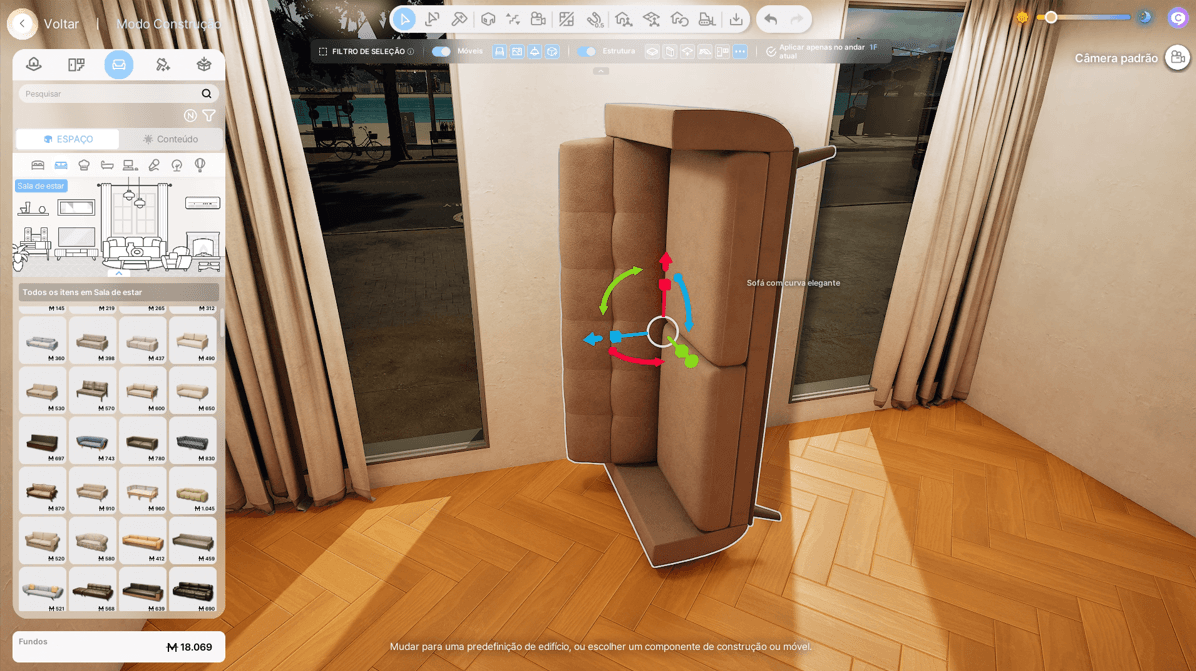
Rotate objects on every axis — stand a sofa on its side, tilt chairs or turn things upside down.
Description
BuildFlex gives you more freedom when moving objects in Build Mode. Click an object, click Move and use the arrows that appear on it – there are no new menus or shortcuts to learn.
What you can do • Change the height – lift objects, leave them floating in the air or sink them into the floor. They stay at that height when you move them to the side. • Tilt and turn in any direction – lean a chair, hang a picture at an angle, even turn things upside down. • Stretch or shrink – make an object wider, deeper or taller, one side at a time. • Place anywhere – objects can go into walls and other objects without turning red.
Objects you don't lift still sit neatly on floors, counters and tables, just like before.
How to use
- In Build Mode, click an object.
- Click Move.
- Drag the straight arrows to move it (the blue arrow pointing up changes the height), the curved arrows to turn it and the small squares to change its size.
Everything is saved with your lot. No cheats needed.
Good to know • Works with furniture and decorations, including most items from other mods. • Doors, windows, stairs, pillars, roofs, platforms and gates work as usual. • Wall objects (shelves, pictures, mirrors, wall lamps, wall cabinets) can be pulled away from the wall, lifted or lowered with the blue arrow, or placed inside other objects. Dragging them with the mouse still snaps them to walls. • For objects you lifted, use the arrows instead of the white circle in the middle: while you drag the circle, the object may drop to the floor for a moment, and it goes back up when you let go. • Since nothing blocks placement, make sure your Zois can still reach doors and walkways.
BuildFlex is a community mod and is not affiliated with or endorsed by KRAFTON.
BuildFlex Team