Money Donut (Meow Store)
- By
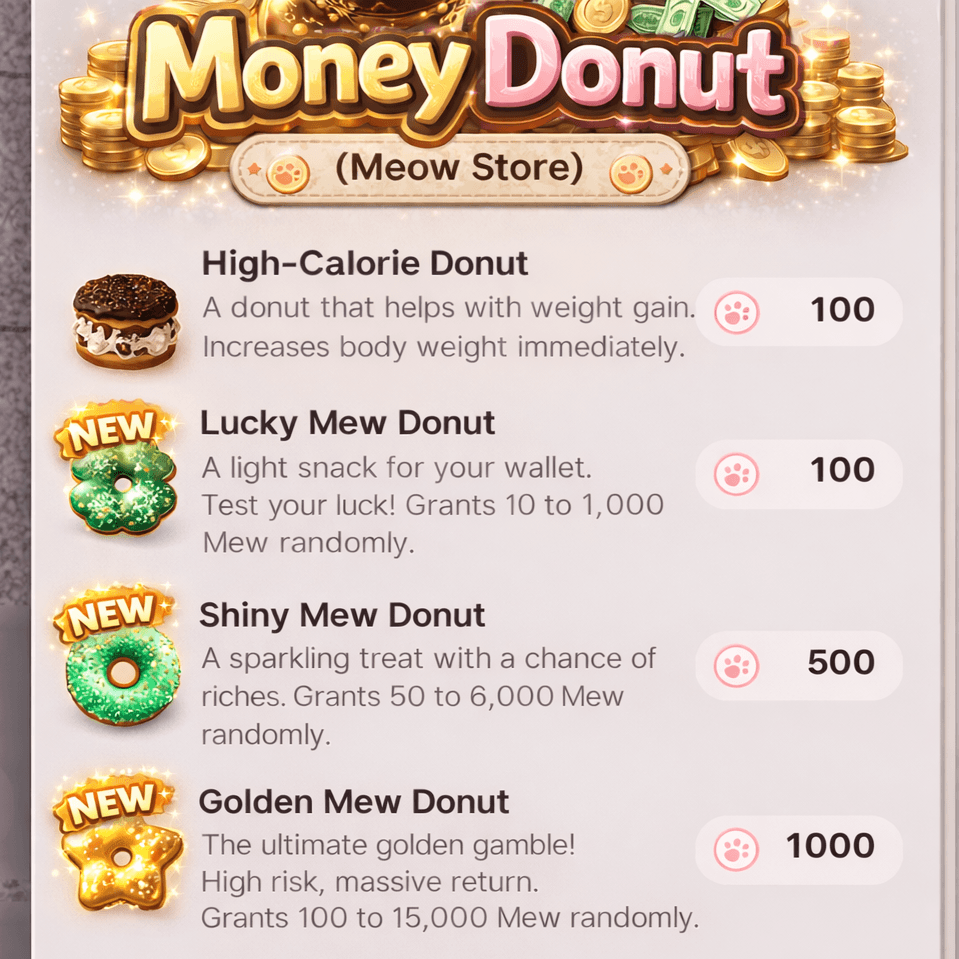
Exchange your Purr Coins (Meow Store Coins) for random amounts of Money (Mew) at the Meow Store! Includes 3 types of donuts with different reward ranges.
Money_Donut3.png
Description
Do you need more money (Mew) for your Zoi?
Do you have too many Purr Coins (Meow Store Coins) piling up?
Money Donut adds 3 special items to the Meow Store.
You can buy these donuts with Purr Coins to receive a random amount of money.
Donut List (Features)
1) Lucky Mew Donut (Price: 100 Purr Coins)
Reward: 10 ~ 1,000 Mew
2) Shiny Mew Donut (Price: 500 Purr Coins)
Reward: 50 ~ 6,000 Mew
3) Golden Mew Donut (Price: 1,000 Purr Coins)
Reward: 100 ~ 15,000 Mew
How to Use
Access Meow Store: Open the Meow Store interface in-game.
Find the Items: Scroll to the very bottom of the store list to find the 3 new donuts.
Exchange: Purchase your preferred donut using Purr Coins and watch your Mew balance grow!
Shop Refresh: If the donuts do not appear after installation, please save your game, exit to the desktop completely, and restart the game.
Known Issues
UI Overlay: When purchasing, the "Coins Deducted" and "Mew Added" text may overlap in the center of the screen. This is a limitation of the current game UI and cannot be fixed at this time.
Money Donut (Meow Store) Team

Owner