Build Description
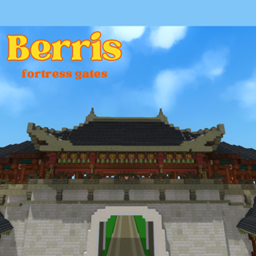
A Joseon-era Korean style construction designed for Hytale. This structure captures the essence of the ancient dynasty using red-toned blocks for the foundation, calcite for the roof, and navy blue blocks for detailing. Perfect for decorating villages and cities. Download instructions can be found at the bottom of the project.
Download Instructions
-
Download the file.
-
Extract (unzip) the file and keep only the folder.
-
Inside the folder, you will find a JSON file; that is the prefab.
-
Open %appdata% on your computer.
-
Navigate to: Hytale > Userdata > Saves.
-
Inside the Saves folder, find your world, then open the prefab folder and paste the JSON file there.
The Corean Temple Team