WorldProtect
- By
Map.png
rg info.png
rg .png
rg flag.png
rg menu id.png
rg menu.png
auto claim.png
Description
WorldProtect
WorldProtect is a flexible region protection plugin inspired by WorldGuard, designed with modern usability, visual map integration, and a clean flag-based system.
It allows server owners to protect regions, control player interactions, manage building permissions, and visually display regions on the world map — all with fine-grained permissions and customizable messages.
Built for the Hytale survival server at play.HolyTale.net
Quick Start
- Install: Download the latest release and drop the JAR into your server's
mods/folder - Restart your server
- Select area: Select two corners of the area you want to protect
/pos1and/pos2 - Claim land: Then create the region with
/rg claim <name> - See your claims: Open your map (M) - claimed regions show in color!
Features
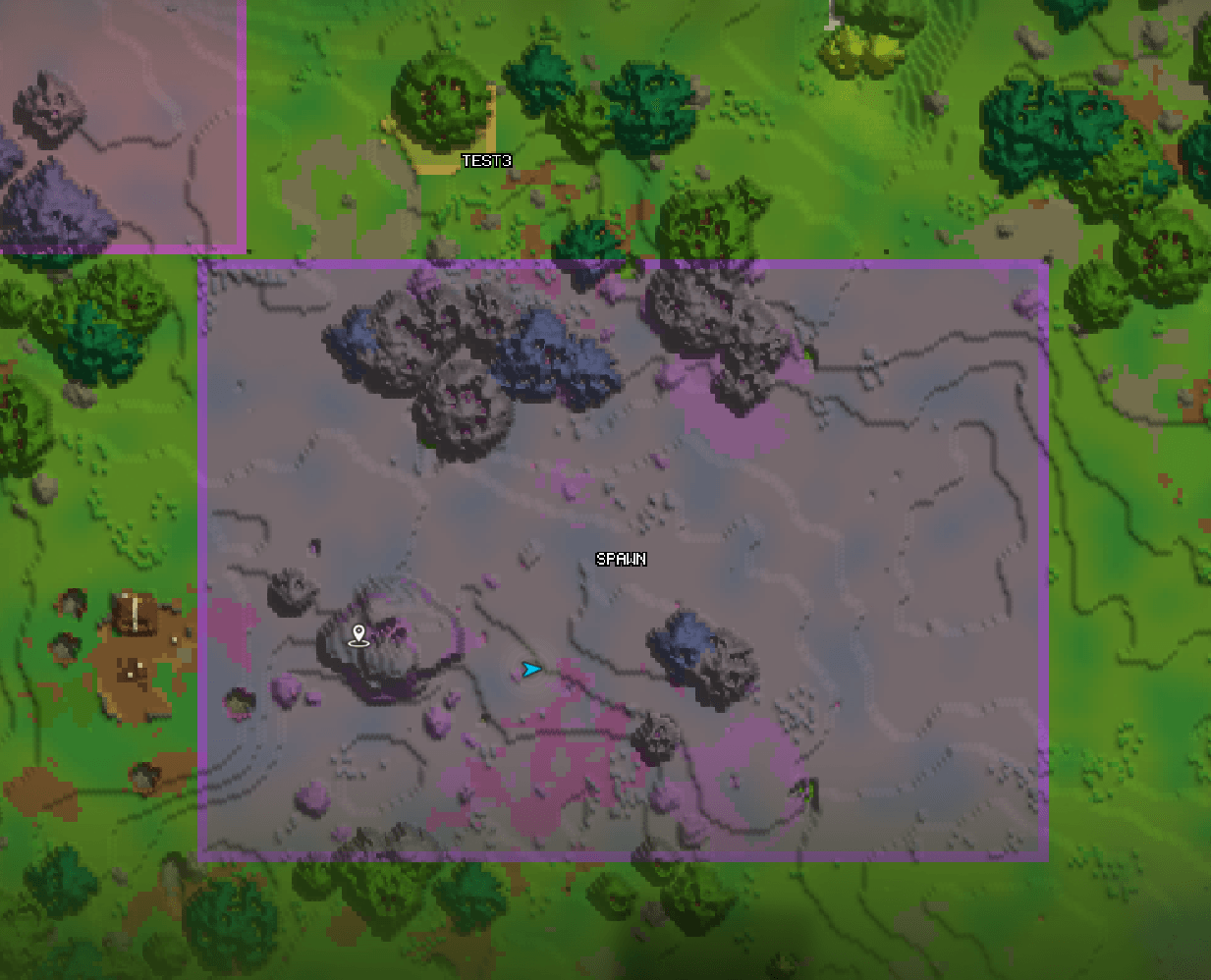
- Region Map Overlay - Claimed regions appear colored on the world map
- Interaction Control - Full control over how players interact inside regions
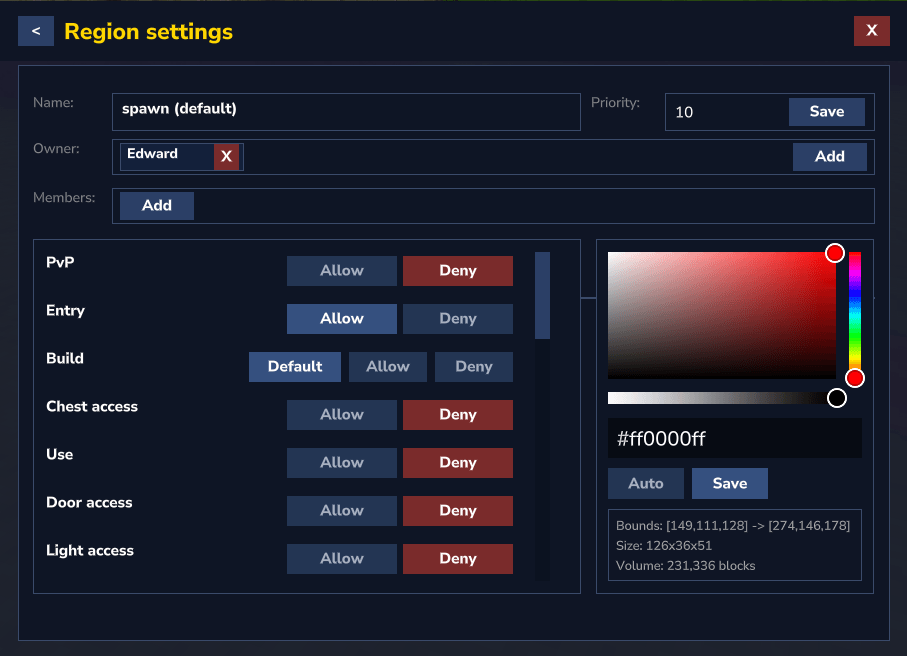
- Region Flags System - Each region supports multiple independent flags
- Custom Messages & Localization - Language file support/Colored chat messages
- Performance & Stability - Optimized cancel handling/Reduced client/server desync warnings
Commands
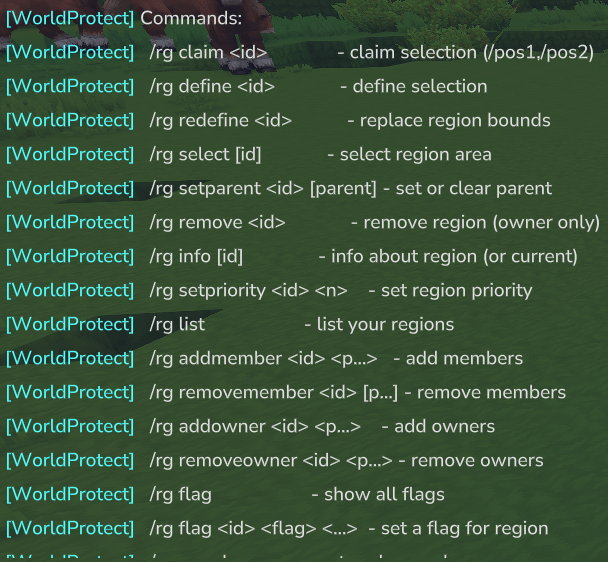
Base command /rg command set:
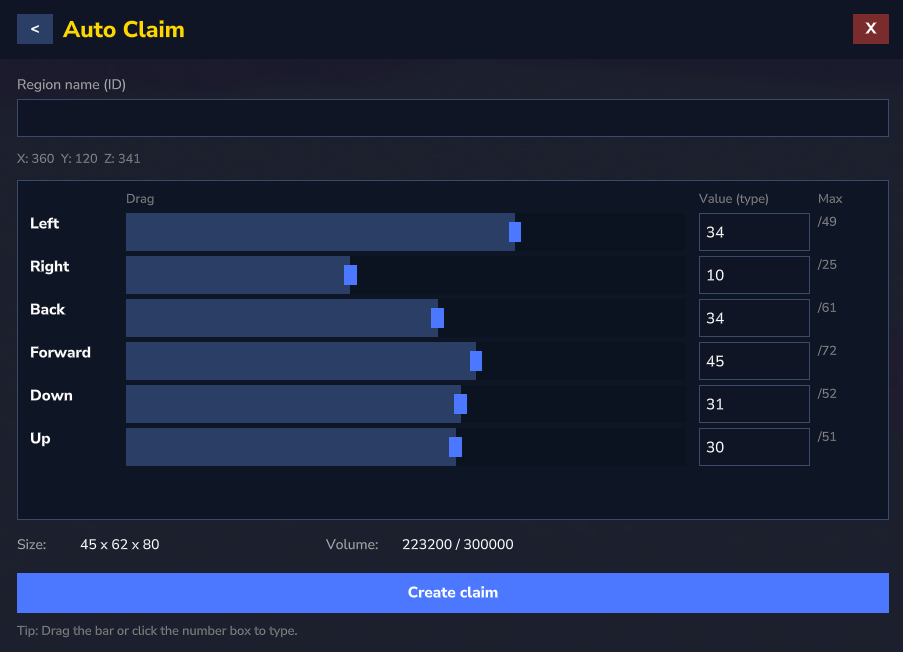
/rg claim <region> — create a protected claim from your current selection
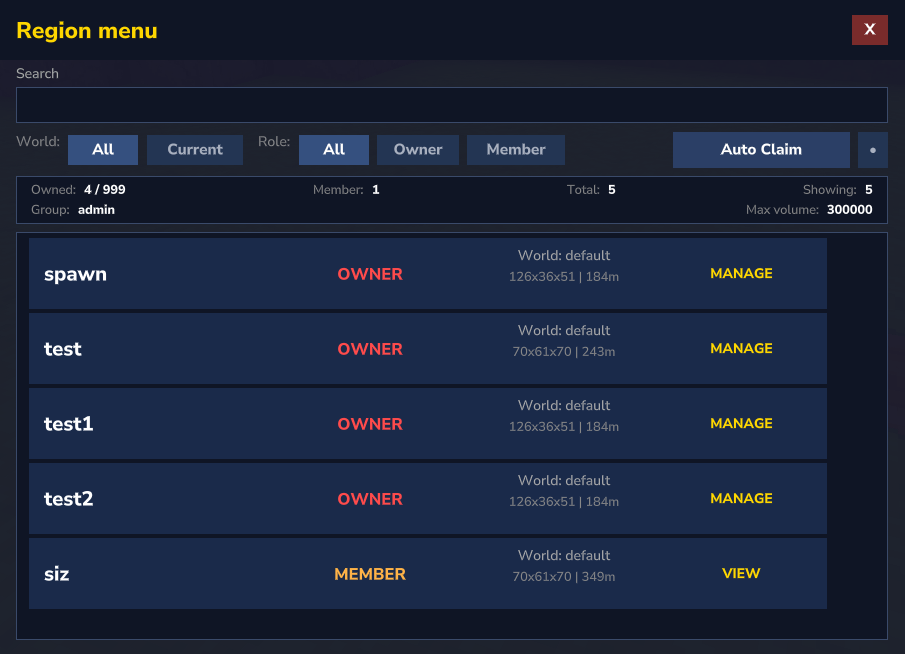
/rg menu — open the region GUI menu
/rg menu <region> — open a specific region menu
/rg wand — toggle region wand
/rg wand clear — clear your current selection
/rg define <region> — create an admin region from selection
/rg remove <region> — delete a region (owner/admin)
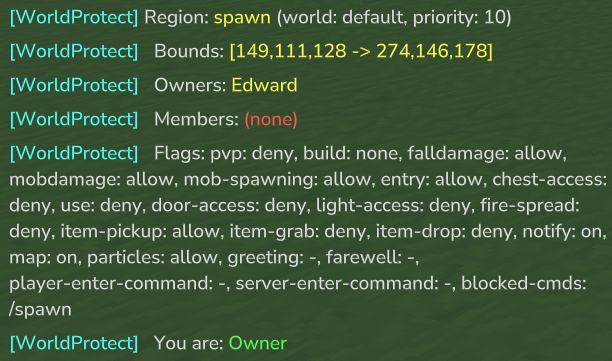
/rg info — info about region (or current)
/rg priority <region> <priority> — set region priority (higher priority wins when regions overlap)
/rg redefine <region> — replace region bounds
/rg select <region> — replace your selection with region bounds
/rg setparent <region> <parent> — set or clear a region parent
/rg addmember <region> <player> — add member
/rg removemember <region> <player> — remove member
/rg addowner <region> <player> — add owner
/rg removeowner <region> <player> — remove owner
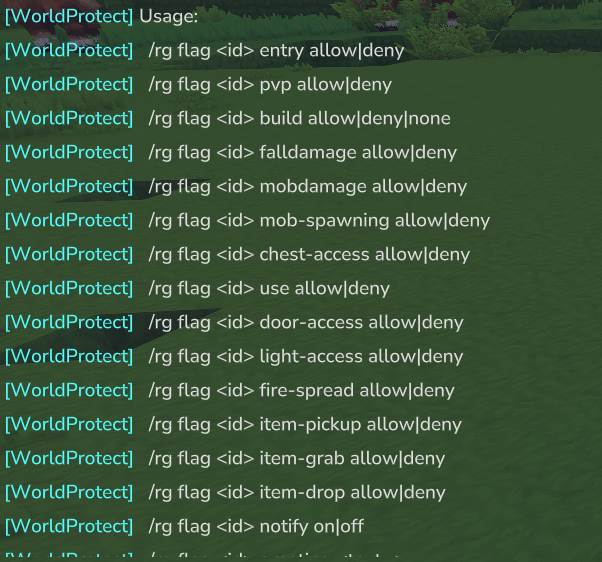
/rg flag <region> <flag> allow|deny|none — set region flags
/rg reload — reload configs, messages and regions
Permissions
- dev.worldprotect.worldprotect.command.rg — allows using /rg (base command access)
- worldprotect.bypass — bypasses all region restrictions and permission checks (admin override)
- worldprotect.reload — allows using /rg reload (reloads config, messages, and regions)
- worldprotect.menu.others — allows opening other players using /rg menu <id>
- worldprotect.addmember — allows using member add commands
- worldprotect.removemember — allows using member remove commands
- worldprotect.addowner — allows using owner add commands
- worldprotect.removeowner — allows using owner remove commands
- worldprotect.remove — allows using /rg remove <id> for own regions
- worldprotect.flag.pvp — allows changing the PvP flag (/rg flag <id> pvp allow|deny)
- worldprotect.flag.build — allows changing the build flag (/rg flag <id> build allow|deny|none)
- worldprotect.flag.falldamage — allows changing the fall damage flag (/rg flag <id> falldamage allow|deny)
- worldprotect.flag.mobdamage — allows changing the mob damage flag (/rg flag <id> mobdamage allow|deny)
- worldprotect.flag.chestaccess — allows changing the chest-access flag (/rg flag <id> chest-access allow|deny)
- worldprotect.flag.use — allows changing the use/interact flag (/rg flag <id> use allow|deny)
- worldprotect.flag.dooraccess — allows changing the door-access flag (/rg flag <id> door-access allow|deny)
- worldprotect.flag.lightaccess — allows changing the light-access flag (/rg flag <id> light-access)
- worldprotect.flag.notify — allows changing notifications (/rg flag <id> notify on|off)
- worldprotect.flag.greeting — allows changing greeting text (/rg flag <id> greeting <text...>)
- worldprotect.flag.farewell — allows changing farewell text (/rg flag <id> farewell <text...>)
- worldprotect.flag.map — allows toggling region visibility on the (M) map overlay (/rg flag <id> map on|off)
- worldprotect.flag.firespread - allows changing the fire spread flag (/rg flag <id> fire-spread allow|deny)
- worldprotect.flag.mobspawning — allows changing the mob spawning flag (/rg flag <id> mob-spawning allow|deny)
- worldprotect.flag.itempickup — allows changing the ground pickup flag (/rg flag <id> item-pickup allow|deny)
- worldprotect.flag.itemgrab — allows changing the manual pickup (F) flag (/rg flag <id> item-grab allow|deny)
- worldprotect.flag.entry — allows changing the entry flag (/rg flag <id> entry allow|deny)
- worldprotect.flag.player-enter-command — allows changing the player-enter-command flag (/rg flag <id> player-enter-command <command...>)
- worldprotect.flag.server-enter-command — allows changing the server-enter-command flag (/rg flag <id> server-enter-command <command...>)
- worldprotect.flag.blockedcmds — allows changing the blocked command flag (/rg flag <id> blocked-cmds <commands...>)
- worldprotect.flag.itemdrop — allows changing the item drop flag (/rg flag <id> item-drop allow|deny)
- worldprotect.flag.particles — allows toggling region border particle effects (/rg flag <id> particles allow|deny)
- worldprotect.flag.grassspread — allows changing the grass spread flag (/rg flag <id> grass-spread allow|deny)
- worldprotect.flag.mushroomspread — allows changing the mushroom spread flag (/rg flag <id> mushroom-spread allow|deny)
- worldprotect.redefine — allows replacing a region’s bounds with your current selection (/rg redefine <id>)
- worldprotect.select — allows replacing your current selection with the bounds of a region (/rg select <id>)
- worldprotect.setparent — allows setting or clearing a region parent (/rg setparent <id> [parent])
- worldprotect.wand — allows using (/rg wand)
- worldprotect.wand.clear — allows using (/rg wand clear)
- dev.worldprotect.worldprotect.command.<COMMAND> — allows using /<COMMAND>
- hytale.editor.selection.use — allows using region selection tools (set pos1 and pos2 with the selection)
Why download WorldProtect?
If you host a multiplayer server, WorldProtect adds clarity, safety, and control:
- Protect builds and bases so players can invest time without fear of griefing or theft
- Easy land claiming with a clean
/rgworkflow, plus member/owner management for teams and factions - Create protected areas instantly (spawn, market, towns, event zones) with admin regions and priorities
- Control gameplay per region using flags: safe zones, PvP arenas, build-permitted areas, restricted entry zones, and more
- Map visibility helps players understand borders at a glance (claimed regions appear colored on the world map)
- Optimized and stable: refactored internals to reduce overhead, bugs, and client/server desync warnings
Configuration
WorldProtect includes a configuration system that lets you fine-tune server rules, including:
- Block/build protection (prevent breaking/placing where not allowed)
- PvP protection rules (safe zones, arenas, wilderness logic)
- Overlap handling & priority rules (which region wins when they intersect)
- Region limits (claims per player, maximum region size, admin region behavior)
- Map overlay/marker integration (show/hide regions and adjust display behavior)
For Developers API
WorldProtect includes a public developer API for integrations and extensions.
This allows other mods/plugins to query region data, check protection rules, modify regions, and listen for region changes.
Getting the API
import dev.worldprotect.worldprotect.api.WorldProtectApi;
import dev.worldprotect.worldprotect.api.WorldProtectApiProvider;
WorldProtectApi api = WorldProtectApiProvider.getApi();
if (api == null) {
return;
}
// Example usage
api.getPrimaryRegionAt(world.getName(), x, y, z).ifPresent(region -> {
System.out.println("Inside region: " + region.id());
});
boolean canBuild = api.canBuild(player, world, blockPos);
boolean pvpAllowed = api.isPvpAllowed(world.getName(), x, y, z);
// Modify regions
api.addMember(world.getName(), "spawn", playerUuid);
api.setBuildFlag(world.getName(), "spawn", WorldProtectBuildFlag.DENY);
api.setFlag(world.getName(), "spawn", WorldProtectFlag.PVP, false);
api.setGreetingText(world.getName(), "spawn", "Welcome to spawn!");
// Create / delete regions
api.createRegion(world, "market", 0, 60, 0, 32, 90, 32, ownerUuid);
api.deleteRegion(world, "market");
// Region hooks
api.registerListener(new WorldProtectRegionListener() {
@Override
public void onRegionCreated(WorldProtectRegionSnapshot region) {
System.out.println("Created: " + region.id());
}
@Override
public void onRegionChanged(WorldProtectRegionChange change) {
System.out.println(change.type() + " -> " + change.region().id());
}
});
The WorldProtect Team