

![[Tblack's] VoidVault logo](https://media.forgecdn.net/avatars/thumbnails/1847/337/64/64/639162430709288611.png)
[Tblack's] VoidVault
- By

What's new
🔥 VoidVault Sponsors
Powered by HyTools
Free Hytale tools built by fans, for the community. Create shapes, format text, analyze server logs, configure servers, prepare announcements, simplify repetitive tasks, and more directly in your browser.
Powered by HyBrasa
Join HyBrasa, a Brazilian Hytale RPG server focused on adventure, progression, community, and an evolving gameplay experience.
Server IP: jogar.hybrasa.com.br:11276
Discord: Join the HyBrasa community →

VoidVault 0.3.0 - CHANGELOG
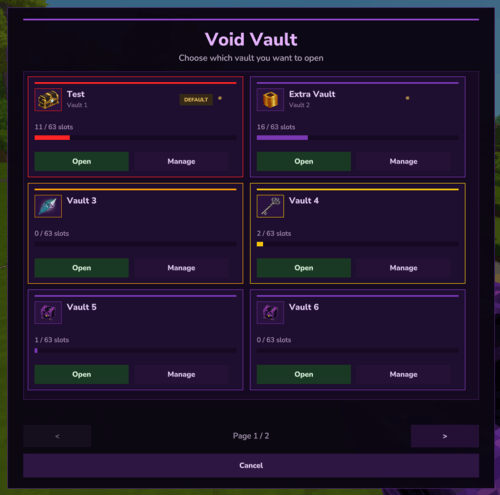
Experience & Organization Update
Your personal vaults are now easier to identify, organize, customize, and manage.
VoidVault 0.3.0 introduces a completely redesigned interface, item icons, custom colors, favorites, default vaults, organization tools, faster saving, and several quality-of-life improvements.
✨ Completely Redesigned Vault UI
The vault selection interface has been completely rebuilt to provide a cleaner, more useful, and more polished experience.
Each vault is now displayed as a detailed card containing:
- the vault's custom name;
- its original vault number;
- a selectable item icon;
- current slot usage;
- a visual occupancy bar;
- overflow warnings when applicable;
- favorite and default vault indicators;
- dedicated Open and Manage buttons.
The new layout keeps information clearly separated, with vault identity at the top, storage usage in the middle, and actions consistently aligned at the bottom.
The interface continues supporting pagination, allowing servers to configure many vaults without displaying every vault at once.
🎨 Vault Colors and Custom Color Picker
Vaults can now be visually customized using a much larger selection of colors.
Players can choose from 25 predefined colors, including:
- purple and violet tones;
- blue, cyan, and teal;
- green, lime, and emerald;
- yellow, gold, amber, and orange;
- red, coral, pink, and magenta;
- neutral colors such as gray, silver, and brown.
For even more customization, players can create their own color using:
- the native Hytale color picker;
- a custom HEX color code;
- a live preview before applying the color.
Custom colors are safely validated and normalized before being saved.
The chosen color is used throughout the interface, including card borders, accent lines, progress bars, icon frames, and management screens.
🖼️ Item Icons for Every Vault
Players can now use real Hytale items as vault icons.
The new item icon selector includes:
- native Hytale item thumbnails;
- a paginated item grid;
- search by the item's translated name;
- support for the player's current language;
- keyboard search using the Enter key;
- a safe default icon option;
- automatic fallback when a saved item no longer exists.
Item IDs and technical names are not exposed to players.
The selector loads only a limited number of icons per page, keeping the interface responsive even when the game contains a very large number of items.
🏷️ Rename Vaults Directly from the UI
Custom vault names can now be managed directly from the new vault management screen.
Players no longer need to use a command every time they want to rename a vault.
The management interface allows players to:
- enter a new vault name;
- save it immediately;
- restore the default vault name;
- see the updated name in the vault selector.
The existing rename command remains available for players and administrators who prefer using commands:
/vv rename <number> <name>
/vv rename <number> reset
⭐ Favorite Vaults
Vaults can now be marked as favorites.
Favorite vaults:
- receive a visible indicator in the selector;
- are displayed before regular vaults;
- keep their favorite state after reconnects and server restarts;
- remain independent from the default vault selection.
Players can favorite as many vaults as they want.
This makes frequently used vaults much easier to find on servers that provide access to several vaults.
💎 Default Vault
Players can now choose which vault should open when using:
/vv
/voidvault
The selected default vault is displayed first in the selection interface and receives a dedicated Default badge.
Important behavior:
- only one vault can be the default at a time;
- Vault 1 remains the fallback when no custom default is selected;
/vv <number>still opens a specific vault directly;- losing temporary access to the default vault does not delete the preference;
- Vault 1 is used safely until access to the selected vault is restored.
This allows every player to decide which vault is their main personal storage.
🧹 Organize Vault
A new Organize Vault action has been added to the management interface.
When used, VoidVault:
- removes empty gaps between visible items;
- moves stored stacks toward the first available slots;
- sorts items using a consistent and deterministic order;
- keeps empty slots at the end of the vault;
- preserves item amounts, metadata, durability, and internal state;
- leaves overflow items untouched.
The operation is protected against concurrent actions and is immediately saved after completion.
No item is merged, divided, deleted, or moved into overflow by the organization process.
📥 Deposit Similar Items
Players can now deposit matching items from their inventory directly into a selected vault.
The Deposit Similar Items action only transfers items that are compatible with items already stored inside the visible portion of that vault.
The system:
- detects actual stack compatibility;
- fills compatible stacks first;
- uses empty visible vault slots when necessary;
- transfers only the amount that can safely fit;
- does not use overflow as additional deposit space;
- does not remove equipped items;
- excludes the hotbar by default;
- never drops excess items on the ground;
- protects both inventories against item loss or duplication.
The operation is performed under a vault-specific lock and saved immediately after a successful transfer.
📊 Improved Storage Information
Vault cards and management screens now provide clearer storage information.
Players can see:
- occupied visible slots;
- total available visible slots;
- a permanent background track for the progress bar;
- the vault's selected color in the progress indicator;
- a dedicated warning when items are stored in overflow.
Example:
18 / 63 slotsOverflow remains protected and is never included as normal available capacity.
⚡ Smarter and Faster Saving
VoidVault now uses a debounced saving system for regular inventory changes.
Previously, several quick item movements could cause multiple immediate database writes.
The new system:
- groups rapid changes into fewer database operations;
- keeps only the newest vault snapshot;
- prevents older delayed saves from overwriting newer data;
- applies a maximum save delay during continuous activity;
- immediately flushes pending changes when required;
- saves immediately after organization and deposit actions;
- flushes safely when closing, reloading, or shutting down.
This reduces unnecessary SQLite activity while preserving the safety guarantees of previous versions.
🛡️ Data Safety and Compatibility
VoidVault 0.3.0 was designed to preserve all existing player data.
When updating:
- existing vault inventories remain unchanged;
- existing custom names are preserved;
- the database is migrated automatically;
- no manual SQL operation is required;
- no configuration reset is required;
- Vault 1 continues being mirrored to the legacy table;
- overflow items remain protected;
- losing vault or slot permissions does not delete stored items;
- the EnderChest importer remains available;
- LuckPerms integration remains optional.
The database migration is transactional and idempotent, allowing it to run safely without duplicating columns or removing existing metadata.
🌐 Localized Interface
All new interface elements are available in every language currently supported by VoidVault:
- English;
- Brazilian Portuguese;
- Russian;
- Ukrainian;
- Simplified Chinese.
Item names in the icon selector are obtained from the player's current game language whenever a translation is available.
New buttons, messages, statuses, color names, item search labels, and management actions have also been localized.
📦 Commands
| Command | Description |
|---|---|
/vv |
Opens the player's effective default vault. |
/vv <number> |
Opens a specific vault, such as /vv 2. |
/vv ui |
Opens the redesigned vault selection interface. |
/vv list |
Lists the player's available vaults. |
/vv overflow <number> |
Shows overflow information for a specific vault. |
/vv overflow all |
Shows total overflow across all vaults. |
/vv rename <number> <name> |
Sets a custom name for a vault. |
/vv rename <number> reset |
Restores the default vault name. |
🧰 Technical Improvements
- database schema updated to version 3;
- metadata support for names, item icons, colors, favorites, and default vaults;
- transactional database migration from previous versions;
- unique default-vault protection per player;
- optimized batch loading for vault cards;
- no individual database query for every card field;
- paginated item icon catalogue;
- localized item-name cache by language;
- safe handling of removed or unavailable item icons;
- server-side validation for UI actions;
- protection against stale UI events;
- vault-specific locking for organization and deposit operations;
- revision-based debounced saving;
- immediate flush for critical operations;
- reduced UI processing during color selection;
- improved interface consistency and spacing;
- additional automated migration, metadata, organization, deposit, and saving tests.
💜 Summary
VoidVault 0.3.0 transforms vault management into a complete visual experience, giving players more control over how their storage looks, behaves, and stays organized.
Customize it. Organize it. Make every vault your own.
Thank you for using VoidVault.
This mod has no additional files