TimeTale: Timezone Sync
- By
A lightweight utility showing local and in-game time in one place. Includes timezone support, 12/24-hour toggle and adjustable HUD positioning.
SC1.png
SC2.png
Description
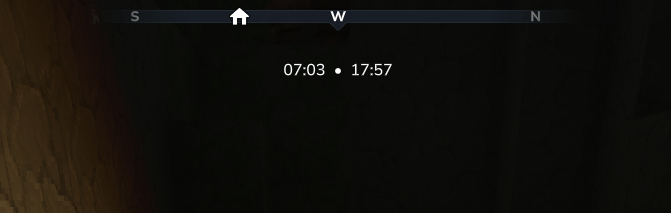
I built Timetale because I wanted a simple way to keep track of time while playing without having to tab out or check my phone. It’s a lightweight utility that adds a small clock display to your screen showing both your local real world time and the current in-game time side by side.
Features
- Dual Time Tracking: View the game time and your actual local time in one line.
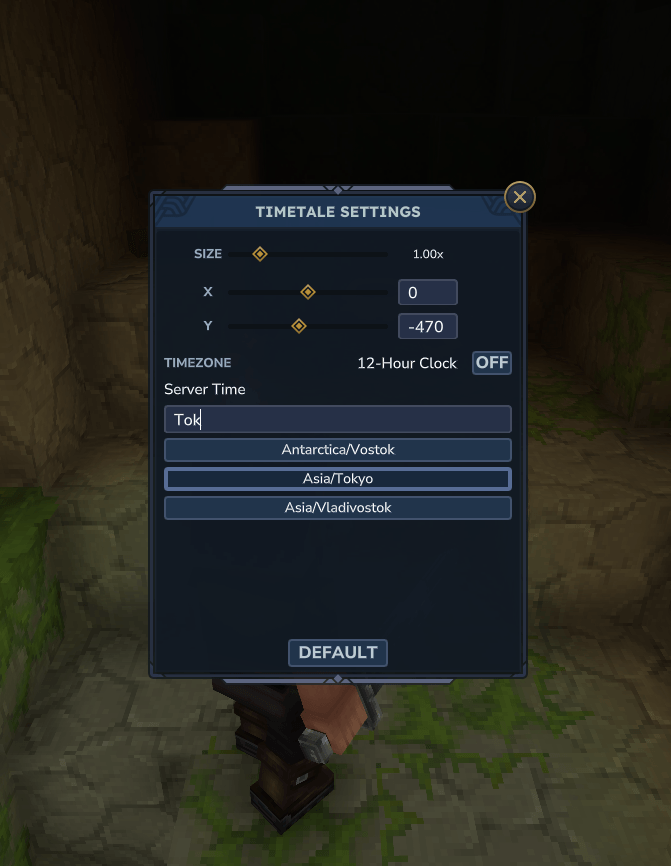
- Timezone Support: You can set your specific timezone so the clock stays accurate to where you actually live, not just where the server is hosted.
- 12-Hour Clock Toggle: Switch between standard 24-hour time or a 12-hour (AM/PM) format depending on what you prefer.
- Adjustable Position: Use the settings menu to move the clocks around or change their scale so it doesn't get in the way of other UI elements.
- Per-player Settings: Everyone can have their own setup and timezone set.
How to use
Once the mod is installed, simply type /clock in the chat. This opens the settings page where you can search for your timezone, toggle the 12-hour clock and adjust the position on the display.
Compatibility & Troubleshooting
If the mod isn't appearing or isn't working as expected, it is likely interfering with another mod:
- HUD Mods: If you have other HUD mods installed, you should use the AutoMultiHud mod to prevent conflicts.
- Time Mods: TimeTale generally cannot run alongside other time mods as they will 'fight' each other for the display.
I'm keeping this mod focused on being a clean set it and forget it tool.
Connect & Support


The TimeTale: Timezone Sync Team