SupOutfit
- By
Captura de pantalla_20260817_141530.png
Captura de pantalla_20260817_141431.png
Captura de pantalla_20260813_091837.png
Captura de pantalla_20260813_091859.png
Description
SupOutfit
Create, customize, save, and manage your character appearances with an easy-to-use Avatar Editor and Outfit System for Hytale.
SupOutfit lets players customize their character directly in-game, create different appearances, save them as outfit presets, and switch between them whenever needed.
Create different looks for exploration, roleplay, events, factions, or any situation where you want to quickly change your character's appearance.
Updated for Hytale Update 6.
✨ Features
Avatar Editor
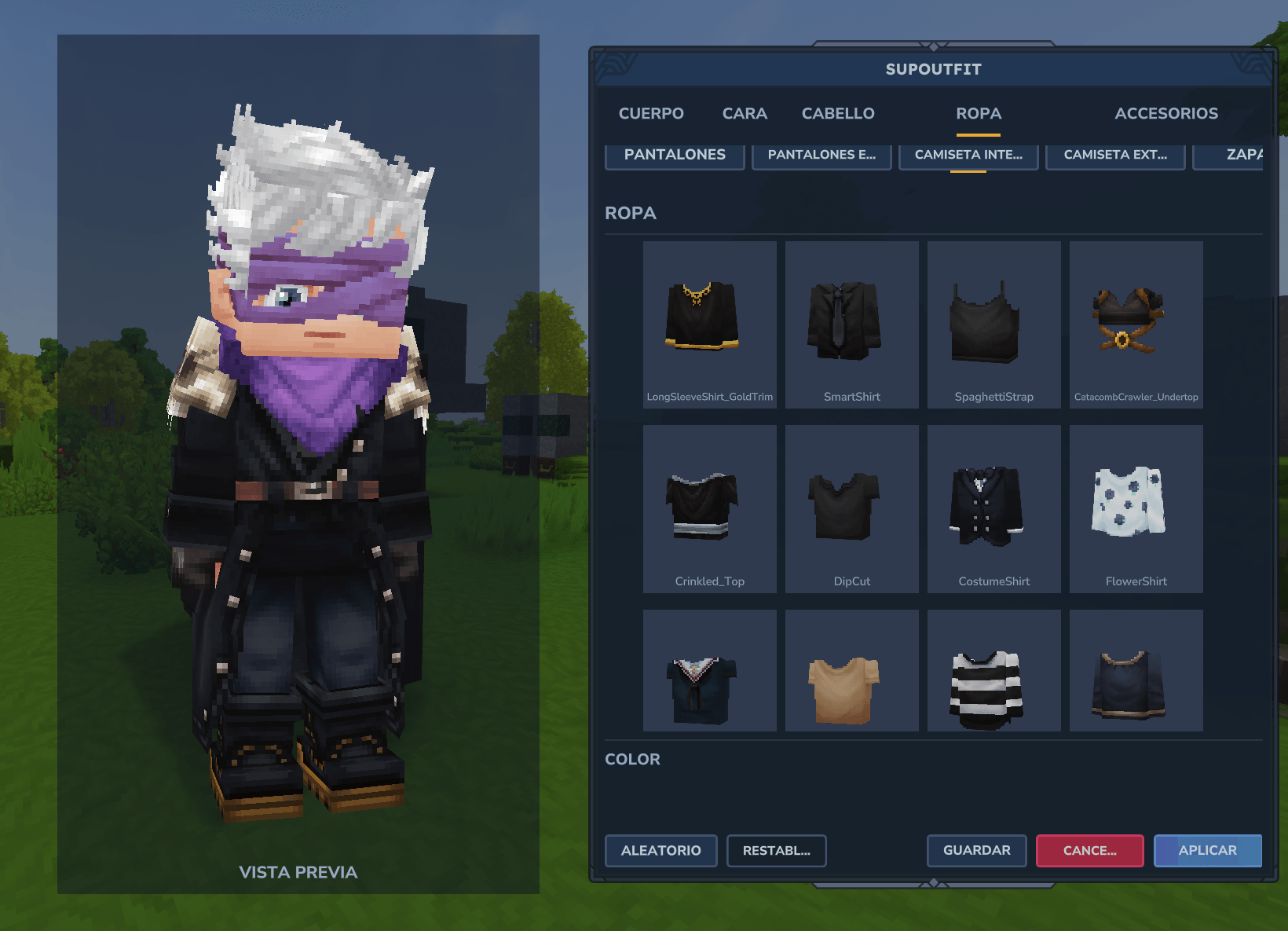
SupOutfit includes a fully integrated Avatar Editor that allows players to customize their character without leaving the server.
- Customize your character directly in-game
- Change body characteristics
- Customize facial features
- Select eyes, eyebrows, ears, and mouth
- Choose hairstyles and facial hair
- Customize clothing and accessories
- Change supported cosmetic colors and variants
- Remove individual cosmetic pieces using the None option
- Preview changes directly on your character
- Apply changes instantly without reconnecting
- Fully localized interface
- Save your customized appearance as an outfit
The Avatar Editor works directly with Hytale's cosmetic system, allowing players to create complete character appearances using the cosmetics currently supported by SupOutfit.
👕 Cosmetic Removal
Removable cosmetic slots can now be cleared directly from the Avatar Editor.
- Remove hairstyles and facial hair
- Remove clothing pieces
- Remove shoes and gloves
- Remove capes and accessories
- Use the localized None option to clear a cosmetic slot
- Required character features remain protected from removal
💾 Outfit Management
Save your customized appearances as outfit presets and switch between them whenever you want.
- Save your current appearance as an outfit preset
- Create outfits directly from the Avatar Editor
- Switch between saved outfits instantly
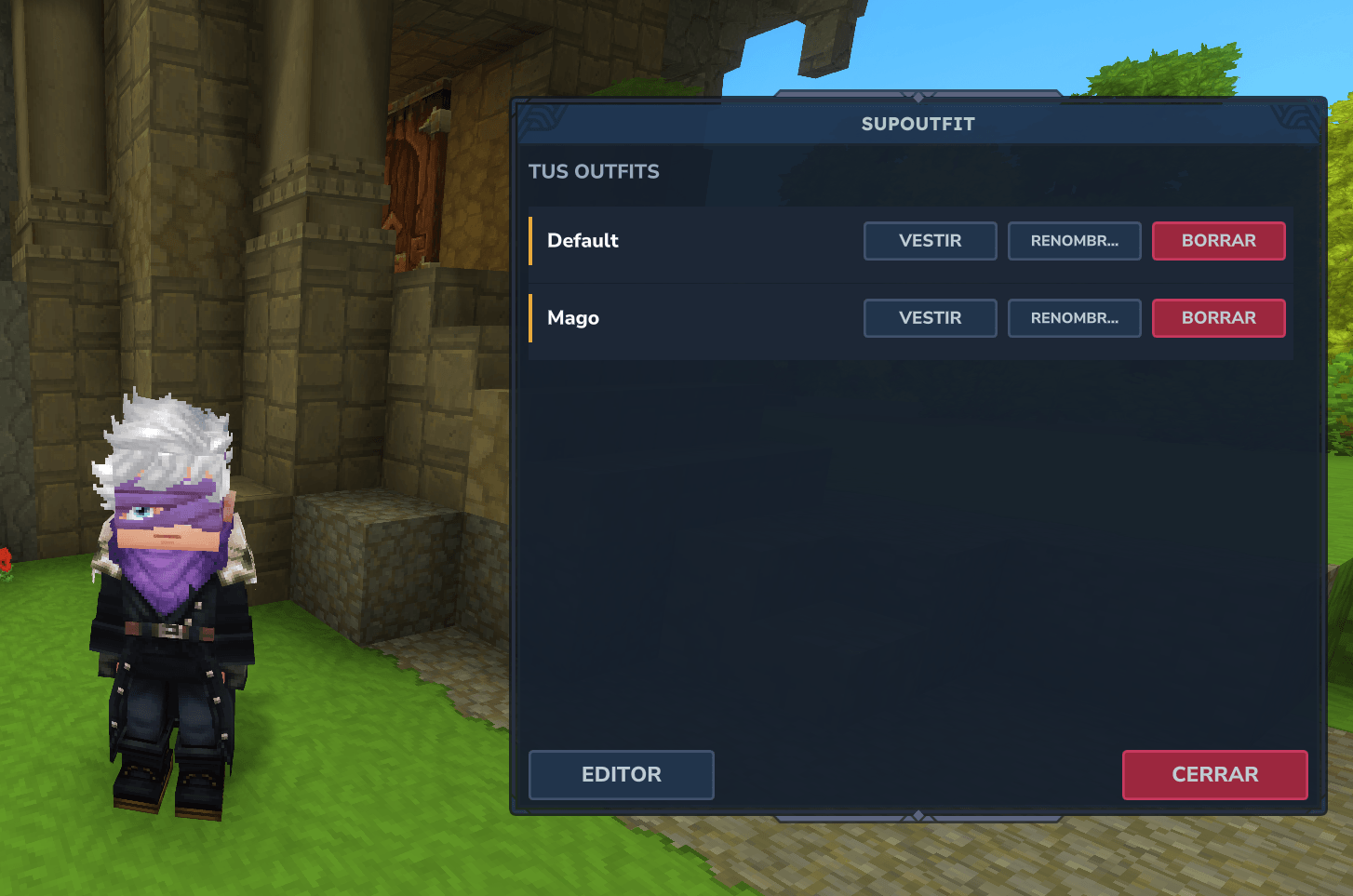
- Browse your saved outfits through the wardrobe interface
- Equip outfits with a single click
- Rename saved outfits
- Delete unwanted outfit presets
- Persistent outfit storage per player
- Automatically remember your last equipped outfit
- Automatically restore your equipped outfit when you rejoin the server
- Equipped outfits persist across server restarts
- Validate outfit names with a maximum of 32 characters
- Support letters, numbers, spaces,
-, and_in outfit names
🔔 Hytale Notifications
SupOutfit uses Hytale's native notification system for action feedback.
- Receive notifications when outfits are saved
- Receive notifications when outfits are equipped
- Receive notifications when outfits are renamed or deleted
- Receive notifications for relevant errors and validation issues
- Chat remains available for information better suited to chat, such as help, outfit lists, and plugin information
👗 Custom Wardrobe
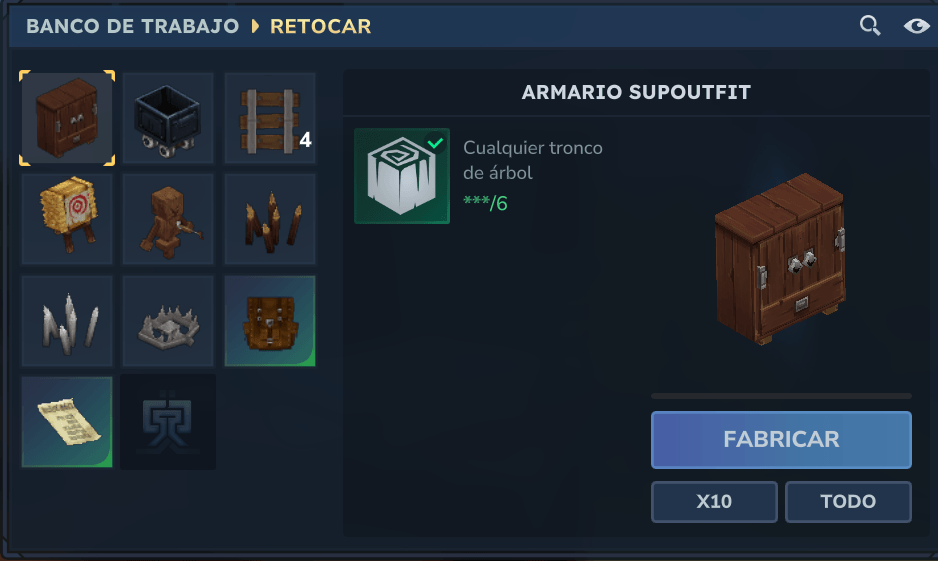
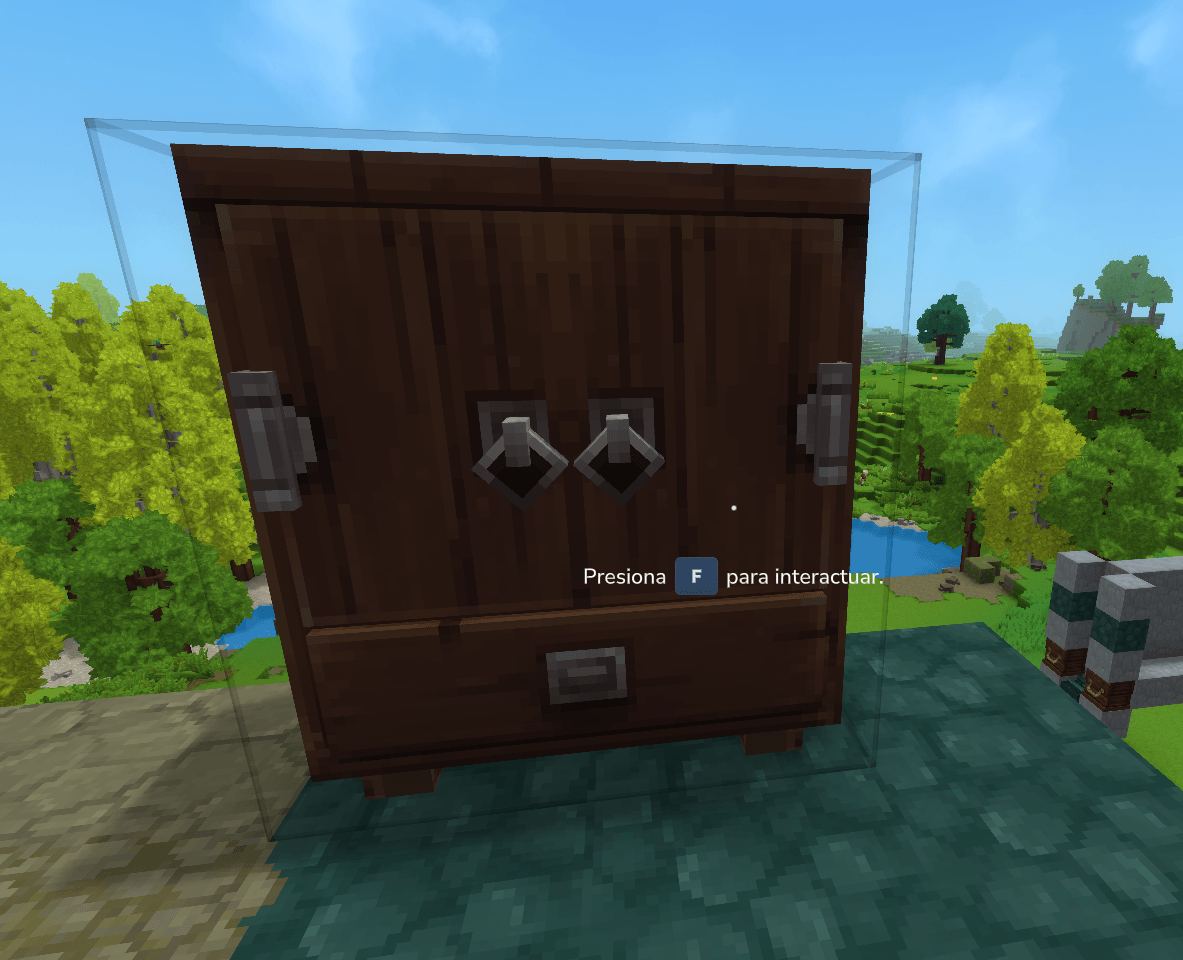
SupOutfit adds a dedicated Custom Wardrobe block designed specifically for character customization and outfit management.
- Place a wardrobe directly in your world
- Interact with the wardrobe to open the Outfit Browser
- Access saved outfits without using commands
- Use it as an in-world alternative to the outfit commands
- Perfect for character customization areas, shops, spawn areas, and roleplay locations
🧥 Outfit Browser
The Outfit Browser provides a compact and easy-to-use interface for managing saved outfits.
- Browse all saved outfits from a scrollable list
- Equip outfits directly from the interface
- Rename saved outfits
- Delete unwanted outfits
- Open the Avatar Editor
- Responsive layout that adapts better to different screen sizes
- Support for longer translated text
- Option to move the Outfit Browser to the left side of the screen
- Keeps the character visible while managing outfits
- Fully localized UI
🔄 Skin Synchronization
SupOutfit keeps skin changes synchronized between the player and the server.
- Skin changes are immediately synchronized with the local player
- Other players see outfit changes correctly
- Works with outfit equipping, Avatar Editor changes, resets, previews, and automatic outfit restoration
- Prevents the player's client from continuing to display an outdated skin
⚠️ Cosmetic Availability
- The Avatar Editor currently includes the Standard edition cosmetics and the basic/default character options.
- Additional edition-specific cosmetics are intentionally not included for now.
- This is a temporary precaution while there is no reliable way to determine which cosmetics a player is legitimately entitled to use.
- Until player cosmetic ownership/entitlements can be safely determined, SupOutfit will avoid exposing cosmetics from editions that may not belong to the player.
- More cosmetics may be added in the future once a safe and appropriate way to verify player entitlements is available.
🌍 Localization
SupOutfit currently supports:
- 🇺🇸 English
- 🇩🇪 German
- 🇫🇷 French
- 🇪🇸 Spanish
- 🇮🇹 Italian
- 🇵🇱 Polish
- 🇧🇷 Brazilian Portuguese
- 🇹🇷 Turkish
- 🇷🇺 Russian
- 🇺🇦 Ukrainian
- 🇨🇳 Chinese
Commands, command descriptions, UI elements, buttons, messages, notifications, and Avatar Editor categories are localized where supported.
⚙️ Configuration
SupOutfit provides a configurable config.json file.
- Configure the maximum number of outfits each player can save
- Enable or disable changing outfits through commands
- Move the Outfit Browser and Avatar Editor to the left side of the screen
- Configuration is automatically created with default values
- Existing configuration files are automatically migrated when new options are added
- Invalid configuration files are automatically backed up and replaced with default settings
Configuration is stored in:
mods/SupOutfit/config.jsonConfiguration Options
maxOutfits
Maximum number of outfits each player can save.
Default:
"maxOutfits": 10changeByCommandEnabled
Controls whether players can change outfits through the outfit commands.
Default:
"changeByCommandEnabled": falseWhen disabled:
/supoutfit saveremains available- Outfit changing through commands is disabled
- Players can still use the Custom Wardrobe to access the outfit interface
- Players can still use the Avatar Editor
leftSideUI
Controls whether the Outfit Browser and Avatar Editor are moved to the left side of the screen.
Default:
"leftSideUI": trueWhen enabled, the UI is positioned on the left side of the screen, leaving the center of the screen unobstructed so the player's character remains visible.
Default Configuration
{
  "maxOutfits": 10,
  "changeByCommandEnabled": false,
  "leftSideUI": true
}
💬 Commands
| Command | Description |
|---|---|
/supoutfit browser |
Opens the wardrobe interface |
/supoutfit save <name> |
Saves your current appearance as an outfit |
/supoutfit set <name> |
Switches to a saved outfit |
/supoutfit list |
Lists your saved outfits |
/supoutfit delete <name> |
Deletes a saved outfit |
/supoutfit rename <current> <new> |
Renames a saved outfit |
/supoutfit help |
Shows the available commands |
/supoutfit info |
Shows plugin information |
Admin Commands
| Command | Description |
|---|---|
/supoutfit open |
Opens the outfit browser for yourself |
/supoutfit open <player> |
Opens the target player's outfit browser |
The admin open command can be used to manage another player's wardrobe without requiring the player to use the command themselves.
It also opens your own outfit browser even when outfit changing through commands is disabled.
Aliases
The main command can also be accessed using:
/outfit/so
📦 Storage
Configuration is stored in:
mods/SupOutfit/config.jsonOutfits are stored per player as JSON files in:
mods/SupOutfit/Outfits/<player-uuid>/🔌 API
SupOutfit provides a public API that allows other Hytale plugins to integrate with its avatar customization and outfit systems.
Plugins can open the Avatar Editor or Outfit Browser directly from their own systems without requiring players to use SupOutfit commands.
The API also provides access to outfit management operations such as creating, applying, renaming, and deleting outfits.
Access
SupOutfitAPI api = SupOutfitAPI.get();

if (api == null) {
    // SupOutfit is not installed or not yet initialized
    return;
}
The public contract is versioned independently from the plugin version:
int version = api.getApiVersion(); // equals SupOutfitAPI.API_VERSIONAvailable Operations
openAvatarEditor(PlayerRef player)— opens the Avatar Editor for a playeropenOutfitBrowser(PlayerRef player)— opens the Outfit Browser for a playergetOutfitNames(UUID playerId)— lists the player's saved outfitshasOutfit(UUID playerId, String name)— checks whether an outfit existsgetOutfit(UUID playerId, String name)— retrieves a saved outfitgetMaxOutfits()— returns the configured outfit limitsaveOutfit(UUID playerId, String name, PlayerSkin skin)— saves or overwrites an outfitdeleteOutfit(UUID playerId, String name)— deletes an outfitrenameOutfit(UUID playerId, String oldName, String newName)— renames an outfitapplyOutfit(PlayerRef player, String name)— applies an outfit asynchronously
Asynchronous Outfit Application
Applying an outfit runs on the target player's world thread. The API schedules the operation and returns a CompletableFuture<Boolean> that completes with the actual result once the skin has been applied:
api.applyOutfit(player, "Knight")
   .thenAccept(applied -> {
       if (applied) {
           // outfit applied successfully
       }
   });
Threading
All operations are safe to call from any thread. UI and skin operations are scheduled internally on the target player's world thread, and the API never exposes Store, Ref, or any internal SupOutfit class.
Outfit management operations only touch disk I/O and may run from any thread.
OutfitData is an immutable record that always returns defensive copies of PlayerSkin.
Optional Dependency
Other plugins should compile against the SupOutfit JAR with compileOnly (never bundling it) and check at runtime that the API class exists:
try {
    Class.forName("com.supreme.supoutfit.api.SupOutfitAPI");
} catch (ClassNotFoundException e) {
    return; // SupOutfit is not installed
}
The API is available from the end of SupOutfit's setup(). Obtain it at runtime, for example in your plugin's start() method, never during plugin setup, since plugin load order is not guaranteed.
This makes SupOutfit suitable for integration with:
- Character creation systems
- NPC interactions
- Roleplay systems
- Class and faction systems
- Character selection screens
- Shops and customization areas
- Other custom UI systems
🎭 Use Cases
SupOutfit is useful for:
- Roleplay servers
- MMORPG-style servers
- Adventure servers
- Character customization areas
- Spawn areas
- Shops and wardrobe systems
- Servers with multiple character roles or factions
- Players who use multiple character styles
Create different appearances for different roles, factions, events, or adventures and switch between them whenever needed.
🗺️ Roadmap
Planned features:
Improved wardrobe UIAdditional avatar customization optionsAdditional outfit management features- Granular per-command permissions
- More server customization options
- Support for future Hytale UI systems as they become available
- Add NPCs such as Barber Shops or Clothing Stores to improve roleplay
SupOutfit Team