This plugin is for admins who want to EXECUTE commands like "Command Blocks" from minecraft but in Hytale.
Made for version 0.7.0-0.8.0. If you need for version lower than that, write a comment (Starting from 13.10.2026 i will be answering comment more frequently) Or DM me on curseforge or Any platform you can find me by @wolfifurr
WARNINGS:
This plugin CANT get and interact with entities through "@" expression - only interact with entities, for example right click on entity and they will execute command "/say Hey @s , don't touch me!". There is no get all entities like @e in minecraft. AND this plugin can't REPEAT commands or CHAIN them like "Command Blocks" in minecraft by itself, you need to make it through "Next" and other built-in options if want that.
This plugin only EXECUTE commands that PLAYER/CONSOLE can execute from chat.
CONSOLE CANT use something like /pos1 or any other selection commands because selections are tied to players
When "From player?" NOT selected COMMAND will EXECUTE with CONSOLE permission!!!!!!
Instruction: (For version 1.0.3, if there is no such version, go to github releases or wait for release on website)
There are only 2 new "Interactions" for ASSET EDITOR that you need to insert yourself
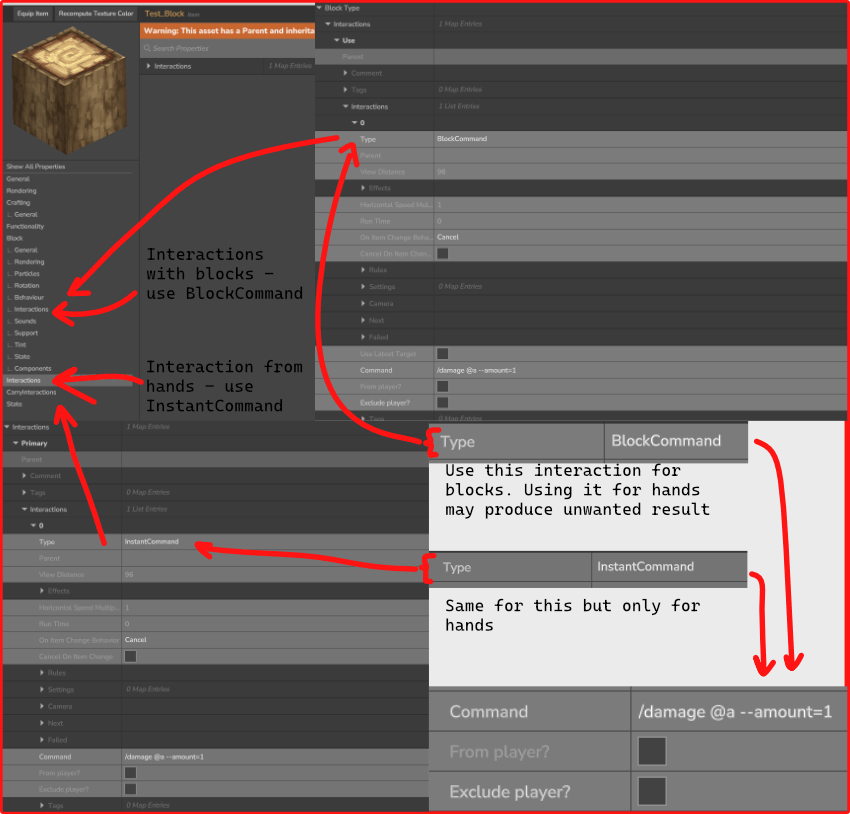
BlockCommand used for BLOCKS in "Interactions" under "Block" section
InstantCommand used for ITEMS OR ENTITIES in "Interactions" not under "Block" section
From player? - execute command from player that used interaction
Exclude player? - execute command with exception for interacted player (Example: "/say Hello" will work, "/damage @s --amount=1" will NOT work when "Exclude player?" checked)
Commands can be with '/' or without
Any bugs please write it in Issues in github (more likely to be seen faster) or in comments
Expressions:
- @a - ALL PLAYERS
- @r - RANDOM PLAYER
- @s - PLAYER THAT INTERACTED
- @p - CLOSEST PLAYER TO INTERACTION
- @w - GETS WORLD'S NAME (contributed by Riley Tuoti)
I hope this instruction is clear enough
Instalation:
Put .jar file into Mods folder in %appdata%/Roaming/Hytale/UserData/Mods and select it while creating a world or into mods folder inside save folder
SimpleCommandInteraction Team