ServerVariables | Custom Data and Variables for Players
- By
Sin tÃtulo.png
Description
Hytale mod that allows storing and managing player variables in MySQL with configurable validation and limitations.
Author: DonKolia
Version: 1.0.0
- ✅ Persistent variable storage in MySQL
- ✅ Validation system with data types (INTEGER, DOUBLE, TEXT)
- ✅ Configurable limitations (min/max values, maximum characters)
- ✅ Automatic out-of-range value management
- ✅ Public API for other plugins
- ✅ Configuration via YAML files
- ✅ Complete commands with silent mode
- ✅ Automatically derived initial values
- Place
ServerVariables.jarin your Hytale server'smods/folder - Start the server to automatically generate the configuration
- Edit
plugins/DonKolia_ServerVariables/config.jsonwith your MySQL credentials - Configure your variables in
plugins/DonKolia_ServerVariables/variables/ - Restart the server or use
/svar reload
The config.json file is automatically generated in plugins/DonKolia_ServerVariables/:
{
  "databaseHost": "localhost",
  "databasePort": 3306,
  "databaseName": "hytale_vars",
  "databaseUser": "root",
  "databasePassword": "password"
}
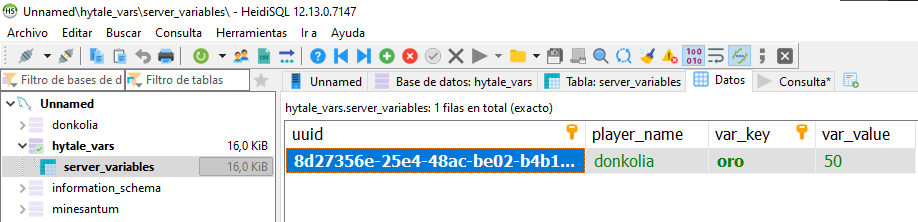
The plugin automatically creates the server_variables table:
CREATE TABLE server_variables (
    uuid VARCHAR(36) NOT NULL,
    player_name VARCHAR(16),
    var_key VARCHAR(64) NOT NULL,
    var_value TEXT,
    PRIMARY KEY (uuid, var_key)
);
Columns:
uuid- Player's UUIDplayer_name- Player's name (for easier queries)var_key- Variable namevar_value- Stored value
Variables are defined in YAML files inside plugins/DonKolia_ServerVariables/variables/.
On first startup, two example files are created:
variables:
  oro:
    value_type: INTEGER
    limitations:
      max_value: 999999
      min_value: 0
      manage_out_of_range: true

  nivel:
    value_type: INTEGER
    limitations:
      max_value: 100
      min_value: 1
      manage_out_of_range: true

  experiencia:
    value_type: INTEGER
    limitations:
      max_value: 1000000
      min_value: 0
      manage_out_of_range: true

  puntos-habilidad:
    value_type: INTEGER
    limitations:
      max_value: 500
      min_value: 0
      manage_out_of_range: true

  reputacion:
    value_type: DOUBLE
    limitations:
      max_value: 100.0
      min_value: -100.0
      manage_out_of_range: true
variables:
  rango:
    value_type: TEXT
    limitations:
      max_characters: 20

  titulo:
    value_type: TEXT
    limitations:
      max_characters: 30

  clan:
    value_type: TEXT
    limitations:
      max_characters: 16

  prefijo:
    value_type: TEXT
    limitations:
      max_characters: 10

  sufijo:
    value_type: TEXT
    limitations:
      max_characters: 10
variables:
  variable-name:
    value_type: INTEGER|DOUBLE|TEXT
    limitations:
      # For INTEGER and DOUBLE:
      max_value: 100
      min_value: 0
      manage_out_of_range: true

      # For TEXT:
      max_characters: 50
value_type:
INTEGER- Whole numbers (e.g.: 1, 100, -5)DOUBLE- Decimal numbers (e.g.: 1.5, 99.99, -10.25)TEXT- Free text
For numeric variables (INTEGER/DOUBLE):
max_value- Maximum allowed valuemin_value- Minimum allowed value (also the initial value)manage_out_of_range- Iftrue, automatically adjusts out-of-range values to the nearest limit
For text variables (TEXT):
max_characters- Maximum number of characters allowed
Initial values are automatically derived:
- INTEGER/DOUBLE: The value of
min_value - TEXT: Empty string
""
After creating or modifying YAML files:
/svar reload
All commands use the format /svar <subcommand> <arguments>
Sets the value of a variable.
Validations:
- The variable must be defined in the YAML files
- The value must match the variable's type
- Configured limitations are applied
Examples:
/svar set oro 1000 DonKolia
/svar set nivel 5 DonKolia
/svar set rango "Guerrero" DonKolia
/svar set reputacion 75.5 DonKolia silent:true
Gets the value of a variable.
Behavior:
- If the variable doesn't exist in the DB, returns the initial value
- Validates that the variable is defined in YAML
Examples:
/svar get oro DonKolia
/svar get nivel DonKolia
Adds a value to a numeric variable (INTEGER or DOUBLE).
Validations:
- Only works with INTEGER or DOUBLE variables
- Applies limitations after adding
Examples:
/svar add oro 100 DonKolia
/svar add reputacion 5.5 DonKolia silent:true
Reduces the value of a numeric variable (INTEGER or DOUBLE).
Validations:
- Only works with INTEGER or DOUBLE variables
- Applies limitations after subtracting
Examples:
/svar reduce oro 50 DonKolia
/svar reduce reputacion 10.0 DonKolia silent:true
Resets a variable to its initial value.
Behavior:
- INTEGER/DOUBLE: Resets to
min_value - TEXT: Resets to empty string
Examples:
/svar reset oro DonKolia
/svar reset nivel DonKolia silent:true
Reloads the plugin configuration and YAML variables.
Example:
/svar reload
Add silent:true at the end of the command to suppress confirmation messages.
Example:
/svar set oro 1000 DonKolia silent:true
When enabled, out-of-range values are automatically adjusted:
oro:
  value_type: INTEGER
  limitations:
    max_value: 1000
    min_value: 0
    manage_out_of_range: true
Examples:
/svar set oro 1500 DonKolia→ Saved as1000/svar set oro -50 DonKolia→ Saved as0
When disabled, the operation is rejected:
nivel:
  value_type: INTEGER
  limitations:
    max_value: 100
    min_value: 1
    manage_out_of_range: false
Examples:
/svar set nivel 150 DonKolia→ Error: "Value 150 exceeds maximum of 100"
"Variable 'X' is not defined in configuration files"
The variable doesn't exist in any YAML file. Create it first.
"Invalid value type for variable 'X'. Expected: INTEGER"
The provided value doesn't match the variable's type.
"Value X exceeds maximum of Y"
The value exceeds the allowed maximum and manage_out_of_range is set to false.
"Text exceeds maximum length of X characters"
The text is too long for the TEXT variable.
Created by DonKolia for Hytale
The ServerVariables | Custom Data and Variables for Players Team