
ServerAutoMessages
- By

File Details
ServerAutoMessages.jar
- R
- Jun 4, 2026
- 20.86 KB
- 0
- 0.5
File Name
ServerAutoMessages.jar
Supported Versions
- 0.5

✨ ServerAutoMessages
ServerAutoMessages is a lightweight Java 25 mod for Hytale servers that automatically broadcasts configurable messages to all online players.
It is designed for server announcements, tips, reminders, links, Discord invites, rules and community messages.
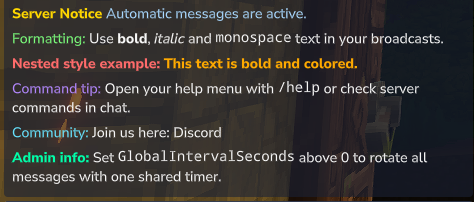
Features
- Automatic broadcast messages
- Global interval mode with round-robin order
- Individual interval mode per message
- Reload command without server restart
- Text formatting support
Text Formatting Support
You can use the following formatting tags inside your messages:
<b>text</b>Bold text
<i>text</i>Italic text
<m>/help</m>Monospace / command style text
<color:#FF0000>Red</color>Hex color text
<link:https://discord.gg/>Discord</link>Clickable link
Nested formatting is also supported:
<b><color:#FF0000>bold red</color></b>Commands
Main command:
/servermessagesAliases:
/smessages
/sam
/automessages
/am
Subcommands
/servermessages statusShows the current status of the message system.
/servermessages listLists all configured messages.
/servermessages previewPreviews configured messages.
/servermessages reloadReloads the configuration without restarting the server.
Permissions
Operators usually have access depending on your server permission setup.
serverautomessages.command.use
serverautomessages.command.reload
serverautomessages.command.preview
Configuration
Config file location:
mods/CommunityTools_ServerAutoMessages/server-auto-messages.jsonExample Configuration
{
  "GlobalIntervalSeconds": 0,
  "Messages": [
    {
      "Message": "<b><color:#FFD700>Server Notice</color></b> <color:#A8D8FF>Automatic messages are active.</color>",
      "IntervalSeconds": 300
    },
    {
      "Message": "<color:#7CFF7C>Formatting:</color> Use <b>bold</b>, <i>italic</i> and <m>monospace</m> text in your broadcasts.",
      "IntervalSeconds": 420
    },
    {
      "Message": "<b><color:#FF6B6B>Nested style example:</color></b> <b><color:#FFAA00>This text is bold and colored.</color></b>",
      "IntervalSeconds": 540
    },
    {
      "Message": "<color:#B388FF>Command tip:</color> Open your help menu with <m>/help</m> or check server commands in chat.",
      "IntervalSeconds": 660
    },
    {
      "Message": "<color:#66E3FF>Community:</color> Join us here: <link:https://discord.gg/your-server>Discord</link>",
      "IntervalSeconds": 780
    },
    {
      "Message": "<b><color:#00FFAA>Admin info:</color></b> Set <m>GlobalIntervalSeconds</m> above 0 to rotate all messages with one shared timer.",
      "IntervalSeconds": 900
    }
  ]
}
Global Interval Mode
Set GlobalIntervalSeconds to a value greater than 0 to send all messages with one shared timer in round-robin order.
Example:
{
  "GlobalIntervalSeconds": 300
}
When global interval mode is enabled, each message's IntervalSeconds value is ignored.
Individual Interval Mode
Set GlobalIntervalSeconds to 0 to use individual intervals for every message.
Example:
{
  "GlobalIntervalSeconds": 0
}
In this mode, every message uses its own IntervalSeconds value.
Notes
- Use
/servermessages reloadafter editing the config. - No server restart is required after config changes.
- Make sure your JSON file is valid.
- Replace the example Discord invite link with your own server invite.
🙌 Inspiration
This mod was inspired by AutoMessages and HyMenu.
❤️ Support
If you enjoy this mod, consider leaving a ⭐ on CurseForge!
🔗 Check Out My Other Hytale Projects
Take a look at my other Hytale mods and projects here:
👉 DerFriesn CurseForge Projects