PotPvP
- By
PotPvP brings that classic MC experience into Hytale for the first time with a brand new item Splashable Health.
PotPvP - The First Official Potion PvP Core for Hytale
If you’ve played HCF or practice servers back in the day, you already know what PotPvP is.
Fast fights. Instant heals.
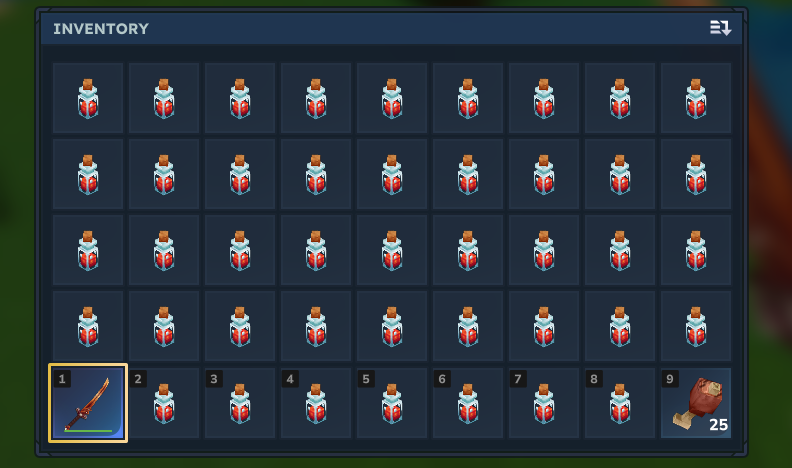
PotPvP brings that classic playstyle into Hytale for the first time with a brand new item which is the Splashable Health Potion. Just like the Minecraft pots, you throw it at your feet to heal instantly, letting you outplay, clutch, and survive fights the way competitive PvP was meant to feel.
What this mod adds
- A new item: Splashable Health Potion (id:splashable_health)
- Works just like classic PotPvP potions
- Heals on impact when thrown
- Not stackable so you have to conserve pots just like in PotPvP
- Uses Hytale's item model
- Built-in sound effects
- Potfill command
potpvp.command.potfill - Splashable Poison and Splashable Slowness
- Red Health names, green Poison names, and blue Slowness names using Hytale's item quality system
- A clean in game settings page for server owners
- Custom kits captured straight from an admin's inventory
- A toggleable potion count HUD
- A throwable movement item called the Riftstone which stacks to 16
- Riftstone cooldown protection which never consumes blocked throws
- Centred Riftstone cooldown text with an optional compact background
- A cleaner potion HUD with two styles and four positions
- Editable potion balance for different server preferences
- Alchemy Bench recipes for all three splash potions
- A 1:1 Essence of the Void recipe for Riftstones at the Arcane Bench
- A full recipe editor for every PotPvP item
- One click ingredient capture from hotbar slots 1 to 4
- Live ingredient, quantity, output, craft time and bench changes
- Designed for PvP and future HCF style servers
- Heal thrower all or all entities
The goal
I wanted to recreate that feeling people (like myself) remember from early PvP gamemodes the rhythm of refilling, strafing, and timing and reserving your heals mid fight. PotPvP was one of the earliest competitive PvP styles, and I wanted to bring that exact experience into Hytale instead of letting it stay in the past.
This mod isn’t trying to reinvent PvP, it’s about bringing back a proven formula in a way that fits naturally with Hytale’s combat.
I am also very open to contributors if they want to help improve this project by any means.
Current state
The mod is fully playable right now with hytales potion models, sounds, and full server settings at mods/com.zackah_PotPvP/config.json. Kits are stored in kits.json, recipes are stored in recipes.json, and each players potion HUD choice is stored in hud-preferences.json beside them. The default heal is still 40.0, and 1.0.5 adds settings for splash range, targets, poison, slowness, throwing, kits, recipes, the potion HUD, and Riftstones. Each settings page can be reset on its own, recipes have their own individual resets, and the full reset actions stay separate. Old files migrate automatically and broken files are backed up before PotPvP recovers them. It still has room to grow, but I’m really happy with how it feels. It’s already got the potions perfect for:
Dedicated PvP servers
- Practice arenas
- Upcoming HCF servers
- Any competitive combat gamemode
Classic Potions Mode
By default, potions use Fast Pot mode (instant throw, no animation). If you prefer the classic potion throw, open /potpvp, change Throw mode to Classic, save, and restart the server. The classic cooldown can be changed on the same page. No jar editing is needed anymore.
Commands
/potpvp opens server settings for staff or the kit selector for players.
/potpvp admin opens the staff settings directly.
/potpvp kits opens kit management for staff or kit selection for players.
/potpvp recipes opens the crafting editor for staff.
/potpvp kit [id] opens the selector or claims a kit by its id.
/potpvp hud shows the current potion counter settings.
/potpvp hud <health|all|off|default> changes what the counter displays.
/potpvp hud style <compact|status|default> changes the counter style.
/potpvp hud position <top-left|top-right|bottom-left|bottom-right|default> moves the counter.
/potfill fills empty inventory slots with Health pots.
/potfill [health|poison|slowness] fills empty slots with a chosen potion.
/potpvp fill [health|poison|slowness] does the same thing through the main command.
/potpvp status, /potpvp reload, and /potpvp config are available for staff and the server console.
Potion balance
Health restores 40 Hytale health by default. Splash radius, distance falloff and who can be healed are all editable.
Poison deals 5 Hytale damage every 1.25 seconds for 33 seconds at full splash. It stops at 5 health unless lethal poison is enabled, and a weaker splash cannot shorten a stronger effect already running.
Competitive Slowness reduces movement by 20 percent for 15 seconds. Light 15 percent and Heavy 50 percent presets are also included.
Kits and Riftstone
Admins can arrange their inventory and capture the exact hotbar, storage, armour and utility layout. Kits can replace the inventory or only fill empty matching slots. They can also restore health and stamina, clear PotPvP debuffs, use their own cooldown and require their own permission.
The default kit places the sword in slot one and 16 Riftstones in slot two. In survival, one Essence of the Void crafts into one Riftstone in the Arcane Misc section of the Arcane Bench. Riftstone cooldown, teleport damage, safe landing and cooldown HUD options can all be changed live. The real throw lock and text above the hotbar use the same timer, and a blocked throw does not consume the item.
Recipe editor
Admins can change the crafting recipe for Health, Poison, Slowness and Riftstone from /potpvp recipes. Each recipe has up to four ingredients, ingredient quantities, an output amount, craft time, bench section and an on or off switch.
You can type item ids directly or place the ingredients in hotbar slots 1 to 4 and capture them. PotPvP checks every item before saving, then updates the crafting menu live. One bad field cannot partly replace a recipe, and Hytale rejecting an update restores the old recipe automatically.
Each recipe has its own reset button. Reset all recipes is kept as a separate confirmed action.
Server permissions
potpvp.admin gives access to every PotPvP admin page.
potpvp.admin.settings controls server settings, recipes, reload, and status.
potpvp.admin.kits controls kit creation and editing.
potpvp.command.potfill controls potfill and stays separate from admin access.
potpvp.command.kit lets players open the kit selector.
potpvp.command.hud lets players toggle the potion counter.
potpvp.command.hud.customize lets players move it and change its style.
potpvp.command.pearl lets players throw Riftstones.
Restricted kits can use their own node such as potpvp.kit.debuff.
/perm group add admins potpvp.admin
/perm group add players potpvp.command.kit
/perm group add players potpvp.command.hud
/perm group add players potpvp.command.hud.customize
/perm group add players potpvp.command.pearl
/perm group add ranked potpvp.kit.debuff
Planned / Progress
PotPvP kit command to give you inventory full of pots and a sword and armor unless another plugin automates that in the meantimePermissions for server ownersExpanded configuration options- General polish based on feedback
Brewing/Crafting for HCFFast PotDebuff PotsPotcount HUD (Toggleable)Enderpearl SystemImprove LogicNative server settings UIEditable crafting recipes
IF YOU KNOW YOU KNOW…………
PotPvP Team