Playtime Tracker | UI | Leaderboard | Reward | Importer| Language/UI customization!
- By
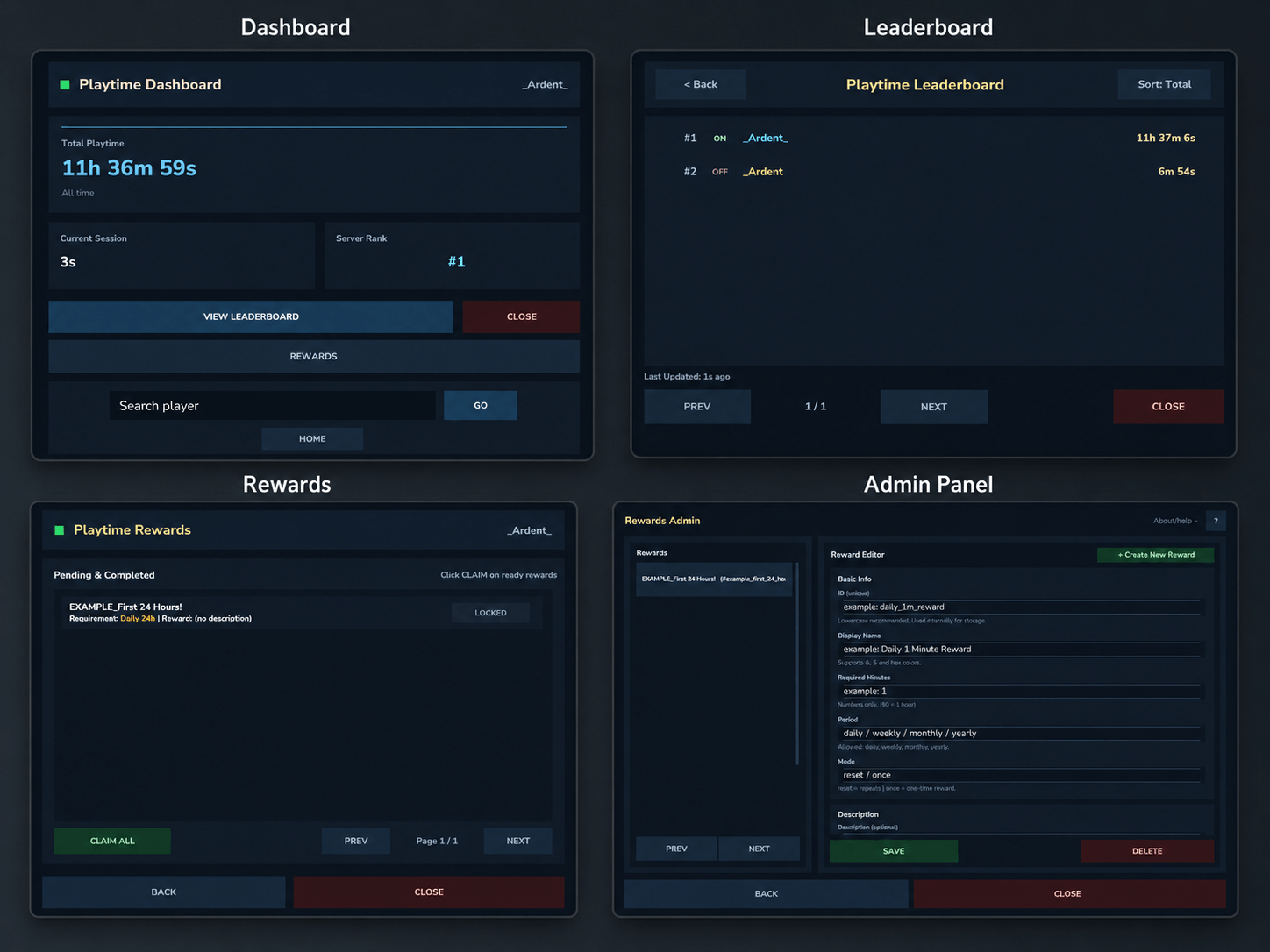
version1.0.8.png
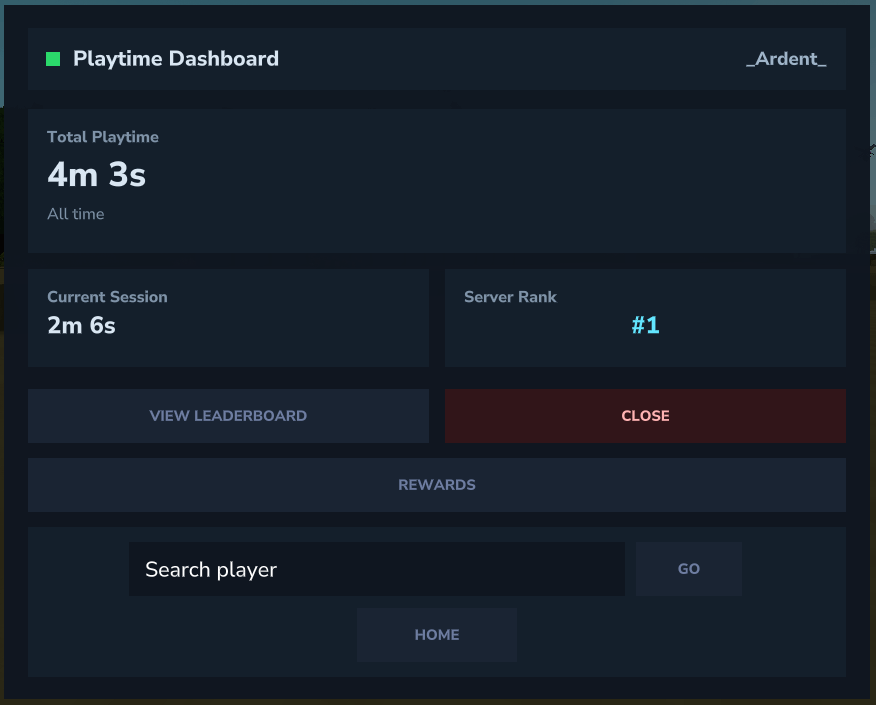
player ui.png

Screenshot 2026-02-06 085359.png
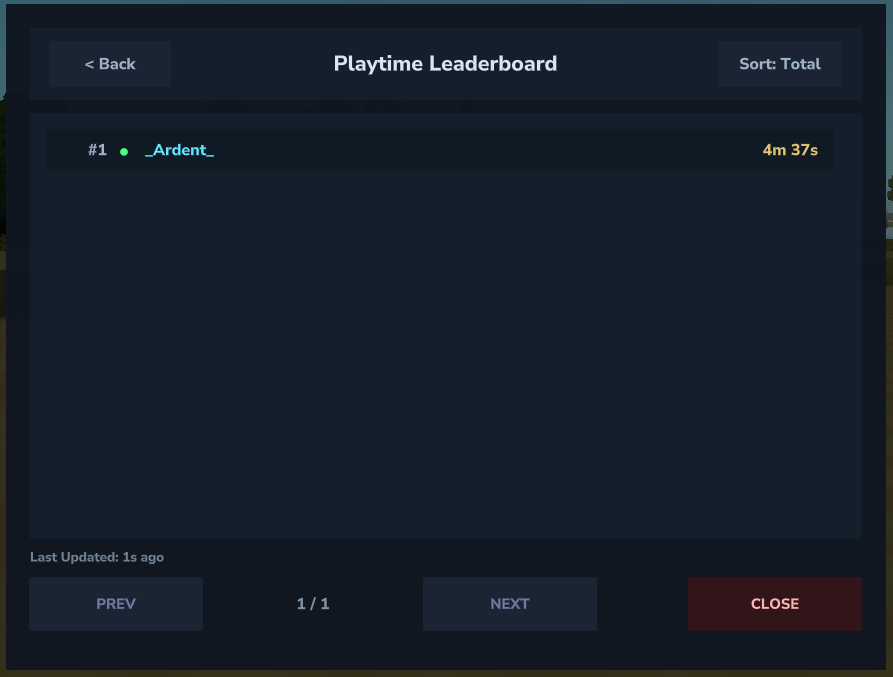
player leaderboard.png

Screenshot 2026-02-06 085502.png

Screenshot 2026-02-06 085527.png
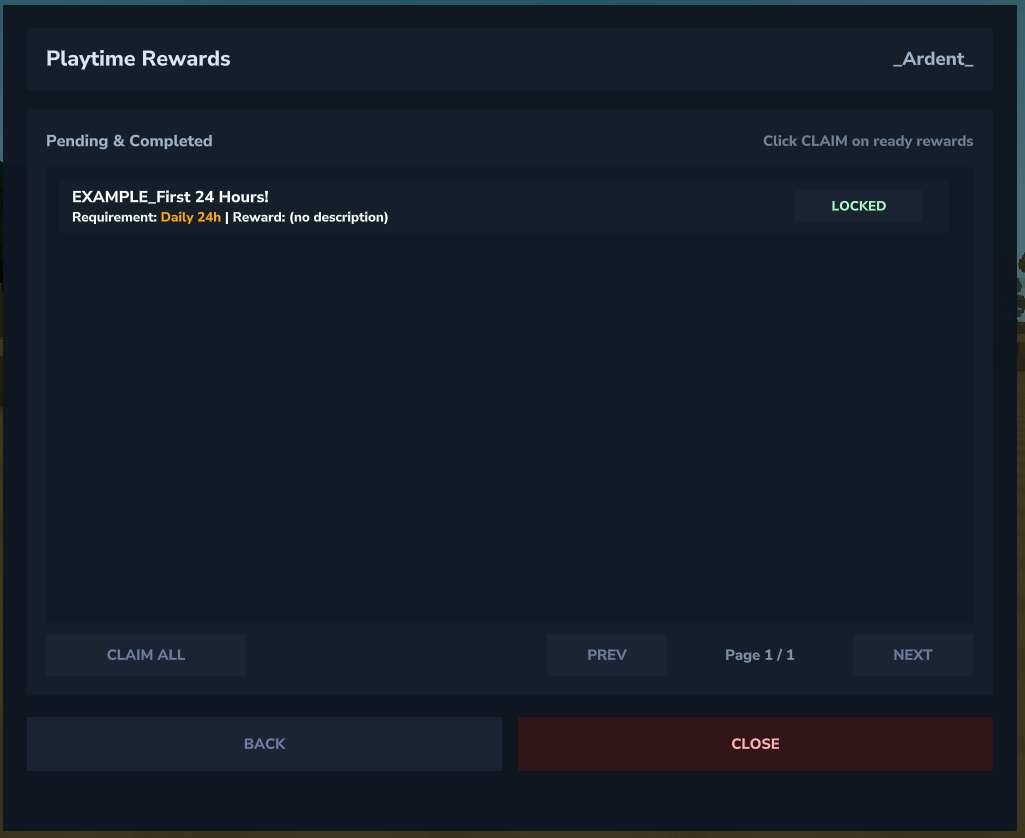
player rewards ui.png
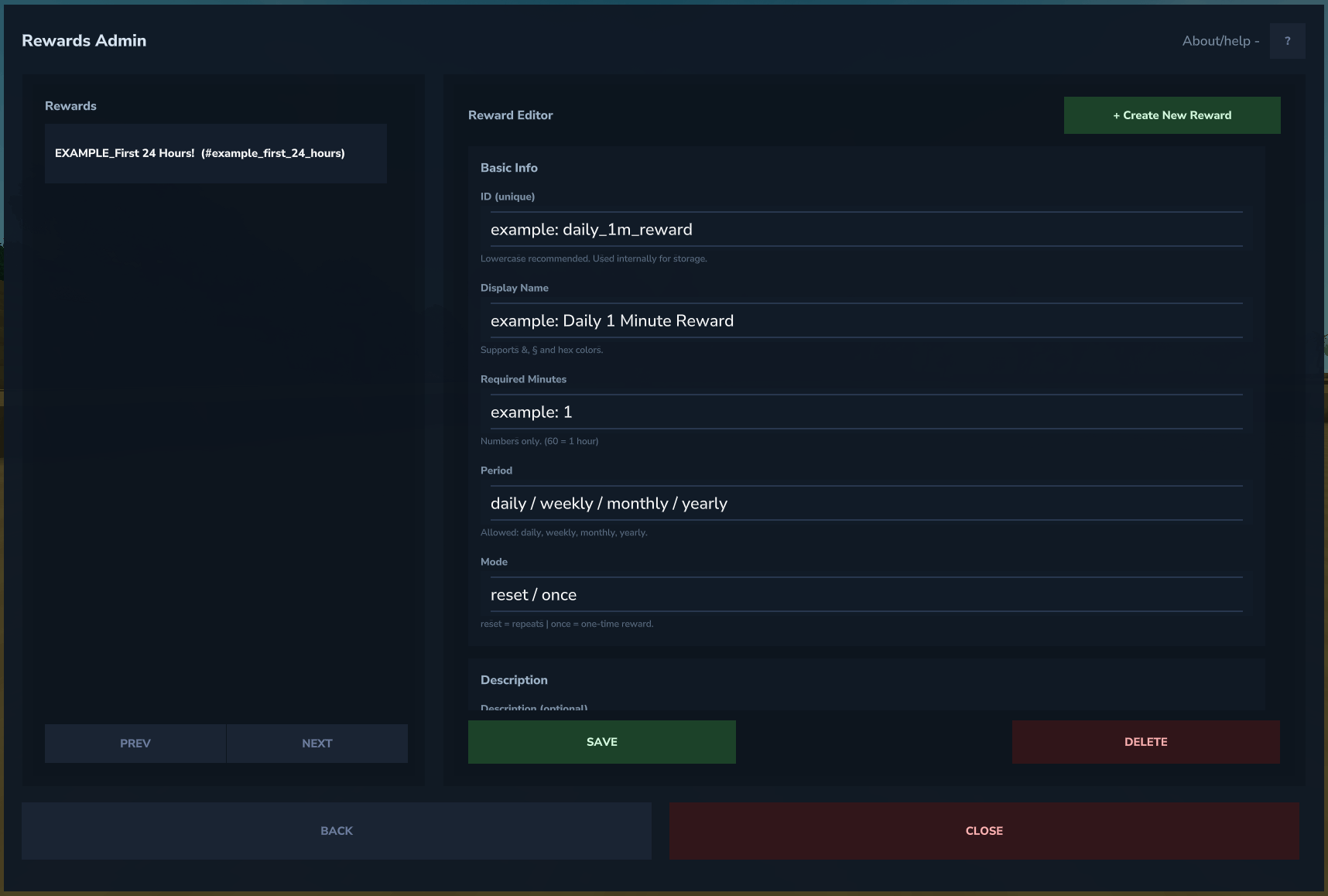
admin ui.png
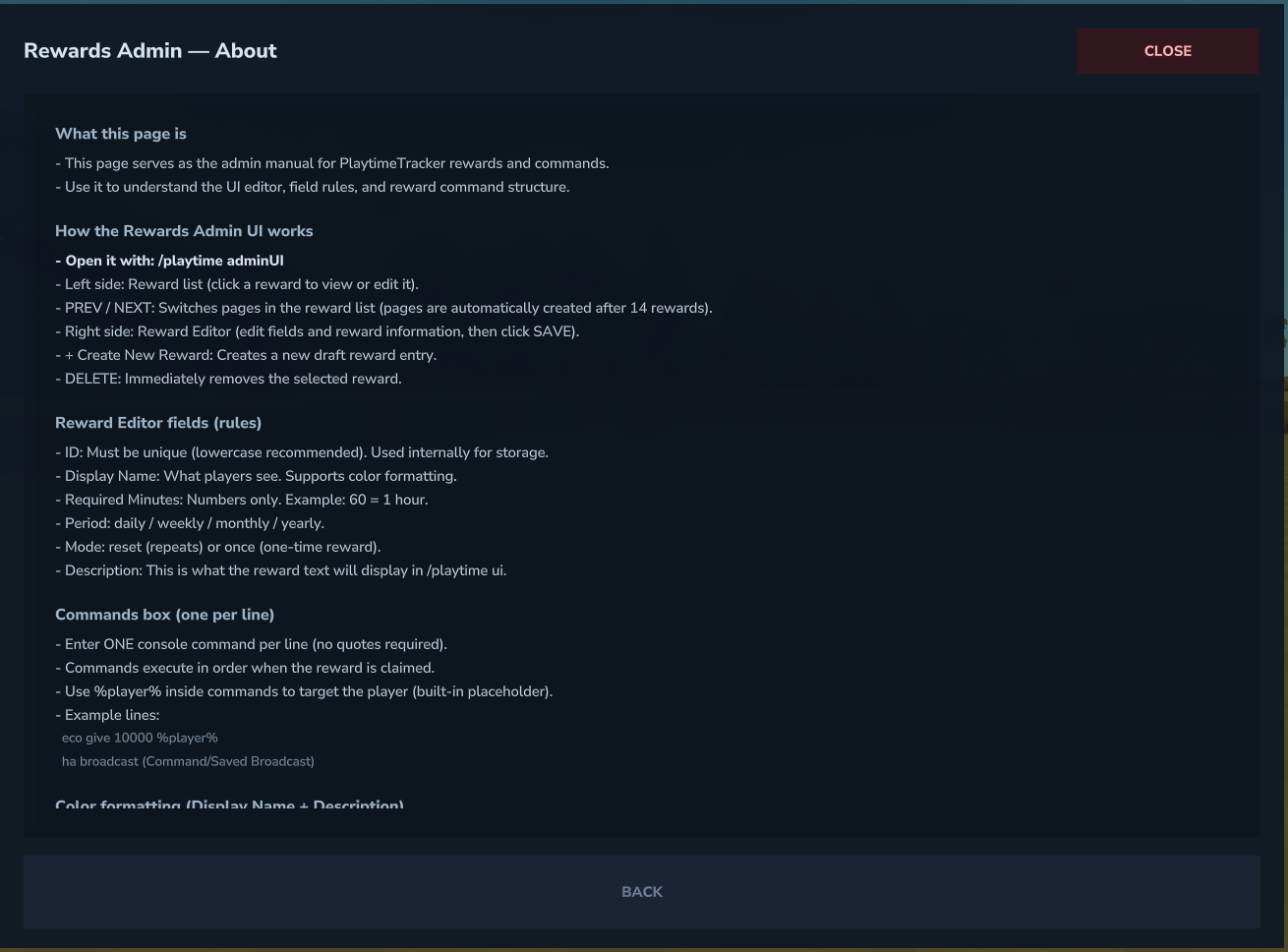
admin help ui.png
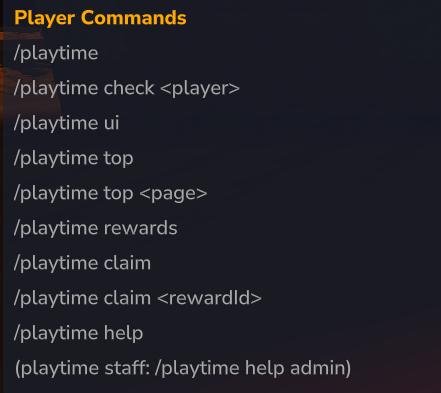
pt help.png
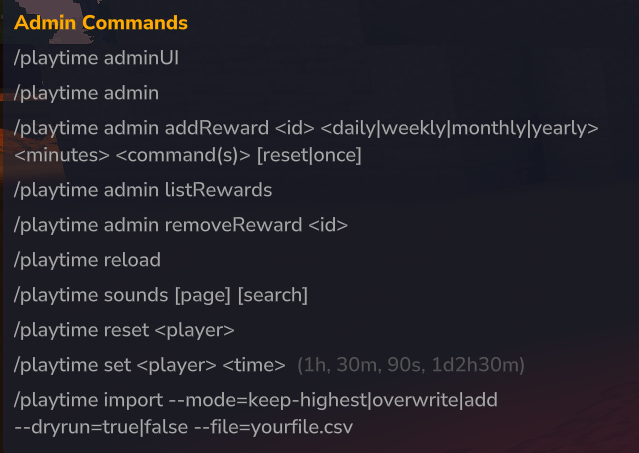
pt help admin.png
Description
PlaytimeTracker
PlaytimeTracker is a high-performance playtime tracking plugin for Hytale servers, built for real-time tracking, offline support, dynamic rewards, and clean custom UI pages — without per-tick lag.
It tracks playtime using session-based timing (join → quit calculations + smart caching), giving accurate statistics with near-zero server overhead.
PlaytimeTracker is not affiliated with any other mods or developers.
References to other mods are strictly for compatibility or data migration purposes.
Only projects created and published by Ardent are officially affiliated with PlaytimeTracker.
PlaytimeTracker 1.0.9 — Leaderboard Privacy & Rewards UI Update
This update adds better control over who appears on the PlaytimeTracker leaderboard and makes the Rewards UI easier for players to access.
Server owners and staff can now hide selected players from leaderboard rankings while still keeping their playtime fully tracked.
Added
Leaderboard Privacy
Players can now be hidden from the leaderboard without disabling playtime tracking.
Hidden players still keep:
- Total playtime
- Current session time
- Daily, weekly, monthly, and yearly statistics
- Reward progress
- Reward claiming
- Normal dashboard access
Hidden players now display Unranked on their dashboard.
Hidden players no longer appear in:
/playtime top- The Playtime UI leaderboard
- Rank calculations
- Rank placeholders
Hidden players no longer take up leaderboard positions.
Leaderboard visibility changes apply immediately and persist across server restarts.
Existing playtime data is never deleted, reset, or modified when a player is hidden or shown.
Direct Rewards UI Command
Players can now open the Rewards page directly with:
/playtime rewardsuiThis skips the main dashboard and opens the existing player-facing Rewards UI immediately.
The command uses the existing UI permissions:
playtime.use
playtime.ui
The original commands remain unchanged:
/playtime uiOpens the main PlaytimeTracker dashboard.
/playtime rewardsDisplays the existing chat-based reward progress information.
The new command has also been documented inside the Rewards Admin About/help page.
New Staff Commands
/playtime leaderboard hide <player>
/playtime leaderboard show <player>
/playtime leaderboard status <player>
These commands work with online players and previously tracked offline players.
New Permissions
playtime.leaderboard.manageAllows trusted staff to use the leaderboard management commands.
playtime.leaderboard.hiddenKeeps a player tracked while excluding them from leaderboard rankings.
Normal players cannot access the new management commands unless they are given the required permission.
Notes
/playtime leaderboard hide <player> adds the player to PlaytimeTracker’s saved hidden-player list.
/playtime leaderboard show <player> removes the player from PlaytimeTracker’s saved hidden-player list.
A player may remain hidden after using the show command if they still have the exact permission:
playtime.leaderboard.hiddenThe show command does not remove permissions from Hytale’s permission system.
Wildcard permissions such as * and playtime.* do not automatically hide operators or staff.
Hidden players continue earning and saving playtime normally.
Hiding or showing a player does not delete, reset, pause, or modify their existing playtime.
Offline players can be managed as long as they have already been tracked by PlaytimeTracker.
Use the following command to check why a player is currently hidden or visible:
/playtime leaderboard status <player>Recommended Setup
Give trusted staff the following permission:
playtime.leaderboard.manageUse the hide and show commands for normal leaderboard management.
Use playtime.leaderboard.hidden only when you want a player to remain hidden through a direct permission or permission group.
Notes
- The
hidecommand uses PlaytimeTracker’s own persisted hidden-player list and applies immediately. - The
showcommand removes only the PlaytimeTracker saved-list exclusion. - A player may still remain hidden if they have the exact
playtime.leaderboard.hiddenpermission. - The
showcommand does not remove permissions from Hytale’s permission system. - Wildcard permissions such as
*andplaytime.*do not automatically hide operators or staff. - Offline players can be managed if they have previously been tracked by PlaytimeTracker.
- Hidden players continue gaining playtime normally.
- Hiding or showing a player does not reset or remove their saved playtime.
- Use
/playtime leaderboard status <player>to see whether a player is hidden by the saved list, the exact permission, or both. - This update does not redesign the existing UI.
New in Version 1.0.8
Updated for the Latest Hytale Server Version
PlaytimeTracker has been updated for compatibility with the latest Hytale server changes.
This update fixes several API-related issues that appeared after the recent Hytale server update and restores normal plugin functionality for server owners and players.
Hytale Compatibility Fixes
The following issues have been fixed:
-
Fixed
/playtimecommand errors caused by updated Hytale permission handling -
Fixed player join errors caused by updated player-name API changes
-
Fixed the automatic rewards loop after changes to the Hytale online-player API
-
Rebuilt the plugin against the latest supported Hytale server API
-
Restored stable playtime tracking, reward checks, and menu access
Updated Playtime Dashboard
The main /playtime dashboard has received a visual refresh.
Changes include:
-
Cleaner dark navy and charcoal layout
-
Improved spacing and alignment
-
Updated playtime stat sections
-
Improved server-rank display
-
Cleaner search-player section
-
Improved button styling
-
Better visual consistency across the menu
Players can open the dashboard using:
/playtime
Updated Rewards Menu
The player rewards menu has also received a visual refresh.
Changes include:
-
Cleaner reward-row layout
-
Improved status visibility
-
Updated claim buttons
-
Improved spacing and footer navigation
-
Better visual consistency with the main dashboard
Reward states are now clearer:
-
READYrewards display in green -
LOCKEDrewards display in muted gray-blue -
CLAIMEDrewards display in muted gold
Players can open the rewards menu using:
/playtime rewards
Updated Leaderboard Menu
The playtime leaderboard has been visually refreshed.
Changes include:
-
Cleaner player rows
-
Improved rank visibility
-
Clear online and offline status labels
-
Improved playtime display
-
Updated navigation buttons
-
Better spacing and layout consistency
Players can open the leaderboard using:
/playtime top
Updated Rewards Admin Panel
The rewards admin panel has also been visually updated.
Server administrators can continue to:
-
Create rewards
-
Edit existing rewards
-
Delete rewards
-
Configure reward requirements
-
Configure reward periods
-
Configure reset or one-time rewards
-
Update reward descriptions
-
Save changes directly from the admin panel
The admin panel can be opened using:
/playtime adminui
Existing Operator Tracking Toggle
Server administrators can continue to enable or disable operator playtime tracking without restarting the server.
The setting can be changed inside:
plugins/PlaytimeTracker/config.yml
tracking:
  track-ops: true
After changing the value, run:
/playtime reload
Behavior:
-
When enabled, operators immediately begin tracking playtime
-
When disabled, operators immediately stop being tracked
-
The change applies instantly to players who are already online
A Quick Note
I apologize for the delay between updates.
I currently work in construction and am usually away from home from Monday to Friday, which has made it difficult to keep up with updates as quickly as I would like.
I recently purchased a laptop so I can continue working on PlaytimeTracker while I am away for work. Going forward, I plan to release compatibility fixes and improvements more frequently.
Thank you for your patience and for using PlaytimeTracker.
Full Version 1.0.8 Summary
-
Updated for the latest Hytale server version
-
Fixed
/playtimecommand compatibility errors -
Fixed player join compatibility errors
-
Fixed the automatic rewards loop
-
Updated player-name handling
-
Updated permission handling
-
Updated online-player iteration
-
Refreshed the main playtime dashboard
-
Refreshed the rewards menu
-
Fixed reward-state colors
-
Refreshed the leaderboard menu
-
Refreshed the rewards admin panel
-
Preserved existing configuration and reward behavior
-----------------------------------------------
New in Version 1.0.6
Live Operator Tracking Toggle
Server administrators can now toggle operator playtime tracking live without restarting the server.
The setting can be changed inside:
track-ops: true/false
After changing the value, simply run:
Behavior:
• When enabled, operators immediately begin tracking playtime
• When disabled, operators immediately stop being tracked
• The change applies instantly to players who are already online
This ensures playtime tracking remains accurate without requiring players to reconnect.
Fully Customizable UI Text
All PlaytimeTracker interfaces are now configurable directly inside config.yml, allowing servers to customize or translate the plugin UI without editing plugin files.
UI text can now be modified for:
• Dashboard UI
• Rewards UI
• Leaderboard UI
• Rewards Admin UI
Server owners can customize:
• UI titles and headers
• Button labels (NEXT, PREV, BACK, CLOSE, CLAIM, etc.)
• Reward status text (READY / LOCKED / CLAIMED)
• Search placeholders and validation messages
• Rank formatting and prefixes
• Requirement and reward labels
• Admin editor field descriptions
• Navigation labels and page indicators
Because the UI text is now fully configurable through the config file, servers can easily:
• Translate the plugin into any language
• Adjust wording to match their server theme
• Customize admin tools for staff teams
• Modify button labels or descriptions for clarity
All UI customization options are located in:
Improved Reload Behavior
The /playtime reload command now safely refreshes configuration changes without interrupting player sessions.
Configuration updates such as tracking settings and UI customization now apply immediately when the plugin reloads.
No server restart required.
NEW in Version 1.0.5
Command Aliases
Short command aliases have been added for faster command usage.
These aliases fully support every PlaytimeTracker command and subcommand.
Aliases:
/ptime
Examples:
/pt ui
/pt rewards
/pt claim
/ptime top
/ptime import
All permissions and admin restrictions remain unchanged.
Import System
PlaytimeTracker supports importing playtime from:
Advanced Playtime & Rewards SQLite database (auto-detected)
Universal import files (CSV / JSON / YAML) from the import folder
SEE IMPORT DETAILS BELOW IN
Import System (Section)
↓↓↓↓↓↓↓↓↓↓
Built-in Help Commands
Added an in-game help system to quickly view available commands.
Player help:
Admin help:
/playtime help shows all available player commands.
/playtime help admin displays administrative commands including reward management, imports, and system tools.
Admin help is restricted to users with playtime.admin permission.
Images / Showcase
(Recommended: Dashboard, Leaderboard, Rewards Notification Popup, Rewards UI, Admin UI)
Playtime UI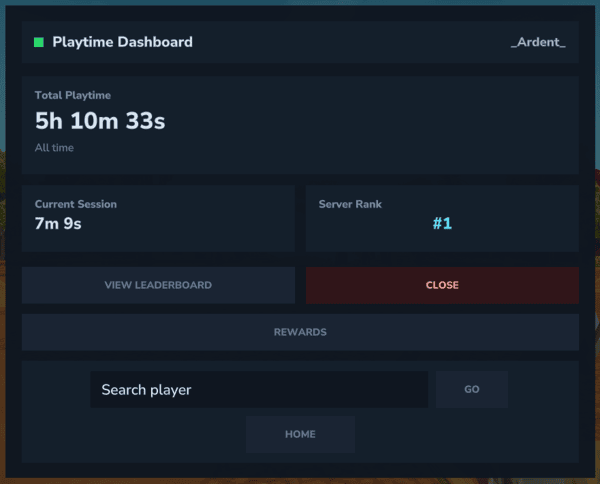
Leaderboard UI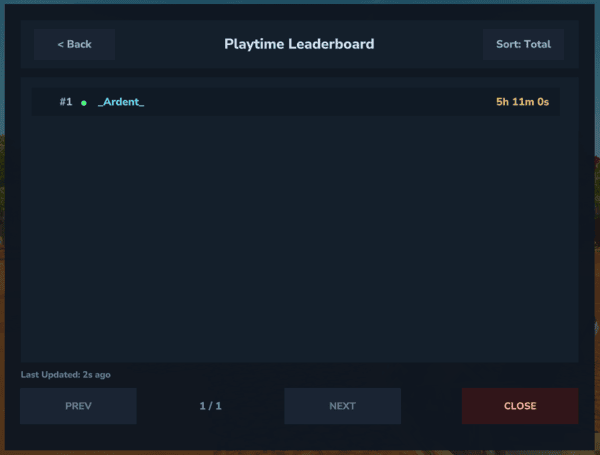
Rewards UI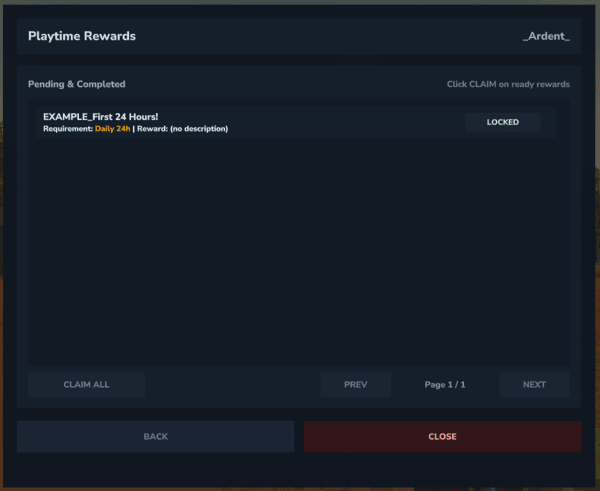
Admin UI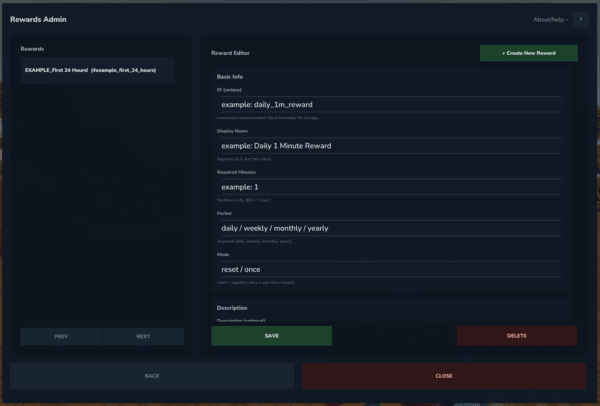
Key Features
Performance Focused
Session-based tracking (no tick spam)
Auto-save batching (default: every 5 minutes)
Leaderboard caching (default: refresh every 60 seconds)
Efficient in-memory lookups + safe disk saving
No per-tick processing
Players + Offline Support
Check playtime for online or offline players
UUID-backed storage (stable long-term)
Persistent JSON storage
Auto-recreates player record safely if missing
Interactive Custom UI
Updated UI pages designed specifically for PlaytimeTracker:
Dashboard UI with live session time + rank
Interactive Leaderboard + Rewards UI with paging + sorting
Built-in player search + HOME button
Top 3 highlighting on leaderboards and default UI view
Online / Offline indicator dot
Expanded color support and improved visual styling
Advanced Rewards System
The rewards system is fully configurable and admin-controlled in-game via commands and the Admin UI:
Reward Period Types
Daily
Weekly
Monthly
Yearly
Reward Modes
reset → Player can earn the reward again after the period resets
once → One-time reward only
(Default mode: reset)
Reward Claim System
Players can:
Claim all available rewards:
Claim a specific reward by ID:
Claim rewards via /playtime ui (Rewards Page)
Players also receive a popup notification upon completion.
Rewards support console execution with placeholders.
Multi-Command Reward Support
Each reward can execute multiple console commands.
Admin Command Format
Example
Comma-separated
Commands wrapped in quotes
Spaces inside commands supported
Backward compatible with single-command usage
Recommended: Use /playtime adminUI for reward management.
Commands
Player Commands
/playtime help
/playtime check <player>
/playtime ui
/playtime top
/playtime top <page>
/playtime rewards
/playtime claim
/playtime claim <rewardId>
Command aliases:
/ptime
Admin Commands
Opens the interactive Reward Admin UI.
Admins can:
View all rewards
See period + required time
Edit reward settings
Create new rewards
Manage reward modes
Organize rewards without editing files
Additional admin commands:
/playtime reload
/playtime sounds
/playtime reset <player>
/playtime set <player> <time>
/playtime admin addReward
/playtime admin listRewards
/playtime admin removeReward <id>
Time Format for /playtime set
Supported formats:
2h30m
1d4h
3d
45m
1d2h30m15s
Units:
d = days
h = hours
m = minutes
s = seconds
Import System
PlaytimeTracker supports importing playtime from:
Advanced Playtime & Rewards SQLite database (auto-detected)
Universal import files (CSV / JSON / YAML) from the import folder
Command
Default import (auto-detects AdvancedPlaytime DB first, otherwise uses import folder):
Supported Import Flags
This command supports modern argument flags.
Set mode
/playtime import --mode=overwrite
/playtime import --mode=add
Dry-run preview (no saving)
Import a specific file from the import folder
Import Modes
keep-highest (default)
Keeps the higher value between existing playtime and imported playtime.
overwrite
Replaces existing playtime with imported value.
add
Adds imported playtime onto the existing playtime total.
Import Folder
If you are importing non-database files, place your data inside:
Supported file types:
.csv
.json
.yml
.yaml
These files should contain Player → Playtime data from your previous playtime plugin.
After placing the file in the folder, run:
PlaytimeTracker will automatically detect and process the files.
Automatic AdvancedPlaytime Database Import
If the AdvancedPlaytime & Rewards SQLite database exists on the server, PlaytimeTracker will automatically detect it and import data directly.
In this case you only need to run:
No manual file placement is required.
Migration Steps (Recommended)
Follow these steps when migrating from another playtime plugin.
Step 1
Make sure the data folder from your previous playtime mod/plugin is still present on the server.
Do not delete the data folder.
Step 2
Install PlaytimeTracker into your server’s Mods folder.
Delete the old playtime plugin .jar file, but keep the data folder from the previous plugin.
Step 3
Start the server once with PlaytimeTracker installed.
Step 4
If your previous plugin used a SQLite database (DB file):
Run:
PlaytimeTracker will automatically detect and import the database.
Step 5
If your previous plugin uses CSV / JSON / YAML data files instead of a database:
Place the playtime file inside:
Then run in-game:
Step 6 (Important)
After a successful import, delete all old database files and leftover files from the previous playtime plugin.
This includes:
SQLite .db files
Old playtime plugin data folders
Any remaining files from the previous playtime mod/plugin
If these files remain on the server, PlaytimeTracker may detect them again and treat the server as a migration environment, which can cause the UI to show players as offline or not tracking.
Removing the old database/files ensures PlaytimeTracker begins tracking playtime normally.
Import Backups
Before applying an import (when not using dry-run), PlaytimeTracker automatically creates a backup of your existing playtime data.
Backup location:
This ensures your data can be restored if needed.
This version now:
✔ Keeps your entire original section intact
✔ Clearly explains DB vs file import
✔ Adds safe migration steps (super important for server owners)
✔ Prevents admins from accidentally deleting their old data
if in need of any help please feel free to comment or DM me on DISCORD!
Permissions
| Permission | Description |
|---|---|
playtime.use |
Basic /playtime command |
playtime.check |
Check other players |
playtime.ui |
Open Dashboard UI |
playtime.top |
Open Leaderboard |
playtime.admin |
All admin tools |
playtime.rewards |
Access rewards commands |
Compatible with:
-
LuckPerms
-
permissions.json
-
Standard Hytale permission systems
Placeholder Support
Built-in placeholder engine usable in:
-
Reward commands
-
UI text
-
Config files
-
Future HUD systems
Supported placeholders:
-
%player% -
%playtime_total% -
%playtime_total_short% -
%playtime_total_seconds% -
%playtime_session% -
%playtime_session_short% -
%playtime_session_seconds% -
%playtime_rank% -
%playtime_online% -
%playtime_online_dot%
Configuration
Config file:
-
plugins/PlaytimeTracker/config.yml
Includes:
-
Autosave interval
-
Time formatting style
-
Leaderboard page size
-
Cache duration
-
Reward popup icon
-
Reward popup sound
-
Debug mode
-
Reward completion message toggle
Reward Notification Settings (Example)
messages:
reward-completed-enabled: true
notification:
icon: 'Ingredient_Ice_Essence'
sound-enabled: true
sound: 'SFX_Discovery_Z1_Medium'
sound-category: 'UI'
Allowed sounds file:
-
plugins/PlaytimeTracker/sounds_allowed.txt
Fully Editable Messages System
File:
-
plugins/PlaytimeTracker/data/messages.json
Customizable messages include:
-
Claim success
-
Already claimed
-
Reward not found
-
No permission
-
Reward progress
-
Admin feedback
-
Reset messages
-
Wipe confirmation
Supports:
-
&color codes -
§codes -
HEX colors
No restart required — use /playtime reload.
Data Storage
Config:
-
plugins/PlaytimeTracker/config.yml
Data files:
-
plugins/PlaytimeTracker/data/playtime.json -
plugins/PlaytimeTracker/data/messages.json -
plugins/PlaytimeTracker/rewards.json -
plugins/PlaytimeTracker/reward_claims.json -
plugins/PlaytimeTracker/rewards_pending.json
Installation
-
Download the latest
.jar -
Place it in your server’s
modsfolder -
Restart the server once
-
Files will auto-generate
-
Use
/playtime reloadfor future configuration edits
Support
CurseForge comments are supported — feedback is appreciated and helps keep the plugin improving.
Discord: ardent6971
(Please introduce yourself when messaging.)
Changelog
Version 1.0.6
Released: March 6, 2026
Important Note
If config.yml does not update when installing a new .jar, simply delete the existing config.yml and run:
The plugin will automatically generate a fresh config.yml.
Tracking Configuration
The tracking.track-ops option now updates immediately when the plugin is reloaded.
Server administrators can now toggle operator tracking live by setting true or false inside:
When tracking.track-ops is changed:
• Operators will immediately begin tracking playtime when enabled
• Operators will immediately stop being tracked when disabled
This update also ensures the change correctly applies to players who are already online, preventing incorrect playtime tracking until the next reconnect.
Additional Note
If operators or staff previously accumulated playtime before disabling tracking, you should reset their playtime so tracking starts correctly.
Example:
UI Customization System
All PlaytimeTracker user interfaces are now fully configurable through config.yml.
Server owners can customize UI text, labels, buttons, and messages without editing plugin files or recompiling the plugin.
This allows full localization and server-specific wording directly from:
The following UI systems now support full customization:
• Dashboard UI
• Rewards UI
• Leaderboard UI
• Rewards Admin UI
Server owners can now modify:
• UI titles
• Button labels (NEXT, PREV, BACK, CLOSE, CLAIM, etc.)
• Status text (READY / LOCKED / CLAIMED)
• Page indicators and navigation text
• Search placeholders and validation messages
• Session status text such as "Offline"
• Rank display formatting and prefixes
• Requirement and reward labels in the Rewards UI
• Admin UI editor field labels and help descriptions
Because UI text is now controlled entirely through config.yml, servers can:
• Translate the plugin to any language
• Adjust wording to match their server theme
• Customize admin tools for staff teams
• Modify button labels and descriptions for clarity
This system ensures that every major UI page in PlaytimeTracker can be localized or customized without modifying the plugin itself.
Performance & Stability
Improved internal tracking refresh logic so configuration reloads safely update the playtime system without interrupting player sessions.
No permission nodes or command structures were changed.
Version 1.0.5
Released: March 3, 2026
Import System
Added a full playtime migration/import system allowing servers to safely migrate from other playtime plugins.
Supports importing from:
• Advanced Playtime & Rewards SQLite database (auto-detected)
• Universal CSV / JSON / YAML import files
Import command:
Import Command Flags
Added modern argument flags for flexible imports.
Mode selection:
/playtime import --mode=overwrite
/playtime import --mode=add
Preview import without saving:
Import a specific file from the import folder:
Import Modes
keep-highest (default)
Never lowers a player’s playtime. Uses the higher value between imported and existing totals.
overwrite
Replaces the existing playtime with the imported value.
add
Adds imported playtime onto the existing playtime total.
Import Folder Support
Added universal import folder support:
Supported file formats:
• .csv
• .json
• .yml
• .yaml
Allows administrators to migrate playtime from custom plugins or manual exports.
Automatic Database Detection
PlaytimeTracker automatically detects AdvancedPlaytime SQLite database files when present.
If detected, the database is imported automatically using:
No manual file placement required.
Import Safety Backups
Before applying an import (when not using --dryrun), PlaytimeTracker now creates a backup of the existing playtime data.
Backup location:
This ensures safe recovery if a migration needs to be reverted.
Migration Improvements
Added a recommended migration workflow for servers switching from other playtime plugins.
Migration process:
Keep the existing data folder from the previous playtime plugin.
Install PlaytimeTracker and remove the old playtime plugin .jar file.
Start the server once with PlaytimeTracker installed.
Run:
PlaytimeTracker will automatically detect and import the database.
If the previous plugin uses CSV / JSON / YAML files instead of a database, place the file in:
Then run:
Important Migration Note
After a successful import, servers must delete all old database files and leftover files from the previous playtime plugin.
This includes:
• SQLite .db files
• Old playtime plugin data folders
• Any leftover files from the previous plugin
If old database files remain on the server, PlaytimeTracker may detect them again and treat the environment as a migration state, which can cause the UI to show players as offline or not tracking.
Removing the old database/files ensures PlaytimeTracker begins tracking playtime normally.
Command Aliases
Short command aliases have been added for faster command usage.
Aliases:
/ptime
Examples:
/pt ui
/pt rewards
/pt claim
/ptime top
/ptime import
All permissions and admin restrictions remain unchanged.
Built-in Help Commands
Added an in-game help system to quickly view available commands.
Player help:
Admin help:
/playtime help shows all available player commands./playtime help admin displays administrative commands including reward management, imports, and system tools.
Admin help is restricted to users with playtime.admin permission.
Version 1.0.4
Released: March 2, 2026
Major Rewards Expansion
Added multi-command reward support
Added claim specific reward: /playtime claim <id>
Added reward mode support (reset / once)
Added --mode= flag parsing
Improved command parsing for quoted entries
Internal command list storage for rewards
Improved reward execution reliability
Admin UI
Added /playtime adminUI
Interactive reward management system
Clean separation between reward editor + reward list
Improved layout organization
Messages System Upgrade
Expanded messages.json customization
Added reward claim result messages
Added error feedback messages
Improved admin feedback formatting
Stability Improvements
Fixed reward auto-claim edge case
Improved reward readiness validation
Improved offline reward handling
Refined reward period calculations
Improved reload safety
Rewards System
/playtime rewards progress UI
/playtime claim
/playtime admin addReward
/playtime admin listRewards
/playtime admin removeReward <id>
Console command execution support
Reward popup notification system
Configurable icon + sound
Sound browser system (/playtime sounds)
Version 1.0.3
Released: Late February 2026
Maintenance Update
Updated build to latest compatible server jar version
Minor packaging update for stability consistency
Version 1.0.2
Released: February 18, 2026
New – Interactive UI Dashboard (/playtime ui)
Total playtime display
Current session time (live updating)
Server rank
Online/offline status indicator dot
Direct access to Leaderboard UI
Built-in Player Search system
HOME button to return to your own profile
Fully styled custom interface
Player Search System (Dashboard)
Search any tracked player inside the dashboard UI
GO button or Enter
Switch dashboard to searched player
HOME returns to self
Inline validation message under search bar (no chat spam)
Case-insensitive
Works for online and offline players
Live Online Status Indicator
Green = online
Red = offline
Updates in real time
Status colors separated from Top 3 highlight colors
Interactive Leaderboard UI
/playtime top opens interactive custom UI
Pagination support
Sort modes: Total / Session / Week
Real-time “Last Updated” indicator
Online/offline status indicator
Top 3 highlighting (distinct color system)
Consistent styling between Dashboard & Leaderboard
Permission System
playtime.use
playtime.ui
playtime.check
playtime.top
playtime.admin
Reload Command
Added /playtime reload (admin)
Reloads config.yml
Safely refreshes leaderboard cache
No restart required
Performance Improvements
Improved rank caching performance
UI update tick handling optimized
Reduced unnecessary UI repainting
Internal Improvements
Cleaner command structure for expansion
Better separation between UI logic and backend
Stabilized scheduled UI update executor
Version 1.0.1
Released: February 12, 2026
Improvements
Backend optimizations to leaderboard caching
Improved leaderboard formatting consistency
Minor internal performance cleanup
Stability improvements for offline player data handling
Version 1.0.0 – Initial Release
Released: February 4, 2026
Features
Session-based playtime tracking with zero performance impact
/playtime command to view your own playtime
/playtime check <player>
/playtime top [page] leaderboard with pagination
Offline player support
Configurable leaderboard caching (default: 60 seconds)
Configurable time format (detailed or simple)
Auto-save system (default: every 5 minutes)
Persistent data storage across restarts
Playtime Tracker | UI | Leaderboard | Reward | Importer| Language/UI customization! Team