Pickup Filter
- By
Choose which items you pick up, with personal blacklists, category filters and a searchable menu with item icons.
PickupFilter
Choose which items you collect with personal blacklists, category filters and a searchable menu with item icons.
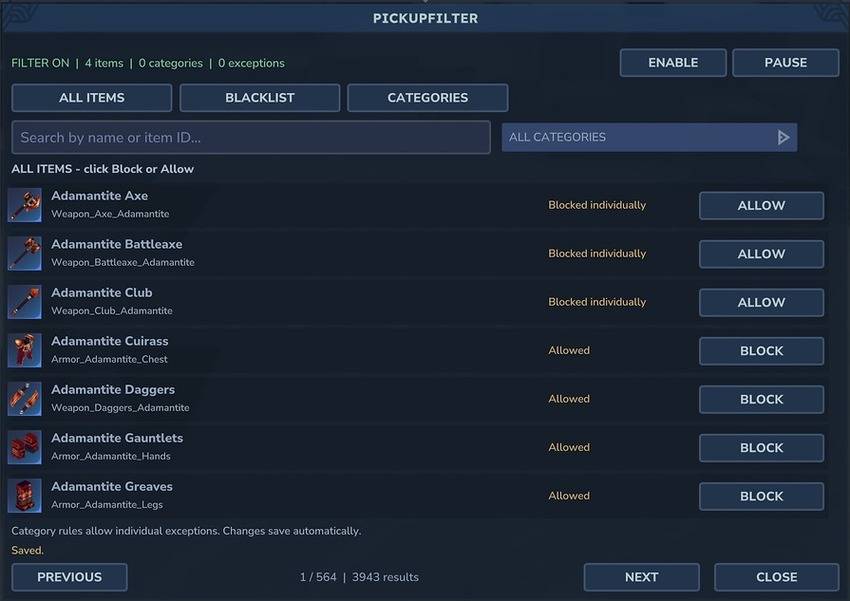
Open /pf to browse items, search by name or item ID, and block anything you don't want to pick up. Your rules only affect you. Blocked items stay on the ground, and other players can still collect them.
Blacklists and categories
Block individual items or entire categories such as soil, stone, ores, wood and plants. Individual exceptions let you keep specific items from an otherwise blocked category.
The blacklist tab shows your blocked items and lets you allow them again directly. You can pause the filter without deleting your rules.
Modded items are supported. Category filtering also works for them when the mod provides category metadata.
Pickup behaviour
PickupFilter covers automatic ground pickup and normal manual pickup interactions.
Blocked harvest rewards that would normally go straight into your inventory are dropped on the ground instead. Existing inventory items, chest transfers, crafting and normal inventory movements are left alone.
Commands
| Command | Action |
|---|---|
/pf |
Open the item browser |
/pf blacklist |
Edit your blacklist |
/pf categories |
Manage category rules |
/pf add |
Block the item type in your hand |
/pf remove |
Allow the item type in your hand |
/pf remove --id=Item_ID |
Allow an item without holding it |
/pf list |
Show your saved rules |
/pf toggle |
Enable or pause your filter |
/pf help |
Show command help |
/pickupfilter also works in place of /pf. Players do not need OP permissions to manage their own settings.
AI Disclosure
AI tools were used to assist with parts of the development.
Pickup Filter Team