MysticNametags
- By
A custom nametag system where you create your own tags players can equip or purchase.
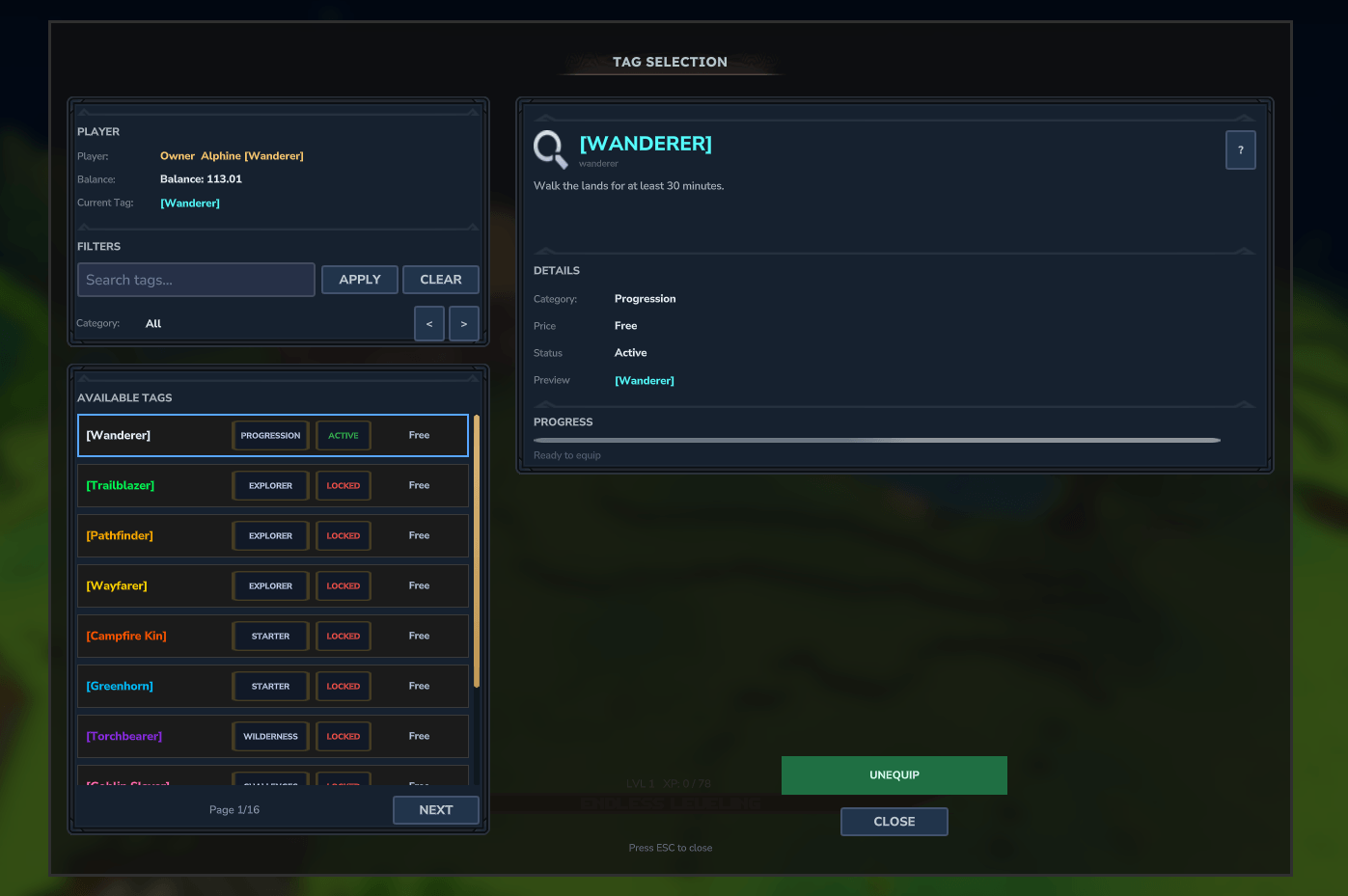
New Tag UI
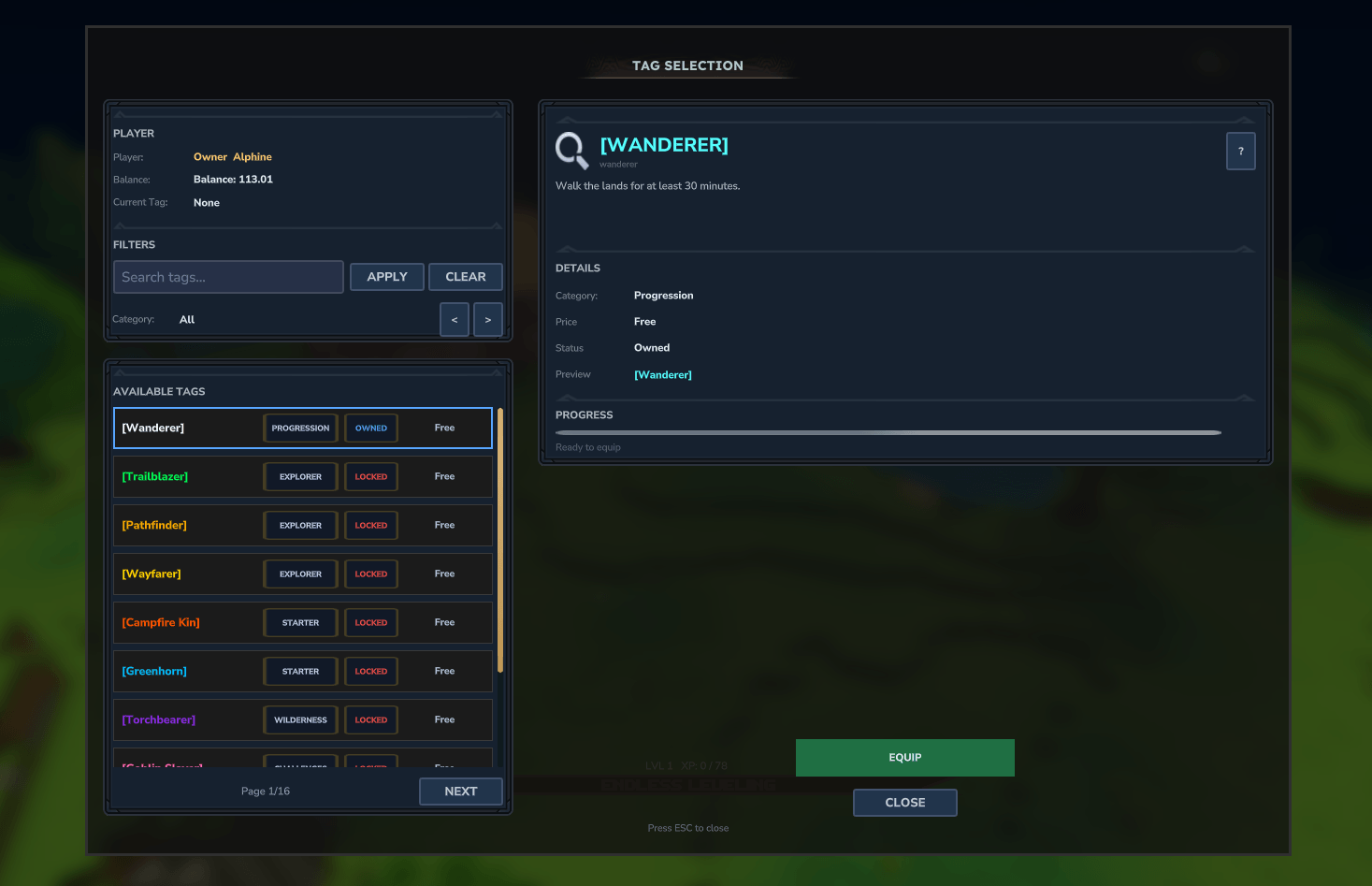
New Tag UI
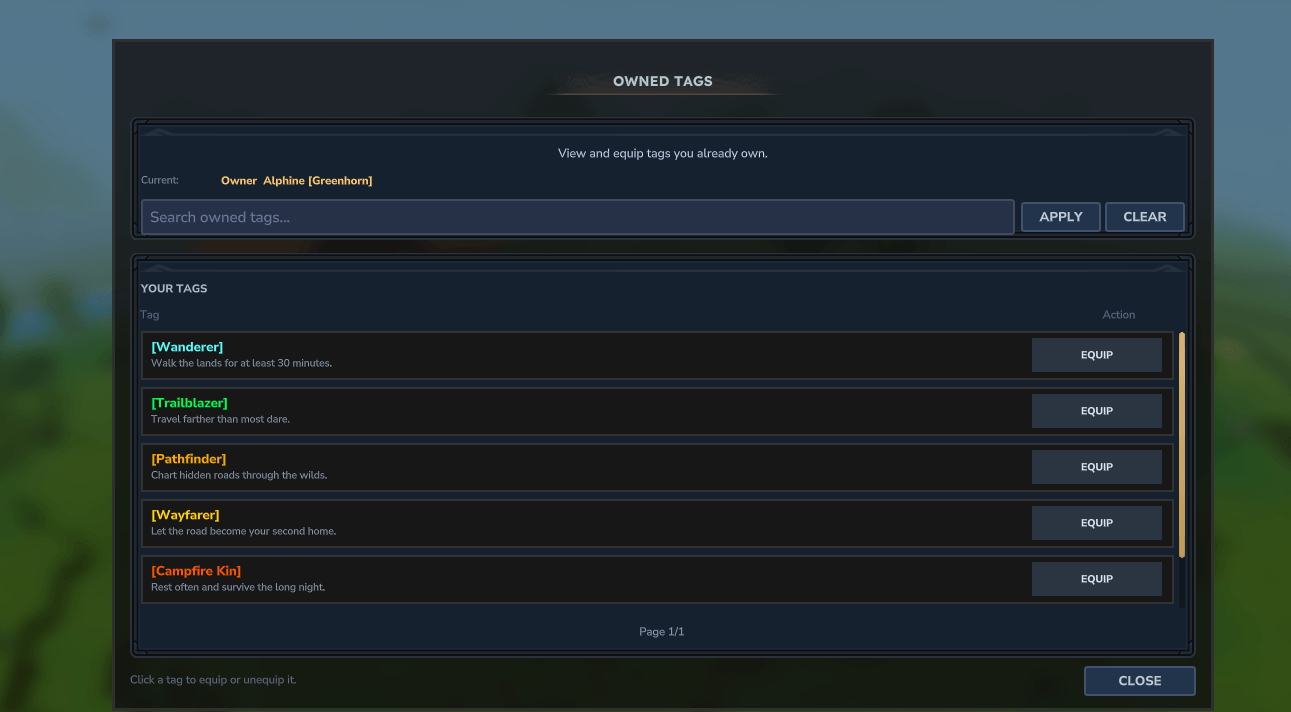
Screenshot 2026-03-12 214434.png
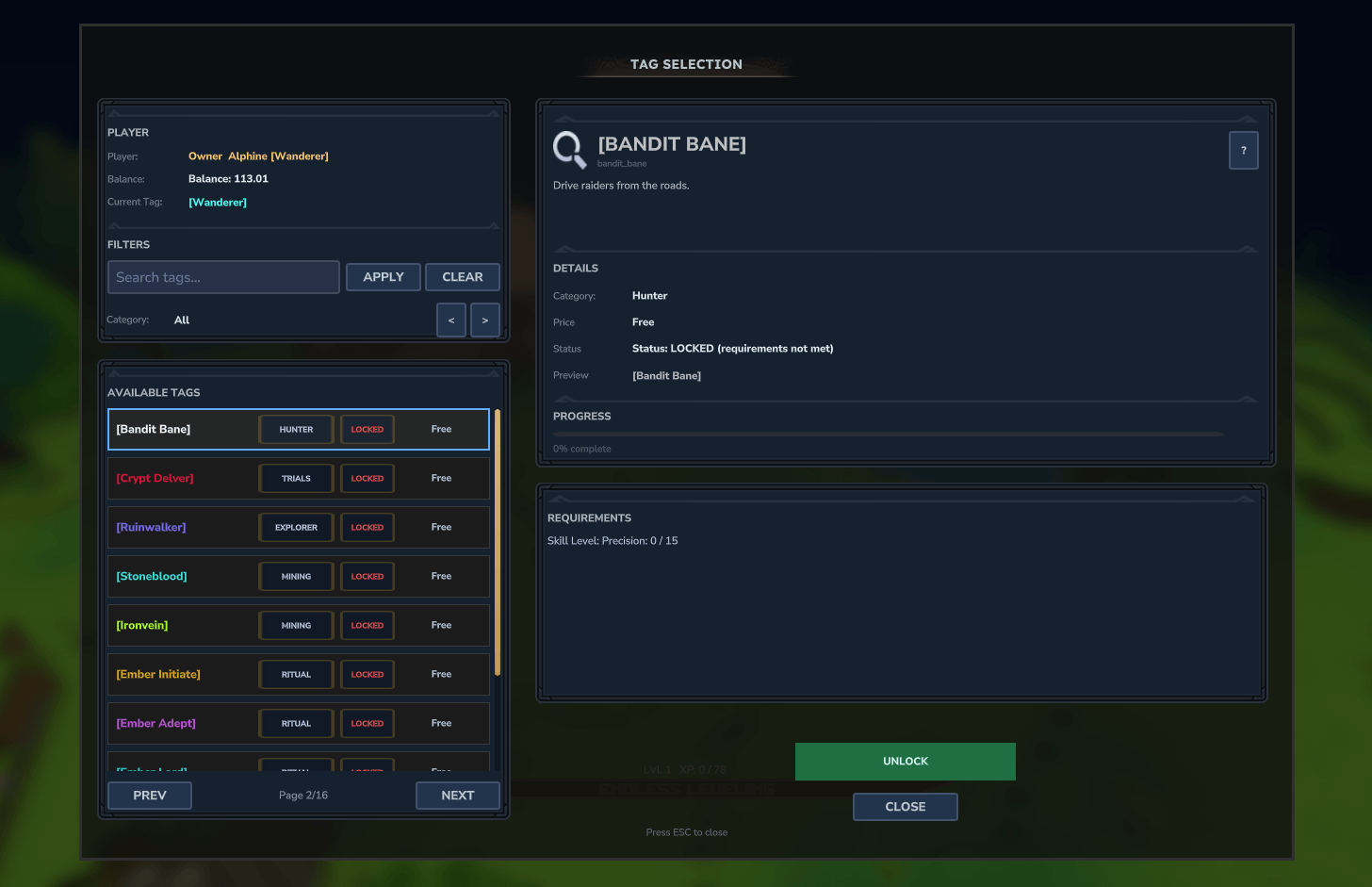
Screenshot 2026-03-12 213219.png

Using Help Chat's PlaceholderAPI in chat for tag display
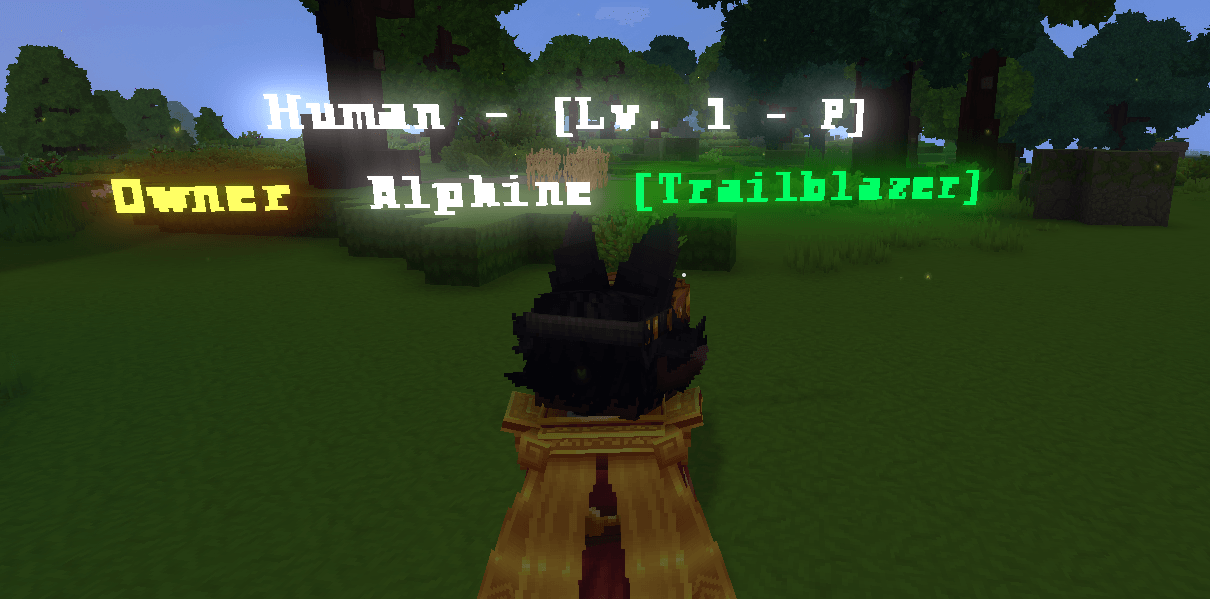
Screenshot 2026-03-17 215408.png
Description
🏷 MysticNameTags
WIKI
Use my Creator Code: ALPHINE to support me and my projects.
Plugin Stats - Starting 1.1.9+

MysticNameTags is a modern, permission-driven, and performance-focused tag and nameplate system for Hytale servers.
Built for servers that want:
- Clean UI
- Flexible tag progression
- Strict permission control
- Optional economy support
- Multi-stat unlock requirements
- Seasonal and event-driven cosmetic tags
- Optional experimental glyph nameplates
- Minimal overhead and no pointless tick spam
License Server Domain Change
Url: https://licenses.hyzion.net
Login using your Discord or with MysticIdentity. You must also be in our discord for updated roles for entitlements.
Notice: The License of MysticNameTags does NOT interfere with runtime, only a single module currently (Tag Banners).
WARNING - Please Read
MYSTICNAMETAGS IS NOT A RANK REPLACEMENT. IT IS BUILT FOR COSMETIC FLAIR, PROGRESSION TITLES, AND PLAYER IDENTITY.
This mod does not currently replace fully colored third-party nameplate solutions such as HTNameplates.
If you want fully colored nameplates right now, use HTNameplates.
MysticNameTags is instead focused on:
- progression-based tags
- unlock requirements
- placeholder support
- economy-based cosmetic titles
- event and seasonal tags
- future-forward nameplate expansion
Experimental Glyph Nameplates
MysticNameTags includes an experimental glyph-based nameplate system.
This system is still under active development and should be treated as experimental.
Important notes:
- glyph nameplates are far more expensive than normal text-based nameplates
- each visible character is effectively rendered through spawned glyph entities
- lower entity limits can cause wording to be cut off
- Hytale may not support every decorative Unicode symbol
- this system is best suited for testing, roleplay events, or smaller servers while it continues to mature
Recent versions introduced major progress toward a more stable glyph nameplate foundation, including:
- improved rendering stability
- better movement/attachment handling
- cross-world support
- crash fail-safes for nameplate load failures
- selectable glyph font folders
- safer behavior in multi-world environments
📦 Suggested Mods / Integrations
These are optional but supported by MysticNameTags:
- Third Person Nameplates
- HTNameplates
- EcoTale / economy backends
- HyEssentialsX
- VaultUnlocked
- Zid’s Playtime
- EndlessLeveling
- RPG Leveling
- WiFlow PlaceholderAPI
- HelpChat PlaceholderAPI
- EcoTalesQuests (early Adventurer Rank override support)
🌐 Community & Support
Discord: Hyzion Discord https://discord.gg/9aq3Gqg3Gy
Support tickets can be created in:
#create-ticket⚠ This Discord also serves an in-development Hytale server, so please keep that in mind when joining.
🤝 Official Partnered Servers
You can see MysticNameTags in action on:
- Hyzion - (Currently in Development)
- Late Nite - (Currently Offline and in Redevelopment)
- HyForger Skyblock -
play.hyforger.com - Endless Leveling -
play.endlessleveling.net:1025
📦 Official Assets For MysticNameTags
If you want to support the mod, you can download it here or grab additional packs below.
✨ Features
🏷 Fully Custom Tag System
Define unlimited tags in:
tags.jsonEach tag supports:
- custom display names
&formatting codes- hex colors via
&#RRGGBB - optional economy pricing
- permission requirements
- playtime requirements
- multi-stat requirements
- owned-tag progression requirements
- item tribute requirements
- unlock console commands
- category grouping
- placeholder-based requirements
- seasonal/event availability windows
Tags can be:
- free
- permission-locked
- stat-based
- playtime-based
- purchase-based
- item-based
- placeholder-gated
- progression-locked
- seasonal/event-limited
- any combination of the above
All configured conditions must be met unless the tag is intentionally configured otherwise.
📅 Seasonal / Event Tags
MysticNameTags supports limited-time tags for holidays, events, seasons, server launches, and temporary promotions.
Example:
{
  "id": "event.winter_frost",
  "display": "&b[Frost]",
  "description": "Winter event tag.",
  "category": "Seasonal",
  "season": "Winter 2026",
  "activeFrom": "2026-12-01",
  "activeUntil": "2027-01-15",
  "availabilityMessage": "The Frost tag is only unlockable during the Winter event.",
  "purchasable": true,
  "price": 500
}
Seasonal behavior:
- unowned tags outside their active window are hidden from normal players
- owned tags can still be equipped after the event ends
- inactive event tags can be shown in debug/admin visibility paths
- custom
availabilityMessagetext is shown when an unavailable tag is attempted /tagsadmin doctorreports seasonal tags that are currently outside their window
Date-only values are interpreted in UTC. For example, activeUntil: "2027-01-15" ends at the next UTC midnight.
🧠 Advanced Unlock Requirements
MysticNameTags supports layered requirement logic such as:
permissionrequiredPlaytimeMinutesrequiredOwnedTagsrequiredStatKey+requiredStatValuerequiredStatsrequiredItemsrequiredPlaceholderspurchasable+priceactiveFrom+activeUntil
Supported Stat Keys
Internal stats via PlayerStatManager:
custom.kills_totalcustom.deaths_totalcustom.damage_dealtcustom.damage_takenkilled.<entityId>mined.<blockId>placed.<blockId>
Examples:
killed.goblin_minerkilled.Playerkilled.goblin_*mined.hytale:stone
Wildcard matching is supported where applicable.
EndlessLeveling Stat Keys
endlessleveling.levelendlessleveling.xpendlessleveling.prestigeendlessleveling.skill.<ATTRIBUTE>
Examples:
endlessleveling.skill.LIFE_FORCEendlessleveling.skill.STRENGTHendlessleveling.skill.ATTACK
These are bridged into MysticNameTags and can be used directly in requirement displays and unlock logic.
🎁 On Unlock Commands
Each tag can optionally execute console commands the first time it is unlocked.
Example:
"onUnlockCommands": [
  "give <player> diamond 3",
  "broadcast &6<player> has unlocked the Primordial tag!"
]
How it works:
- runs only once on first unlock
- executes as console
- replaces
<player>automatically
Useful for:
- crate keys
- rank rewards
- item rewards
- broadcasts
- external integration hooks
Placeholder Requirement Operators
MysticNameTags supports multiple placeholder comparison types.
Numeric operators
>>=<<===!=
String operators
==!=contains
Boolean operators
truefalse
Examples:
{
  "placeholder": "%wi_level%",
  "operator": ">=",
  "value": "100"
}
{
"placeholder": "%luckperms_primary_group%",
"operator": "==",
"value": "vip"
}{
"placeholder": "%some_permission_placeholder%",
"operator": "true",
"value": "true"
}This makes it easy to gate tags behind:
- ranks
- web sync flags
- external status values
- custom placeholder systems
- permission-style checks
🎨 Color Formatting
MysticNameTags supports color formats that Hytale currently handles reliably.
Supported formatting
- legacy
&color/format codes - hex colors using
&#RRGGBB - MiniMessage subset colors and gradients
Examples:
&6&l[Champion]
&#FFAA00&l[Dragon Soul]
Nameplate color limitations
Due to current Hytale API limitations:
- full colored native nameplate rendering is still limited
- multi-line native nameplates are still constrained by the game/client
- decorative symbols may not render in all Hytale text paths
- final visual rendering is still partially controlled by the client
MysticNameTags will continue to expand proper nameplate styling as Hytale’s APIs mature.
🖥 Clean & Scalable UI
Open the main interface with:
/tagsIncluded features:
- tag browser UI
- category filtering
- locked vs unlocked state indicators
- seasonal/event tag state indicators
- requirement breakdown panels
- current nameplate preview
- pagination for large tag libraries
Additional UI:
/tagsownedShows only tags already unlocked by the player, if enabled in settings.json.
🛠 Admin Dashboard
MysticNameTags includes an Admin Dashboard for server owners and admins.
Dashboard features include:
- update information
- integration status
- permission backend visibility
- economy backend visibility
- placeholder backend visibility
- nameplate integration status
- active nameplate preset display
- active glyph font display
- doctor/debug health summary
The dashboard is meant to make common configuration issues visible without digging through logs.
🩺 Config Doctor
Run:
/tagsadmin doctorThe doctor command checks common configuration problems, including:
- malformed or duplicate tag IDs
- missing displays
- invalid prices
- default tag problems
- seasonal/event availability windows
- availability messages without availability windows
- economy configuration issues
- missing permission nodes when permission gates are enabled
- item, stat, placeholder, and owned-tag requirement issues
- multiline nameplate formats without glyph nameplates enabled
- active nameplate preset behavior
- active glyph font behavior
INFO findings are usually informational. For example, a seasonal tag outside its active window is expected behavior unless it should currently be live.
🔐 Permission-First Design
MysticNameTags is designed around permission safety.
Core notes:
- all tags can respect permissions
- nothing is hardcoded into the plugin for tag unlock nodes
- tag permissions come from
tags.json - checks are cached and refreshed safely
- no pointless polling loops
Core permission nodes:
mysticnametags.ui.openmysticnametags.reloadmysticnametags.admin.update
Permission Gate Modes
Soft Permission Gate
"permissionGate": trueTags remain visible, but the player still needs the permission to unlock or equip them.
Full Permission Gate
"fullPermissionGate": trueTags are fully hidden when the player lacks permission.
Useful for:
- donor tags
- staff tags
- admin-only tags
- hidden event tags
- seasonal content
🔄 Multi-Permission Backend Support
MysticNameTags supports multiple permission backends and probes them safely.
Supported:
- native Hytale permissions
- LuckPerms
- PermissionsPlus
- HyperPerms
If no third-party backend is found, the plugin safely falls back to native Hytale permissions.
💰 Optional Economy Support
MysticNameTags supports both ledger-style economies and physical currency systems.
Supported ledger backends
The plugin probes these in order and uses the first valid backend:
- EconomySystem / TheEconomy and forks
- HyEssentialsX EconomyAPI
- EcoTale
- VaultUnlocked
- EliteEssentials
Physical currency support
Full support exists for Coins & Markets style physical coin systems.
This allows:
- item-based currency
- direct coin removal
- no virtual balance requirement
When economy logic runs
Economy checks only run when needed:
- opening the
/tagsUI - attempting to purchase a tag
There are no useless per-tick economy loops.
If no economy is available, or economy is disabled, the plugin safely shows:
Balance: N/Aand price-based tags become non-purchasable.
🔌 Optional Integrations
MysticNameTags includes safe optional support for:
- LuckPerms
- PermissionsPlus
- HyperPerms
- PrefixesPlus
- EconomySystem / TheEconomy
- EcoTale
- VaultUnlocked
- Coins & Markets
- EliteEssentials
- HyEssentialsX
- HelpChat PlaceholderAPI
- WiFlow PlaceholderAPI
- RPG Leveling
- EndlessLeveling
- EcoTalesQuests (early Adventurer Rank override support)
If an integration is not installed, it is skipped safely without hard errors.
🎮 RPG Leveling Integration
MysticNameTags supports RPG Leveling nameplate values and tag requirements.
To avoid nameplate conflicts with RPG Leveling:
In RPG Leveling config:
EnablePlayerLevelNameplate = falseIn settings.json:
"rpgLevelingNameplatesEnabled": true,
"rpgLevelingRefreshSeconds": 30
Then restart or reload MysticNameTags.
Starting with MysticNameTags v1.2.5, RPG Leveling support has been updated for Hytale Update 5 / RPG Leveling 0.3.6+.
Supported requirement keys include:
rpgleveling.lvl
rpgleveling.skills.<stat>
rpgleveling.skills.available
rpgleveling.skills.total
rpgleveling.classes
rpgleveling.classes.<classId>
rpgleveling.classes.tier
rpgleveling.classes.tier.<classId>
rpgleveling.progression
rpgleveling.progression.xp
rpgleveling.progression.required_xp
rpgleveling.progression.class_kills
Older aliases are still preserved where possible, including:
rpgleveling.level
rpgleveling.class.*
rpgleveling.class_tier.*
This allows tags to be locked behind RPG Leveling progression, class data, skill stats, XP progress, and class kill progression.
⚙ Configuration Guide
settings.json
MysticNameTags generates a structured settings.json on first run.
Core
"nameplatePreset": "CUSTOM",
"nameplateFormat": "{rank} {name} {tag}\\n{endless_race} - [Lv. {endless_level} - P{endless_prestige}]",
"stripExtraSpaces": true,
"language": "en_US",
"tagDelaysecs": 60
Supported format tokens include:
{rank}{name}{tag}{endless_level}{endless_prestige}{endless_race}{endless_primary_class}{endless_secondary_class}{rpg_level}{ecoquests_rank}
Supported newline formats:
/n\n{nl}{newline}<br>
Native Hytale nameplates may still render as one line. Experimental glyph nameplates are the reliable multiline path.
Nameplate Presets
"nameplatePreset": "CUSTOM"Available presets:
CUSTOMCOMPACTTAG_ONLYTWO_LINERPGENDLESS
When nameplatePreset is anything other than CUSTOM, it overrides nameplateFormat.
Storage
"storageBackend": "FILE",
"sqliteFile": "playerdata.db",
"mysqlHost": "localhost",
"mysqlPort": 3306,
"mysqlDatabase": "mysticnametags",
"mysqlUser": "root",
"mysqlPassword": "password"
Supported storage backends:
FILESQLITEMYSQL
Nameplates
"nameplatesEnabled": true,
"defaultTagEnabled": false,
"defaultTagId": "mystic"defaultTagEnabledenables a fallback tag when no tag is equippeddefaultTagIdmust match an existing tag intags.json
EndlessLeveling
"endlessLevelingNameplatesEnabled": true,
"endlessRaceDisplay": true,
"endlessPrestigeDisplay": true,
"endlessPrimaryClassDisplay": false,
"endlessSecondaryClassDisplay": false,
"endlessPrestigePrefix": "P"
Controls EndlessLeveling-based data in nameplates and formatting.
Placeholder APIs
"wiFlowPlaceholdersAutoDetect": true,
"wiFlowPlaceholdersEnabled": true,
"helpchPlaceholderApiAutoDetect": true,
"helpchPlaceholderApiEnabled": true
Autodetect can enable integrations automatically when installed.
Economy / Gating
"economySystemEnabled": true,
"useCoinSystem": false,
"usePhysicalCoinEconomy": false,
"fullPermissionGate": false,
"permissionGate": true
Controls:
- price-based tags
- coin logic
- physical currency behavior
- soft permission gates
- full permission gates
RPG Leveling
"rpgLevelingNameplatesEnabled": false,
"rpgLevelingRefreshSeconds": 30
Playtime
"playtimeProvider": "AUTO",
"ownedTagsCommandEnabled": true
Supported playtime modes:
AUTOINTERNALZIB_PLAYTIMENONE
Experimental Glyph Nameplates
"experimentalGlyphNameplatesEnabled": true,
"experimentalGlyphFont": "default",
"experimentalGlyphMaxChars": 32,
"experimentalGlyphUpdateTicks": 1,
"experimentalGlyphMaxEntitiesPerPlayer": 72,
"experimentalGlyphViewerActivationDistance": 12.0,
"experimentalGlyphViewerDropDistance": 14.0,
"experimentalGlyphViewerRefreshActiveMs": 1,
"experimentalGlyphViewerRefreshIdleMs": 50,
"experimentalGlyphIdleFollowIntervalMs": 50,
"experimentalGlyphRotationSyncIntervalMs": 1,
"experimentalGlyphMaxLines": 2,
"experimentalGlyphMaxCharsPerLine": 32,
"experimentalGlyphLineSpacing": 0.3,
"experimentalGlyphTintStrength": 1.0
Available glyph fonts:
defaultsansserifcomiccursiveimpactmonothin
The default font uses the root glyph assets in:
Common/NPC/MysticNameTagsThe named fonts use their matching folders, such as:
Common/NPC/MysticNameTags/sans
Common/NPC/MysticNameTags/comic
Common/NPC/MysticNameTags/serif
Important notes:
- glyph nameplates are experimental
- each character consumes entity budget
- lower
experimentalGlyphMaxEntitiesPerPlayerimproves performance but increases the chance of cut-off wording - longer formats and multiple lines need higher values
- use plain ASCII in test configs if Hytale does not render decorative symbols reliably
- use with care on larger servers
⚙ Recommended Glyph Settings
Small servers (1-15 players)
Use these for maximum visual quality:
"experimentalGlyphUpdateTicks": 1,
"experimentalGlyphMaxEntitiesPerPlayer": 72,
"experimentalGlyphViewerActivationDistance": 12.0,
"experimentalGlyphViewerDropDistance": 14.0,
"experimentalGlyphViewerRefreshActiveMs": 1,
"experimentalGlyphViewerRefreshIdleMs": 50,
"experimentalGlyphIdleFollowIntervalMs": 50,
"experimentalGlyphRotationSyncIntervalMs": 1,
"experimentalGlyphMaxLines": 2,
"experimentalGlyphMaxCharsPerLine": 32
Medium servers (15-40 players)
Use these for balanced visuals and performance:
"experimentalGlyphUpdateTicks": 2,
"experimentalGlyphMaxEntitiesPerPlayer": 48,
"experimentalGlyphViewerActivationDistance": 10.0,
"experimentalGlyphViewerDropDistance": 12.0,
"experimentalGlyphViewerRefreshActiveMs": 5,
"experimentalGlyphViewerRefreshIdleMs": 75,
"experimentalGlyphIdleFollowIntervalMs": 75,
"experimentalGlyphRotationSyncIntervalMs": 5,
"experimentalGlyphMaxLines": 2,
"experimentalGlyphMaxCharsPerLine": 24
Large servers (40+ players)
Use these only if you want to prioritize stability:
"experimentalGlyphUpdateTicks": 3,
"experimentalGlyphMaxEntitiesPerPlayer": 32,
"experimentalGlyphViewerActivationDistance": 8.0,
"experimentalGlyphViewerDropDistance": 10.0,
"experimentalGlyphViewerRefreshActiveMs": 10,
"experimentalGlyphViewerRefreshIdleMs": 100,
"experimentalGlyphIdleFollowIntervalMs": 100,
"experimentalGlyphRotationSyncIntervalMs": 10,
"experimentalGlyphMaxLines": 1,
"experimentalGlyphMaxCharsPerLine": 16
Glyph tuning notes
- lowering
experimentalGlyphMaxEntitiesPerPlayerhas one of the biggest performance impacts - lowering it too much can cause nameplate wording to cut off
- reducing
experimentalGlyphMaxCharsPerLinelowers entity usage - increasing refresh intervals improves performance
- fewer lines means fewer glyph entities
- longer nameplate formats require higher entity budgets
⚙ Glyph Reload Behavior
To avoid massive update spikes across all worlds, glyph nameplates are not force-refreshed globally when reload runs.
Running:
/mnatags reloaddoes not instantly rebuild every active glyph nameplate in every loaded world.
This is intentional.
Why?
Because force-updating all glyph nameplates globally can create:
- unnecessary lag spikes
- cross-world refresh overhead
- mass entity churn
- worse performance on busy or multi-world servers
How do glyphs update then?
Glyphs update naturally when:
- a player joins a world
- a player equips or changes a tag
- a player status/integration value changes
- a normal internal refresh path is triggered
Manual refresh note
If you want an immediate post-reload visual update, the player should simply re-equip their tag.
This localized refresh behavior is an optimization choice and helps prevent global lag.
🌍 Cross-World Glyph Safety
MysticNameTags includes:
- cross-world nameplate support
- safer world transition handling
- fail-safes when glyph nameplates fail to load in another world
If a glyph/nameplate fails to load during a cross-world situation:
- the world should not crash
- the player should not crash
- the nameplate safely skips or recovers instead of causing a fatal failure
This is a major stability improvement for multi-world environments.
Placeholder Support
HelpChat PlaceholderAPI
%mystictags_tag%%mystictags_tag_plain%%mystictags_full%
WiFlow PlaceholderAPI
{mystictags_tag}{mystictags_tag_plain}{mystictags_full}{mystictags_full_plain}
These can be used in chat, scoreboards, UI systems, and other supported integrations.
🌐 Language Support
MysticNameTags includes locale files such as:
lang/en_US.jsonLanguage selection is controlled in settings.json:
"language": "en_US"Behavior:
- missing keys fall back to
en_US - custom locales can be expanded manually
- new updates may add additional keys
Relevant files include:
messages.json
howitworkspanel.json
If you update from older versions, regenerate message/language files when required.
📋 Tag Schema
MysticNameTags includes:
tag.schema.jsonThis can help editors validate tags.json fields such as:
iddisplaypricecategoryrequiredStatsrequiredItemsplaceholderRequirementsactiveFromactiveUntilavailabilityMessage
⚡ High Performance Design
MysticNameTags is designed to avoid wasteful processing.
Performance principles:
- no meaningless tick spam for tags
- economy logic only runs when needed
- permission checks are cached
- stat updates are event-driven where possible
- playtime updates run on controlled intervals
- glyph systems avoid dangerous global refresh behavior
🚧 Active Development Roadmap
Current and planned focus includes:
- continued work toward a stable glyph nameplate system
- more nameplate preset options
- deeper seasonal/event tooling
- image support for nameplates and tags
- more mod integrations
- deeper external system compatibility
- long-term nameplate revamp by v2.0
v1.2.7 planned direction
The remaining post-Update-5 feature work is planned to continue in v1.2.7.
v2.0 goal
A full revamp of the nameplate system with:
- better rendering behavior
- better scalability
- more flexibility
- cleaner long-term architecture
✅ Summary
MysticNameTags delivers:
- modern tag management
- layered unlock requirements
- economy-backed cosmetic progression
- placeholder-driven logic
- optional integrations
- seasonal and event tag support
- clean player UI
- admin diagnostics
- configurable progression paths
- strong performance-aware design
- experimental forward-looking glyph technology
If you want cosmetic tags done right for a Hytale server, MysticNameTags is built for you.
⚠ Notice
Hytale’s APIs and surrounding ecosystem are still evolving.
MysticNameTags will continue adapting as the API matures, integrations improve, and more rendering options become possible.
The project remains actively maintained and continues to expand.
🏷 MysticNameTags FAQ
❓ What is MysticNameTags?
MysticNameTags is a cosmetic player tag and nameplate system for Hytale servers.
It allows players to unlock and equip titles such as:
[Wanderer] PlayerName
[Miner] PlayerName
[Dragon Soul] PlayerName
Tags can be unlocked through:
- permissions
- stats
- playtime
- items
- purchases
- placeholders
- progression chains
- seasonal events
- external integrations
❓ Is MysticNameTags a rank system?
No.
MysticNameTags is not a replacement for ranks or permission groups.
It is built for:
- cosmetic titles
- progression tags
- donor flair
- quest rewards
- achievement-style titles
- event and seasonal rewards
Ranks themselves should still be managed by a permission backend.
❓ Does MysticNameTags support fully colored nameplates?
Not fully yet.
Due to Hytale API limitations, full colored native nameplate rendering is still limited.
What works well right now:
- colored tags in UI
- colored tags in chat via placeholders
- colored placeholder output in supported systems
- colored glyph nameplates in the experimental glyph renderer
For fully colored nameplates right now, use:
HTNameplates
MysticNameTags can work alongside it.
❓ What are glyph nameplates?
Glyph nameplates are an experimental alternate rendering mode where nameplate text is built from glyph entities instead of relying only on default text rendering.
This allows more control, but it is much heavier than normal nameplate behavior.
❓ How do I choose a glyph font?
Set:
"experimentalGlyphFont": "sans"Available values:
default, sans, serif, comic, cursive, impact, mono, thinThe default font uses the root glyph assets. Named fonts use their matching folders in Common/NPC/MysticNameTags.
❓ Are glyph nameplates production-ready?
Not fully.
They are improving rapidly, and recent updates added:
- rendering stability improvements
- movement/attachment improvements
- cross-world support
- crash fail-safes
- selectable glyph fonts
But they are still considered experimental and should be used carefully on larger servers.
❓ Why is my glyph nameplate text cut off?
Usually because:
"experimentalGlyphMaxEntitiesPerPlayer"is set too low.
This value limits how many glyph entities can be used for a player's rendered nameplate.
Lower value:
- better performance
Higher value:
- more complete wording
If long nameplates or multi-line formats are used, increase this value.
❓ Why didn’t glyph nameplates instantly update after reload?
Because glyph nameplates are not force-refreshed globally on reload.
This is intentional and prevents lag spikes across all worlds.
Glyphs usually update when:
- a player re-equips a tag
- a player joins a world
- a state refresh happens naturally
If you want an immediate update after reload, have the player re-equip their tag.
❓ Does MysticNameTags support multi-world servers?
Yes.
Recent glyph updates added:
- cross-world nameplate handling
- safer world transition logic
- fail-safe protection if nameplates fail while a player is in another world
This prevents world crashes and player crashes caused by broken glyph loading edge cases.
❓ Does MysticNameTags support other entities?
No.
MysticNameTags is built specifically for players.
It does not provide tags for:
- mobs
- NPCs
- armor stands
- general custom entities
❓ How do I show tags in chat?
Use a chat system that supports placeholders.
Supported placeholder APIs include:
- HelpChat PlaceholderAPI
- WiFlow PlaceholderAPI
Examples:
%mystictags_tag%
%mystictags_full%
or
{mystictags_tag}
{mystictags_full}
❓ How do players unlock tags?
Tags are defined in:
tags.jsonA tag can require:
- permissions
- playtime
- stats
- items
- other tags
- placeholders
- economy purchases
- seasonal/event windows
All configured requirements must be met.
❓ Can tags require multiple conditions?
Yes.
A tag can require multiple conditions at once.
For example:
- kill 100 enemies
- have 5 hours playtime
- reach level 10
- own another tag first
- be inside an active event window
This allows deep progression chains and RPG-style tag paths.
❓ How do seasonal tags work?
Seasonal tags use:
"activeFrom": "2026-12-01",
"activeUntil": "2027-01-15",
"availabilityMessage": "This tag is only unlockable during the Winter event."
Players who do not own the tag can only unlock it while the window is active.
Players who already own it can continue to equip it after the event ends.
❓ Do you support stat requirements?
Yes.
Stats can come from:
- MysticNameTags internal stat tracking
- EndlessLeveling
- RPG Leveling
- custom or bridged stat providers
Examples:
killed.enemy_miner
mined.hytale:stone
endlessleveling.level
endlessleveling.skill.ATTACK
rpgleveling.lvl
rpgleveling.skills.damage
❓ Do stat wildcards work?
Yes.
Wildcard matching is supported where relevant.
Example:
killed.enemy_*This can count all matching enemy-type entity kills.
❓ Does MysticNameTags support EndlessLeveling?
Yes.
Supported values include:
- level
- XP
- prestige
- skill levels
- race display
- class display options
It can also show compatible values in nameplates depending on your format.
❓ Does MysticNameTags support RPG Leveling?
Yes.
MysticNameTags can display RPG Leveling information on nameplates, but you should disable conflicting native RPG Leveling nameplate output first.
❓ Does MysticNameTags support EcoTalesQuests?
Yes, in early form.
Current support includes:
- Adventurer Rank nameplate override support
This integration is limited right now because EcoTalesQuests does not yet expose the full API surface needed for deeper, fully reliable integration.
Support can expand further once a more complete API is available.
❓ Can tags require permissions?
Yes.
You can define permissions directly in tags.json.
MysticNameTags supports:
- soft permission gating
- full permission gating
Soft gate:
- visible but unusable without permission
Full gate:
- completely hidden without permission
❓ Does MysticNameTags support economy purchases?
Yes.
Supported economy styles include:
- ledger economies
- physical item economies
Compatible examples:
- EcoTale
- HyEssentialsX
- VaultUnlocked
- EconomySystem / TheEconomy
- Coins & Markets
- EliteEssentials
❓ Does MysticNameTags cause lag?
Normally, no.
The main tag/unlock/economy systems are built to be lightweight.
Performance design includes:
- no per-tick tag polling
- cached permission checks
- event-driven stat updates
- economy checks only when needed
Important exception
The experimental glyph system is heavier.
If you enable glyph nameplates, performance depends heavily on:
- player count
- nameplate length
- line count
- entity budget
- refresh settings
Use the recommended glyph settings section for tuning.
❓ What settings matter most for glyph performance?
The biggest ones are:
experimentalGlyphMaxEntitiesPerPlayerexperimentalGlyphMaxCharsPerLineexperimentalGlyphMaxLines- viewer refresh intervals
- rotation sync interval
Lower entity budgets improve performance but can truncate text.
❓ What does /tagsadmin doctor do?
It checks your MysticNameTags setup for common problems.
It can report:
- invalid
tags.jsonentries - default tag issues
- seasonal/event timing info
- economy setup warnings
- missing integration support
- multiline nameplate concerns
- active glyph font and preset info
❓ How long does it take to add support for another mod?
That depends on the quality of the API.
If the mod has a clean and documented API, integration can usually happen much faster.
If the API is undocumented, unstable, or not exposed properly, it may take significantly longer.
❓ Do you support X mod?
Check the integration list first.
If the mod you want is not currently supported, open a support ticket in:
#create-ticketand request integration support.
❓ Where can I get support?
Join the Hyzion Discord:
Then create a ticket in:
#create-ticketMysticNametags Team