Mercantia
- By
A complete server economy: gold currency, item prices from recipes, safe player trades and a server-wide auction house.
Captura de tela 2026-11-10 181847.png
Captura de tela 2026-11-10 181909.png
Captura de tela 2026-11-10 181917.png
Captura de tela 2026-11-10 181946.png
Captura de tela 2026-11-10 182619.png
Description
Mercantia
A complete server economy for Hytale: one currency, a reference price for every item, player-to-player trades, a server-wide auction house and a market in your world.
Mercantia is a server plugin. Everything runs on the server and is saved in its own database, so players need nothing installed. Every gold movement is recorded in a transaction log that admins can query.
Mercantia is in English, Portuguese, German, Spanish, French, Russian and Chinese. Each player sees it in their game language, with no setup.
Features
🪙 Gold, one currency
- Every player has a gold balance. It is virtual: it takes no slot, is not dropped on death and cannot be stolen.
- New players receive a configurable starting balance, once.
- The balance is shown in a small HUD above the health bar. When it changes, the HUD shows for a few seconds how much came in (
+1,000, green) or went out (-3,000, red). - Admins can show, give, take and audit any player's balance, online or offline.
🏷️ Prices for every item
- Ships with a ready-made price table: 1,348 items get a fixed price on first start, and about 70% of the game's items become tradeable, counting crafted ones.
- Crafted items are priced from their recipe: the price of the ingredients plus a margin. Change the price of iron ore and every iron tool follows.
- The recipe markup (30% by default) can be set globally, per item category (game tag) or per item.
- The price players see is the reference price: it starts at the base price and follows the average of the last 7 days of auction sales. You can turn that off.
- Rigged sales don't move prices. The average only counts with enough sales from different sellers (5 from 3, by default), repeated sales between the same two players count once, and it stays between a third of the base price and 3 times it. All four limits are configurable.
- Crafted items follow the reference price of their ingredients: when iron ingots sell for more, iron tools go up too.
- The reference price can also show in the item tooltip, in each player's language.
- Items with no price cannot be traded or auctioned, so nothing trades for free by accident.
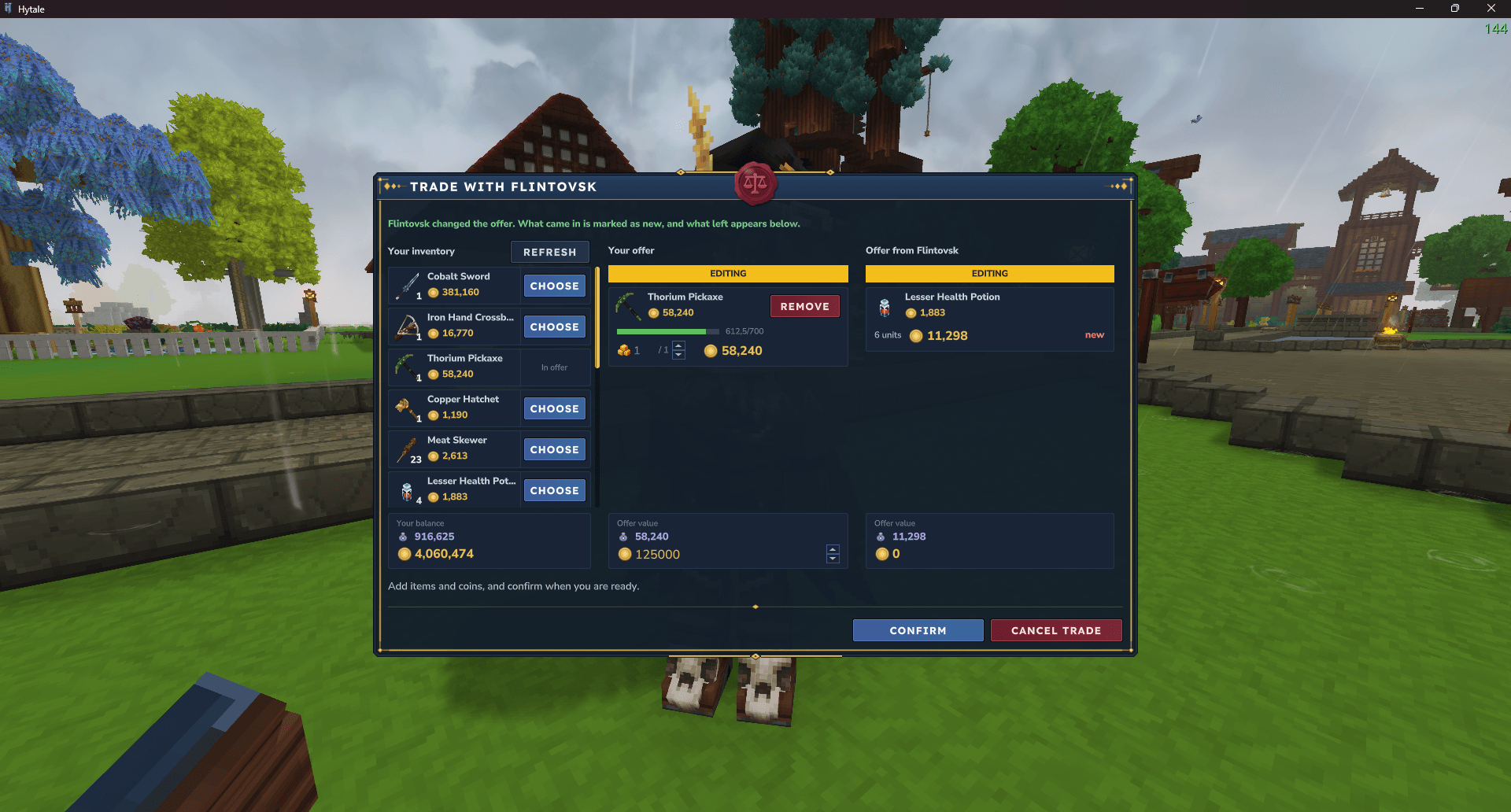
🤝 Trades between players
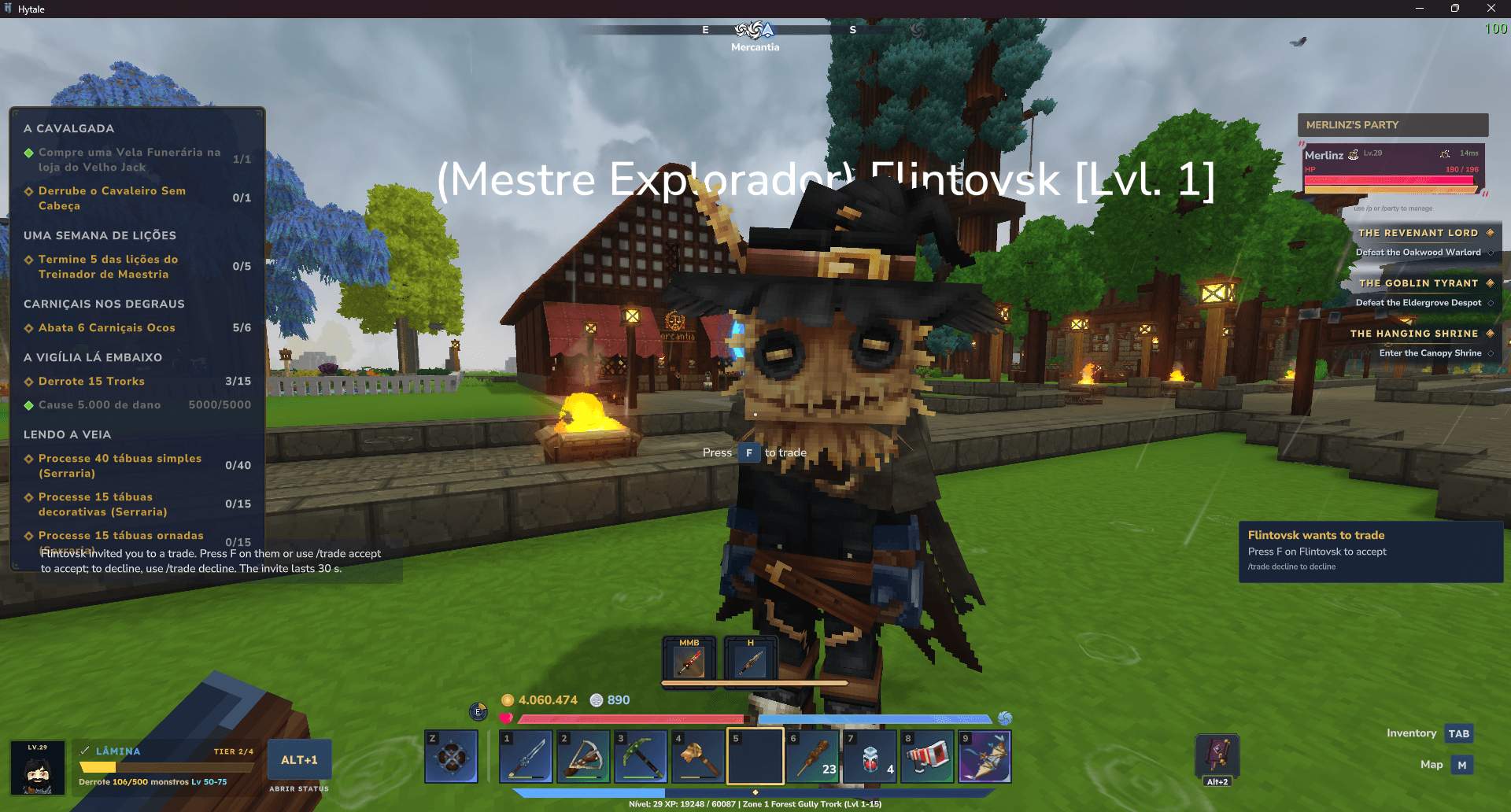
- Press F on a nearby player to invite them, or use
/trade <player>. The invite shows as a card on the right of the screen and doesn't lock the player: press F on whoever invited you to accept. - Both sides offer items and gold in a shared window, with no fee.
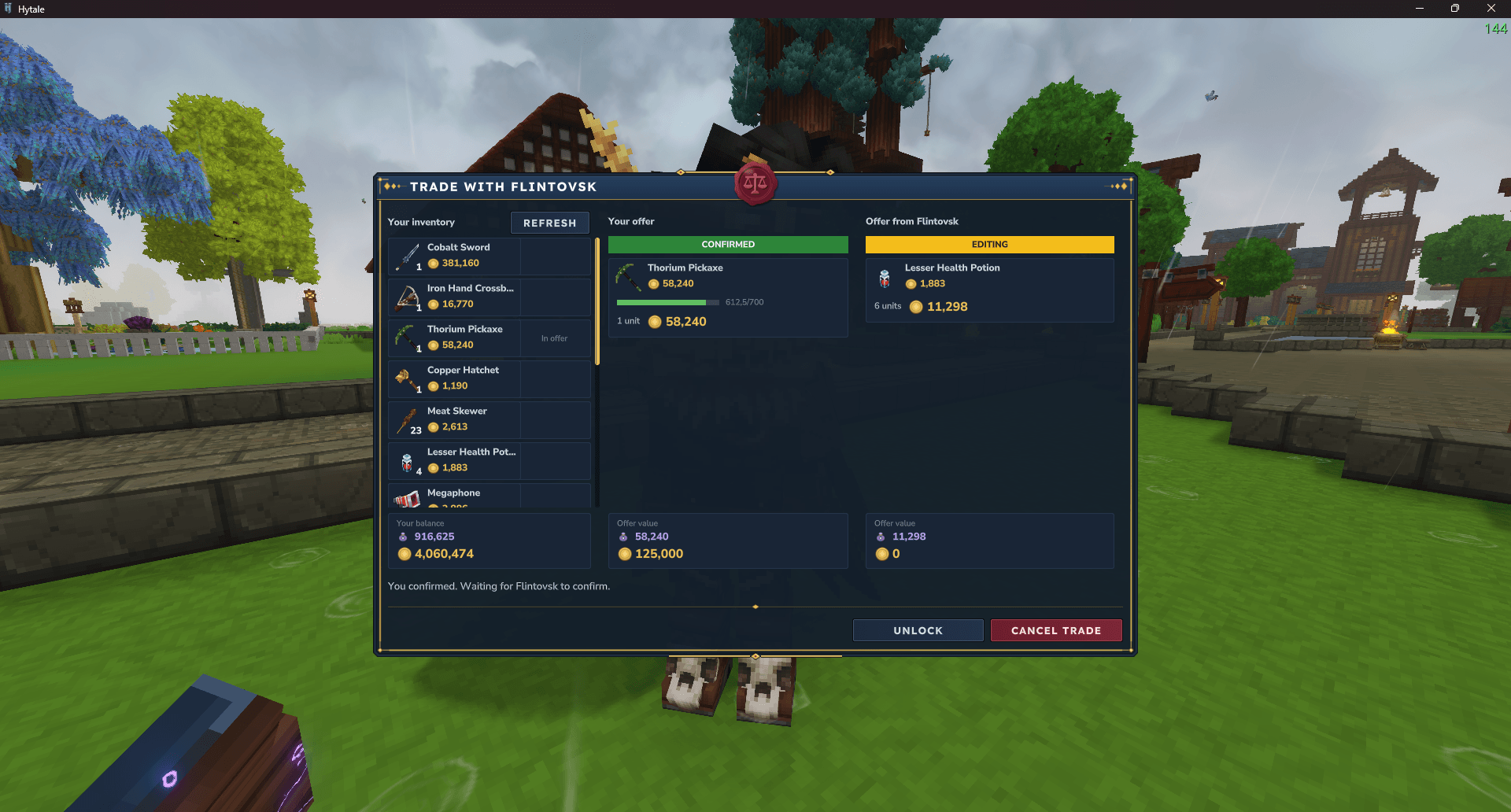
- Scam protection: the trade only closes when both confirm, and any change to an offer unlocks the other side.
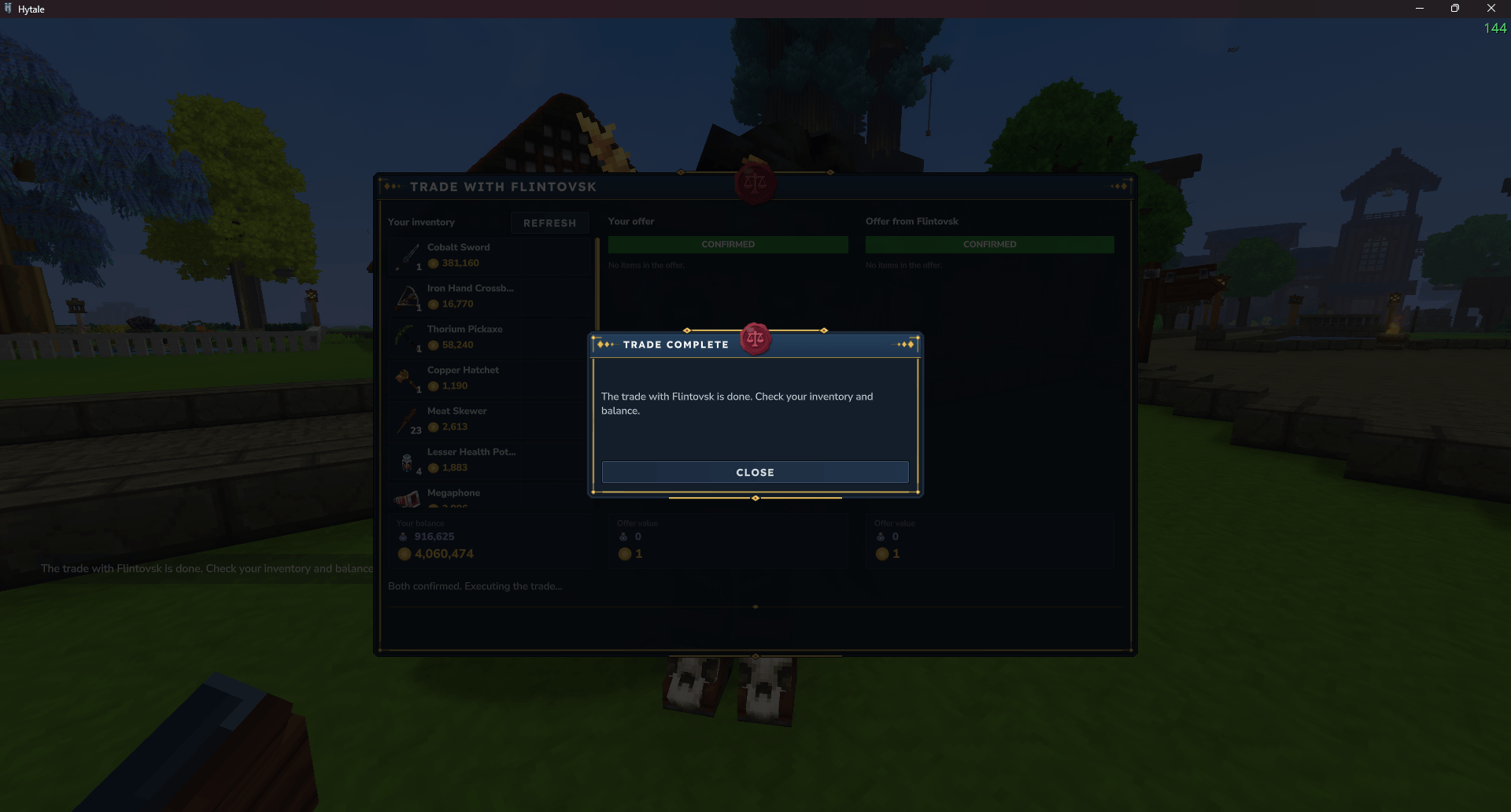
- The exchange is atomic: until both confirm, nothing moves. Items that don't fit are kept and delivered when the player is back.
🏪 The market
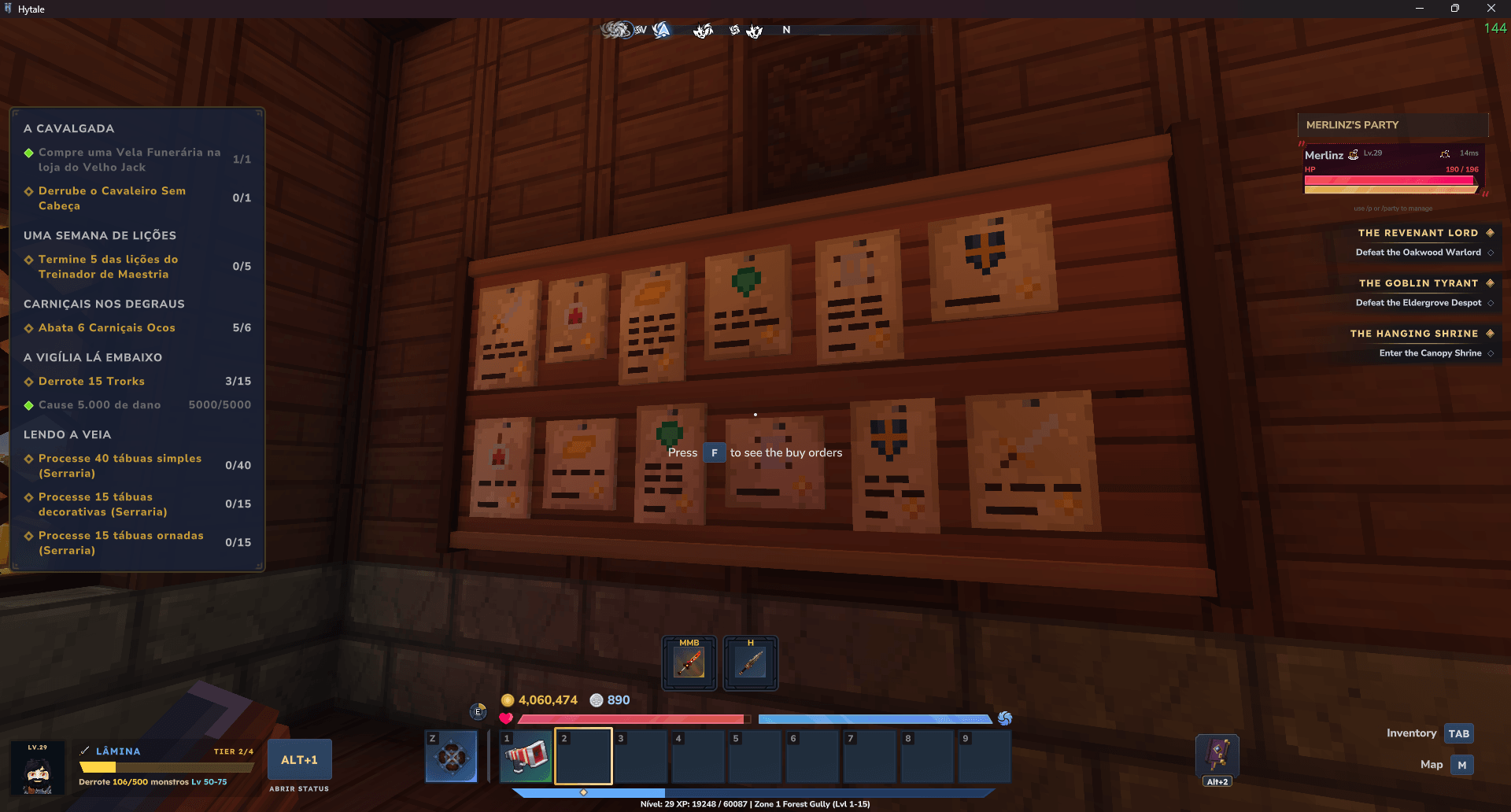
The auction house, the buy orders and the Merchant live in the market, a ready-made medieval shop you paste into your world.
- Get the Market Deed (
/give Mercantia_Market_Deed, or the creative inventory, admin only). In creative mode, move the preview, rotate it and right-click to paste: the market comes with its portal, a protected area, an arrival point, a title when you walk in and an icon on the map. Undo with/undo. - Inside: the Auctioneer behind the counter opens the auction house, the Merchant in the back buys your items and runs the shop, and the offers board at the entrance opens the buy orders. All with F. The Auctioneer and the Merchant are Saurians.
- Place as many markets as you want: they all share the same auction.
/auction gotakes players to the nearest one. - Each market has its own protected area. You choose, per market, whether blocks can be changed and whether there is PvP, and how far the area reaches, in the Markets tab of the admin menu, which shows it on a map.
- The market's own blocks have original art, made for Mercantia.
- Admins with the
merlinz.mercantia.auction.openpermission (OPs have it) can also open the auction anywhere with/auction(/ah). For everyone else,/auctiontells them where the auction is.
🏛️ Auction house
- One market for the whole server, opened at the Auctioneer. Sellers get paid even while offline.
- Buy tab: offers in a category tree built from the item tags, search by name, sort by price, and buy only part of a listing.
- Sell tab: your inventory drawn inside the screen, a suggested price, and the sales history of the item (7-day average, minimum, maximum, last 10 sales). A warning asks for confirmation when the price looks like a typo.
- Collect tab: claim the money from sales, and retrieve expired or cancelled items and purchases that didn't fit in your inventory.
- Sale notifications on screen, and a summary of what happened while you were away when you log in.
- A configurable fee on each sale. The fees go to an internal auction account that admins can audit, so gold leaves circulation without vanishing.
📋 Buy orders
- Ask for an item you want, with the quantity and the price per unit. The gold is reserved from your balance.
- Whoever has the item sells to your order and is paid at once. What you bought waits in the Collect tab, with the gold of cancelled or expired orders.
- Opened with F on the market's offers board, in a window like the auction's.
🧺 The Merchant
- Press F on the Merchant to sell him your priced items, of several kinds at once, for a share of their reference price, paid straight into your balance. Worn items are worth less.
- The admin sets the share and an optional daily limit. With the limit on, the screen shows how much he can still pay you today.
🥈 Credibility Coins and the shop
- A second virtual balance, shown in the HUD next to your gold, earned by selling at the auction house and to buy orders. It can't be traded, auctioned or mailed.
- The Merchant's Shop tab sells exclusive items for coins, with a daily limit per item. In this version it sells the Clamor megaphone, with Clamor installed, free by default.
- Admins show, give and take coins with
/mercantia coins, or edit them in the player's window of the admin menu.
✉️ Mail, 📣 megaphone and 🎡 action wheel: Epistula, Clamor and Actio
Mail, the megaphone and the action wheel are separate mods by the same author, each one optional and usable without Mercantia:
- Epistula (mail): with Mercantia, a mail can carry gold, and the fee goes to the auction account.
- Clamor (megaphone): with Mercantia, each announcement costs Credibility Coins, and the Merchant's Shop sells the megaphone.
- Actio (action wheel): hold E with an empty hand to open it. F on a player still asks for a trade.
Mercantia is the payment provider of Epistula and Clamor: pick it in each mod's config.json. A payment is never charged twice, even if the server crashes in the middle.
🛠️ Admin menu and commands
/mercantia adminopens an in-game admin menu in four tabs: Settings (every setting in one list, with a single Save that shows the before and after), Item prices (with search and categories), Economy (every known player's gold, coins and history, and the fees kept by the auction) and Markets.- Edit balance changes a player's gold and Credibility Coins in the same window.
- A test mode with ghost players lets you test alone what would need two players: listings, purchases, buy orders and trades. It is off by default; never turn it on on a real server.
- Commands suggest player names as you type, including offline players the server knows.
- The config and price files stay the source of truth: edit them by hand and reload with no restart.
- If the server crashes in the middle of a large save, the next start undoes the interrupted save and keeps everything that was confirmed.
🔌 Works with other mods
- A public API for other mods to read, credit and debit a player's gold, with a reason and a note that show in the logs. See
docs/api.mdin the repository. - Optional VaultUnlocked support: with VaultUnlocked installed, shops, rewards and other mods use the Mercantia gold balance, and every movement goes to the same log.
- Uses only the
/mercantia(/merc),/tradeand/auction(/ah) commands./balance,/payand/ecoare left free for other mods.
Requirements
| Hytale server | 0.7.x (Update 7). Tested on 0.7.5 |
| VaultUnlocked | Optional. Tested with 2.20.1 |
| Epistula, Clamor, Actio | Optional: the mail, the megaphone and the action wheel, by the same author |
Each Mercantia version supports one Hytale update. The Hytale API changes with each update, so don't update your server to a new Hytale update before a Mercantia version for it is out.
| Mercantia | Hytale |
|---|---|
| 1.0.0 | 0.7.x (Update 7), tested on 0.7.5 |
| 0.2.x (beta) | 0.7.x (Update 7), tested on 0.7.5 |
| 0.1.x (beta) | 0.7.x (Update 7), tested on 0.7.5 |
Installation
- Stop the server.
- Put
Mercantia-<version>.jarin the server'smodsfolder. Keep only one Mercantia jar there. - Start the server. Mercantia creates its files in
mods/Merlinz_Mercantia/. - Make yourself OP (
/op add <name>in the console) and type/mercantiain the game to check it is loaded. - Paste a market with the Market Deed where players can reach it. Without a market, players have no way to open the auction.
Where the gold comes from. New players get the starting balance (1,000,000 gold by default, 0 turns it off). The Merchant also pays new gold for the items he buys, and admins can add gold with /mercantia balance give.
Updating from 0.2.x. Mail, the megaphone and the action wheel moved to Epistula, Clamor and Actio: put their jars in mods with the new Mercantia. On the first start with Epistula, uncollected mail moves to the Epistula mailbox on its own, with items, messages and gold, after a copy of the database goes to backups/. Your config.json and prices.json keep working, with no price change.
Updating from 0.1.x. The auction camp is gone: existing camps disappear on their own, with nothing dropped, and the server log says where each one was. Paste a market right after updating. A 0.1.2 database upgrades on its own.
Back up the mods/Merlinz_Mercantia/ folder together with the world (universe/), with the server stopped. Restoring only one of them can duplicate or lose items that are listed in the auction.
Commands
Players (no permission needed)
| Command | What it does |
|---|---|
/auction go |
Teleports to the nearest market |
/trade <player> |
Invites a nearby player to trade (or press F on them) |
/trade accept · /trade decline |
Answers a trade invite |
/trade cancel |
Cancels your open trade or invite |
Admins
Except for /auction, all admin commands are under /mercantia (alias /merc). The permission of each command is merlinz.mercantia.command. followed by its path, like merlinz.mercantia.command.mercantia.balance.give. A subcommand also needs the permission of each command above it. OPs have all of them.
| Command | What it does |
|---|---|
/auction (/ah) |
Opens the auction anywhere. Needs merlinz.mercantia.auction.open; without it, the command only says where the auction is |
/mercantia admin |
Opens the admin menu |
/mercantia reload |
Reloads config.json and shows what changed |
/mercantia balance show <player> |
Shows a balance (alias bal) |
/mercantia balance give <player> <amount> |
Adds gold |
/mercantia balance take <player> <amount> |
Removes gold |
/mercantia balance log <player> [days] |
The latest movements of a player |
/mercantia coins show · give · take |
Shows, gives or takes Credibility Coins |
/mercantia price set [itemId] <amount> |
Sets a fixed price, for the item in your hand or by ID |
/mercantia price reload |
Reloads prices.json and lists what changed |
/mercantia price missing [page] |
Lists the items with no price |
/mercantia auction fees [days] |
The fees kept by the auction |
/mercantia auction place |
Lists the markets, the teleport point and the extra protected area |
/mercantia auction point set · clear |
Sets or removes a teleport point, used in a world with no market |
/mercantia auction area set <radius> · clear |
Sets or removes an extra protected area (radius 1 to 256) |
/mercantia deliveries |
Lists trade deliveries that got stuck, to resend or complete |
/mercantia oldmail |
Lists the old mail Epistula refused, to send without the item or refund |
Building inside a locked protected area needs merlinz.mercantia.auction.area.build. Opening the auction anywhere with /auction needs merlinz.mercantia.auction.open.
Configuration
mods/Merlinz_Mercantia/config.json, applied with /mercantia reload or from the admin menu:
| Key | Default | What it does |
|---|---|---|
AuctionFeePercent |
10 | Fee on each auction sale, in %. It also sets the minimum price per unit (10 gold at 10%) |
ListingDurationHours |
72 | How long a listing stays for sale |
MaxListedItemTypes |
25 | How many different item types a player can have listed |
AuctionBuyOrderFeePercent |
10 | Fee on a sale to a buy order, paid by the seller, in % |
MaxBuyOrders |
25 | How many open buy orders a player can have |
StartingBalance |
1000000 | Gold a player receives the first time they join. 0 turns it off |
CredibilityCoinGoldPerCoin |
1000 | Gold sold at the auction per Credibility Coin. 0 turns the coins off |
TradeInviteTimeoutSeconds |
30 | How long a trade invite waits for an answer |
MaxTradeDistanceBlocks |
5 | Maximum distance between the two players of a trade |
ShopBuyPercent |
10 | % of the reference price the Merchant pays |
ShopDailySellLimit |
0 | Gold a player can get from the Merchant per day. 0 means no limit |
StoreMegaphonePrice · StoreMegaphoneDailyLimit |
0 · 3 | Price in coins and daily limit of the megaphone in the shop |
LowPriceWarningPercent |
50 | Asks for confirmation when a listing is this % below the reference price |
BasePriceInTooltip |
true | Shows the reference price in item tooltips |
AveragePriceUpdates |
true | Auction sales update the reference price |
AverageMinSales · AverageMinSellers |
5 · 3 | Sales and different sellers in 7 days for the average to count. 0 turns each off |
AverageCeilingPercent · AverageFloorPercent |
300 · 33.33 | The average stays between these % of the base price. 0 turns each off |
RecipeMarkupPercent |
30 | What a crafted item adds to the cost of its ingredients, in % |
TestTools |
false | Test mode with ghost players. Never on a real server |
Prices and the margins per item and category are in prices.json, applied with /mercantia price reload.
Known limits
- The translations have not been reviewed by native speakers yet. Server logs and config file errors are always in English.
- Tested together with VaultUnlocked 2.20.1 and Advanced Item Info 1.0.8. Other economy mods can run alongside Mercantia, but each one keeps its own balance.
License
Free to use on any number of servers, including monetized servers. You may not republish, redistribute, sell or distribute modified versions of Mercantia. See the license on this page for the full text.
Mercantia is an unofficial mod. It is not made, endorsed or supported by Hypixel.
Support
Mercantia is free. If it helps your server, you can support its development on Ko-fi. Thank you!

Mercantia Team