MacroUI
- By
WARNING
This is my first MOD, so there will likely be bugs along this journey. I am open to criticism and suggestions. Please note that I have very little free time (college takes up 12–14 hours from Monday to Saturday) and I am still learning how to program properly. I've been working on this for weeks, creating it for my own server.
Known issues: using gamemode commands opens the Panel, although it is still possible to change gamemode through the panel.
MacroUI - The Ultimate Shortcut & Macro Manager
MacroUI is a powerful and lightweight utility tool designed to optimize your gameplay experience. It offers a fully customizable quick-access interface for global server shortcuts and personal player macros.
🚀 Key Features:
Quick Access Hub: Open your panel instantly by pressing the 'O' key or typing '/m' in the chat.
Dynamic Tab System: Organize commands into distinct categories, making it easy to navigate between different functional groups.
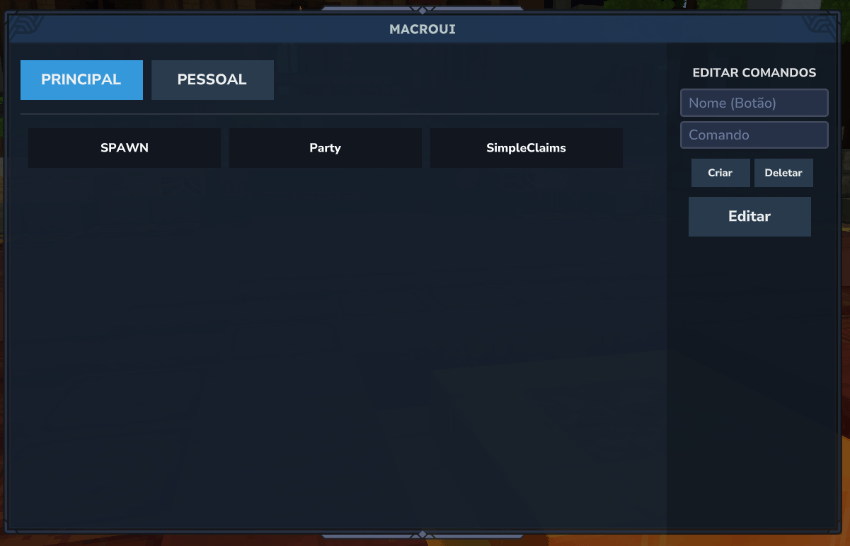
Personal Macros: Beyond global server buttons, every player can create, manage, and save their own private macros for frequently used commands.
Admin Sidebar: Authorized staff members have access to an exclusive sidebar for quick Gamemode switching and management of Server Tabs and Commands (Commands created in the PERSONAL Tab do not appear to other players).
Translation: the mod allows translations using the messages.json file generated for the first time.
In-Game Editor: Add, delete, or update buttons and tabs directly through the interface without needing to edit configuration files manually.
Minimalist Design: A clean and non-intrusive interface, specifically styled to follow the Hytale aesthetic, ensuring an integrated visual experience.
FUTURE IDEAS:
- Improve the appearance and organization.
- Fix some bugs.
- Add new features (e.g., fixed HUD, Colors, Allow more than 4 TABS to be created).
🛠️ Commands:
/m or /macroui or /painelui: Opens the main MacroUI panel.
Hotkey 'O': The default key for quick activation.
IMAGEM 1: Visão do OP/OP's perspective
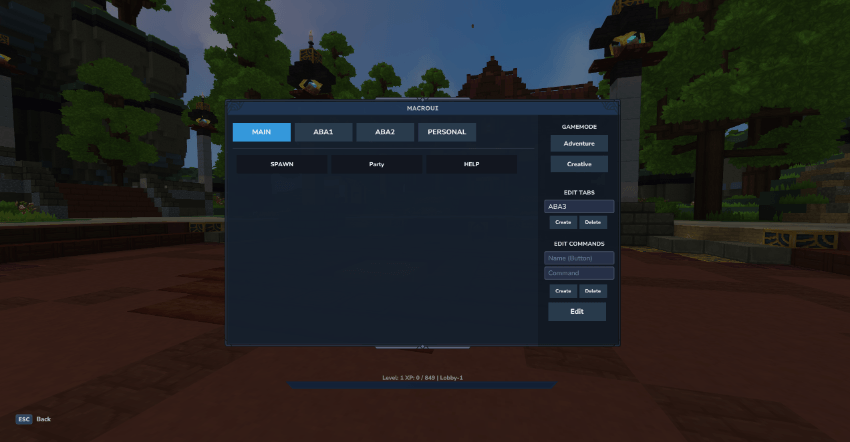
IMAGEM 2: Visão do Jogador/Player View
AVISO
Meu primeiro MOD, provalvelmente vai ter bugs ao longo dessa jornada. Aceito críticas, aceito sugestões, tenho pouco tempo (faculdade pega 12-14 horas de segunda a sábado), e não sei programar direito ainda, estou a semanas nisso, criando pra servidor próprio.
MacroUI - O Gerenciador Definitivo de Atalhos e Macros
O MacroUI é uma ferramenta utilitária poderosa e leve, projetada para otimizar sua experiência de jogo. Ele oferece uma interface de acesso rápido totalmente personalizável para atalhos globais do servidor e macros pessoais dos jogadores.
🚀 Funcionalidades Principais:
Hub de Acesso Rápido: Abra seu painel instantaneamente pressionando a tecla 'O' ou digitando '/m' no chat.
Sistema Dinâmico de Abas: Organize comandos em categorias distintas, facilitando a navegação entre diferentes grupos de funções.
Macros Pessoais: Além dos botões globais do servidor, cada jogador pode criar, gerenciar e salvar seus próprios macros privados para comandos usados com frequência.
Barra Lateral de Administração: Membros autorizados da equipe têm acesso a uma barra lateral exclusiva para troca rápida de Modos de Jogo (Gamemode) e controle das Abas e Comandos do Servidor (Comandos feitos na Aba PESSOAL não aparece para outros jogadores).
Tradução: the mod allows translations using the messages.json file generated for the first time.
Editor In-Game: Adicione, exclua ou atualize botões e abas diretamente pela interface, sem a necessidade de editar arquivos de configuração manualmente.
Design Minimalista: Uma interface limpa e não intrusiva, estilizada especificamente para seguir a estética de Hytale, garantindo uma experiência visual integrada.
IDEIAS FUTURAS:
- Melhorar o visual e organização.
- Corrigir alguns bugs.
- Trazer novas funcionalidades (ex: HUD fixo, Cores, Permitir mais de 4 ABAS criadas).
🛠️ Comandos:
/m ou /macroui ou /painelui: Abre o painel principal do MacroUI.
Tecla de Atalho 'O': Tecla padrão para ativação rápida.
The MacroUI Team