


Loot Chest
- By

Description
Overview
Loot Chest Plugin brings an exciting reward system to your Hytale server! Players can open virtual loot chests with a satisfying casino-style roulette animation that scrolls through potential rewards before landing on their prize.
Server administrators have full control over:
- Which items appear in each rarity tier
- How many chests each player can open
- Drop chances for every reward
Perfect for minigames, survival servers, reward systems, or any server looking to add an engaging loot mechanic!
Features
Roulette Animation
- Smooth scrolling animation showing 9 item slots
- Items gradually slow down before stopping on the final reward
- Satisfying sound effects during the spin
- Clean custom UI that doesn't interfere with gameplay
Five Rarity Tiers
Each tier has its own separate loot table with customizable rewards:
| Tier | Color | Description |
|---|---|---|
| Common | Gray | Basic items, higher drop rates |
| Uncommon | Green | Intermediate items |
| Rare | Blue | Less common items |
| Epic | Purple | Valuable items |
| Legendary | Gold | The rarest and most valuable rewards |
Player Balance System
- Each player has a personal balance of loot chests per rarity
- Balances persist across server restarts
- Admins can give or remove chests from players
- Players can check their own balance anytime
Admin Panel
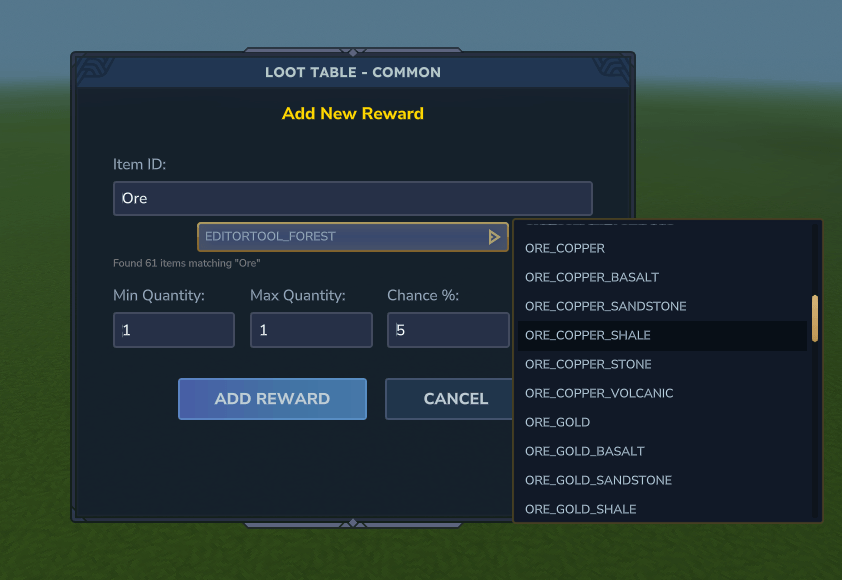
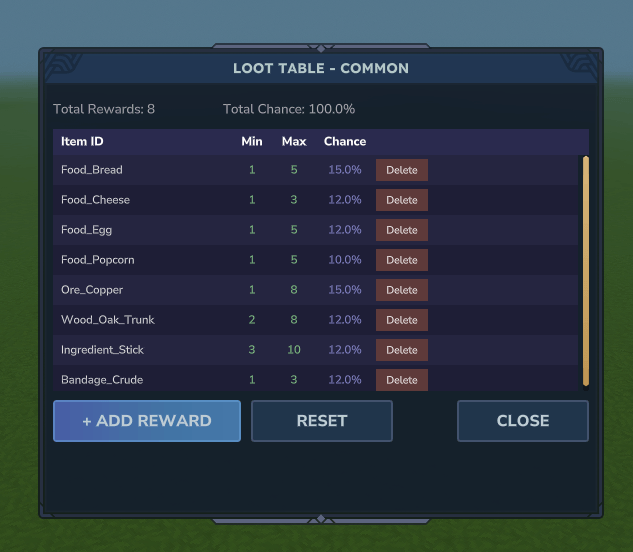
- Beautiful in-game UI for configuring loot tables
- Add, edit, or remove rewards with a few clicks
- Search through all available items with the built-in search bar
- Set precise drop chances (percentage-based system)
- View all player balances in a dedicated admin panel
Persistent Storage
- All configurations saved to JSON files
- Player balances saved per-player (UUID-based)
- Automatic saving on server shutdown
- Easy to backup and transfer between servers
Commands
Player Commands
| Command | Description |
|---|---|
/lootchest <rarity> |
Opens a loot chest of the specified rarity |
/lc <rarity> |
Alias for /lootchest |
/lootbalance |
Shows your loot chest balance for all rarities |
/lb |
Alias for /lootbalance |
Admin Commands
| Command | Permission | Description |
|---|---|---|
/lootgive <player> <rarity> <amount> |
lootchest.admin |
Give loot chests to a player |
/lg <player> <rarity> <amount> |
lootchest.admin |
Alias for /lootgive |
/lootadmin <rarity> |
lootchest.admin |
Open the loot table configuration UI |
/lootbalances |
lootchest.admin |
View all player balances in a UI |
/lbs |
lootchest.admin |
Alias for /lootbalances |
/lootbalance <player> |
lootchest.admin |
View another player's balance |
Permissions
| Permission | Description |
|---|---|
lootchest.admin |
Access to all admin commands (give chests, configure loot tables, view all balances) |
Note: Opening loot chests (/lootchest) requires no permission - players just need to have chests in their balance.
Configuration
Loot Table Files
Located in plugins/LootChestPlugin/:
lootchest_common.json
lootchest_uncommon.json
lootchest_rare.json
lootchest_epic.json
lootchest_legendary.json
Loot Table Format
{
  "rewards": [
    {
      "itemId": "Food_Bread",
      "minQuantity": 1,
      "maxQuantity": 5,
      "chance": 15.0
    },
    {
      "itemId": "Ore_Iron",
      "minQuantity": 1,
      "maxQuantity": 3,
      "chance": 10.0
    }
  ]
}
Player Balance Files
Located in plugins/LootChestPlugin/balances/:
<player-uuid>.json
Each file stores the player's username and their chest count per rarity.
Installation
- Download the plugin JAR file
- Place it in your Hytale server's
pluginsfolder - Start/restart your server
- Configure loot tables using
/lootadmin <rarity>or edit the JSON files directly - Give players chests using
/lootgive <player> <rarity> <amount>
Usage Example
As an admin:
/lootgive Steve common 10      → Gives Steve 10 Common loot chests
/lootgive Steve legendary 1    → Gives Steve 1 Legendary loot chest
/lootadmin rare                → Opens the Rare tier configuration UI
/lootbalances                  → View all player balances
As a player:
/lootbalance                   → Check your chest balance
/lootchest common              → Open a Common loot chest
/lc legendary                  → Open a Legendary loot chest
Bug Reports & Suggestions
Found a bug or have a suggestion? Feel free to reach out!
Loot Chest Team
