Captura de tela 2026-04-07 015053.png
Captura de tela 2026-04-07 015129.png
Captura de tela 2026-04-07 015117.png
Captura de tela 2026-04-07 015107.png
Description
Jbank — Player Bank, Stock Market & Loans for Hytale
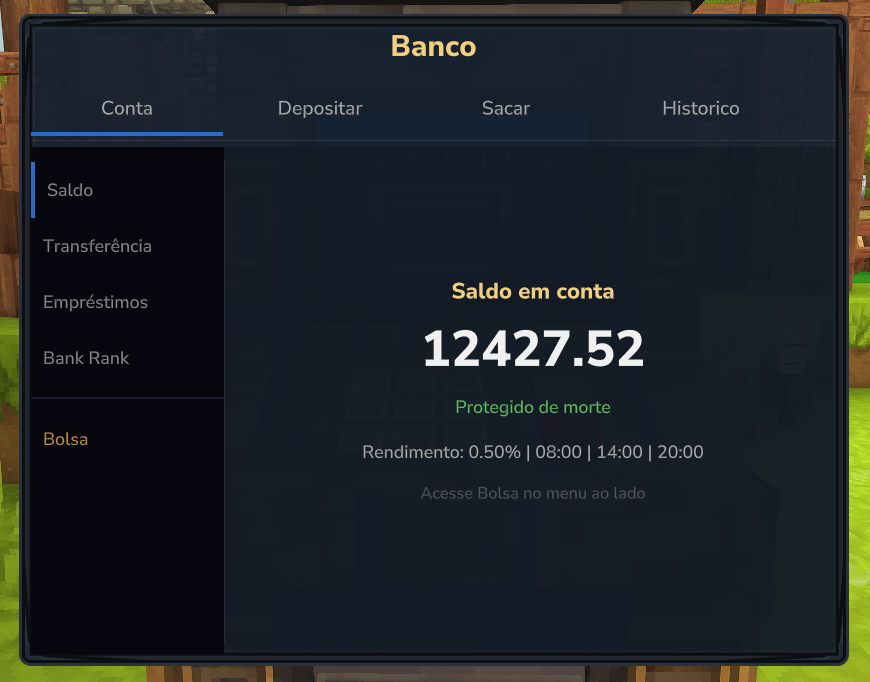
Jbank is a server-side plugin that gives players a personal bank account, access to a live stock market, and a full loan system. Money in the bank is protected from death and earns configurable interest. Players can invest their savings in stocks, earn dividends, take out loans with compound interest, transfer funds to other players, and track everything — all through native GUIs without typing a single command.
Features
Asset ATM Machine - Press "F" to interact - New in version 1.3.0
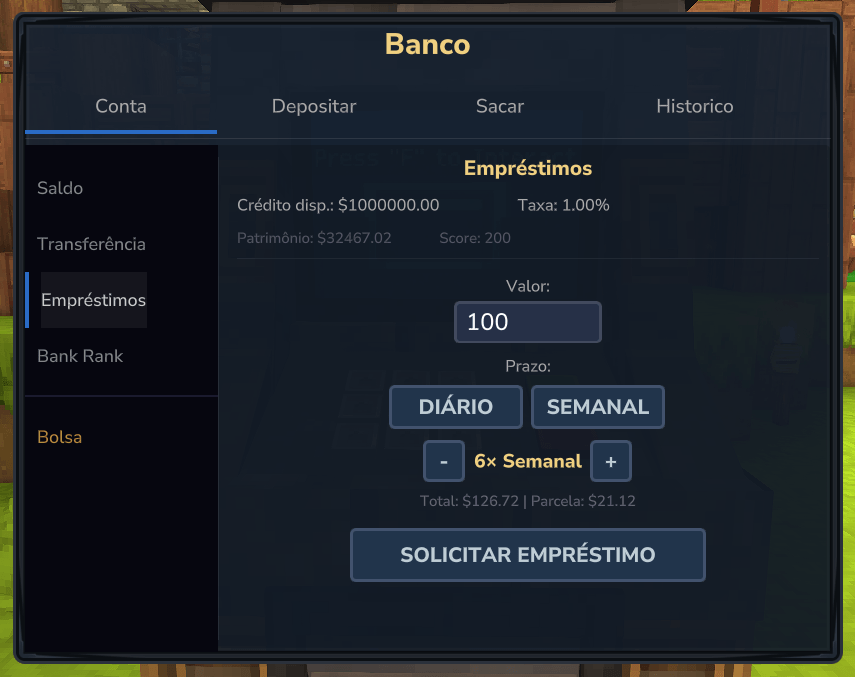
Loan System (Empréstimos)
A full in-game lending system accessible via the bank sidebar.
Compound interest — Tabela Price (PMT formula)
Installments are calculated using the standard PMT formula: PMT = P × r / (1 − (1+r)^−n). The weekly period rate is compounded from the daily rate: r_weekly = (1 + r_daily)^7 − 1, so longer or weekly installment plans correctly cost more than daily ones.
Configurable installments
Players choose the number of installments (1–12, configurable per server) directly in the GUI with − / + buttons, and select daily or weekly period with dedicated term buttons.
Market rate
The effective interest rate varies automatically over time based on total active loan volume on the server. High demand raises the rate; low demand lowers it. The rate is always bounded by loanMinInterestPercent and loanMaxInterestPercent.
Credit score
Each player has a credit score (0–200, neutral = 100) that adjusts their effective rate up or down by up to loanMaxCreditAdjustPercent. The score improves on timely payments and worsens on missed payments or default.
2-step confirmation
Clicking Request Loan shows the total cost and installment amount for review. A second click within 10 seconds executes the loan. This prevents accidental requests.
Auto-collection
Due installments are deducted automatically from the player's bank balance every 5 minutes. Players receive a chat notification for each payment and for full repayment.
Early repayment
Players can repay the remaining balance at any time. A configurable discount (loanEarlyPaymentDiscountPercent) is applied to the remaining interest, rewarding early payment.
Default handling
After 2 consecutive missed installment periods the loan is marked DEFAULTED, the remaining balance is zeroed against the bank, and the player's credit score is reduced by 50.
Bank Rank — New in 1.2.0
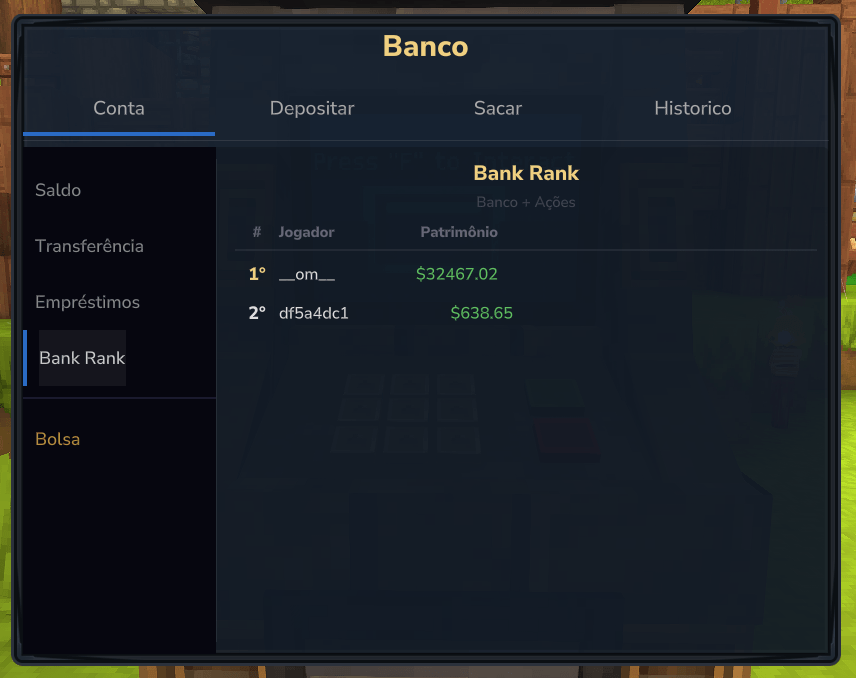
A top-10 leaderboard accessible from the bank sidebar, ranking players by total patrimony — bank balance + current stock portfolio value combined. Updated in real time.
Bank Transfers — New in 1.2.0
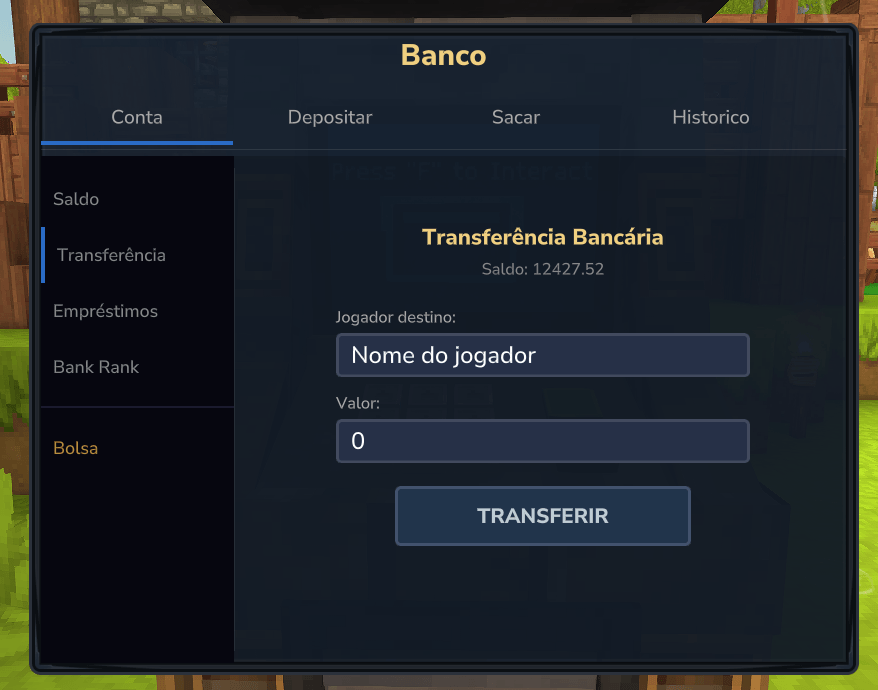
Players can send money directly to another player's bank account from within the bank GUI. Transfers use the same 2-step confirmation pattern: the first click shows the recipient and amount for review; the second click executes the transfer. Both sender and receiver receive chat notifications.
Stock Market (Bolsa de Valores) — New in 1.1.0
A full player-facing stock exchange accessible via /bank stock.
Market tab
- Live list of all active stocks: ticker, name, current price, dividend range, available shares
- Click any stock to open the detail panel:
- Current price with color-coded % variation vs previous tick
- Scrollable price history (last 10 entries, green/red per direction)
- Dividend range and available shares
- Buy form with quantity input and real-time bank balance display
Buy
- Cost deducted from the player's bank account
- Configurable buy fee applied on top of the purchase price
- Partial buys supported (any quantity up to available shares)
- Chat notification confirms quantity, stock name, total cost and new balance
Portfolio tab (Carteira)
- Lists all held positions: ticker, quantity, current value, P/L in currency and %
- Click a position to open the detail panel:
- Average buy price, total invested, current value, P/L
- Per-share sell breakdown: gross sale value, fee, capital gains tax on profit, net
- Sell form with quantity input and real-time bank balance display
Sell
- Revenue credited to the player's bank account
- Configurable sell fee and capital gains tax (applied only on profit)
- Chat notification confirms quantity, stock name, net received and new balance
Price dynamics
- Prices fluctuate automatically at a configurable interval (default: every 10 minutes)
- Random walk bounded by per-stock min/max price; buy/sell pressure influences direction
- Each tick triggers a randomized dividend payout for all holders (per-stock min/max %)
Admin tab
Visible only to jbank.admin. Two sections:
Create stock — fill in: ID, name, initial price, min/max price, volatility (0–1), available shares, dividend min/max %, max shares % per player
Manage stocks — list of all stocks with current price and share count. Per stock:
- Add shares
- Deactivate (graceful shutdown — players can still sell, no new buys accepted)
Anti-monopoly — New in 1.2.0
Each stock supports a maxSharesPercentPerPlayer field. When set, a single player cannot hold more than that percentage of the stock's total shares. Buy attempts that would exceed the limit are rejected with a chat message.
Player Bank Account
- Every player has a personal bank account separate from their inventory wallet
- Deposit any amount — no fee
- Withdraw with a configurable fee (default: 2%)
- Bank balance is fully protected from death
- All operations are persisted to disk immediately — no data loss on crash or restart
Interest / Yield
- Configurable interest rate applied automatically at scheduled times of day
- Multiple payouts per day are supported (e.g. 08:00, 14:00, 20:00)
- Timezone-aware scheduling (configurable per server)
- Online/offline rate split — online players receive the full interest rate; offline players receive a configurable fraction (
offlineInterestPercent, default: 50%). Set to0to restore online-only behaviour - Interest cap — optional ceiling on the amount credited per payout (
maxInterestEnabled+maxInterestValue), useful when a few players hold very large balances - Players receive a chat notification whenever interest is credited to their account
Native GUI (/bank)
Accessible via the /bank command.
| Tab | Description |
|---|---|
| Balance | Displays current bank balance, interest rate and next payout schedule |
| Deposit | Enter an amount and confirm — wallet balance shown in real time |
| Withdraw | Enter an amount, fee and net amount displayed before confirming |
| History | Scrollable list of the last 50 transactions with date, type, amount and running balance |
| Transfers | Send money to another player's bank account — 2-step confirmation |
| Loans | Request a loan, choose installment count and period, see preview before confirming |
| Rank | Top-10 leaderboard by total patrimony (balance + portfolio) |
Transaction History
Each entry records:
- Date and time (server timezone)
- Type:
Deposit,Withdraw,Interest,Fee,Transfer,Loan Received,Loan Payment,Stock Buy,Stock Sell,Dividend - Amount (color-coded by type — green for credits, red for debits, purple for loans, orange for stock buys, teal for stock sells, gold for dividends)
- Resulting balance after the operation
- Stock ID is shown for all stock-related entries (e.g. "Compra Ação PETRO", "Dividendo TECH"), making it easy to trace which stock each transaction relates to
Fee Collection
- All withdrawal fees are collected into a global bank account
- The bank balance is accessible to admins and to other plugins via the public API
- Full history of fee income is maintained in
data/bank.json
Commands & Permissions
| Command | Permission | Description |
|---|---|---|
/bank |
jbank.use |
Opens the bank GUI |
/bank open <player> |
(server-side) | Opens the bank GUI for a player — designed for NPC bankers |
/bank admin balance |
jbank.admin |
Shows the global bank balance in chat |
/bank admin reload |
jbank.admin |
Reloads config.json and messages without restarting the server |
/bank stock |
jbank.use |
Opens the stock market GUI |
/bank stock open <player> |
(server-side) | Opens the stock market GUI for a player — designed for NPC brokers |
/bank admin stock |
jbank.admin |
Opens the stock admin panel (create stocks, manage, deactivate) |
NPC Banker Setup
Jbank supports an NPC banker workflow where players are required to physically visit a bank NPC instead of using /bank directly.
How it works:
- Enable the feature in
config.json:
"npcCommandEnabled": trueRemove the
jbank.usepermission from players so/bankis inaccessible.Configure your NPC to run the following server-side command when a player interacts with it:
bank open {player}Because /bank open runs server-side (as the server, not the player), it bypasses jbank.use entirely and opens the bank GUI for the interacting player. The player never needs to type a command.
Configuration (config.json)
{
  "withdrawFeePercent": 8.0,
  "interestRatePercent": 0.5,
  "interestSchedule": ["08:00", "14:00", "20:00"],
  "timezone": "America/Sao_Paulo",
  "currencyId": "money",
  "maxHistoryEntries": 50,
  "economyProvider": "auto",
  "language": "pt_BR",
  "npcCommandEnabled": true,
  "offlineInterestPercent": 50.0,
  "maxInterestEnabled": false,
  "maxInterestValue": 10000.0,
  "loanEnabled": true,
  "loanMaxAmount": 1000000.0,
  "loanMinInstallments": 1,
  "loanMaxInstallments": 12,
  "loanMinInterestPercent": 0.5,
  "loanMaxInterestPercent": 5.0,
  "loanVolatility": 0.1,
  "loanPressureFactor": 0.3,
  "loanEarlyPaymentDiscountPercent": 20.0,
  "loanMaxCreditAdjustPercent": 1.5
}| Field | Description |
|---|---|
withdrawFeePercent |
Percentage charged on every withdrawal (e.g. 2.0 = 2%) |
interestRatePercent |
Interest percentage applied per scheduled payout (e.g. 0.5 = 0.5%) |
interestSchedule |
List of times (HH:mm) when interest is paid — server timezone |
timezone |
Java timezone ID used for scheduling (e.g. America/New_York) |
currencyId |
Currency identifier passed to the economy provider |
maxHistoryEntries |
Maximum number of transactions kept per account |
economyProvider |
auto, hyvault, or vaultunlocked |
language |
Message file to load: pt_BR, en_US, or es_ES |
npcCommandEnabled |
Enables the /bank open <player> server-side command for NPC banker setups |
offlineInterestPercent |
Fraction of full interest rate paid to offline players (0–100; 0 = online-only) |
maxInterestEnabled |
Enables the per-payout interest ceiling |
maxInterestValue |
Maximum amount credited per payout (only used if maxInterestEnabled is true) |
loanEnabled |
Enables the loan system |
loanMaxAmount |
Maximum amount a player can borrow per loan |
loanMinInstallments |
Minimum selectable installment count in the GUI |
loanMaxInstallments |
Maximum selectable installment count in the GUI |
loanMinInterestPercent |
Minimum daily interest rate (market rate floor) |
loanMaxInterestPercent |
Maximum daily interest rate (market rate ceiling) |
loanVolatility |
How fast the market rate responds to loan volume changes |
loanPressureFactor |
How strongly loan volume pushes the rate toward min/max |
loanEarlyPaymentDiscountPercent |
Discount on remaining interest for early full repayment |
loanMaxCreditAdjustPercent |
Maximum % adjustment to rate based on credit score (±) |
Stock Market Configuration (acao.json)
{
  "priceVariationIntervalMinutes": 10,
  "pressureFactor": 0.3,
  "buyFeePercent": 1.5,
  "sellFeePercent": 1.5,
  "capitalGainsTaxPercent": 15.0,
  "stocks": []
}| Field | Description |
|---|---|
priceVariationIntervalMinutes |
How often prices fluctuate and dividends are paid (in minutes) |
pressureFactor |
How much buy/sell volume influences price direction (0 = no pressure, 1 = full pressure) |
buyFeePercent |
Fee charged on purchases, added to the total cost (e.g. 1.5 = 1.5%) |
sellFeePercent |
Fee charged on sales, deducted from the gross revenue (e.g. 1.5 = 1.5%) |
capitalGainsTaxPercent |
Tax applied only on profit when selling (e.g. 15.0 = 15% of the gain) |
stocks |
List of stock definitions — managed via the in-game admin panel, do not edit manually |
Localization
Jbank ships with three languages out of the box:
pt_BR— Brazilian Portugueseen_US— Englishes_ES— Spanish
All player-facing messages — chat notifications, GUI labels, error messages — are loaded from Messages/<language>.json. You can edit these files freely or add your own language by creating a new file and setting "language" in config.json.
Economy Compatibility
Jbank auto-detects your economy plugin at startup:
- HyVault (single-currency)
- VaultUnlocked (multi-currency)
Set "economyProvider": "auto" to let Jbank detect automatically, or force a specific one with "hyvault" or "vaultunlocked".
Data Storage
All data is stored in the plugin's data directory:
data/
  accounts/<player-uuid>.json      — bank balance + transaction history per player
  bank.json                        — global bank balance + fee income history
  stocks/<ticker>.json             — stock state: current price, history, available shares
  portfolios/<player-uuid>.json    — holdings per player: quantity + average buy price
  loans/<player-uuid>.json         — active loan: principal, installments, due dates, credit score
  acao.json                        — stock market configuration (fees, tax, price interval, stock definitions)
All files are written to disk after every operation. Stock and portfolio files use atomic writes (write to .tmp → rename) to prevent corruption if the server is stopped mid-tick. No database required.
Public API — For Plugin Developers
Jbank exposes a static API that any plugin on the same server can use to read, deposit to, or withdraw from the global bank balance. This is useful for economy ecosystems where multiple plugins share a common treasury.
Setup
Add the Jbank JAR to your project as a compileOnly dependency. The JAR is available in the Jbank release assets.
Gradle (Kotlin DSL):
dependencies {
    compileOnly(fileTree("libs") { include("Jbank-*.jar") })
}
The Jbank plugin must be loaded on the server at runtime. Your plugin does not need to declare a hard dependency — just null-check before calling.
Getting the API instance
JbankPlugin jbank = JbankPlugin.getInstance();
if (jbank == null) {
    // Jbank is not loaded — handle gracefully
    return;
}
BankManager bank = jbank.getBankManager();
getInstance() returns null if Jbank is not installed or has not finished loading. Always null-check before use.
Reading the bank balance
double balance = bank.getBankBalance();Returns the current global bank balance as a double.
Depositing into the bank
bank.addToBankBalance(double amount);Adds amount to the global bank balance. The operation is:
- Thread-safe (
synchronized) - Persisted to disk immediately
- Recorded in the bank's transaction history
- Logged to the server console
Example — crediting voucher sale proceeds:
double salePrice = 500.0;
JbankPlugin jbank = JbankPlugin.getInstance();
if (jbank != null) {
    jbank.getBankManager().addToBankBalance(salePrice);
}
Withdrawing from the bank
boolean success = bank.withdrawFromBankBalance(double amount);Deducts amount from the global bank balance. Returns:
true— operation successful, balance updated and persistedfalse— insufficient balance or invalid amount (nothing is changed)
The operation is thread-safe, persisted to disk, and logged to console.
Example — paying for a server service:
double cost = 200.0;
JbankPlugin jbank = JbankPlugin.getInstance();
if (jbank != null) {
    boolean paid = jbank.getBankManager().withdrawFromBankBalance(cost);
    if (!paid) {
        // Bank has insufficient funds — handle accordingly
    }
}
API Summary
| Method | Return | Description |
|---|---|---|
JbankPlugin.getInstance() |
JbankPlugin or null |
Gets the active plugin instance |
jbank.getBankManager() |
BankManager |
Access to all bank operations |
bank.getBankBalance() |
double |
Current global bank balance |
bank.addToBankBalance(amount) |
void |
Deposit into the bank (thread-safe) |
bank.withdrawFromBankBalance(amount) |
boolean |
Withdraw from the bank (thread-safe) |
All API methods are safe to call from any thread.
Requirements
- Hytale Server API
- HyVault or VaultUnlocked (economy plugin)
- Java 25+
- MIT License
Jbank Team