What is Interactive Fluids?
This library adds a new config/ticker for fluids,
which allows for easier configuration of collisions between the initial fluid and other fluids/blocks.
Currently, it doesn't do much on its own and needs packs that implement its logic in Hytale.
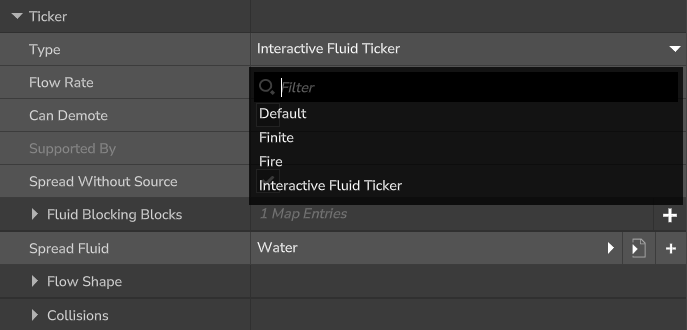
Spread Without Source

It allows a fluid to flow even though its source block got removed. This makes the fluid a bit more dynamic in its flowing behavior.
If this option is false the fluid will just behave like a normal Hytale fluid.
Fluid Blocking Blocks

You can add different blocks that should have a changed behavior regarding the fluid's flow behavior.
The "Example" key in the picture is the block ID of the block that you want to configure.
If you want the fluid to flow through this block, leave the "Blocks Fluid" option set to false.
Else, if it should block the flowing of the fluid, you can set this option to true.
If the other "Keep Vanilla Behavior" option is true and "Blocks Fluid" is false, the vanilla Hytale mechanism is used
to decide if the fluid is allowed to flow through this block.
Flow Shapes
This option can modify the shape/range of the modified blocks based on their interaction with the fluid that implements the Interactive Fluid Ticker.
The shape acts as a way to control the range of changed blocks by this ticker.
By default it uses the diamond shape with the size of 1, which is also equal to the implementation before v.0.3.0.
Currently supported shapes:
Cube(size), Cuboid(width, height, depth), Sphere(radius), Diamond(radius),
Flat_Square(size), Flat_Rectangle(width, height), Flat_Circle(radius), Flat_Diamond(radius)
➔ The arguments mentioned in the brackets must be defined in the Shape Size Options.
Example:
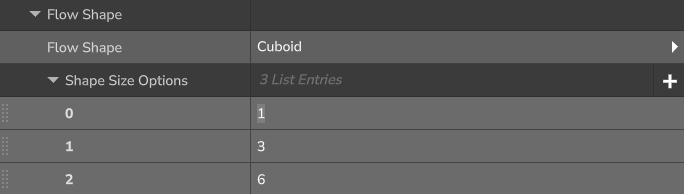
➔ argument 0 = width of cuboid
➔ argument 1 = height of cuboid
➔ argument 2 = depth of cuboid
Collisions
The Collisions list is completely modified in comparision to the original one implemented in vanilla Hytale. It is now separated into two different types of collision phases.

If you define a collision in the Spread list, it starts the collision on the spread of the fluid.
If you define a collision in the Demote list, it starts the collision when the fluid has completely finished demoting.
The elements name in the Spread list don't do anything (since v.0.7.0) and can be used to comment on specific conversions.
The same applies to the Demote list.
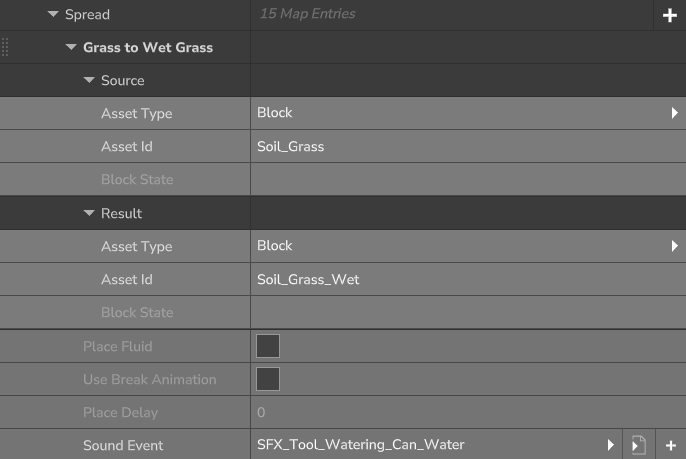
The element is split into a Source, a Result and a general config part.
The Source defines what specific condition the asset has to fulfill in order to start the asset conversion.
Therefore, the asset that will be placed if the condition is fulfilled is defined in the Result config.
Both the Source & Result config require the configuration of the "Asset Type".
The "Asset Type" can either be a "Block" or "Fluid".
In the general section you are able to configure more things regarding the collision.
The "Place Fluid" works like the same called option in the "Default" ticker. It allows the fluid to still be placed on collision.
The "Use Break Animation" option enables the breaking animation if the asset type in the Source config is configured to be a "Block".
The "Place Delay" option allows you to define a delay in which the asset will be placed.
You can also define a sound in the "Sound Event" option.
This sound will be played on collision.
Preview
The Water turns dirt into mud ➔ implemented in the pack "VanillaFlow"

Bugs
If you experience any form of bug that is related to this mod, you can report it on the linked GitHub repository.
The Interactive Fluids Team