


HyTickets
- By
StaffView_1.png
StaffView_2.png
UserView_1.png
DiscordExample_1.png
Description
HyTickets
HyTickets is a complete in-game support ticket system for Hytale servers, designed around a clean UI-first workflow (with commands as a full fallback).
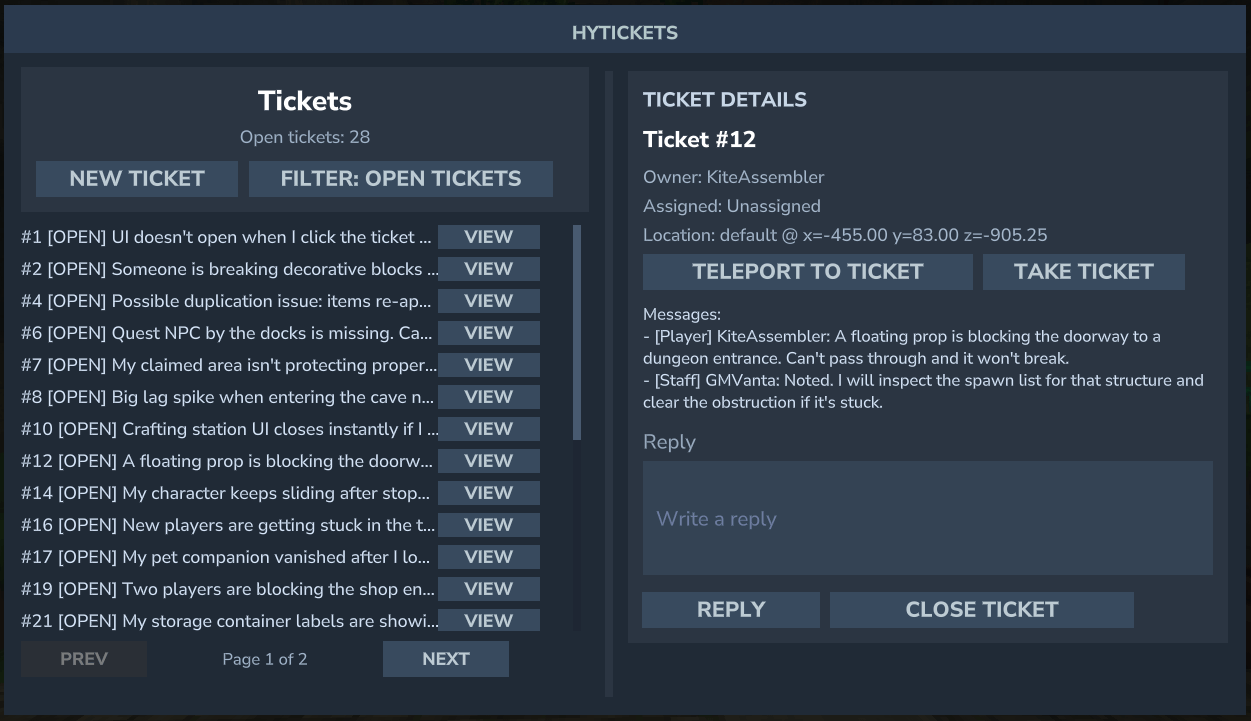
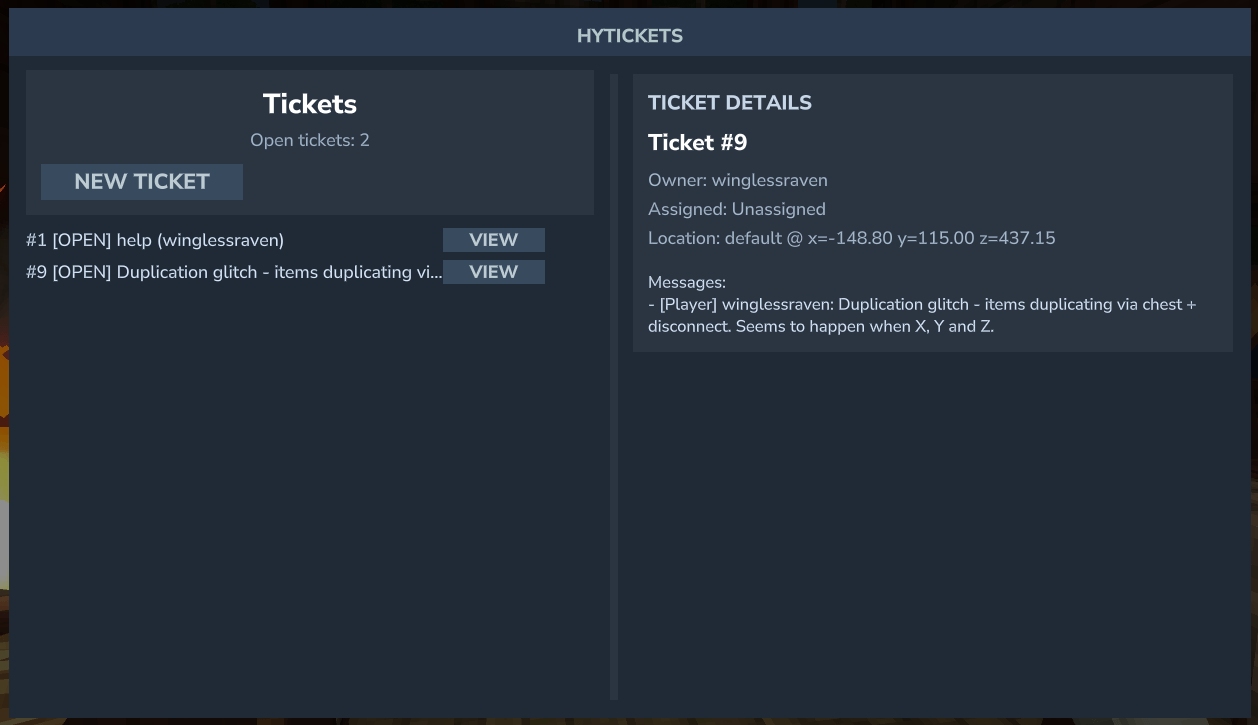
Players can create tickets, browse their own history, reply to staff, and close issues when resolved. Staff can review all tickets, assign ownership, reply in-game, take tickets with a single click, and teleport directly to the reported location.
Each ticket logs the player's world + coordinates at creation time, making issues faster to reproduce and resolve.
Storage is flexible: run on a simple JSON flatfile or use MySQL for larger servers. If you switch from flatfile to MySQL, HyTickets can automatically migrate existing ticket data.
Key highlights
- UI-first experience: the primary interface for both players and staff
- Full in-game workflow: create, reply, review, assign, close
- Teleport to issue location: jump to saved world/coordinates
- Flexible storage: JSON flatfile or MySQL
- Automatic migration: flatfile -> MySQL when switching storage type
- Optional Discord integration: thread-per-ticket, buttons, slash commands, and account linking
Features
Player workflow
- Create tickets with a message
- View open/closed tickets (and drill into details)
- Reply to staff on your own tickets
- Close your own tickets when done
Staff workflow
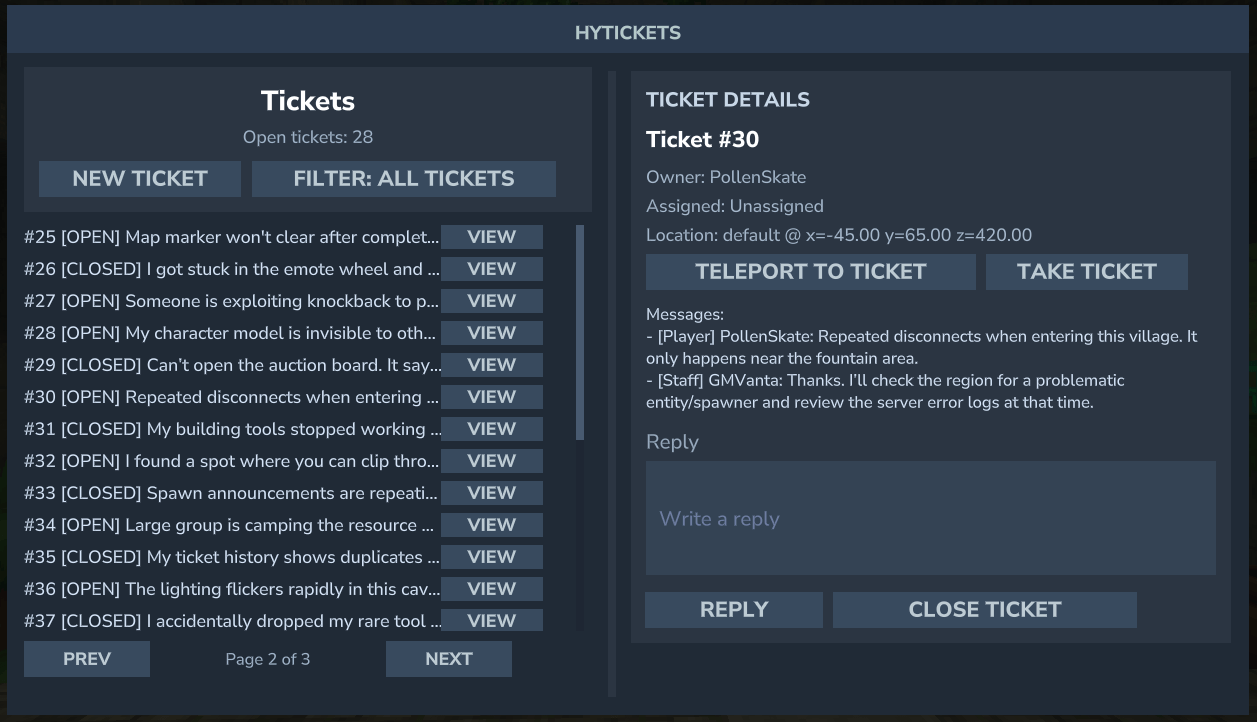
- List all tickets (with optional status filtering)
- Assign a ticket to yourself (or Take Ticket in the UI)
- Reply to players from within the server
- Teleport to the ticket's saved world/coordinates
- Filter views: Open / All / Assigned to me / Closed / Unassigned
Notifications (online-only)
- Staff are notified when a new ticket is created
- Ticket owners are notified when staff reply
- Assignees are notified when a player replies to an assigned ticket
- Ticket owners are notified when a ticket is closed
Storage
FLATFILE_JSON(simple, zero-setup)MYSQL(recommended for scale)- Automatic flatfile -> MySQL migration when changing storage type
UI (optional, but recommended)
- Clean in-game ticket browser
- Ticket list with a preview of the first message
- Ticket detail view with full conversation and metadata
- Staff-only actions: Teleport, Take Ticket, Reply, Close
- Staff-only filter button that cycles through views
Discord integration (optional)
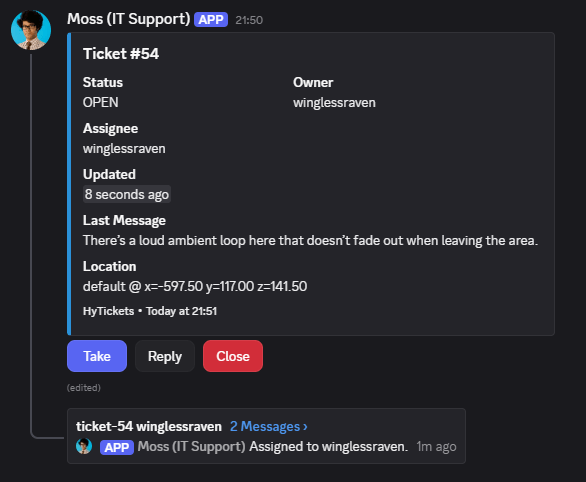
- Thread-per-ticket: one embed + one thread per ticket in a configured channel
- Buttons on the embed: Take / Reply / Close
- Slash commands:
/ticket view <id>and/ticket list [status] [assigned] - Account linking:
/hytickets linkin-game +/link <code>in Discord - Role-gated: only allowed role IDs can use buttons/commands
- Auto-updating embeds and thread event lines for ticket changes
- Automatic flatfile -> MySQL migration for Discord mappings when switching storage type
Configuration (config.json)
Core
StorageType:FLATFILE_JSONorMYSQLFlatfilePath: file path for JSON storageUiEnabled:true/falseTranslationsFile: Translations file location (relative)
MySQL
MySql.HostMySql.PortMySql.DatabaseMySql.UsernameMySql.PasswordMySql.UseSslMySql.TablePrefix
Discord (optional)
Discord.Enabled: enable the Discord moduleDiscord.BotToken: bot tokenDiscord.GuildId: guild where slash commands are registeredDiscord.TicketChannelId: channel for ticket embeds/threadsDiscord.AllowedRoleIds: comma/space-separated role IDs allowed to use buttons/commandsDiscord.StorageType:FLATFILE_JSONorMYSQLDiscord.FlatfilePath: JSON file for Discord mappingsDiscord.MySql.*: MySQL settings for Discord storageDiscord.LinkCodeExpiryMinutes: link code expiryDiscord.EmbedColor: hex color (e.g.,2B90D9)Discord.EmbedFooter: footer textDiscord.EmbedIncludeLocation: include world/coords in embed
Example config (full)
{
  "StorageType": "FLATFILE_JSON",
  "FlatfilePath": "tickets.json",
  "MySql": {
    "Host": "127.0.0.1",
    "Port": 3306,
    "Database": "hytickets",
    "Username": "root",
    "Password": "password",
    "UseSsl": false,
    "TablePrefix": "hyt_"
  },
  "UiEnabled": true,
  "Discord": {
    "Enabled": false,
    "BotToken": "",
    "GuildId": "",
    "TicketChannelId": "",
    "AllowedRoleIds": "",
    "StorageType": "FLATFILE_JSON",
    "FlatfilePath": "discord.json",
    "MySql": {
      "Host": "127.0.0.1",
      "Port": 3306,
      "Database": "hytickets",
      "Username": "root",
      "Password": "password",
      "UseSsl": false,
      "TablePrefix": "hyt_"
    },
    "LinkCodeExpiryMinutes": 10,
    "UseHyDiscordXLinking": false,
    "EmbedColor": "2B90D9",
    "EmbedFooter": "HyTickets",
    "EmbedIncludeLocation": true
  }
}
Integrations
Optional HyDiscordX integration will disable the link feature in HyTickets and instead use the linked accounts from HyDiscordX. To enable, set UseHyDiscordXLinking to true in the config.
Commands
Player Commands
Permission: hytickets.command.basic
| Command | Description |
|---|---|
/hytickets |
Open the in-game ticket UI (recommended). |
/hytickets create [message...] |
Create a new ticket with a full description. |
/hytickets view [id] |
View your tickets, or a specific ticket by ID. |
/hytickets reply [id] [message...] |
Reply to your own ticket. |
/hytickets close [id] |
Close one of your tickets. |
/hytickets link |
Generate a Discord link code for your account. |
Staff Commands
Permission: hytickets.command.staff
| Command | Description |
|---|---|
/hytickets list [status] |
List all tickets (optionally filter by status). |
/hytickets assign [id] |
Assign a ticket to yourself. |
/hytickets reply [id] [message...] |
Reply to any ticket. |
/hytickets tp [id] |
Teleport to the ticket's saved location. |
Discord Commands (optional)
Requires allowed role + linked account
| Command | Description |
|---|---|
/link [code] |
Link your Discord account to Hytale. |
/ticket view [id] |
View ticket details and thread link. |
/ticket list [status=open/closed] [assigned=me/any] |
List tickets with filters. |
Localisations
On first run, a translations.json file is written into the plugin data directory. Community translations repository can be found here, feel free to contribute: https://github.com/winglessraven/HyTicketsTranslations
Edit it to translate UI labels, buttons, Discord messages, and in-game chat text. Variables that can be used:
{count}{filter}{page}{pages}{id}{status}{preview}{assigned}{name}{world}{coords}{role}{author}{content}{owner}{updated}{message}{thread}{minutes}{version}{location}
Discord Setup Notes
- The bot needs permission to View Channel, Send Messages, Create Public Threads, and Send Messages in Threads in the ticket channel.
- All Discord button/command actions require a linked account. Use
/hytickets linkin-game, then/link <code>in Discord. Note: If HyDiscordX integration is enabled then linked accounts from there will be used instead and the command will be disabled.
HyTickets Team
