![HyChatter - [NEW] Bubblechat feature is out to try in beta version! logo](https://media.forgecdn.net/avatars/thumbnails/1691/9/64/64/639073245938906692.png)
HyChatter - [NEW] Bubblechat feature is out to try in beta version!
- By
Chat mod with Global/Region/Party + custom channels, anti-spam moderation, optional multi-server GLOBAL chat forwarding and discord bridge.
Description
------------------------

Disclaimer: This mod is still in development. Found a bug or have an idea? Tell us on Discord.
When reporting issues, please include: your HyChatter.json5, Errors.json5, Moderation.json5, and ChatForwarder.json5 (if you use forwarding), plus the relevant part of your server log. For forwarding issues, set debug: true in the forwarder config for detailed logs.
------------------------
HyChatter — Smarter chat for Hytale servers
HyChatter adds channels (global, region, party), @mentions with ping + toast, whispers, moderation (censor, spam, mutes), join/leave messages, custom player-owned channels, a persistent channel HUD overlay, and a native Discord bridge. Everything is configurable in JSON5 and can be reloaded with /hc reload — no server restart needed.

At a glance
- One command hub:
/hychatteror/hcfor all features. - Channel panel UI — Open with
/hcor/hc ui: Chat tab (Global, Region, Party, custom), My channels, and Moderation tab (OP orhychatter.moderation). Switch channels, manage custom channels (members, Kick, @mention), and edit moderation toggles and values in-game. - Channel HUD overlay — A small pill bar on-screen always shows your active channel and keyboard shortcuts. Updates instantly when you switch channels.
- Mod compatible — Works alongside MultipleHUD, PartyPro, and EndlessLeveling with no conflicts.
- Used on play.hylordia.com.
What you get
Chat channels
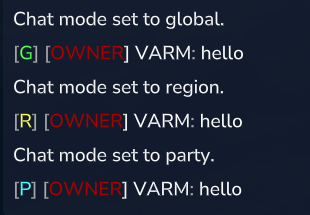
- Global
[G]— everyone online sees it. - Region
[R]— only players within a configurable distance (default 100 blocks, same world). - Party
[P]— only your party. Integrates with PartyPro automatically when installed. - Channel panel —
/hcor/hc uiopens the redesigned UI: Chat tab (pick Global, Region, Party, or a custom channel), My channels (create/join/manage), and Moderation tab for staff. Compose and send from the panel. - Swap — Use
/hc swapto switch between HyChatter chat and default in-game chat anytime.
Join/leave messages
Customize what players see when someone joins or leaves.
- On your server — Turn local messages on/off and set the format (e.g.
[+] {name} joined). When enabled, the default game join/leave line is hidden so only your message shows. - Across servers — Optionally forward join/leave to other servers (HUB/spokes) with a different format (e.g.
{name} joined {server}). Local and forwarded are separate: you can use one, the other, or both.
All options are in HyChatter.json5 (join/leave section).
Multi-server chat (optional)
Send global chat across multiple servers: one HUB (e.g. lobby) and several SPOKE servers connect to it. Only GLOBAL chat is forwarded; mentions work cross-server too. Reload config with /hc reload to apply forwarder changes.
HUB example (lobby — listens for connections):
{
"enabled": true,
"serverId": "Lobby",
"secret": "yourSharedSecret",
"mode": "HUB",
"listenHost": "0.0.0.0",
"listenPort": 25650,
"forwardTo": [],
"remoteFormat": "&7[&b{server}&7] &f{name}&7: &f{message}",
"maxLineBytes": 8192,
"debug": true
}
SPOKE example (game server — connects to HUB):
{
"enabled": true,
"serverId": "HollowCrown",
"secret": "yourSharedSecret",
"mode": "SPOKE",
"hubHost": "LOBBY_IP",
"hubPort": 25650,
"forwardTo": [],
"remoteFormat": "&7[&b{server}&7] &f{name}&7: &f{message}",
"maxLineBytes": 8192,
"debug": true
}
Moderation
Configure in mods/HyChatter/Moderation.json5 — or use the Moderation tab in /hc (OP or hychatter.moderation) to toggle options and set cooldown, mute default, and max length without editing the file. Blocked words are still edited in the JSON5 file.
- Word censor — Replace blocked words (e.g. with
*or a custom string). - Anti-spam — Cooldown and burst limits; optional auto temp-mute.
- Links — Block URLs and Discord invites, or allow specific domains.
- Mutes —
/hc mute//hc unmute; optional persistence. - Safety — Max message length; custom channel names can be checked against the censor.
Channel HUD overlay
A persistent pill bar visible on-screen at all times shows which channel the player is currently in and the keyboard shortcuts to switch. Pills: Global (CTRL+2), Region (CTRL+3), Party (CTRL+4, shown only when PartyPro is installed), and up to two Custom channels the player has joined (CTRL+5/6). The active pill is highlighted; inactive pills are dimmed. Enable or disable the overlay in HyChatter.json5 with channelHudEnabled.
MultipleHUD compatible — On servers running MultipleHUD, HyChatter’s overlay is merged cleanly into the combined HUD document alongside other mods (PartyPro, EndlessLeveling, etc.) with no conflicts.
Default channel
HyChatter can set a default channel for each player. Order: 1) player’s own choice (set with /hc chatdefault), 2) server default in config. On join, after idle timeout, or when leaving a custom channel, players return to this default.
Custom channels (player-owned)
Players can create private channels, invite others, and chat as [ChannelName]. Channel names support colors (&5, &#RRGGBB) and show in color in the UI and chat. Only members see and use the channel. In the /hc panel, Manage a channel to see the member list: Kick (owner only) and @ (toast: type @Username in chat to mention). Non-members can send a join request (toast to the owner). If the owner leaves the server, the channel is removed for everyone. @mentions in custom channels only ping members of that channel.
@Mentions
Type @PlayerName to ping someone: highlight in chat, optional sound, and a toast notification (all configurable). Sender confirmation works too, including across servers when forwarding is on.
Whispers
/msg <player> <message> (or /w, /whisper) and /reply <message> (or /re). Formats are configurable; messages stay private.
LuckPerms (optional)
If LuckPerms is installed, HyChatter can use player prefixes. It falls back safely when prefix data isn’t ready yet.
Discord bridge (built-in, optional)
HyChatter includes a native Discord bridge — no third-party mod required. Configure in mods/HyChatter/DiscordBridge.json5.
- Bidirectional chat relay — Global chat flows both ways: in-game messages appear in Discord, Discord messages appear in-game (formatted with
toHytaleFormat, e.g.&9[Discord] &f{name}: {message}). - Player notifications — Join, leave, and death events can be posted to a separate Discord notification channel with configurable formats (🟢/🔴 join/leave, ☠ death).
- Cross-server aware — Forwarded messages from SPOKE servers include
{server}in the Discord format. - Emoji handling — Discord custom emojis (e.g.
:skull:) and standard Unicode emojis are converted to readable:name:text in-game instead of appearing as??.
// DiscordBridge.json5
{
"enabled": true,
"botToken": "YOUR_BOT_TOKEN",
"channelId": "YOUR_CHANNEL_ID",
"toDiscordFormat": "**{name}**: {message}",
"toHytaleFormat": "&9[Discord] &f{name}&7: &f{message}",
"notificationChannelId": "YOUR_NOTIF_CHANNEL_ID",
"notifyJoin": true,
"notifyLeave": true,
"notifyDeath": true
}
HyDiscordX (optional)
If HyDiscordX is installed, you can also relay selected channels via HyDiscordX. Enable in HyChatter.json5: hyDiscordXCompatEnabled, hyDiscordXBridgeChannels. No hard dependency.
Config files and reload
-
Main:
mods/HyChatter/HyChatter.json5 -
Errors/messages:
mods/HyChatter/Errors.json5 -
Moderation:
mods/HyChatter/Moderation.json5 -
Forwarder:
mods/HyChatter/chatForwarder/ChatForwarder.json5 -
Discord bridge:
mods/HyChatter/DiscordBridge.json5
Change any config, then run /hc reload — no restart needed.
Colors
Use &0–&f, &r, and &#RRGGBB in your formats (no §). Reference: hytaletools.cc/tools/color-codes.
Commands and permissions
Everything is under /hychatter or /hc. Type /hc in-game for the full list. Aliases use the same permission as the main command.
Base permission: hychatter.command — Required to run /hc at all (including /hc help and /hc ui). Give this to any player who should use HyChatter; then use the permissions below for specific subcommands.
Player commands (give these to your default group)
hychatter.command.gchat— Global chat./gchator/hc gchathychatter.command.rchat— Region chat./rchator/hc rchathychatter.command.pchat— Party chat./pchator/hc pchathychatter.command.msg— Private message./msg <player> <msg>or/whychatter.command.reply— Reply to last whisper./replyor/rehychatter.command.chatdefault— Set your default channel./hc chatdefault global|region|party|off|inherithychatter.command.swap— Toggle between HyChatter chat and default in-game chat./hc swap
Custom channels
hychatter.command.ch.create— Create a channel./hc channel create <name>hychatter.command.ch.invite— Invite a player (owner only)./hc channel invite <channel> <player>hychatter.command.ch.leave— Leave a channel./hc channel leave [channel]hychatter.command.ch.rename— Rename channel (owner)./hc channel rename <channel> <newName>hychatter.command.ch.kick— Kick a member (owner)./hc channel kick <channel> <player>hychatter.command.ch.transfer— Transfer ownership./hc channel transfer <channel> <player>hychatter.command.ch.list— List your channels./hc channel list- Join or switch:
/hc channel join <channel>— non-members send a join request (toast to owner).
Admin commands
hychatter.command.reload— Reload all configs and forwarder./hc reloadhychatter.command.mute— Mute a player./hc mute <player> [seconds]hychatter.command.unmute— Unmute./hc unmute <player>hychatter.command.chaton— Turn HyChatter on server-wide./chatonhychatter.command.chatoff— Turn HyChatter off./chatoffhychatter.command.ch.serverlist— List all custom channels on the server./hc channel serverlist
Moderation tab (in-game UI): hychatter.moderation — access the Moderation tab in /hc to view and edit moderation settings (OP also has access).
Moderation bypass (if enabled in Moderation.json5): hychatter.moderation.bypass and hychatter.moderation.bypass.*.
Configuration highlights
Main config (HyChatter.json5): serverEnabled, regionRadius, idleResetSeconds, allowPlayerColors, mention options (sound, toast, highlight color), whisper formats, and join/leave options (local + forwarded formats and toggles).
Server default channel: Set defaultChatChannel to "GLOBAL", "REGION", "PARTY", or "OFF" / "NONE".
"defaultChatChannel": "REGION",
"defaultGlobalChat": false
PlaceholderAPI (optional)
HyChatter can use PlaceholderAPI in formats. Without it, everything else still works.
- Install PlaceholderAPI and put its .jar in
/mods/. - Start the server once so folders like
/mods/PlaceholderAPI/expansions/are created. - For CurseForge builds, download expansions manually from ecloud.placeholderapi.com and put them in
expansions/. - Reload PlaceholderAPI:
/papi reload. - Test:
/papi parse "TEST -> %your_placeholder%". - In HyChatter formats use
%placeholder%; HyChatter’s own placeholders stay as{name},{message}, etc. Then/hc reload.
Placeholders are only applied in server-controlled format strings, not in raw player input, to avoid abuse.
HyChatter - [NEW] Bubblechat feature is out to try in beta version! Team