Screenshot_1.png
Screenshot_2.png
Description
# Hytale-Discord Chat Bridge
**Synchronize your Hytale server with Discord in real-time!**
## 🌟 Description
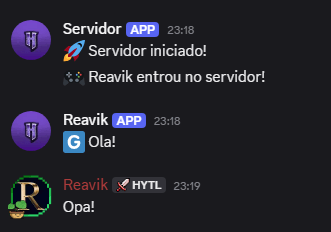
Hytale-Discord Chat Bridge is a powerful plugin that connects your Hytale server to Discord, enabling instant bidirectional communication between players and Discord members. Keep your community connected even when they're on different platforms!
## 🔧 Main Features
### 💬 Bidirectional Chat Sync
- Game messages automatically appear on Discord
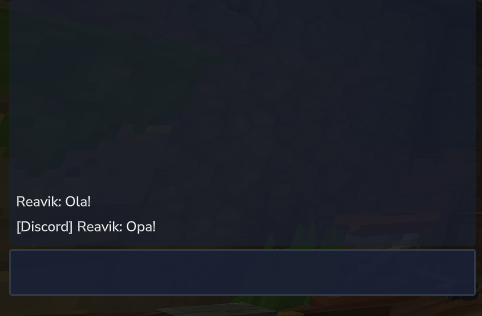
- Discord messages appear in-game chat
- Customizable prefix system to identify message origins
### 🎮 Automatic Notifications
- Real-time alerts when players join/leave the server
- Configurable messages for server events
- Optional suppression of default server messages
### 🖼️ Full Customization
- Custom avatar for server webhook
- Fully configurable messages
### 🔧 Technical Features
- Automatic reconnection on failures
- Detailed logging system for diagnostics
- Simple configuration via JSON file
## ⚙️ Configuration
### 1. Installation
1. Place the `.jar` file in your server's `mods` folder
2. Restart the server
3. Configure the generated `config.json` file
### 2. Arquivo de Configuração
```json
{
"botToken": "TOKEN_DO_SEU_BOT",
"channelId": "ID_DO_CANAL_DISCORD",
"serverAvatarUrl": "URL_DA_IMAGEM_DO_SERVIDOR",
"enableHytaleToDiscord": true,
"enableDiscordToHytale": true,
"discordMessagePrefix": "[Discord] ",
"hytaleMessagePrefix": "[Hytale] ",
"hytaleMessageFormat": "[Discord] %s: %s",
"playerJoinMessage": "🎮 %s entrou no servidor!",
"playerLeaveMessage": "👋 %s saiu do servidor!",
"serverStartMessage": "🚀 Servidor iniciado!",
"serverStopMessage": "🛑 Servidor desligando... Voltamos já!",
"showJoinLeaveMessages": true,
"suppressDefaultJoinMessages": true,
"reconnectAttempts": 3,
"reconnectDelayMs": 5000
}
```
### 3. Getting Credentials
- **Bot Token**: Create a bot on [Discord Developer Portal](https://discord.com/developers/applications)
- **Channel ID**: Enable developer mode on Discord and copy the channel ID
- **Avatar**: Use any public image URL (PNG, JPG, GIF)
## 🎯 Benefits
### For Administrators
- Monitor server activity in real-time
- Easily communicate with your community
- Keep everyone informed about important events
### For Players
- Interact with Discord friends while playing
- See who is online on the server
- Participate in discussions even outside the game
### For the Community
- Strengthens sense of community
- Facilitates event organization
- Keeps everyone connected and engaged
## 🛠️ Requirements
- Discord bot with appropriate permissions
- Text channel on Discord for synchronization
## 🔒 Required Permissions
Your Discord bot needs the following permissions:
- `VIEW_CHANNEL` - View channels
- `SEND_MESSAGES` - Send messages
- `MANAGE_WEBHOOKS` - Manage webhooks
- `READ_MESSAGE_HISTORY` - Read message history
## 📊 Usage Example
With the plugin installed and configured:
1. A player types in chat: "Hello everyone!"
2. The message instantly appears on Discord as: `[Hytale] PlayerName: Hello everyone!`
3. A Discord member responds: "Welcome!"
4. The response appears in-game as: `[Discord] UserName: Welcome!`
## 🆘 Support and Issues
If you encounter problems:
1. Check server logs for error messages
2. Confirm all credentials are correct
3. Test with known avatar URLs
4. Verify bot permissions on Discord
---
*Keep your Hytale community connected with the Discord world!* 🚀
HDiscord Chat Bridge Team

Owner