
Grand Exchange
- By
sell-items.png
my-offers.png
collect-box.png
cover-2000x1000.png
Description
Grand Exchange adds an order-book market to your server. Players don't wait for a buyer to show up. They place a sell offer ("I sell 64 Iron Ore at 5.00 each") or a buy offer ("I buy 100 Iron Ore at up to 4.50 each"). As soon as the prices cross, the trade happens on its own, even if one or both players are offline. Items and money wait in each player's Collect Box.
Everything runs through an in-game menu that looks like the native Hytale UI. Every action also has a chat command.
Works out of the box: in single-player and on servers without an economy plugin, Grand Exchange uses its own built-in wallet. If your server runs VaultUnlocked with an economy plugin, it uses that economy automatically.
Features
- Buy and sell offers with automatic matching. Price-time priority means the best price trades first, and at the same price the oldest offer trades first. Partial fills are supported.
- Works while players are offline. Matching doesn't need anyone online. Online players get a chat message when their offer fills.
- Fair pricing for buyers. A trade always happens at the price of the offer that was already waiting. If you bid more than the cheapest seller asks, you pay the lower price and get the difference back.
- Safe escrow. A buy offer holds its money and a sell offer holds its items until the offer fills or is cancelled. Nothing is promised that isn't actually there.
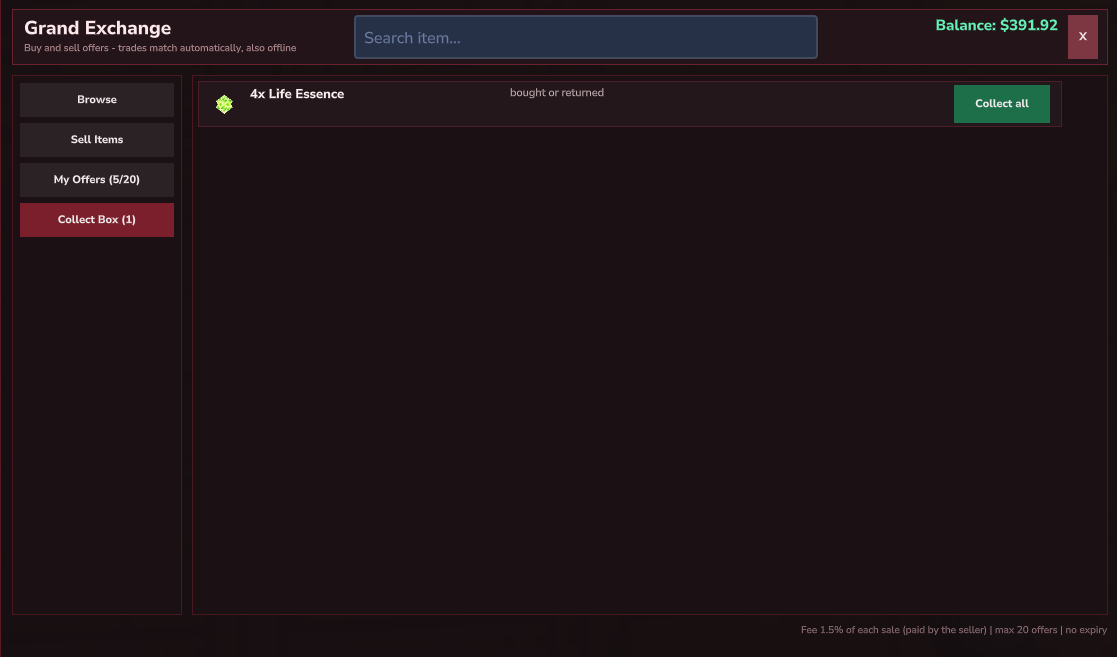
- Collect Box. Bought items, earnings and refunds go to the Collect Box. Click "Collect all" or use
/ge collect. If your inventory is full, the leftovers stay in the box. - In-game menu (
/ge) with four tabs:- Browse: items with open offers, showing the best ask, best bid, last price and 24h volume. You can also browse all items in the game. Search works by name or item ID.
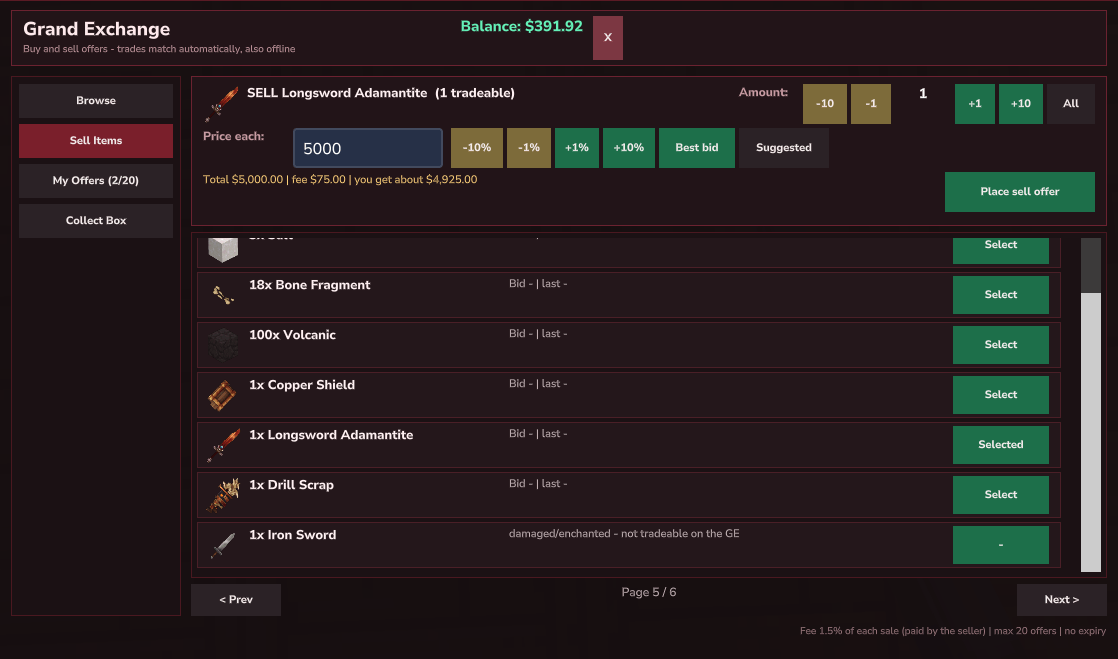
- Sell Items: pick a stack from your inventory, then set the amount and the price each. There are -10% / -1% / +1% / +10% buttons, plus Best bid and Suggested. A live preview shows the total, the fee and what you'll receive.
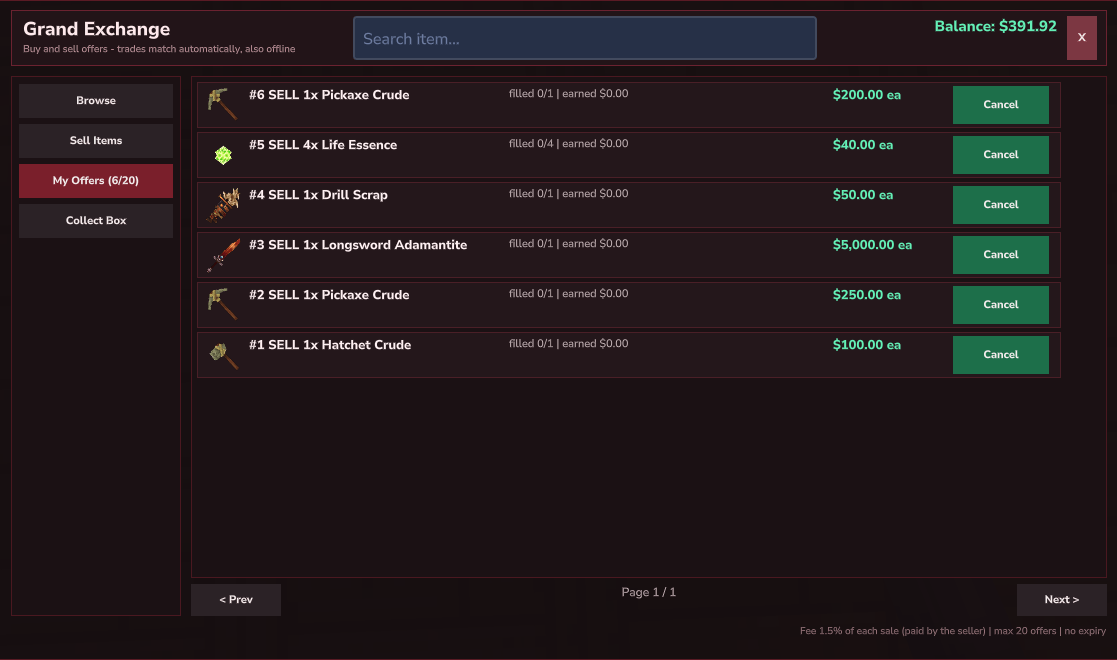
- My Offers: progress for each offer (filled / total, money spent or earned) and Cancel, with a confirm step.
- Collect Box: money and items waiting for you.
- Works standalone or with your economy. It uses any VaultUnlocked economy (for example HyEssentialsX, EcoTale or TheEconomy) when one is installed. Otherwise it uses a built-in wallet with a persistent balance per player and a configurable starting balance. You can also force either one with
economy.mode. - Seller fee (default 1.5%), taken from the seller's proceeds. The fee is removed from the economy, so it works as a money sink and isn't paid to anyone.
- No expiry. Offers stay open until they fill or you cancel them.
- Offer limit per player (default 20 open offers).
- Only clean items can be traded. Damaged, enchanted, named or otherwise modified items are refused, so every unit of an item is identical. You can also block items or ID prefixes in the config.
- Click twice to place. You get a confirm step before every offer.
- Admin tools: cancel any offer (the rest goes to the owner's Collect Box), view totals, reload the config, and give, take or set money in the built-in wallet.
- Audit trail: every money and item movement is written to a daily transaction log in the plugin folder.
- Crash-safe storage: data is saved to
ge.jsonwith an atomic write after every change.
Commands
| Command | What it does | Permission |
|---|---|---|
/ge |
Opens the Grand Exchange menu | everyone |
/ge sell <amount> <price each> |
Sell offer for the item in your hand | everyone |
/ge buy <item> <amount> <max price each> |
Buy offer. The money is held until the offer fills or you cancel it | everyone |
/ge offers |
Lists your open offers | everyone |
/ge collect |
Collects items and money from your Collect Box | everyone |
/ge price <item> |
Shows the best offers, last trade, 24h volume and recent trades | everyone |
/ge cancel <id> |
Cancels one of your offers. Whatever is left goes to your Collect Box | everyone |
/ge balance (aliases bal, money) |
Shows your balance and any money in your Collect Box | everyone |
/ge help |
Lists all commands | everyone |
/ge admin cancel <id> |
Cancels any player's offer | grandexchange.admin |
/ge admin stats |
Shows open offers, escrow, Collect Box totals, volume, fees removed and the economy provider | grandexchange.admin |
/ge admin reload |
Reloads config.json |
grandexchange.admin |
/ge admin money give\|take\|set <player> <amount> |
Changes a player's balance in the built-in wallet (only when the built-in wallet is in use) | grandexchange.admin |
Default aliases are /grandexchange and /exchange. You can change the command name and aliases in the config. <item> accepts an item ID such as Ore_Iron or the item's name, with _ instead of spaces.
Permissions
grandexchange.admin: the admin subcommands, including the wallet commands. All player features work without a permission.
Configuration
The config is at mods/MojoTvStream_GrandExchange/config.json and is created on first start.
{
  "command": "ge",
  "aliases": ["grandexchange", "exchange"],
  "currencySymbol": "$",
  "feePercent": 1.5,
  "maxOffersPerPlayer": 20,
  "maxAmountPerOffer": 10000000,
  "maxPricePerItem": 1000000000.0,
  "pageSize": 8,
  "notifyOnFill": true,
  "browseAllItems": true,
  "blockedItems": ["Debug_*", "Editor_*", "Template_*", "Test_*"],
  "transactionLog": true,
  "economy": { "mode": "auto", "startingBalance": 100.0 },
  "language": "en-US"
}
feePercent: 0 to 50. It is taken from the seller and removed from the economy.browseAllItems: whentrue, Browse has an "All items" filter and search covers every item in the game.blockedItems: exact item IDs, or prefixes ending in*, that can never be traded.economy.mode:auto(default) uses a VaultUnlocked economy if one is installed and falls back to the built-in wallet otherwise.vaultuses VaultUnlocked only.builtinuses the built-in wallet only. Changing it needs a restart.economy.startingBalance: the balance a new player gets in the built-in wallet.currencySymbol: shown in front of every amount, in the menu and in chat.language: the language used for item names in the menu and in chat.- Changes to
commandandaliasesneed a server restart. Everything else can be reloaded with/ge admin reload.
Data files: ge.json holds offers, Collect Boxes and price history. wallet.json holds built-in wallet balances. logs/transactions-YYYY-MM-DD.log holds the audit trail.
Requirements
- A Hytale server or a single-player world. This version is built against server version 0.7.5 and Java 25.
- Nothing else is required. Without an economy plugin, Grand Exchange uses its built-in wallet.
- Optional: VaultUnlocked 2.19 or newer, plus an economy plugin that registers with it. Grand Exchange then uses your server's existing balances.
Installation
- Put
GrandExchange-1.0.0.jarin your server'smods/folder, or install it from the in-game Mod Browser. - Optional: add VaultUnlocked and your economy plugin to use your server's existing money.
- Start or restart the server. The log shows
Grand Exchange v1.0.0 by MojoTvStreamandeconomy in use: .... - Optionally edit
mods/MojoTvStream_GrandExchange/config.jsonand run/ge admin reload.
Players don't need to install anything.
FAQ
Do players have to be online for a trade? No. Offers match the moment they cross, whether the owners are online or not. Results wait in the Collect Box.
Who pays the fee? The seller pays it, as a percentage of each sale (1.5% by default). It is removed from the economy.
Do offers expire? No. They stay until they are filled or cancelled.
Why can't I sell my sword? Damaged, enchanted, named or otherwise modified items can't be traded, because every unit on the exchange has to be identical. Repair the item first, or trade it directly with another player.
What happens to my money when I place a buy offer? The full amount (amount × max price) is held right away. Anything you don't spend comes back to your Collect Box, either because the item sold cheaper or because you cancelled.
Do I need an economy plugin?
No. Without one, Grand Exchange uses its built-in wallet, and new players start with economy.startingBalance. With VaultUnlocked and an economy plugin installed, it uses that economy instead (in auto mode).
I added an economy plugin later. What happens to built-in balances?
The economy is chosen at startup and doesn't change while the server runs. Built-in balances stay in wallet.json but are not moved to the new economy. Set economy.mode explicitly if you want to control the choice.
Can I rename /ge?
Yes. Set command and aliases in config.json, then restart the server.
Credits
Made by MojoTvStream. © 2026 MojoTvStream, all rights reserved.
License: free to download and use on any server or world. You may not copy, re-upload, modify, decompile, redistribute or sell the plugin or its code, or remove the author credit. See LICENSE.txt in the jar.
Grand Exchange Team
