Golden Apples (And carrots)
- By
Adds the famous Minecraft golden apple, enchanted golden apple and golden carrot, with its own recipes!!

Golden Apple recipe

Golden Carrot recipe
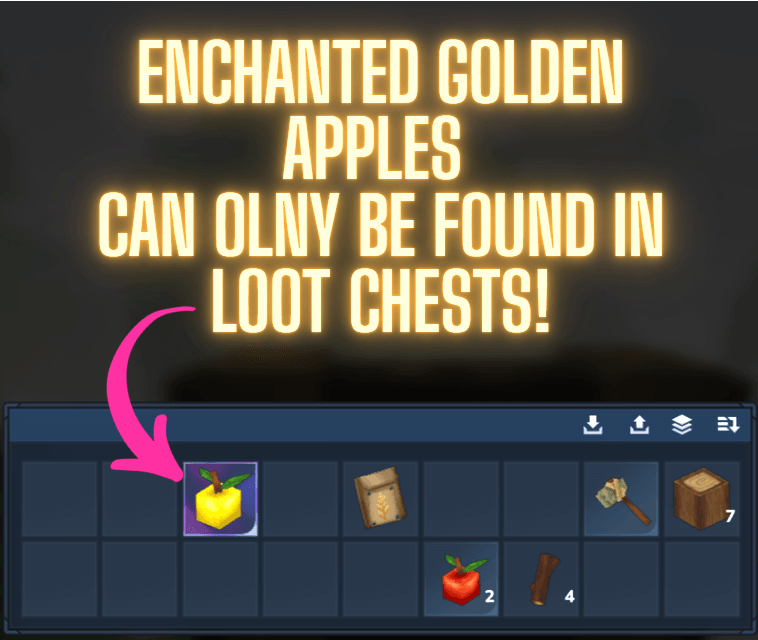
Enchanted golden apple found in a chest

Photo of the golden apple, enchanted golden apple and golden carrot.
Description

ENGLISH (US)
🍎 OVERVIEW: This mod introduces the Golden Apple, the Enchanted Golden Apple and the Golden Carrot, inspired by their Minecraft counterparts and balanced for Hytale.
✨ ITEMS:
- Golden Apple – Crafted at the Alchemy Bench (1 Apple + 5 Gold Bars). Restores 85% Health and grants minor Health Regeneration for 2 minutes.
- Enchanted Golden Apple – Cannot be crafted! Find it in chests: it is much more common in high-tier dungeon chests and very rare in normal ones. Restores 100% Health and grants Absorption (+50 Max Health for 10 minutes), strong Health Regeneration for 30 seconds and Stamina Regeneration for 5 minutes. It glows when placed. You can put its older crafting recipe if you write this command: /goldenapples craftable on
- Golden Carrot – Crafted at the Alchemy Bench (1 Carrot + 1 Gold Bar). Restores 20% Health, regenerates some Health for 1 minute and restores Stamina for 3 minutes.
🗝️ LOOT: Golden Apples and Golden Carrots can also be found in chests all across Orbis.
🛠️ CURRENT STATUS: Updated for Hytale 0.7 and fully stable. I will do my best to fix any potential bugs that may arise in future updates as quickly as possible.
💬 FEEDBACK: If you have any questions, suggestions or issues, please let me know in the comments section below!
SUPPORT MY WORK ☕ I'm making these mods in my free time! If you enjoy my work and want to help me for future lore and mods, you can buy me a coffee here: 👉 [https://ko-fi.com/mingocreator] 💗
CHECK OUT MY OTHER MODS!!

──────────────────────────
ESPAÑOL (ES)
🍎 DESCRIPCIÓN GENERAL: Este mod añade la Manzana de Oro, la Manzana de Oro Encantada y la Zanahoria Dorada, inspiradas en las de Minecraft y equilibradas para Hytale.
✨ OBJETOS:
- Manzana de Oro – Se fabrica en la Mesa de Alquimia (1 manzana + 5 lingotes de oro). Restaura un 85 % de la vida y da regeneración leve durante 2 minutos.
- Manzana de Oro Encantada – No se puede fabricar. Encuéntrala en cofres: es mucho más común en los cofres de mazmorra de nivel alto y muy rara en los normales. Restaura el 100 % de la vida y da Absorción (+50 de vida máxima durante 10 minutos), regeneración fuerte durante 30 segundos y regeneración de energía durante 5 minutos. Brilla al colocarla. Se puede volver a craftear mediante este comando aunque no es recomendable (Está muy OP): /goldenapples craftable on
- Zanahoria Dorada – Se fabrica en la Mesa de Alquimia (1 zanahoria + 1 lingote de oro). Restaura un 20 % de la vida, regenera algo de vida durante 1 minuto y restaura energía durante 3 minutos.
🗝️ BOTÍN: Las Manzanas de Oro y las Zanahorias Doradas también aparecen en cofres por todo Orbis.
🛠️ ESTADO ACTUAL: Actualizado para Hytale 0.7, estable y sin errores conocidos. Trabajaré para solucionar lo más rápido posible cualquier bug que pueda surgir en el futuro.
💬 COMENTARIOS: Si tienes alguna duda, sugerencia o encuentras algún fallo, no dudes en dejármelo saber en la caja de comentarios.
APOYA MI TRABAJO ☕ ¡Estoy haciendo estos mods en mi tiempo libre! Si disfrutas de mis creaciones y quieres ayudarme para mis futuros proyectos, puedes invitarme a un café aquí: 👉 [https://ko-fi.com/mingocreator] 💗
CHECK OUT MY OTHER MODS!!
🛠️ How to Customize Healing & Regeneration (Mini-Tutorial) (OBSOLETE, IT MAY CHANGE)
This tutorial is designed for those who want to customize the healing levels of the Golden Apples and Golden Carrots to their liking. The mod was primarily balanced for Survival mode, meaning it might be a bit overpowered ("OP") for PvP (especially on multiplayer servers). Because of this, I wanted to provide a guide on how to modify the healing and regenerative aspects of the mod.
This tutorial is meant for everyone, whether you have coding knowledge or not, so I’ve made it as simple as possible!
Step 1: First, you need to go to your Hytale installation folder (usually located in the appdata/Roaming folder). To do this, press the Windows + R keys at the same time, type appdata, and hit Enter. Once the folder opens, navigate to: appdata/Roaming/Hytale/UserData/Mods.
Step 2: Once inside the Mods folder, find my mod (Golden_Apples (And carrots)) and unzip the file. (I recommend creating a new folder with the mod's name and unzipping it there so no files get lost). You should see 3 main files/folders appear. All of them are crucial; if any are missing when you finish the tutorial, the mod won't work correctly and will cause bugs.
Step 3: Out of those 3 folders, the one we care about is the Server folder. Open it, then go into the Entity folder, and finally into the Effects folder. The folder path should look exactly like this: Server/Entity/Effects.
Step 4: Inside the Effects folder, you will find several .json files (8 in total).
-
The first one,
Enchanted_Golden_Apple.json, controls the regenerative healing of the Enchanted Golden Apple over time. -
The file named
Enchanted_Golden-Apple_Instant.jsoncontrols the amount of health regenerated instantly upon eating. -
The same logic applies to the other
.jsonfiles (Note: any file ending with "stamina" dictates the amount of stamina regenerated per second).
Step 5: To modify any of these effects, simply open the .json file using NOTEPAD (it usually opens with this by default, but if you have other programs, it might try to use those and not let you edit properly). Let's take Enchanted_Golden_Apple.json as an example. You will see something similar to this image:

The parameters you can change that actually affect the game are:
-
Health: The amount of health you recover (the higher the number, the more it heals).
-
DamageCalculatorCooldown: The higher the number, the longer it takes to heal or regenerate stamina per second. (I personally wouldn't change this and would only modify the health amount, but feel free to experiment! :))
-
Duration: How long the effect lasts (measured in seconds, so 60 seconds = 1 minute).
-
Stamina: The amount of standard stamina that regenerates.
-
SignatureEnergy: The amount of stamina dedicated to special attacks that regenerates.
Step 6: I highly recommend that you DO NOT change the Duration in the .json files ending in "instant". If you set it to more than 1 second, they will no longer be instant effects, they will become regenerative and will overlap with the actual regenerative files.
Step 7: Once you have changed the values you wanted, you must SAVE the Notepad file by pressing Ctrl + S or by clicking File > Save. Otherwise, the changes will not be applied.
Step 8: Finally, to turn the mod back into a .zip file so Hytale can read it, you must select the 3 main mod files (just like I do in this mini-video), right-click them, and select "Send to > Compressed (zipped) folder". If you've done everything right, you now have the mod working with your custom values!
I hope this mini-tutorial was helpful! If you have any questions, suggestions, or if I made a mistake somewhere, don't hesitate to let me know in the comment section.
Golden Apples (And carrots) Team