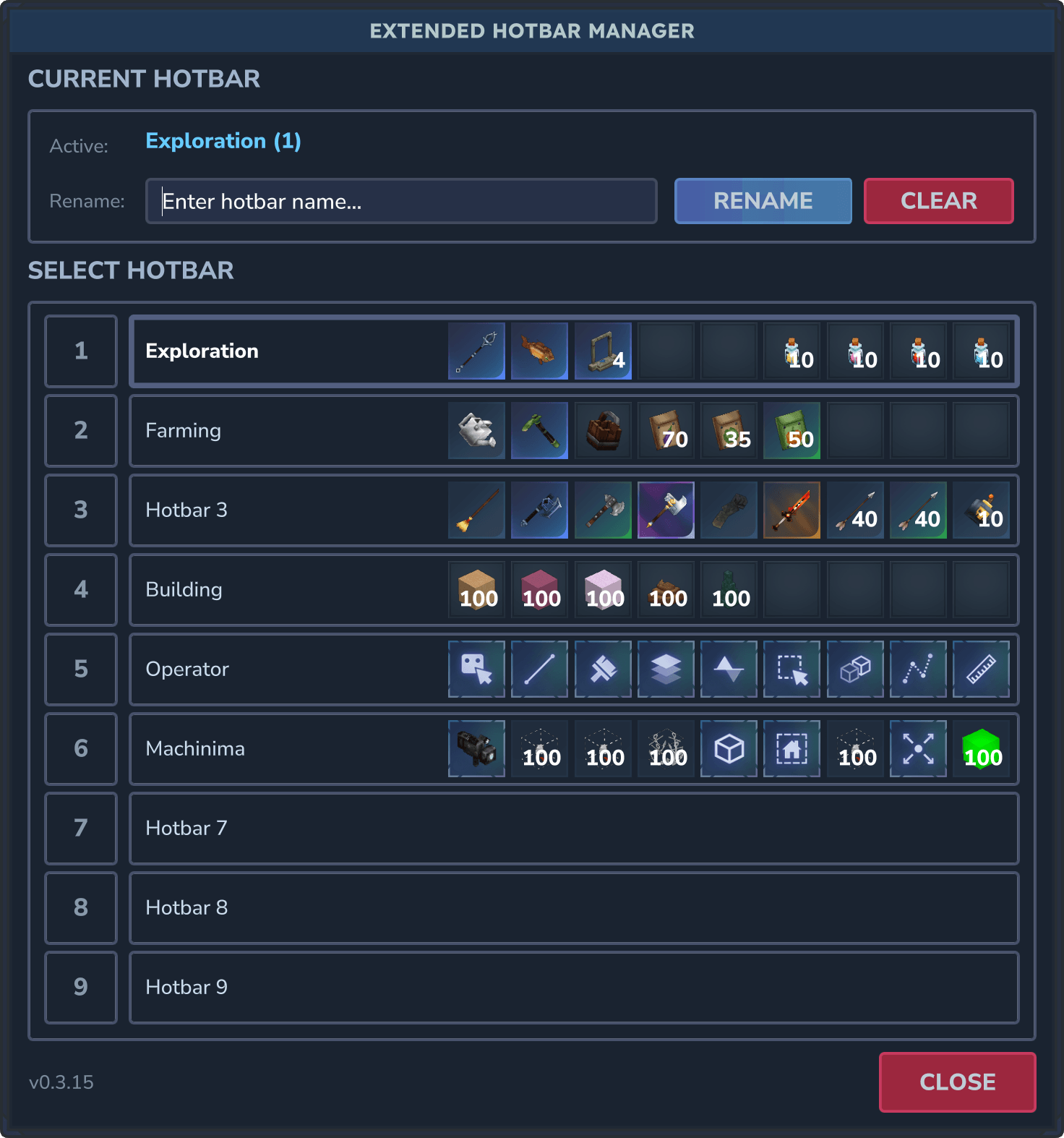
/hbm (v0.3.15)
Description
Extended Hotbar
A Hytale server plugin that extends the hotbar system to support multiple switchable hotbars with customizable names.
Update for Hytale Update 3 (v0.3.17)
Overview
Extended Hotbar gives players up to 9 switchable hotbars (81 total slots!) with custom naming and a graphical interface for easy management. Perfect for organizing different gameplay styles like combat, building, mining, and more.
Key Features
✓ Multiple Hotbars - Up to 9 switchable hotbars per player
✓ Custom Names - Organize with names like "Combat", "Building", "Mining"
✓ Graphical UI - Easy-to-use visual hotbar manager
✓ Persistent Storage - All hotbars saved automatically per-player
✓ Server Configurable - Admins control hotbar counts and slot limits
✓ Permission Support - Fine-grained access control for commands
Quick Start
- Place the JAR file in your server's
mods/directory - Restart the server (config auto-generates)
- Players use
/hbmto open the hotbar manager - Click hotbars to switch, rename them as needed
Commands
/hotbar - Main Hotbar Command
| Command | Description |
|---|---|
/hotbar |
Display current hotbar status |
/hotbar --number {1-9} |
Switch to a specific hotbar by number |
/hotbar --name {name} |
Switch to a hotbar by its custom name |
/hotbar --setname {name} |
Rename the current hotbar |
Examples:
/hotbar --number 2/hotbar --name Combat/hotbar --setname "Base Building"/hotbarmenu or /hbm - Graphical Interface
Opens the Hotbar Manager UI with visual controls:
- View all your hotbars at a glance (Currently displays name and index)
- Click to switch between hotbars instantly
- Rename hotbars using the built-in input field
- Clear hotbar names when needed
GUI Overhaul, added ItemStacks (v0.3.15)
Installation
- Download the plugin JAR file
- Place it in your server's
mods/directory - Restart or start your server
- Configuration file auto-generates on first run
Configuration
Config File Location
mods/Ghraken_ExtendedHotbar/config.json
Default Configuration
{
  "MaxSlotsPerHotbar": 9,
  "MaxHotbarCount": 9,
  "DefaultSlotsPerHotbar": 9,
  "DefaultHotbarCount": 9
}
Configuration Settings
| Setting | Default | Range | Description |
|---|---|---|---|
MaxSlotsPerHotbar |
9 | 1-9 | Maximum slots any hotbar can have |
MaxHotbarCount |
9 | 1-9 | Maximum number of hotbars per player |
DefaultSlotsPerHotbar |
9 | 1-9 | Starting slots for new players |
DefaultHotbarCount |
9 | 1-9 | Starting hotbars for new players |
Recommended Settings
Note: Future versions will extend the game UI for additional slots. For now:
- Keep
MaxSlotsPerHotbarat 9 (matches vanilla UI) - Adjust
MaxHotbarCountbetween 1-9 based on preference
Permissions
Available Permissions
| Permission | Default | Description |
|---|---|---|
extendedhotbar.command.hotbar |
✓ Allowed | Access to /hotbar command |
extendedhotbar.command.hotbarmenu |
✓ Allowed | Access to /hotbarmenu and /hbm |
Managing Permissions
All permissions default to allowed for all players.
To revoke access:
/perm user remove {uuid} -extendedhotbar.command.hotbar/perm user remove {uuid} -extendedhotbar.command.hotbarmenuTo restore access:
/perm user add {uuid} -extendedhotbar.command.hotbar/perm user add {uuid} -extendedhotbar.command.hotbarmenuHow It Works
Hotbar Synchronization
- Your in-game hotbar is always synced with the active extended hotbar
- Switching hotbars saves current items and loads the new hotbar's contents
- The game manages the active hotbar; this plugin adds multiple hotbar support
Data Persistence
- Automatic saving when switching hotbars
- Empty slots preserved for sparse hotbar layouts
- All data stored per-player in JSON format
Naming Conventions
Underscores: Multi-word names using underscores
Example: Combat_Gear displays as "Combat_Gear"
Spaces: Supported with quotes in commands
Example: /hotbar --setname "Base Building"
Note: The UI handles spaces automatically when renaming via /hotbarmenu or /hbm
Player Data Storage
Storage Location
Local instances - data will be stored in the world mods
UserData\Saves\{world}\mods\Ghraken_ExtendedHotbar\playerdata\{uuid}.jsonDedicated servers - data will be saved in the server mods
\mods\Ghraken_ExtendedHotbar\playerdata\{uuid}.jsonStored Data
Each player's JSON file contains:
- Hotbar contents - Item IDs and quantities for all inactive hotbars
- Custom names - All hotbar name assignments
- Active selection - Currently selected hotbar number
Releases
- 0.1.20 - Initial chat command release - Hotbar management using slash commands
- 0.2.12 - Added GUI /hotbarmenu - Hotbar management interface and additional commands
- 0.2.39 - Major GUI overhaul - Refactored to use Pages and import styles from base game
- 0.3.15 - Added ItemStacks to the GUI - Items on each hotbar can now be seen in the GUI
- 0.3.17 - Resolve server version target warning - Compatibility fix for Update 3
The Extended Hotbar Team