DiscordRelay
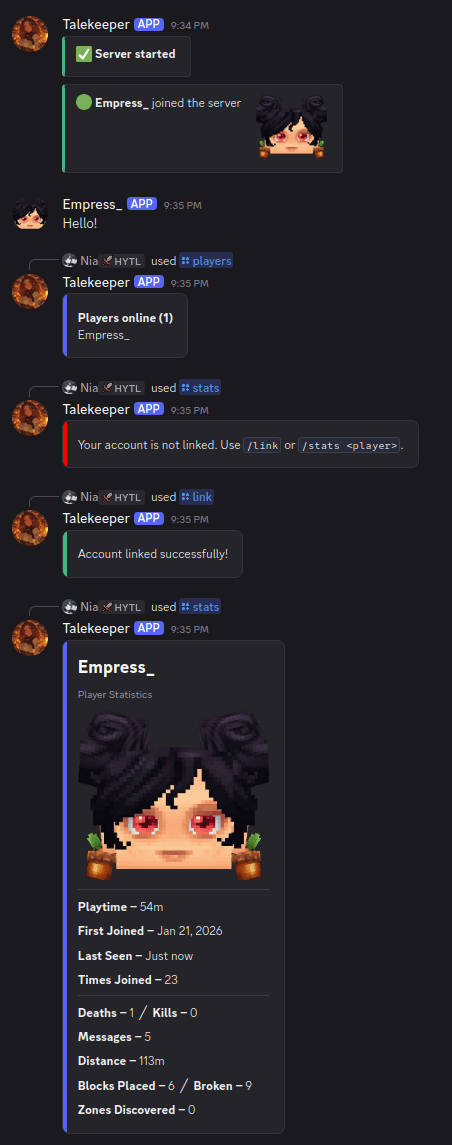
A two way bridge between your Hytale server and Discord. Relay chat both ways, announce player events, run console commands from Discord, link accounts, sync bans, track stats, and more.
Source and issues: https://github.com/darkcupid412/discord-relay
Features
- Chat relay - messages sync between Discord and in game, with player names and avatars
- Join / leave notifications with player avatar thumbnails
- Death messages using the game's own kill feed, with a pool of randomized formats
- Server start / stop announcements
- Console channel - run server commands from Discord, role gated and limited to a command allowlist
- Account linking - link Discord to in game accounts with
/link - Role sync - auto assign Discord roles when linked (bot needs Manage Roles)
- Nickname sync - set the Discord nickname to the in game name (bot needs Manage Nicknames)
- Require linking - optionally require a linked account to chat from Discord and/or to play
- Discord name in game - show a linked player's Discord name on the world map, above their head, and in chat
- Player stats - playtime, blocks placed/broken, deaths, kills, messages, zones, and a paginated
/playtimeleaderboard with all time, today, 7 day, and 30 day ranges - Bot status - shows the player count as the Discord bot status
- Live status embed - one self updating status message instead of repeated posts
- Ban sync - a game ban bans the linked Discord user and a Discord ban blocks the player, plus ban and unban broadcasts
- Zone discovery broadcasts
- Chat filter - censor or block words (configurable word list)
- Embed messages for join / leave / death / status (bot needs Embed Links), toggleable per event
- AFK detection - announces when a player goes idle and returns
- Update check - notes in the log when a newer release is out
Commands
Discord slash commands:
/players- list online players/link <code>- link your account/unlink- unlink your account/stats [player]- view player statistics/playtime [range] [page]- playtime leaderboard
In game:
/players(aliases list, online) - list online players/link- get a link code/unlink- unlink your account
Config
The config is a self documenting config.yml: every option has a comment explaining what it does.
- Toggle any feature on or off
- Custom message formats with
%player%and%message%placeholders - Console command allowlist and blacklist (dangerous commands blocked by default)
- Named colors (red, dodgerblue, …) or hex codes for the in game Discord line
- Chat filter with censor or block mode
- Optional embeds (can be disabled for plain text), per event
- Separate channels for chat, console, and join/leave
- Webhook chat - the bot can auto create a webhook to relay chat as the player with their avatar
Upgrading from 1.5.1: your existing config.yml is converted automatically on first start and your settings are kept (the original is saved as config.yml.old).
Setup
- Create a bot at https://discord.com/developers/applications and enable the Message Content intent
- Drop the JAR in your server's mods folder
- Start the server once, then edit
mods/Discord_Relay/config.yml - Add your bot token and chat channel ID
- Restart
Privacy
Player avatars are rendered by Crafthead (crafthead.net) from player UUIDs. To disable avatars, set AvatarEnabled to false in the config and messages are sent without them.
Support
Issues and suggestions: https://github.com/darkcupid412/discord-relay/issues Discord: https://discord.gg/knXSzeute3
DiscordRelay Team