Deepest Storage
- By
Store a single type of any item to a massive quantity which is configurable
Screenshot 2026-03-19 220716.png
Description
Please reach out if you think you can too tribute to the storage design.
Deepest Storage
Deepest Storage is a Hytale server plugin that lets players store massive quantities of items in a single block. Five upgrade tiers scale from early-game convenience to late-game bulk storage, with deep crafting bench integration, a visual display system, and full admin control over every setting.
Storage Units
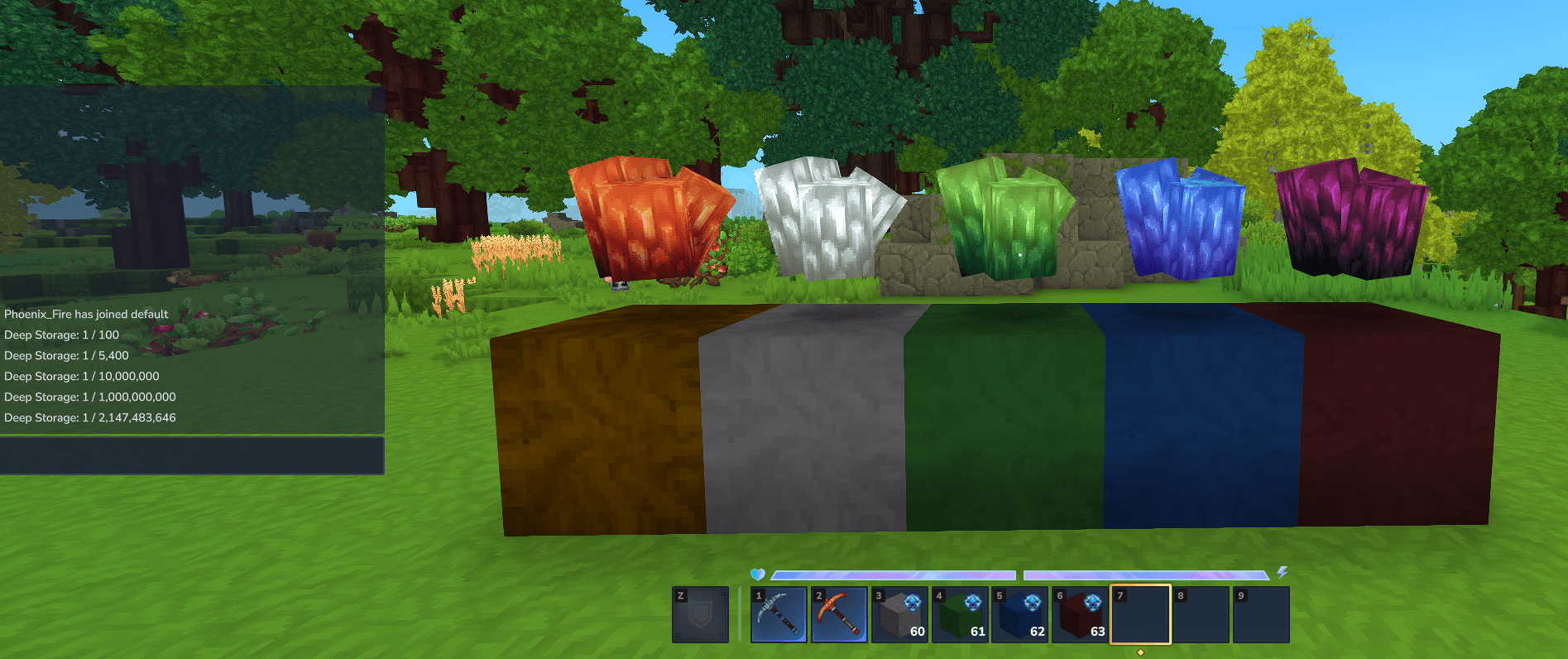
Each storage unit holds one item type and tracks its quantity as a true large integer — far beyond what normal stacks allow. Place a unit, right-click it to open the storage UI, then deposit or withdraw items freely.
- Basic — 100 items
- Common — 5,400 items
- Advanced — 10,000,000 items
- Mythic — 1,000,000,000 items
- Supreme — 2,147,483,646 items
All tier capacities are configurable by server admins at any time. Items and quantity are always preserved when upgrading, clamped to the new tier's limit.
Storage Unit Controls
- Right-click — Open the storage UI
- Crouch + Right-click — Pass through (allows placing blocks on top of the unit)
- Left-click with pickaxe (or in Creative) — Break the block and drop its contents
Upgrade Items
Craft an upgrade item at a bench and right-click a matching storage unit to advance it to the next tier. The stored item type and quantity carry over automatically.
Upgrade path: Basic → Common → Advanced → Mythic → Supreme
Crafting Bench Integration
Every storage unit in the world connects automatically to any crafting bench a player opens. When crafting, materials are drawn from the player's inventory first, with storage filling the remainder. The bench extra-resources panel shows a live count of available storage quantities, and updates in real time as items are deposited or withdrawn.
Display Configurator Tool
The Display Configurator is a special item that lets players customize the floating item entity shown above each storage unit — adjusting position, scale, and animation — or apply a texture camouflage that makes the storage block visually resemble any other block type.
Configurator Controls
- Right-click in air — Open the configurator settings GUI (set X/Y/Z offset, scale, animation)
- Right-click a storage block — Apply your saved display settings to that block
- Left-click a storage block — Toggle the floating item display on/off
- Crouch + Left-click a storage block — Toggle Texture Override Mode on/off
Texture Camouflage
Enable Texture Override Mode (Crouch + Left-click any storage block), then:
- Right-click a storage block while holding a block item — Apply that block's texture as camouflage
- Crouch + Left-click with an empty hand — Remove the texture camouflage
Server admins can blacklist specific block type IDs to prevent them from being used as camouflage. New players joining after a camouflage has been applied will see the correct visual immediately.
Admin Controls
Everything is configurable in-game. Players with the deepstorage.admin permission node can open the admin GUI with /ds admingui.
- Set per-tier storage capacities (applied live to all open storage UIs)
- Edit crafting recipes for each tier
- Configure Display Configurator offset and scale limits (the range players are allowed to use)
- Manage the texture camouflage blacklist — block types that players cannot apply as camouflage
- Add blocks from your own inventory to the blacklist with one click
Command reference:
/ds info— In-game guide available to all players/ds admingui— Open the admin settings GUI/ds setcap <tier> <capacity>— Set capacity for a tier/ds reload— Reload config from disk
In-Game Help
Any player can type /ds info to open a scrollable in-game guide covering all storage controls, the Display Configurator, texture camouflage, upgrade items, and workbench integration — no admin permission required.
The Deepest Storage Team