
Command Timer Execute
- By
NVIDIA_Overlay_C9hQQMAh8T.png
Description
Guide to the Command Scheduler plugin
Description
This plugin allows you to schedule the execution of commands on the Hytale server. You can:
- Execute commands after a certain period of time
- Execute commands periodically (with repetition)
- Execute commands at a given time
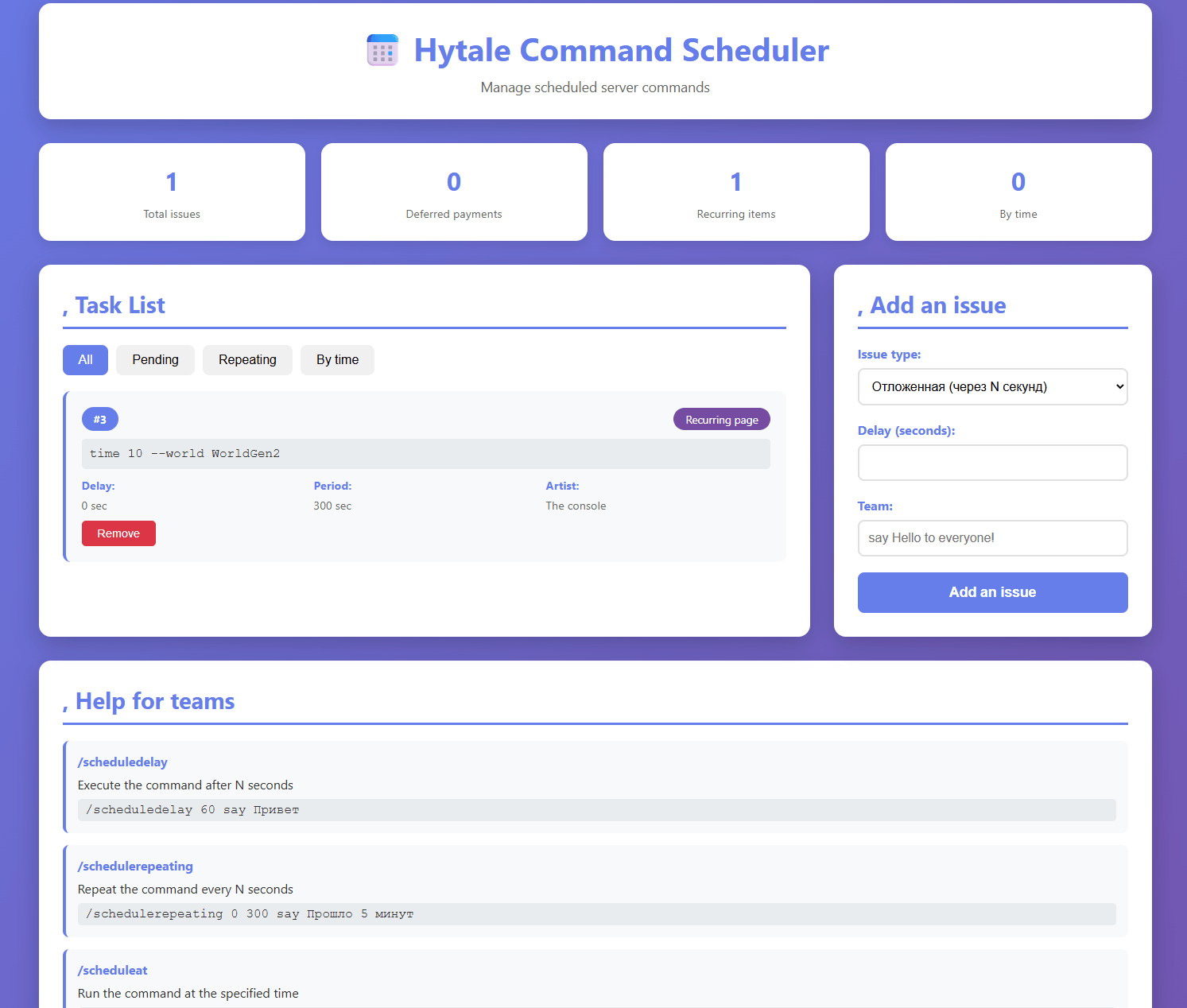
🌐 The web interface of the team scheduler
📋 Description
The plugin now includes a built-in web interface for easy task management via the browser!
🚀 Quick Start
- Start the server with the plugin installed
- Open a browser and navigate to:
http://localhost:8080 - Ready! You will see a beautiful task management interface.
Teams
1. /scheduledelay <seconds> <command>
Schedule a one-time execution of the command after a specified number of seconds.
Examples:
/scheduledelay 60 say One minute has passed! /scheduledelay 300 time set day /scheduledelay 10 give @a diamond 1
2. /schedulerepeating <initial delay> <period> <team>
Schedule periodic command execution.
Parameters:
initial delay- after how many seconds to start execution- `period' - at what interval (in seconds) to repeat the command
Examples:
/schedulerepeating 0 60 say A minute has passed! /schedulerepeating 10 300 weather clear /schedulerepeating 5 120 give @a bread 1
3. /scheduleat <date_time> <command>
Schedule the execution of a command at a specific time.
Date/time formats:
- Full format:
yyyy-MM-dd HH:mm:ss' (for example:2026-02-02 15:30:00`) - Time only:
HH:mm:ss' (for example:15:30:00` - for today's date)
Examples:
/scheduleat 2026-02-02 18:00:00 say Dinner time! /scheduleat 15:30:00 say Afternoon snack! /scheduleat 2026-02-03 09:00:00 time set day
4. /schedulelist
Show a list of all scheduled tasks.
Output example:
=== Scheduled tasks === ID: 1 [ACTIVE] Team: say Hello! Type: Disposable (after 60 seconds) ───────────────────── ID: 2 [ACTIVE] Command: time set day Type: Recurring (start after 0 seconds, period of 300 seconds) ───────────────────── Total tasks: 2
5. /schedulecancel <ID>
Cancel a scheduled task by its ID.
Examples:
/schedulecancel 1 /schedulecancel 5
Usage examples
Example 1: Automatic announcement every 5 minutes
/schedulerepeating 0 300 say §6[Server] §Don't forget to save your progress!
Example 2: Setting the daylight time every 10 minutes
/schedulerepeating 0 600 time set day
Example 3: Server restart at 4 a.m.
/scheduleat 2026-02-03 04:00:00 stop
Example 4: Reward distribution after 1 hour
/scheduledelay 3600 give @a diamond 10
Example 5: Daily event at 20:00
/scheduleat 20:00:00 say §a[Event] A daily event is being remembered!
Important notes
- Task ID - each task gets a unique ID that can be used to cancel it.
- Server time - all times are specified relative to the server time
- Automatic cleaning - One-time tasks are automatically deleted after completion
- Recurring tasks - will run indefinitely until they are canceled
Plugin build
- Open the terminal in the root folder of the project
- Run the build command:
./gradlew build - The compiled JAR file will be located in
lib/build/libs/
Installation
- Copy the compiled JAR file to the
pluginsfolder of your Hytale server - Restart the server
- The plugin will be loaded automatically.
Project structure
lib/src/main/java/org/example/plugins/scheduler/
├── SchedulerPlugin.java # The main class of the plugin
├── scheduler/
│   └── CommandScheduler.java # Command Scheduler
├── task/
│   └── ScheduledTask.java # Task class
└── commands/
    ├── ScheduleDelayCommand.java# One-time execution command
    ├── ScheduleRepeatingCommand.java # A command for periodic execution
    ├── ScheduleAtCommand.java# Command to execute at a given time
    ├── ScheduleListCommand.java # Command to view the task list
    └── ScheduleCancelCommand.java # Command to cancel a task
``

## Support

If you have problems with the plugin, check the server logs. All actions of the scheduler are recorded in the log.

Author: beavulf
Version: 0.1.0
Дата: 02.02.2026
The Command Timer Execute Team
