Chronicle Stats
- By
Player statistics, leaderboards, records and a web dashboard that shows your in game character
Description
Please feel free to join my discord if you run into issues or have ideas! https://discord.gg/mKgxyk6qvb
…or you just want to hangout
Works with
Chronicle Stats runs on its own on any 0.7.0 server and picks these mods up by itself when they are installed. None of them is required and none needs any setup on the Chronicle Stats side.
| Mod | What it adds |
|---|---|
| TrackerAPI 1.0.0 or newer | Chronicle Stats registers none of its own tracking hooks and takes every statistic, record and dashboard number from TrackerAPI's events, so a server with several stats plugins pays for the tracking once. A chip at the top right of the dashboard and of /stats reads "TrackerAPI connected". The tracker setting takes auto, always or never. Health, stamina and mana stats need vitalsSeconds set to 1 in TrackerAPI.json. |
| Feats 1.2.0 or newer, checked up to 1.5.1 | Feat unlocks, points and rarity on the /stats Feats tab, the profile and the dashboard Feats page, server first feats from Feats 1.3.0, and a one time import of the statistics Feats already kept. |
| Atlas 1.1.0 or newer, checked up to 1.6.0 | One browser login for the map and the dashboard in both directions, also under two base paths of one host name, a Chronicle tab inside Atlas with the top players, and players hidden on the map stay hidden on the dashboard. Set atlasUrl and profiles, the players list and /stats link to the map. For the Chronicle tab set chronicleExport in atlas.json to mods/Ryvrook_ChronicleStats/export/stats.json. |
| RPG Leveling And Stats 0.4.2 | Level, XP by source, levels gained, class and tier on every profile, in /stats and on the Overview, level and XP leaderboards, and the level of every creature in deaths and boss fights, read only and never touching anyone's XP. |
| PlaceholderAPI 1.0.8 or newer | %chronicle_...% placeholders for every public stat, each leaderboard window and each rank, for scoreboard and hologram mods. |
| BetterMap | Chronicle Stats draws its HUD under its own key, so BetterMap's position HUD stays where it is and MultipleHUD is not needed. |
Coming later. Dominion Factions standings, MMO Skill Tree, Endless Leveling, PartyPro and the VaultUnlocked economy bridge.
Overview
Chronicle Stats does not need any other mod. It is ten times better with TrackerAPI. With TrackerAPI installed, Chronicle Stats stops hooking the engine itself and reads every event from one shared tracker, so the server pays for tracking once however many stats plugins it runs, the counts agree with Feats and Atlas, and the dashboard shows "TrackerAPI connected" at the top right. Without it, everything on this page still works.
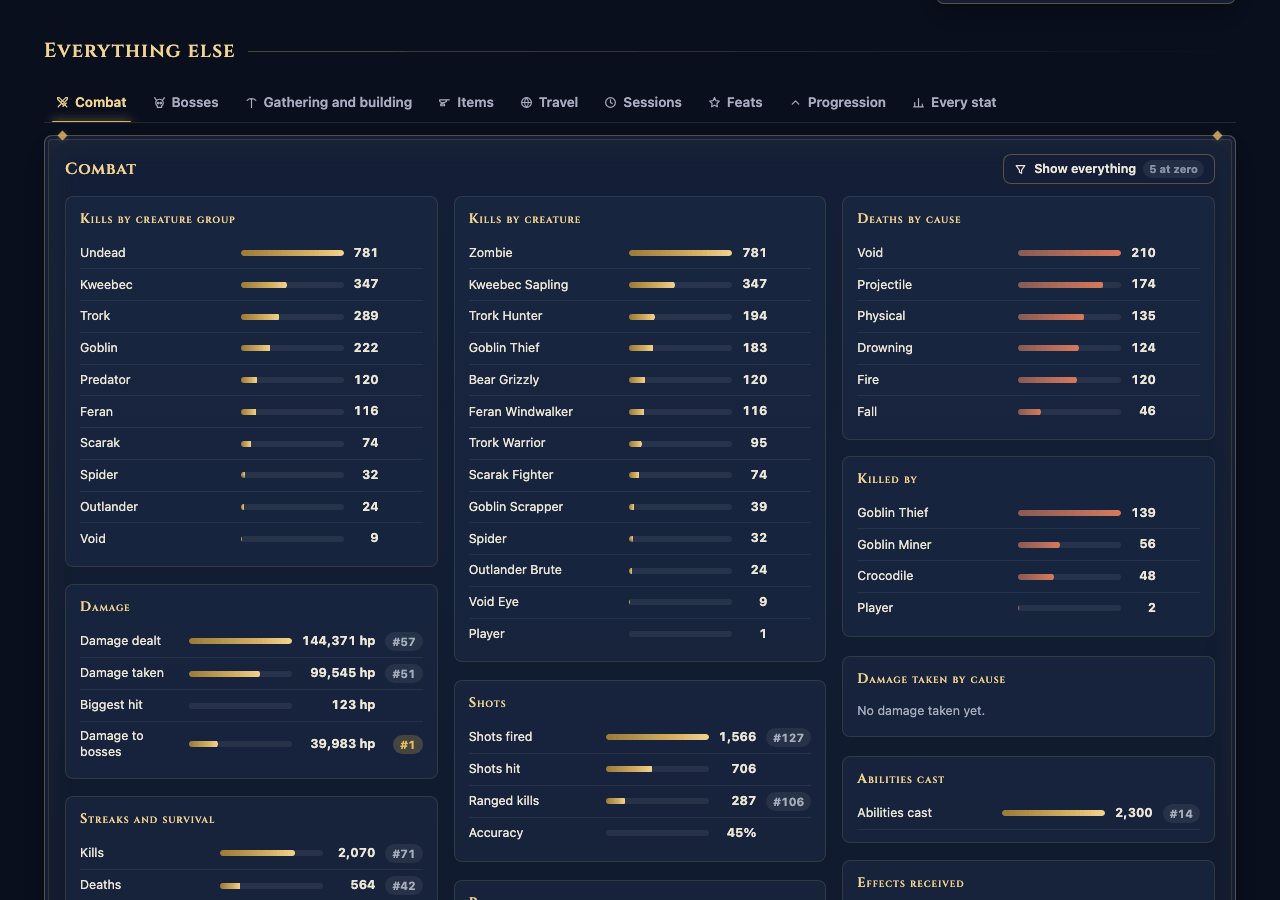
Chronicle Stats counts what happens on your server. Blocks broken and placed per block, creatures slain per creature, bosses with fastest kills by party size and hard mode clears, damage by cause, distance by how you moved, crafts per bench, zones, biomes and Memories, world events, weather, sessions and playtime, and the server's own tick rate, memory and entity counts. Everything is kept per player, per world and for the whole server, with history by day, so every leaderboard works for today, this week, this month and all time. Offline players are always ranked.
In game, /stats opens a tabbed browser with search, sorting and paging, /top shows a leaderboard with a podium, /stats vs puts two players side by side and /stats recap sums up your week. A small optional HUD and record toasts keep the tracking visible while you play.
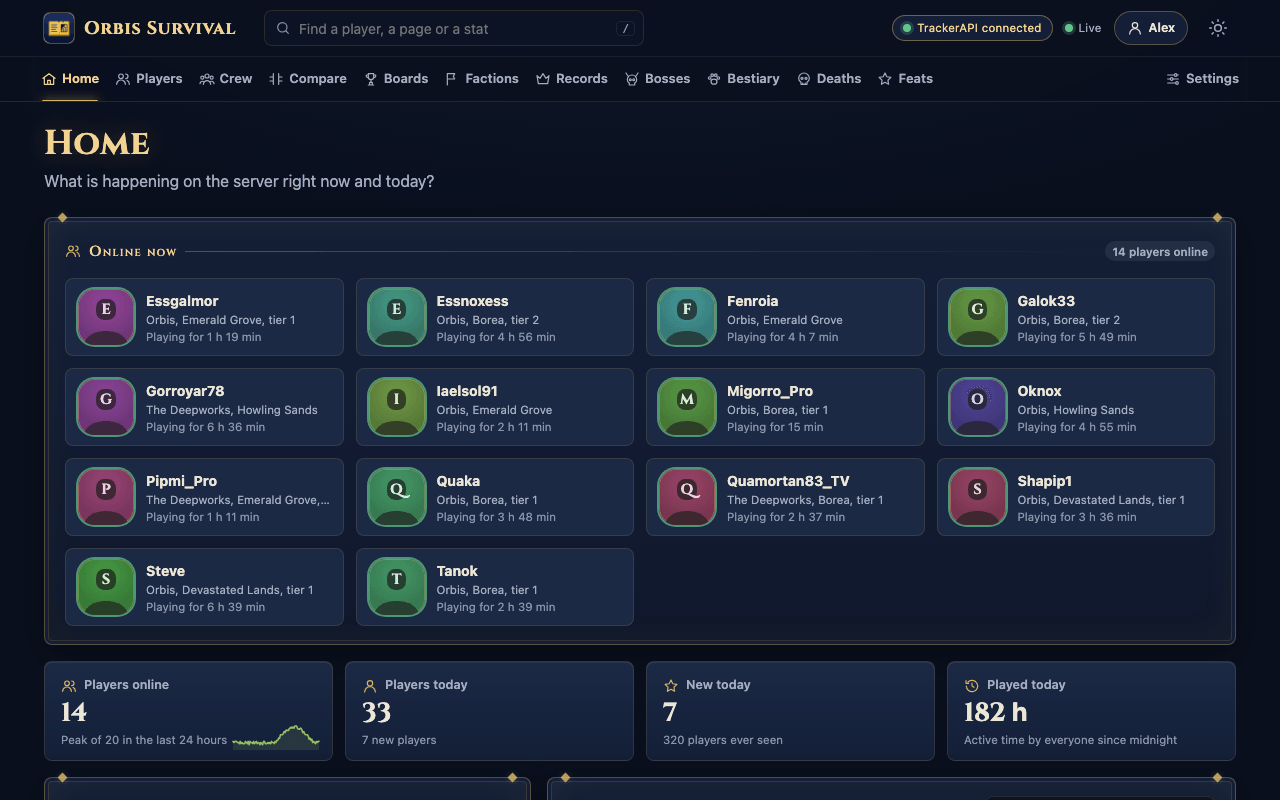
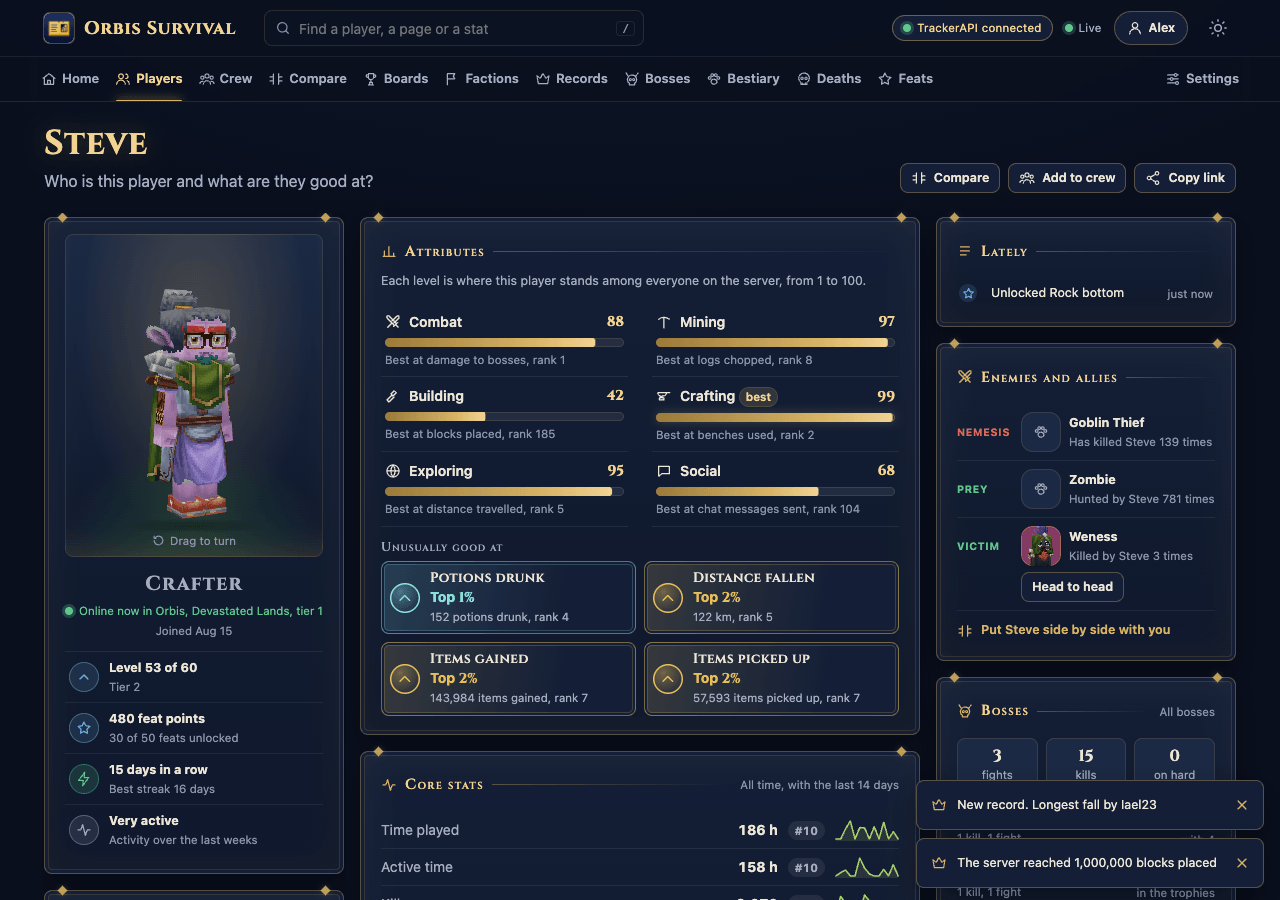
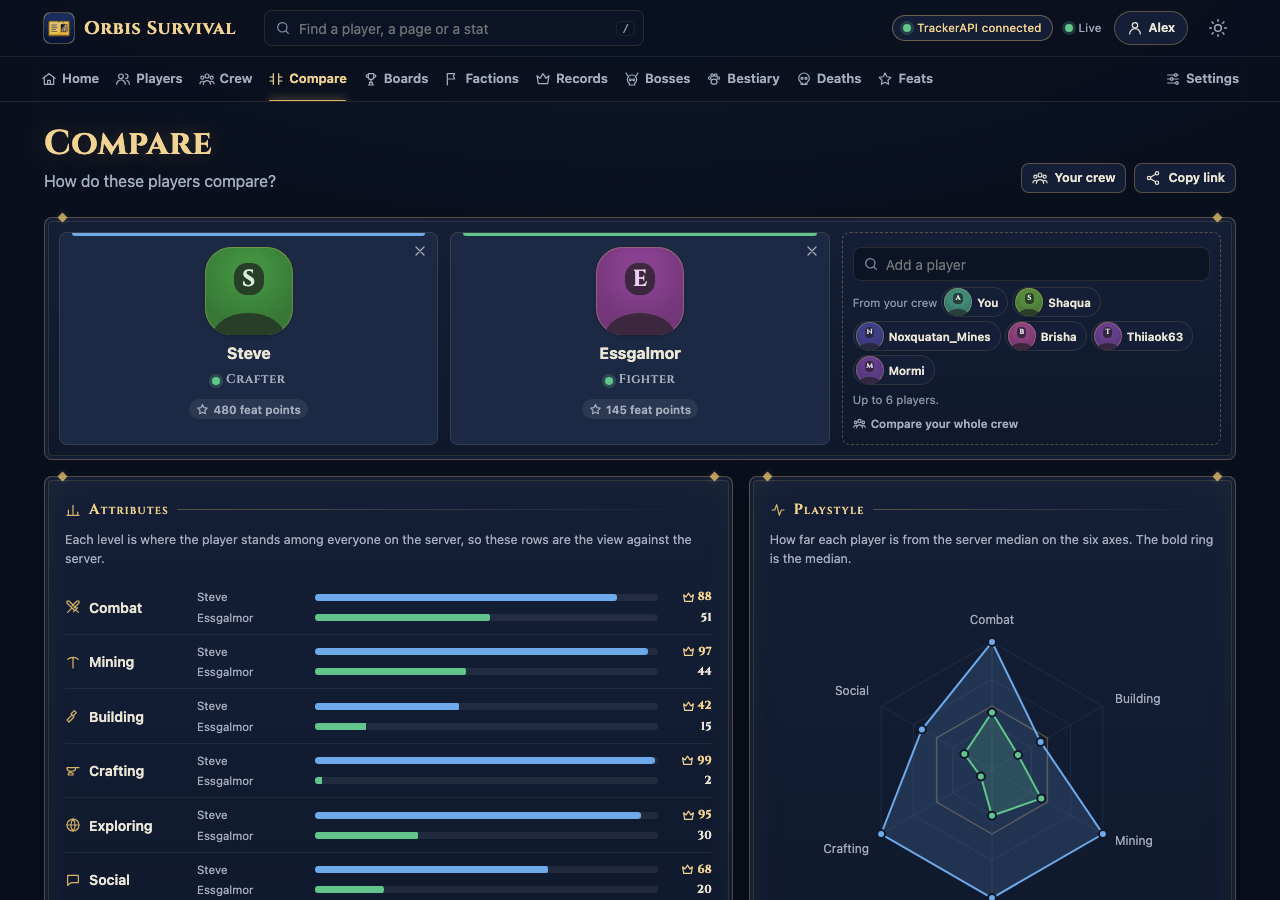
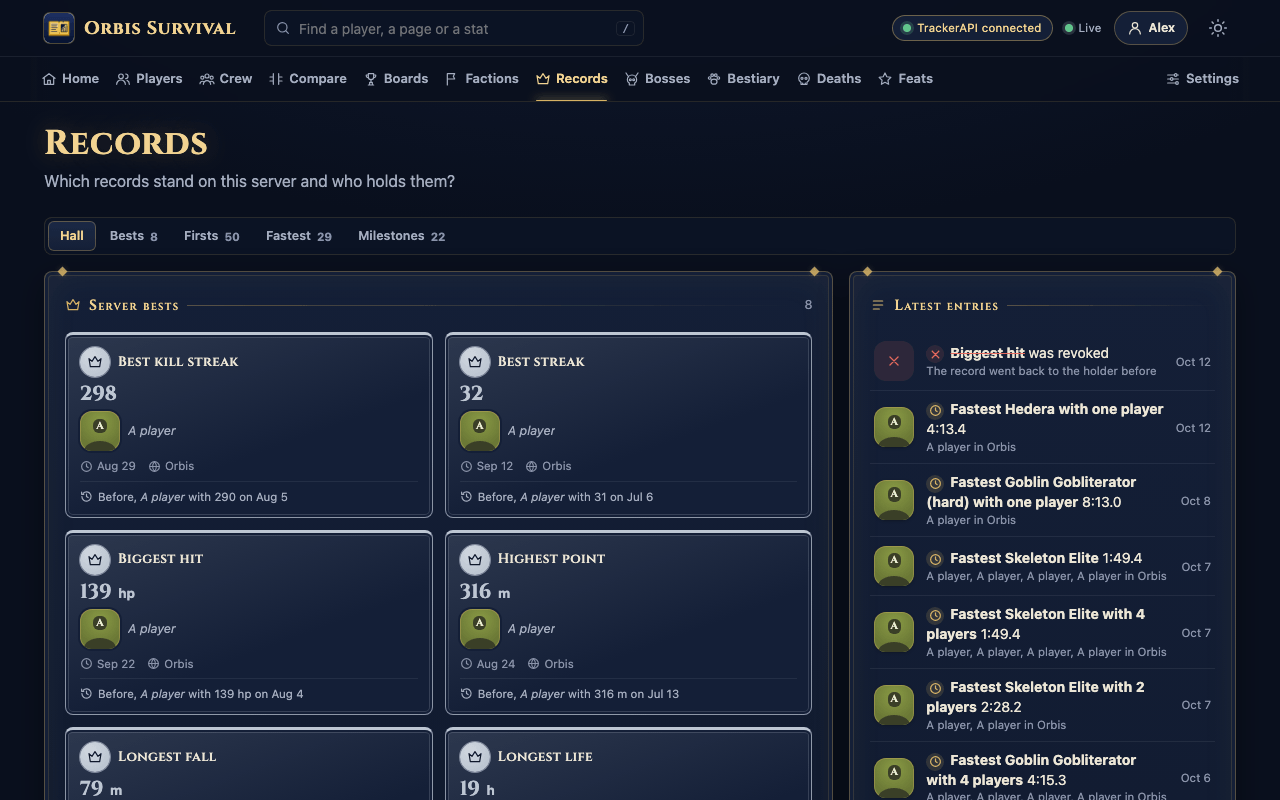
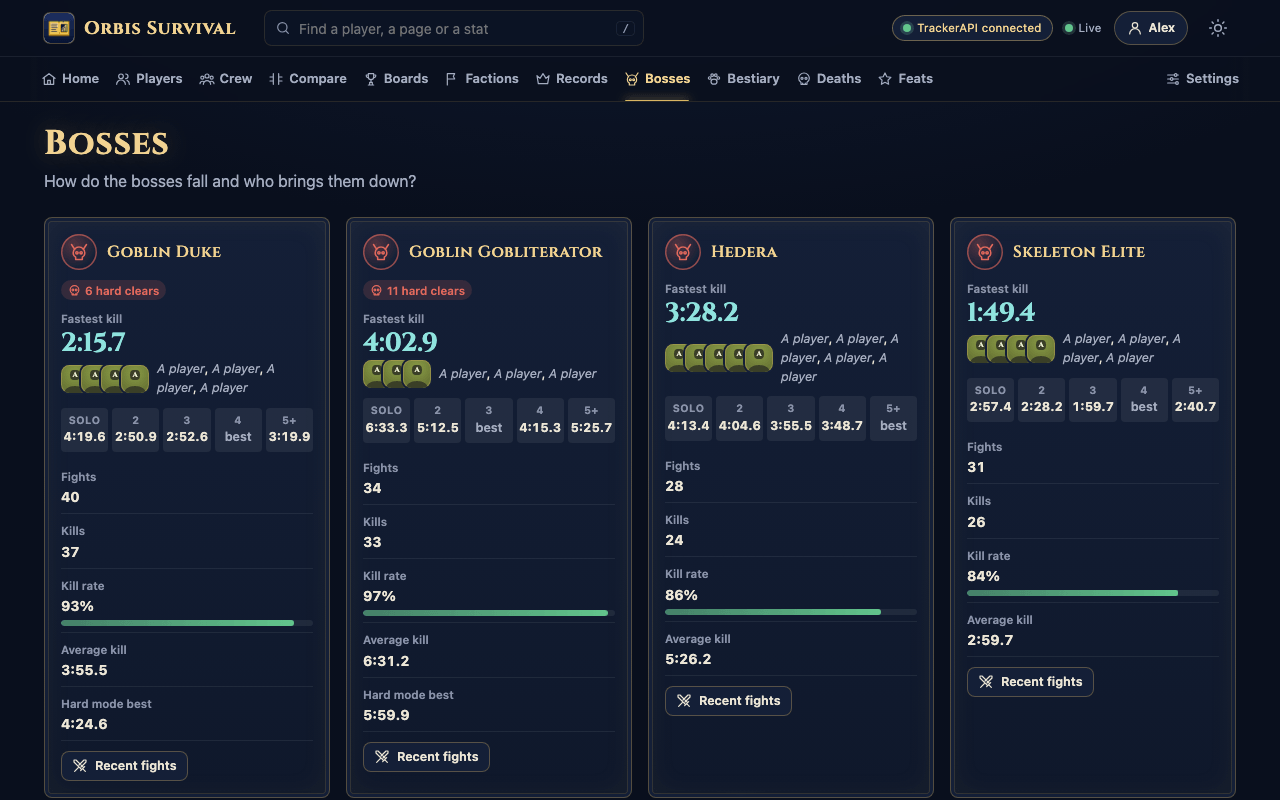
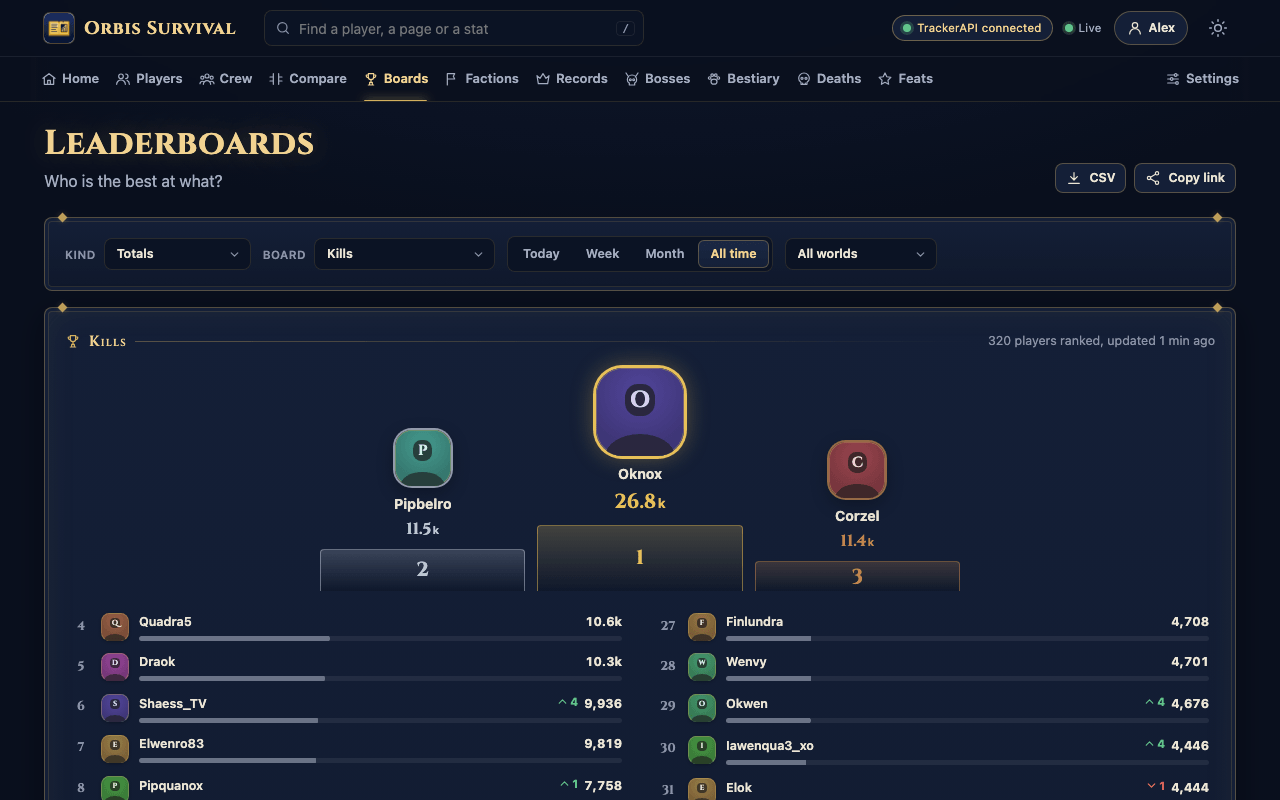
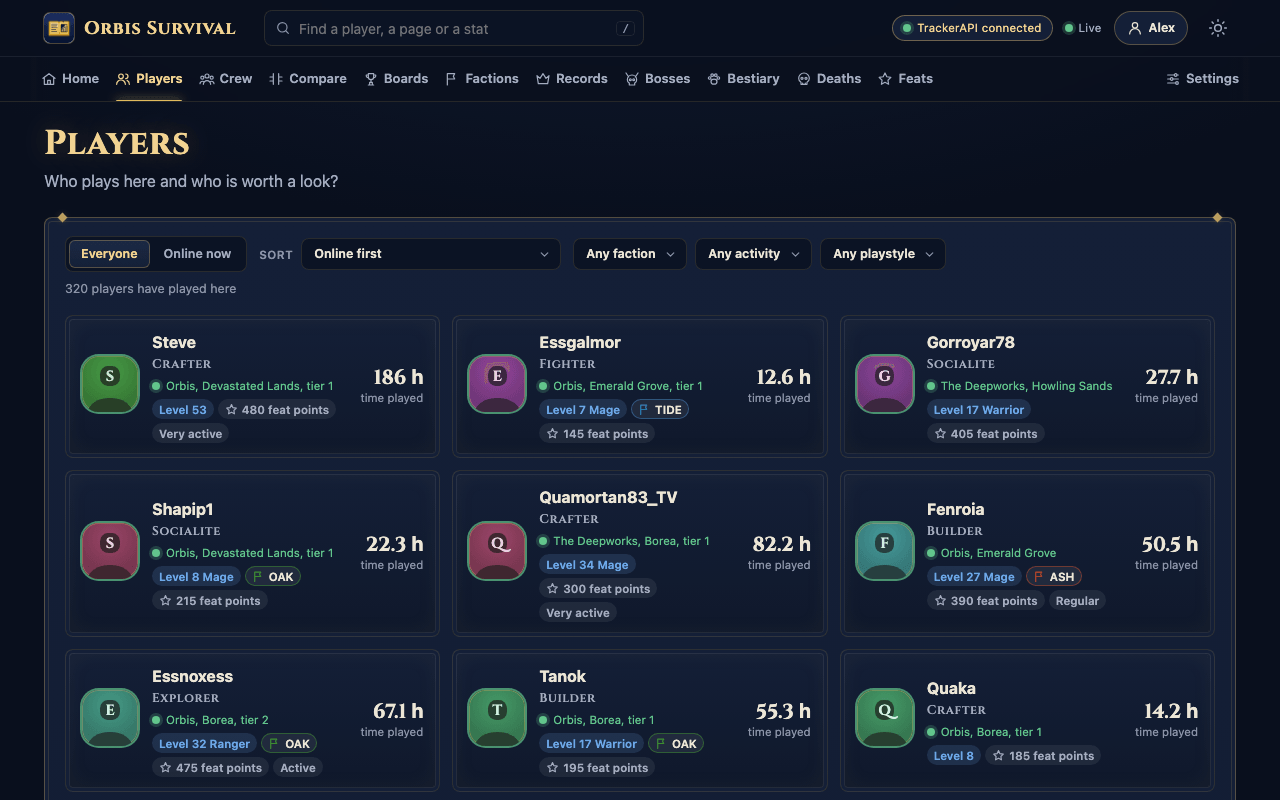
The web dashboard runs inside the plugin on its own port, with nothing else to host and no outside service. It serves player profiles with a playstyle radar and an activity calendar, head to head comparisons, leaderboards that show who climbed since yesterday, a hall of records, boss boards in speedrun style, a bestiary, a danger index of where and when players die, retention cohorts and a performance page for admins. It updates live while you watch and fits a phone.
The mod is a server plugin with a small UI asset pack bundled in the jar. It works in singleplayer worlds and on dedicated servers alike, and players join with an unmodified client. All data stays on your server.
Features
New in 1.2
- Queued bench crafts count correctly. The engine reports one craft event per finished unit of a queued batch and stamps each with the whole batch quantity, which made a batch of a hundred count as ten thousand crafts. Instant crafts were always right. Totals counted before 1.2.1 are not rewound.
- Record and personal best toasts have a quiet window per record, so a growing kill streak is announced once, then once more with its final value, instead of on every kill. See
recordToastQuietSeconds. - Works with TrackerAPI. With TrackerAPI installed, Chronicle Stats stops registering 22 of its own tracking hooks and two polls and reads everything from TrackerAPI, with the same rules for placed blocks, own drops and boss credit. The dashboard header and the
/statspage show whether it is connected. - A few numbers move under TrackerAPI. Weather time follows the world's weather rather than each player's, the in game hour on a death record can lag by up to a minute, and the RPG Leveling level of a creature is not known on death records while TrackerAPI is in use.
What gets counted
- 116 named statistics, from time played and blocks broken to longest fall, biggest hit, close calls and blood moons. 12 of them belong to the server as a whole, such as chunks generated, restarts and the most players online.
- 31 creature groups such as goblins, Trorks, Void creatures, undead, livestock and each Gobliterator fight, so "any goblin" just works.
- 35 breakdowns by type. Blocks broken, placed and used, items crafted, gained, picked up, dropped and eaten, kills and deaths per creature and cause, damage by cause, abilities per ability, distance per movement mode, time per world, zone, biome and weather, ore by depth, crafts per bench, portals, Memories and mounts.
- Server performance once a minute. Ticks per second against each world's own target, tick times, memory, garbage collection, entities, chunks and players online, with restart and crash markers.
Leaderboards
- 46 leaderboard stats. 40 of them have today, this week, this month and all time boards, and 6 records such as longest session and best kill streak keep an all time board. With RPG Leveling installed, RPG level and RPG experience add two more all time boards.
- Per type boards for kills per creature, blocks broken, blocks placed and items crafted, up to 128 types each, and kills per boss, up to 64 bosses.
- Per world boards for up to eight worlds.
- Rank and percentile beside every stat on your own page, and movers that show who climbed and who fell since yesterday or last week.
Bosses and records
- Every boss fight is kept with its party, duration, damage per player, hard mode and outcome.
- Fastest kills by party size from one to five, first kills, hard mode clears and deathless Gobliterator kills.
- Server records with the current holder and the one before, personal bests, and server milestones that show as a big title for everyone.
In game pages
Four pages and a HUD, all built from the game's own UI.
/statshas ten tabs. Overview, Combat, Bosses, Gathering, Items, Creatures, Travel, Discovery, Records and Server, plus Feats when Feats is installed. Items and Creatures are tables you can sort by any column, search and page through. The Server tab updates every second while it is open. With RPG Leveling, the Overview tab shows your level, XP, class, tier and XP by source./topshows a podium for the top three, the rest of the board and your own rank pinned at the bottom, with tabs for each window./stats vscompares twelve stats side by side, counts who leads, and shows your fights against each other and both playstyles./stats recapcovers this week with top deeds, new records, rank changes, your best day and your longest session.- The HUD shows up to five lines. By default those are kills this session, blocks broken, time played, the deadliest creature of the day and your progress to the next record.
Web dashboard
Fifteen pages with fifteen kinds of chart, in a light and a dark theme.
| Page | What it shows |
|---|---|
| Overview | Players online, new players, totals, a calendar of players per day, a weekday by hour punchcard, the server recap, the biggest movers, and levels and classes with RPG Leveling |
| Players | Every player who ever joined, searchable and sortable, online players first |
| Profile | Playstyle radar, activity calendar, weekly and monthly recap, nemesis and prey, combat, travel, items, the timeline of bests and feats, the RPG level, XP by source, class and tier, and a link to the web map |
| Compare | Two players with mirrored bars, both playstyles on one radar, the head to head record and how each stands against the server |
| Leaderboards | Every board with its windows, worlds, medals, climbs and falls, a pin for your own row and CSV for linked viewers |
| Records | Firsts, bests with the previous holder, fastest kills and milestones |
| Bosses | Each boss with normal and hard mode, party size, record history and the fastest kills |
| Bestiary | A card per creature with kills, deaths caused, the top killer and the first killer, and locked cards for what nobody has fought |
| Deaths | A live feed, the deadliest causes, creatures, zones, worlds and biomes, and a ring of deaths by game hour with blood moons marked |
| Retention | Weekly join cohorts, how many come back after a day, a week and a month, and activity groups over 30 days |
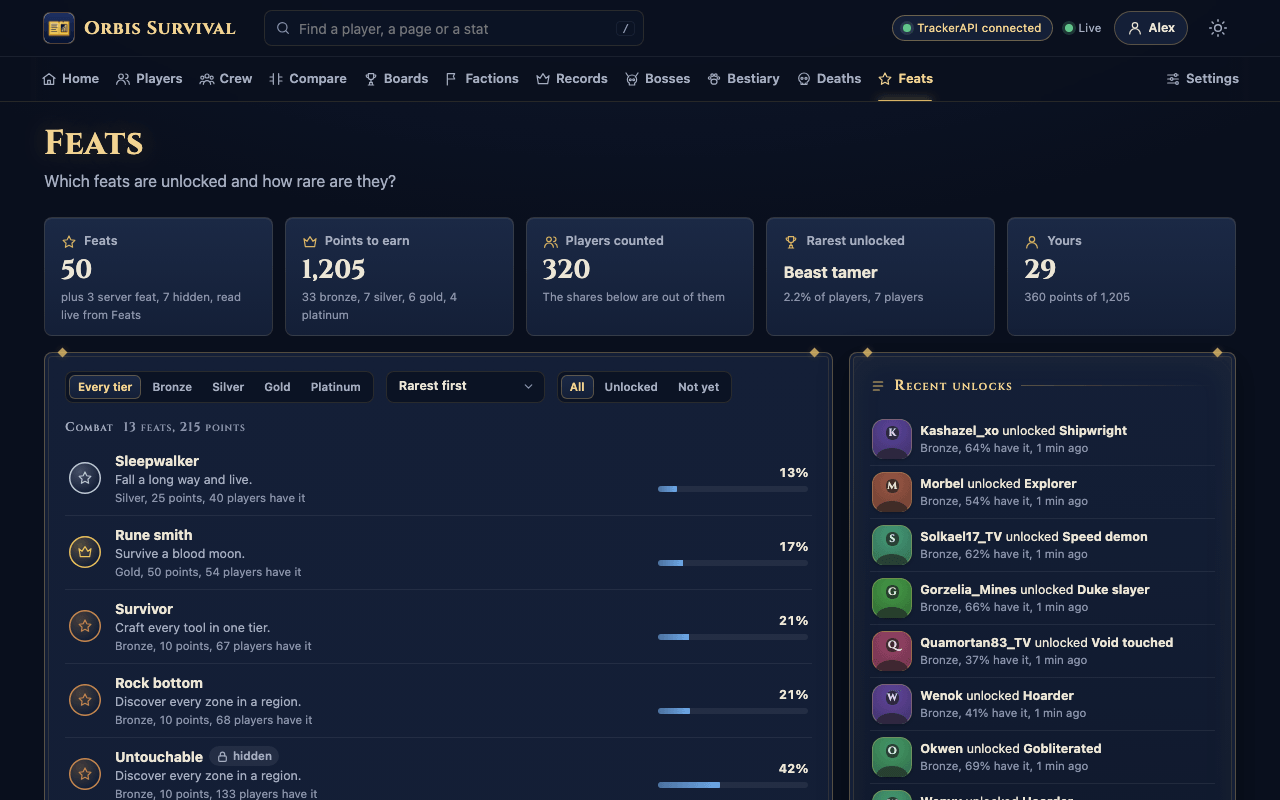
| Feats | Rarity of every feat and the latest unlocks, when Feats is installed |
| Performance | Ticks per second, tick times, memory, entities, chunks and the cost of Chronicle Stats itself, for admins |
| Settings | Theme, linking, what you can see, and for admins the Feats import with its progress and the erase of a player |
The chart kinds are time series, sparklines, ranked bars, mirrored bars, columns, donuts, radars, calendars, punchcards, bullets, step lines, stacked areas, a 24 hour ring, a cohort triangle and a level ring. Every link is shareable and the page follows the server through one live event stream.
For other tools
export/stats.jsonholds the top ten of each leaderboard, server totals and the latest records, with hidden players shown as "A player". Atlas reads it for its Chronicle tab.- PlaceholderAPI forms are
%chronicle_total_<key>%,%chronicle_today_<key>%,%chronicle_week_<key>%,%chronicle_month_<key>%,%chronicle_rank_<key>%and%chronicle_rank_<key>_<window>%, where the window istoday,week,monthorall.
Getting started
- Download
ChronicleStats-<version>.jar. - Put it in your Mods folder.
- Windows
%APPDATA%\Hytale\UserData\Mods - macOS
~/Library/Application Support/Hytale/UserData/Mods - Dedicated server, the server's
mods/directory
- Windows
- Start the world or server. Counting begins the moment a player joins.
- Type
/statsin game, or openhttp://<server address>:8124/in a browser. - Run
/chronicle linkin game and click the link to sign your browser in as your player.
Warning Set
publicUrlinchronicle.jsonbefore you share the dashboard, otherwise/chronicleand/chronicle linkcannot give players a working address.
Warning Open port 8124 in the firewall only if the dashboard should be reachable from other machines.
Commands
Player commands are open to everyone. Admin commands need the chronicle.admin permission, and the server console has it.
| Command | What it does | Permission |
|---|---|---|
/chronicle |
Shows the version and the dashboard address. | None |
/chronicle link |
Gives a six character code and a link that signs your browser in, valid for five minutes. | None |
/chronicle privacy <public|private> |
Shows or hides your name on boards and records and keeps your page to yourself and staff. | None |
/chronicle notify <on|off> |
Turns your Chronicle Stats toasts and big titles on or off. | None |
/chronicle hud <on|off> |
Shows or hides your HUD. | None |
/stats |
Opens your statistics. Alias /statistics. |
None |
/stats <player> |
Opens another player's statistics, online or not, unless they are private. | None |
/stats vs <player> |
Compares you with another player. | None |
/stats recap |
Opens your recap of this week. | None |
/top [stat] [today|week|month|all] |
Opens a leaderboard. Alone it shows time played. Alias /leaderboard. |
None |
/chronicle reload |
Reads chronicle.json again without a restart. |
chronicle.admin |
/chronicle admin status |
Players online and known, integrations, boards, the last rollup and the last save. | chronicle.admin |
/chronicle admin perf [reset] |
What each Chronicle Stats handler costs, or clears the report. | chronicle.admin |
/chronicle admin reset <player> |
Clears a player's counters. Records stay as history. | chronicle.admin |
/chronicle admin erase <player> --confirm |
Removes everything Chronicle Stats holds about an offline player. Without --confirm it only says what would happen. |
chronicle.admin |
/chronicle admin record revoke <recordKey> |
Takes a record away and gives it back to the previous holder. | chronicle.admin |
/chronicle admin boards reset <prefix> |
Clears the per type boards of one prefix, such as kill. |
chronicle.admin |
/chronicle admin import feats [--force] |
Brings over the statistics Feats kept for players Chronicle Stats has never seen, with a progress line for large folders. | chronicle.admin |
A set of /chronicle debug test tools exists for admins and stays off unless debugCommands is true.
Configuration
chronicle.json is created in mods/Ryvrook_ChronicleStats/ on first start. Edit it and run /chronicle reload. Missing keys are written back with their defaults and values out of range are corrected with a line in the log. These are the keys most owners touch first.
| Key | Default | Meaning |
|---|---|---|
port |
8124 |
Dashboard port. |
bind |
"0.0.0.0" |
Listen address. Use 127.0.0.1 behind a reverse proxy. |
publicUrl |
"" |
The address /chronicle and /chronicle link hand out. |
basePath |
"" |
Sub path behind a reverse proxy, such as /stats. |
publicTitle |
"Chronicle Stats" |
Page and tab title. A title already in chronicle.json is kept. |
atlasUrl |
"" |
Address of the Atlas web map. Profiles, the players list and /stats link to it. |
webEnabled |
true |
false turns the dashboard off. |
adminToken |
random | Full access for tools, sent as X-Chronicle-Token or a Bearer token. |
trustedProxies |
[] |
Reverse proxy addresses or CIDR ranges. |
visibility |
see below | Who sees each part of the dashboard. |
publicProfiles |
true |
false makes every player private. |
excludedPlayers |
[] |
Names or uuids kept off every board and record. |
hideStaffPermission |
"chronicle.hide" |
Players granted this exact node are kept off boards and records. |
hudDefault |
false |
Turns the HUD on for players who never chose. |
hudLines |
five lines | Up to five HUD lines, stat keys or session_kills, session_time, deadliest_today and next_record. |
toasts |
true |
Record and personal best toasts. |
recordToastQuietSeconds |
120 |
A record that keeps rising, such as a kill streak, is announced once, and further rises within this many seconds go out as one toast with the final value when the window ends. 0 announces every rise. |
tracker |
auto |
auto reads everything from TrackerAPI when it is installed and tracks on its own when it is not, always only uses TrackerAPI, never ignores it. Read at start. |
serverMilestones |
true |
Big titles for server milestones. |
ignoreCreative |
true |
Stops counting in Creative mode. |
disabledWorlds |
[] |
Worlds where nothing is counted. |
timeZone |
"" |
Zone for days and weeks. Empty uses the server's zone. |
weekStart |
"MONDAY" |
First day of the week for weekly boards. |
featsExport |
"mods/Ryvrook_Feats/export/feats.json" |
Feats export file. |
featsBinding |
true |
false stops Chronicle Stats listening to Feats unlocks. |
rpgLeveling |
{"enabled": true, "readSaveFiles": false} |
RPG Leveling binding. readSaveFiles has no effect yet. |
cookieName |
"ryvrook_session" |
Login cookie, the same name Atlas uses. It is host wide, so one login works for the map and the dashboard on one host name. |
exportSeconds |
30 |
How often export/stats.json is rewritten. 0 turns it off. |
The dashboard has thirteen visibility layers, each public, linked or admin. By default everything is public except the players list and CSV downloads, which need a linked browser, and performance, which is for admins. The retention keys are listed in the privacy policy.
Every key reloads live except maxWorldKeys, maxSeriesWorlds, boardWorldKeys, boardIdCaps and apiBoardKeysMax, which need a restart. timeZone and weekStart apply from the next day. A chronicle.json that does not parse is refused by the reload, so Chronicle Stats keeps the running settings, leaves the file as it is and says which line to fix.
Privacy
Everything Chronicle Stats records stays on your server, in the mod's folder. Nothing is sent to any outside service, IP addresses are never written to disk and chat text is never read. Players can go private with /chronicle privacy private, owners can keep players off the boards entirely, and death heights are shown to admins only. Players hidden on the Atlas map are treated like hidden staff, left off boards and /top. When a player asks to be removed, /chronicle admin erase <player> --confirm or the Erase button in the dashboard settings removes everything Chronicle Stats holds about them, and a record they held alone goes back to the player before them. An erase cut short by a restart finishes at the next start, and a later Feats import cannot bring the player back. A short privacy policy you can publish for your players ships as docs/PRIVACY.md, with every file and retention period spelled out.
Requirements
- Hytale server 0.7.0 or newer, tested on 0.7.1.
- Java 25.
- No other mods required. TrackerAPI, Feats, Atlas, RPG Leveling, BetterMap and PlaceholderAPI are picked up when present.
Server owners
One hostname for the map and the dashboard
To share one login with Atlas, serve both from one hostname under two base paths, such as https://example.com/map/ and https://example.com/stats/. Set basePath to /map in atlas.json and to /stats in chronicle.json, keep the same cookieName in both, bind both to 127.0.0.1 and list the proxy in trustedProxies. Set publicUrl in Chronicle Stats to the full address and chronicleUrl in Atlas to the same address, so the Chronicle tab in Atlas links to the dashboard, and set atlasUrl in Chronicle Stats to the map address so profiles link to the map. Both cookies carry Path=/, so a login on either site works on the other.
In the proxy, send /map/ to http://127.0.0.1:8123 and /stats/ to http://127.0.0.1:8124 with the full path left on, since each mod strips its own base path. Pass the X-Forwarded-For and X-Forwarded-Proto headers, and turn response buffering off for both so the live event streams reach browsers at once.
Warning Behind a reverse proxy, list it in
trustedProxies. Otherwise every browser shares the proxy's address for rate limits and the login cookie is never marked Secure.
The admin token
adminToken is generated on first start and grants full access to the API, including private players and death heights. It is meant for scripts and tools. Staff in a browser run /chronicle link instead and get the admin view when they hold chronicle.admin.
Warning Keep
chronicle.jsonprivate. If the token ever leaks, change it and run/chronicle reload.
Excluded players and hidden staff
excludedPlayerskeeps test accounts and bots off every board and out of every record. Their activity still counts toward server totals.hideStaffPermissiondoes the same for staff. Grantchronicle.hideto a player or group. The*wildcard operators hold does not count, so an owner who plays is still ranked, and an explicit-chronicle.hidewins.- Players hidden in Atlas are treated like hidden staff. They are left off boards, the board CSV and
/top, and/stats <name>answers them like an unknown name. - Hidden and private players show as "A player" on boards, records, the death feed and the export, and their profile opens only for themselves and admins.
Note Players who played before Chronicle Stats was installed start from zero. With Feats installed,
/chronicle admin import featsbrings over what Feats kept for players Chronicle Stats has never seen.
Known limits
Chronicle Stats 1.2.1 runs on a live 0.7.1 server with real players beside Feats, Atlas and TrackerAPI, and every release is checked on a headless server with synthetic players, unit tests, a load test of 200 browsers and screenshots of every dashboard page at desktop and phone width. What has not been confirmed in a real client yet is how the in game pages, the HUD next to BetterMap, the toasts and the TrackerAPI chip on /stats look, since no client has drawn them so far.
- With TrackerAPI installed, weather time follows the world's weather rather than each player's, the in game hour on a death record can lag by up to a minute, the level of a creature from RPG Leveling is not known on death records, and health, stamina and mana need
vitalsSecondsset to 1 inTrackerAPI.json. Without TrackerAPI none of this applies. - Crafts queued at a bench before 1.2.1 were over counted, see New in 1.2. Those totals stay as they are unless an admin resets them.
- The RPG Leveling class and tier of a player show once they were online since the server started. Levels and XP show for everyone.
/chronicle admin resetclears a player's counters but keeps their records and logged sessions, deaths and boss fights until those expire./chronicle admin eraseremoves everything, but only for a player who is offline, and it leaves Feats files and backups alone. A Feats import skips an erased player until they join again.- A logout on the map while Chronicle Stats is not running is not seen by the dashboard, which keeps that login until the player logs out there or leaves it unused for
sessionDays.
Links
- Source code https://github.com/ryvrook/chronicle-stats (Private)
- Discord
https://discord.gg/mKgxyk6qvb - More mods by ryvrook
https://www.curseforge.com/members/ryvrook/
Chronicle Stats Team