Chat Customization
- By
Customize your chat with prefixes, suffixes, colors, nicknames, pronouns, and more!
Chat Customization
DISABLE CHAT FORMATTING IN LUCKPERMS AND USE JAVA 25
Customize your chat with prefixes, suffixes, colors, nicknames, pronouns, and more!
Documentation
Features
- Visual Editor - Full GUI for customizing your chat appearance with live preview
- Preset System - Admin-defined presets (Style, Prefix, Pronoun, Message) with automatic application based on permissions and priority
- Gradients Tab - Dedicated tab for gradient and rainbow configuration per element
- Custom prefixes and suffixes with colors
- Nicknames and pronouns display
- Name and message color customization
- Text styles: bold, italic, underline
- Gradient text effects for all elements (prefix, name, pronouns, suffix, message)
- Rainbow text effects for all elements
- @mentions with sound notifications
- Permission-Based - Fine-grained control over features and presets
Visual Editor
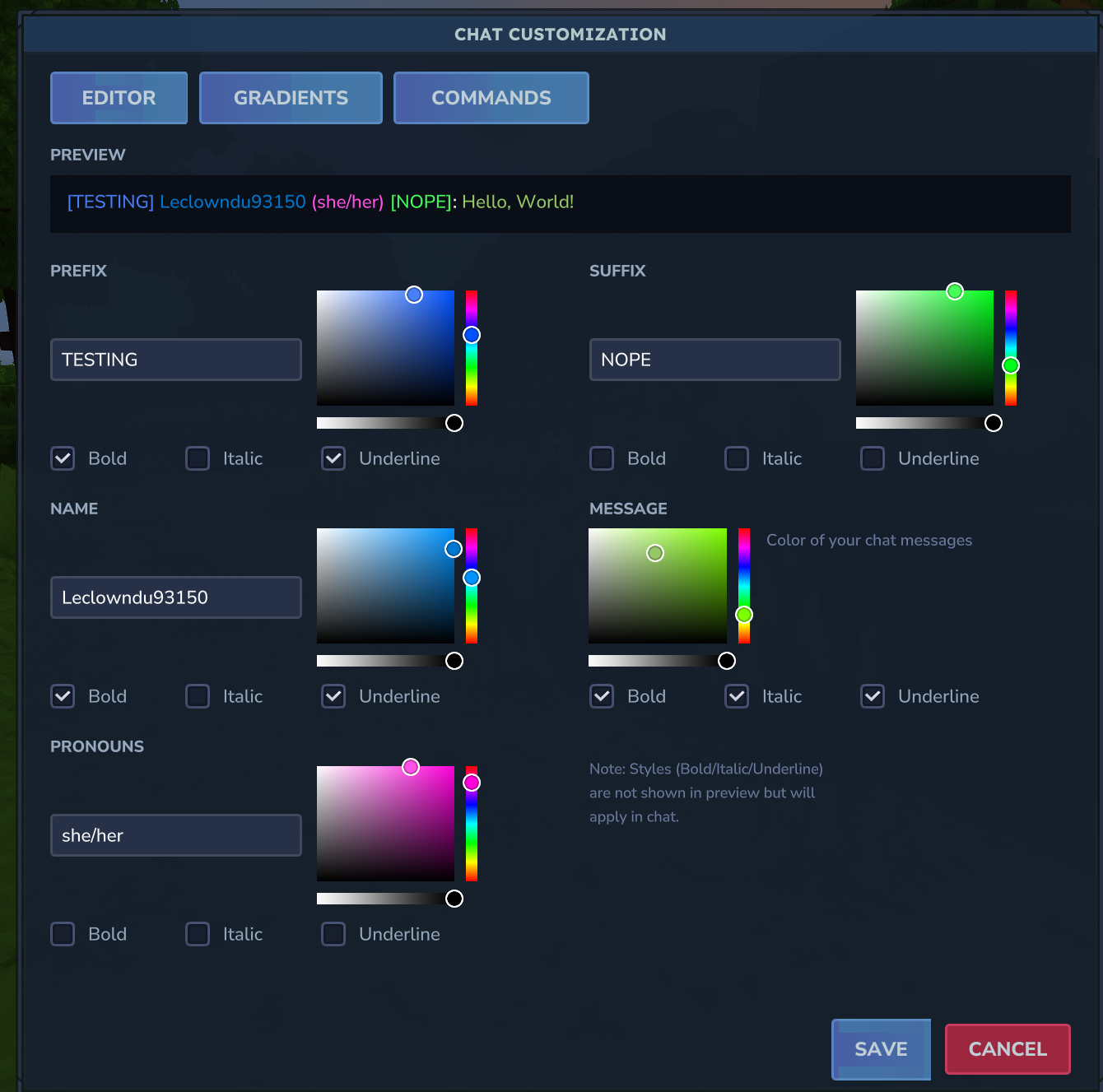
Open the visual editor with /chateditor to customize your chat without memorizing commands:
- Editor Tab - Set prefix, suffix, nickname, pronouns with color pickers and style toggles
- Gradients Tab - Configure gradient start/end colors and rainbow effects for each element
- Commands Tab - Quick reference for all available commands
- Live preview of your chat appearance
- Color pickers for each element
- Style toggles (bold, italic, underline)
- Press X to reset gradients/rainbow for any element
Commands
Basic Customization
| Command | Description | Example |
|---|---|---|
/prefix <text> |
Set your chat prefix | /prefix VIP |
/prefix "spaced text" |
Set prefix with spaces | /prefix "VIP Member" |
/suffix <text> |
Set your chat suffix | /suffix MVP |
/suffix "spaced text" |
Set suffix with spaces | /suffix "2024 Edition" |
/nickname <name> |
Set your display name | /nickname CoolSteve |
/nickname "spaced name" |
Set nickname with spaces | /nickname "Cool Steve" |
/pronouns <text> |
Set your pronouns | /pronouns she/her |
Colors
| Command | Description | Example |
|---|---|---|
/namecolor <color> |
Set your name color | /namecolor GOLD |
/msgcolor <color> |
Set your message color | /msgcolor #FF69B4 |
/prefixcolor <color> |
Set your prefix color | /prefixcolor RED |
/suffixcolor <color> |
Set your suffix color | /suffixcolor AQUA |
/pronounscolor <color> |
Set your pronouns color | /pronounscolor PINK |
/colors |
Show all available colors | /colors |
Clearing Settings
Use /hyssential clear <target> to clear any setting:
| Command | Description |
|---|---|
/hyssential clear nickname |
Reset to username |
/hyssential clear prefix |
Remove your prefix |
/hyssential clear suffix |
Remove your suffix |
/hyssential clear pronouns |
Remove your pronouns |
/hyssential clear namecolor |
Reset name color |
/hyssential clear msgcolor |
Reset message color |
/hyssential clear prefixcolor |
Reset prefix color |
/hyssential clear suffixcolor |
Reset suffix color |
/hyssential clear pronounscolor |
Reset pronouns color |
/hyssential clear colors |
Reset all colors |
/hyssential clear style |
Clear all text styles |
/hyssential clear rainbow |
Clear all rainbow effects |
/hyssential clear gradient |
Clear all gradients |
/hyssential clear all |
Reset entire chat profile |
Text Styles
| Command | Description | Example |
|---|---|---|
/style <target> bold |
Toggle bold on element | /style name bold |
/style <target> italic |
Toggle italic on element | /style prefix italic |
/style <target> underline |
Toggle underline on element | /style message underline |
Valid targets: prefix, name, pronouns, suffix, message
Advanced Effects
| Command | Description | Example |
|---|---|---|
/gradient <target> <start> <end> |
Gradient effect on any element | /gradient name RED GOLD |
/gradient <target> clear |
Remove gradient from element | /gradient prefix clear |
/rainbow <target> |
Toggle rainbow on element | /rainbow name |
/rainbow <target> on |
Enable rainbow on element | /rainbow suffix on |
/rainbow <target> off |
Disable rainbow on element | /rainbow message off |
Valid targets: prefix, name, pronouns, suffix, message
Profile Management
| Command | Description | Example |
|---|---|---|
/chateditor |
Open the visual chat editor | /chateditor |
/chatprofile |
View your current chat profile | /chatprofile |
/resetformat |
Reset all customizations | /resetformat |
Preset Commands
| Command | Description | Permission |
|---|---|---|
/preset |
Open the preset selector GUI | - |
/chatcustom preset |
Open preset management UI (admin) | chatcustom.admin.presets |
/chatcustom reload |
Reload configuration and presets | chatcustom.admin.reload |
Alias: /cc for /chatcustom
Presets are automatically applied based on player permissions and priority when chatting. Higher priority presets take precedence.
Admin Commands
| Command | Description | Example |
|---|---|---|
/chatadmin view <player> |
View a player's profile | /chatadmin view Steve |
/chatadmin reset <player> |
Reset a player's profile | /chatadmin reset Steve |
/chatadmin setprefix <player> [value] |
Set/clear player prefix | /chatadmin setprefix Steve Admin |
/chatadmin setsuffix <player> [value] |
Set/clear player suffix | /chatadmin setsuffix Steve Pro |
/chatadmin setnickname <player> [value] |
Set/clear player nickname | /chatadmin setnickname Steve Steven |
/chatadmin setpronouns <player> [value] |
Set/clear player pronouns | /chatadmin setpronouns Steve he/him |
/chatadmin setnamecolor <player> [value] |
Set/clear player name color | /chatadmin setnamecolor Steve RED |
/chatadmin setmsgcolor <player> [value] |
Set/clear player message color | /chatadmin setmsgcolor Steve AQUA |
/chatadmin setprefixcolor <player> <color> |
Set player prefix color | /chatadmin setprefixcolor Steve GOLD |
/chatadmin setsuffixcolor <player> <color> |
Set player suffix color | /chatadmin setsuffixcolor Steve BLUE |
/chatadmin setpronounscolor <player> <color> |
Set player pronouns color | /chatadmin setpronounscolor Steve PINK |
/chatadmin clearnamecolor <player> |
Clear player name color | /chatadmin clearnamecolor Steve |
/chatadmin clearmsgcolor <player> |
Clear player message color | /chatadmin clearmsgcolor Steve |
/chatadmin clearprefixcolor <player> |
Clear player prefix color | /chatadmin clearprefixcolor Steve |
/chatadmin clearsuffixcolor <player> |
Clear player suffix color | /chatadmin clearsuffixcolor Steve |
/chatadmin clearpronounscolor <player> |
Clear player pronouns color | /chatadmin clearpronounscolor Steve |
/chatadmin setstyle <player> <target> <style> |
Set text style on element | /chatadmin setstyle Steve name bold |
/chatadmin setrainbow <player> <target> [on/off] |
Set rainbow on element | /chatadmin setrainbow Steve prefix on |
/chatadmin setgradient <player> <target> <start> <end> |
Set gradient on element | /chatadmin setgradient Steve name RED BLUE |
/chatadmin clearstyle <player> [target] |
Clear styles (all or specific) | /chatadmin clearstyle Steve name |
/chatadmin clearrainbow <player> [target] |
Clear rainbow (all or specific) | /chatadmin clearrainbow Steve |
/chatadmin cleargradient <player> [target] |
Clear gradient (all or specific) | /chatadmin cleargradient Steve prefix |
Available Colors
Named Colors
- RED — #FF5555
- DARK_RED — #AA0000
- GOLD — #FFAA00
- YELLOW — #FFFF55
- GREEN — #55FF55
- DARK_GREEN — #00AA00
- AQUA — #55FFFF
- DARK_AQUA — #00AAAA
- BLUE — #5555FF
- DARK_BLUE — #0000AA
- LIGHT_PURPLE — #FF55FF
- DARK_PURPLE — #AA00AA
- WHITE — #FFFFFF
- GRAY — #AAAAAA
- DARK_GRAY — #555555
- BLACK — #000000
- PINK — #FF69B4
- ORANGE — #FFA500
- LIME — #00FF00
- CYAN — #00FFFF
Custom Hex Colors
You can also use any hex color in the format #RRGGBB:
- #FF0000 — Pure Red
- #00FF00 — Pure Green
- #0000FF — Pure Blue
- #FF69B4 — Hot Pink
- #FFD700 — Gold
- #8A2BE2 — Blue Violet
Configuration
Config file: config.json
{
  "DefaultNameColor": "WHITE",
  "DefaultMessageColor": "WHITE",
  "MaxPrefixLength": 16,
  "MaxSuffixLength": 16,
  "MaxNicknameLength": 24,
  "MaxPronounsLength": 16,
  "AllowBold": true,
  "AllowItalic": true,
  "AllowUnderline": true,
  "AllowGradients": true,
  "AllowRainbow": true,
  "EnableMentions": true,
  "MentionColor": "YELLOW",
  "MentionSound": true
}| Option | Description | Default |
|---|---|---|
| DefaultNameColor | Default color for player names | WHITE |
| DefaultMessageColor | Default color for messages | WHITE |
| MaxPrefixLength | Maximum prefix length | 16 |
| MaxSuffixLength | Maximum suffix length | 16 |
| MaxNicknameLength | Maximum nickname length | 24 |
| MaxPronounsLength | Maximum pronouns length | 16 |
| AllowBold | Allow bold text style | true |
| AllowItalic | Allow italic text style | true |
| AllowUnderline | Allow underline text style | true |
| AllowGradients | Allow gradient text effects | true |
| AllowRainbow | Allow rainbow text effects | true |
| EnableMentions | Enable @mention system | true |
| MentionColor | Color for highlighted mentions | YELLOW |
| MentionSound | Play sound when mentioned | true |
Permissions
Configure permissions in config.json:
| Permission | Description | Default |
|---|---|---|
| chatcustomization.prefix | Use /prefix command | chatcustomization.prefix |
| chatcustomization.suffix | Use /suffix command | chatcustomization.suffix |
| chatcustomization.nickname | Use /nickname command | chatcustomization.nickname |
| chatcustomization.pronouns | Use /pronouns command | chatcustomization.pronouns |
| chatcustomization.color | Use color commands | chatcustomization.color |
| chatcustomization.style | Use style commands | chatcustomization.style |
| chatcustomization.gradient | Use gradient effects | chatcustomization.gradient |
| chatcustomization.rainbow | Use rainbow effects | chatcustomization.rainbow |
| chatcustomization.admin | Use admin commands | chatcustomization.admin |
Set RequirePermissionForPrefix, RequirePermissionForSuffix, etc. to true to enforce permissions.
Data Storage
Player profiles are stored in JSON format in the plugin data folder:
profiles.json- All player chat profiles
Chat Format Example
[VIP] Steve (he/him) [MVP]: Hello everyone!Where:
[VIP]- PrefixSteve- Nickname (or username)(he/him)- Pronouns[MVP]- SuffixHello everyone!- Message
Support on Discord
If you'd like to support me and the development of my mods, I recommend trying out BisectHosting. Use code "project8gbderam" to get 25% off your first month of a gaming server for new customers. They offer 24/7 support and lightning-fast response times, ensuring you're in great hands and providing exceptional assistance for all your gaming needs. https://www.bisecthosting.com/project8gbderam

The Chat Customization Team


Owner