


BroadcastSystem
- By
Capture d'écran 2026-01-15 213248.png
Capture d'écran 2026-01-15 213258.png
Capture d'écran 2026-01-15 013254.png

Capture d'écran 2026-01-15 013110.png
Capture d'écran 2026-01-15 013057.png
Capture d'écran 2026-01-15 013243.png

Capture d'écran 2026-01-15 213230.png
Description
The 1.1 will be a final version for now. I prefer to have a reliable plugin without errors than a plugin with multiple methods and errors or lags.
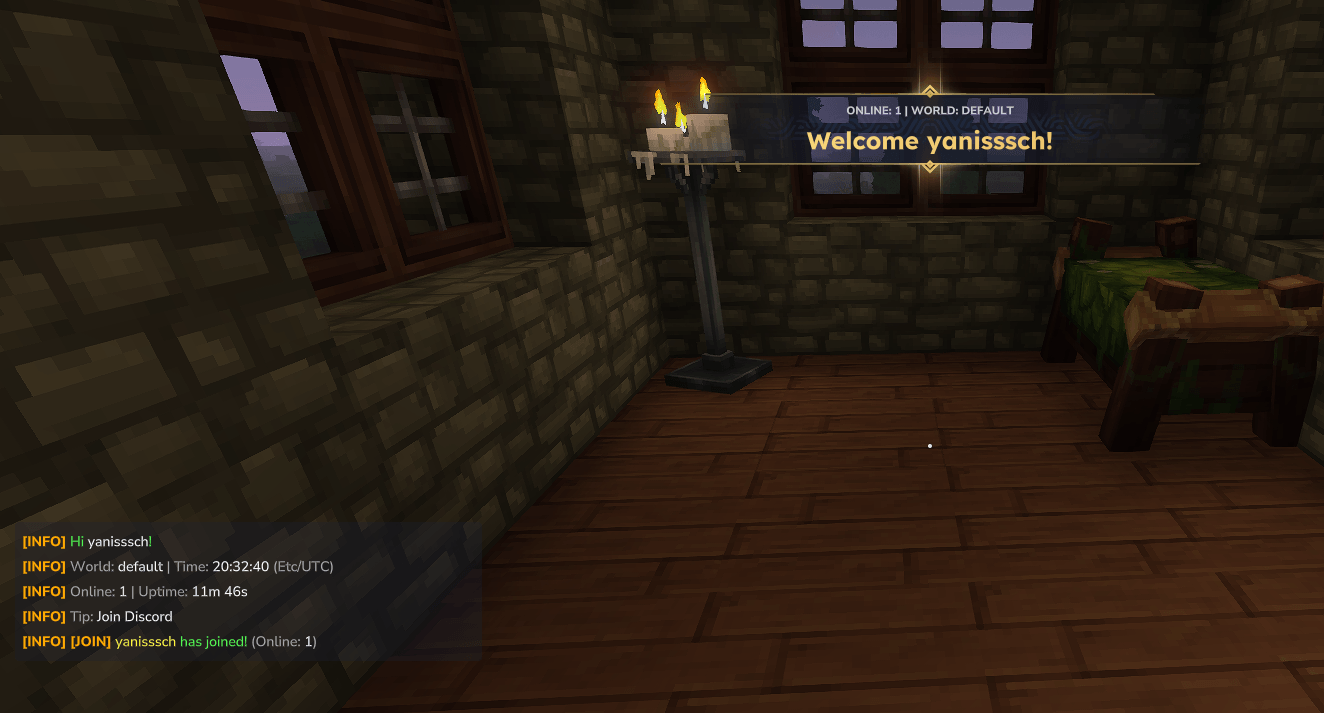
Looking for an easy way to display server tips, rules, Discord links, or announcements? BroadcastSystem provides two independent auto-broadcast systems (Chat + Title), plus join messages, manual commands, & colors, placeholders, and a clean JSON configuration.
Features:
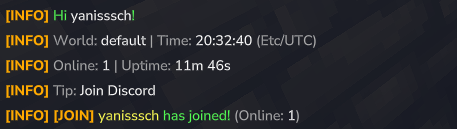
- ✅ Chat broadcasts (multi-line supported)
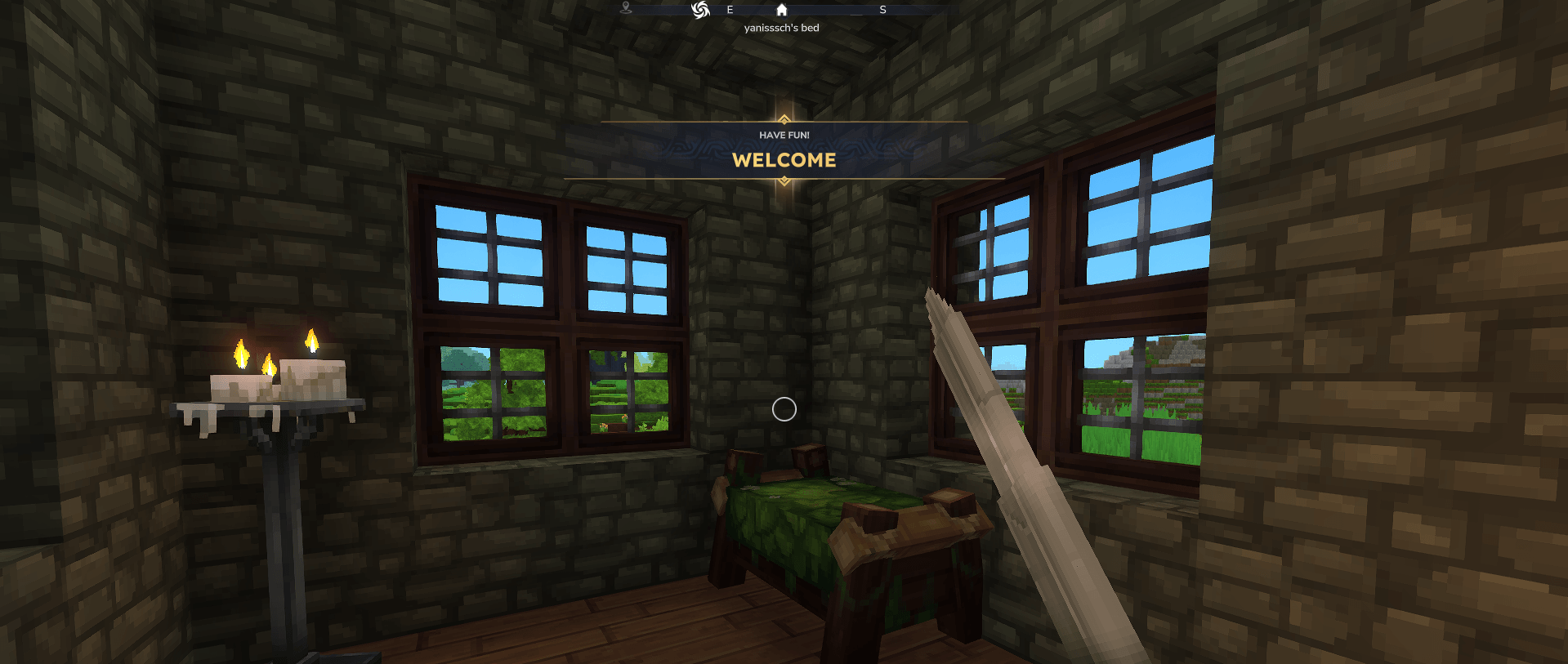
- ✅ Title broadcasts (Event Title / “big title” in the middle of the screen)
It also includes:
- ✅ Manual broadcast commands
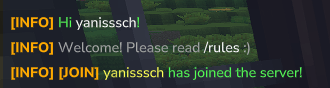
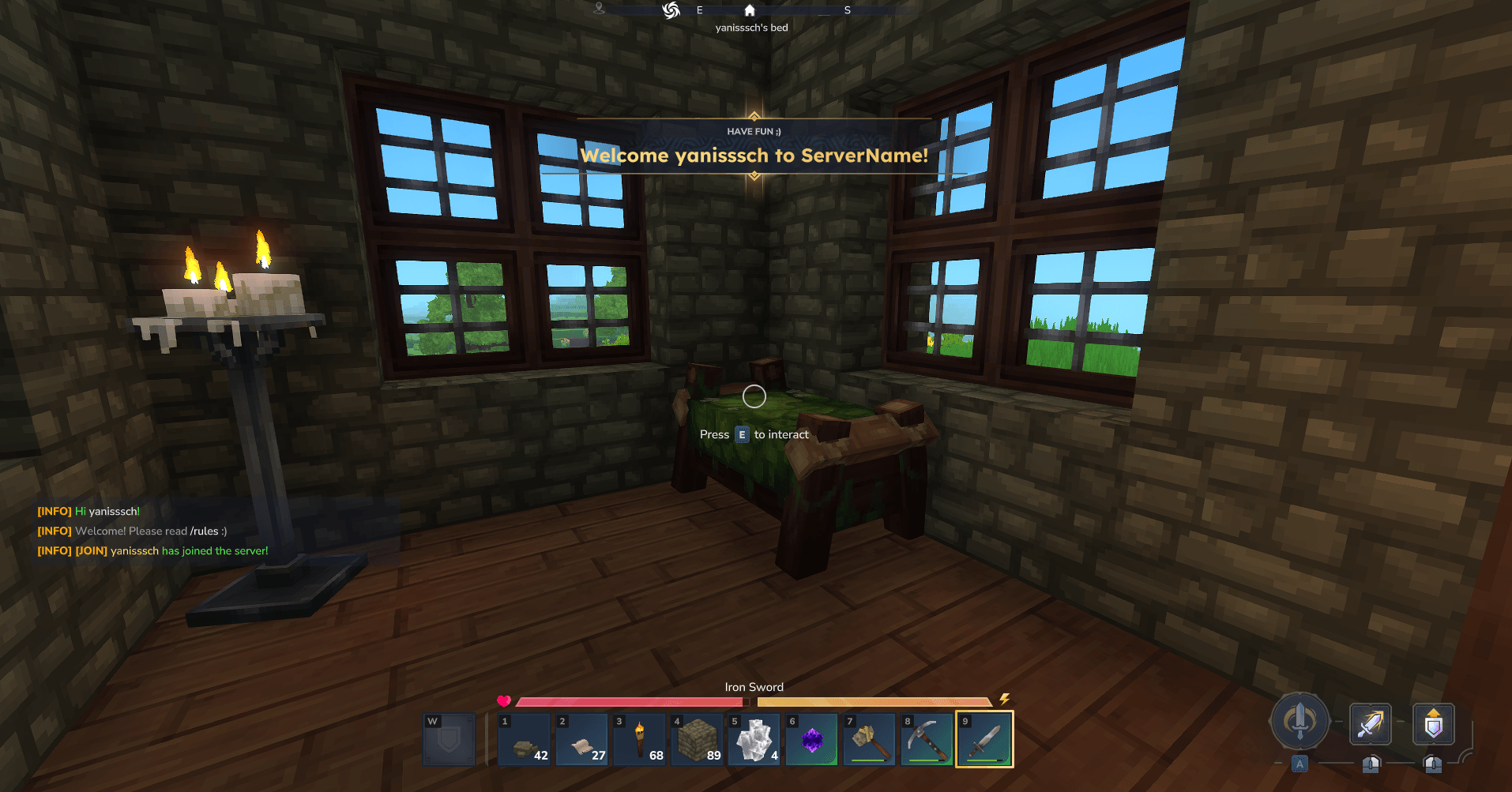
- ✅ Join messages (private message to joiner + public message to everyone)
- ✅ Minecraft-style
&color codes - ✅ Placeholders like
%player%and%joiner% - ✅ Simple JSON configuration (
config.json)
Features
1) Two independent broadcast systems
Each system has its own settings:
- enabled/disabled
- interval in seconds
- shuffle mode (random) or round-robin order
So you can run:
- Chat every 120s
- Title every 300s
- Or disable one entirely.
2) Shared announcement pool with per-entry targets
You define announcements once in "announcements" and choose where they go using:
"targets": ["CHAT"]"targets": ["TITLE"]
Each announcement can contain:
"chat"content (multi-line block)"title"content"subtitle"content (optional)
3) Join messages (optional)
Two dedicated join message sections:
- joinSelf: only sent to the joining player
- joinServer: broadcast to all online players
Both support:
- chat and/or title targets
- multi-line blocks
- placeholders
- optional disabling of vanilla join message
4) Text formatting
Legacy color codes
Supports Minecraft-like codes:
- Colors:
&0to&9,&ato&f - Formatting:
&l(bold),&o(italic),&r(reset) - Works with both
&and§
Multi-line blocks
For chat messages (and join chat), you can use:
"chat": "----\nLine 1\nLine 2\n----"Or simply use \n newlines.
5) Placeholders
%player%
Replaced with the recipient player name (the player who receives the message).%joiner%
Replaced with the joining player name (only meaningful for join messages).%world%
Replaced with the recipient player’s current world (best-effort: name/id/uuid depending on API availability).%players_online%
Replaced with the number of players currently online.%online%(alias of%players_online%)
Same as above, shorter name.%server_uptime%
Replaced with the server/plugin uptime (time since plugin boot), formatted like:12m 05s,3h 12m 09s,2d 04h 01m 33s%time%
Current server local time:HH:mm:ss
Example:21:43:10%date%
Current server local date:yyyy-MM-dd
Example:2026-01-15%datetime%
Current server local date + time:yyyy-MM-dd HH:mm:ss
Example:2026-01-15 21:43:10%day%
Current day of week (uppercase):MONDAY,TUESDAY, etc.%timezone%
Current server system timezone id (example:Europe/Paris)
Random integer
%random_int:min:max%
Generates a random integer betweenminandmax(inclusive).
Examples:
%random_int:1:100%→42%random_int:-5:5%→-1%random_int:10:10%→10
Random choice
%random_choice:a|b|c%
Randomly picks ONE option from a|separated list.
Examples:
%random_choice:Read /rules|Join Discord|Use /help%%random_choice:Hello|Hi|Hey%
✅ Supports placeholders inside options, for example:
%random_choice:Online: %online%|World: %world%|Time: %time%%
Commands
Main command: /hb
/bs reload
Reloads config.json and restarts the broadcast schedulers.
/bs status
Shows current status:
- whether chat/title systems are enabled
- intervals
- pool sizes
- config file path
/bs now [chat|title|both]
Instantly sends a broadcast from the configured pool.
Examples:
/bs now/bs now chat/bs now title
/bs start [chat|title|both]
Starts broadcasting.
Examples:
/bs start/bs start chat
/bs stop [chat|title|both]
Stops broadcasting.
Examples:
/bs stop/bs stop title
/bs send chat <message...>
Sends a manual chat announcement to all players.
Example:
/bs send chat &aHello world!
/bs send title <message...>
Sends a manual title announcement to all players.
Supports \n to force multi-line title.
Example:
/bs send title &eServer Restart\n&7In 5 minutes
Permissions
Admin permission (full control)
- broadcast_system.admin
Allows:
- reload
- status
- start/stop
- now
Send permission (manual broadcasts only)
- broadcast_system.send
Allows:
/hb send chat .../hb send title ...
Operator fallback
If your server uses role permissions, the plugin also allows:
role.operator
Configuration
The plugin creates:
mods/Yanisssch_BroadcastSystem/config.json
Key sections:
chattitlejoinSelfjoinServerannouncements
Important notes
- If
"showSubtitle": false, subtitles will be hidden even if provided. - If subtitle is empty,
title.defaultSubtitleis used (when enabled). - If
disableDefaultJoinMessageis true for join configs, vanilla join broadcast is disabled. - Do not use colors for Title, this not work….
- Do not use BOTH target for announcement (currently fixing an issue with this target)
- Be careful when making the config, keep backup in case your making errors, the "," and "{}" are very important and do not use " in the chat or title it can break the config itself ;)
- Take time to test the plugin and read all the config file
- And, this plugin is the first i made for Hytale, i'm still learning the api so if you see some bugs do not hesitate to tell me on discord "Yanisssch_Sori"
Example Config
{
  "_comment": "BroadcastSystem config.json - examples. Colors(only for the chat - not the titles!): &a, &6, &l, &r… Placeholders: %player% = recipient, %joiner% = joining player. '\n' blocks allow multi-line text only for chat, not titles!",
  "_help_targets": "targets for JoinSelf and JoinServer can be: [\"CHAT\"], [\"TITLE\"], and for announcement can be [\"BOTH\"] (or [\"CHAT\",\"TITLE\"]).",

  "chat": {
    "_comment": "Automatic announcements in chat.",
    "enabled": true,
    "intervalSeconds": 120,
    "shuffle": false,
    "prefix": "&6&l[INFO]&r "
  },

  "title": {
    "_comment": "Automatic announcements as center title (EventTitle).",
    "enabled": true,
    "intervalSeconds": 300,
    "shuffle": false,
    "showSubtitle": true,
    "defaultSubtitle": "&eAnnouncement",
    "animate": true
  },

  "joinSelf": {
    "_comment": "Message sent ONLY to the joining player (private).",
    "enabled": true,
    "disableDefaultJoinMessage": true,
    "targets": ["BOTH"],
    "chat": "----\n&aHi &f%player%&a!\n&7Welcome! Please read &f/rules&7 :)\n----",
    "title": "Welcome %player% to ServerName!",
    "subtitle": "Have fun ;)",

    "_example_title": {
      "_comment": "ALTERNATIVE EXAMPLE: show a Title instead of chat",
      "enabled": false,
      "disableDefaultJoinMessage": true,
      "targets": ["TITLE"],
      "title": "WELCOME",
      "subtitle": "&7Rules: &f/rules"
    },

    "_example_chat": {
      "_comment": "ALTERNATIVE EXAMPLE: show a Chat instead of title",
      "enabled": false,
      "disableDefaultJoinMessage": true,
      "targets": ["CHAT"],
      "chat": "----\n&aHi &f%player%&a!\n&7Welcome! Please read &f/rules&7 :)\n----"
    }
  },

  "joinServer": {
    "_comment": "Message sent to EVERYONE when someone joins.",
    "enabled": true,
    "disableDefaultJoinMessage": true,
    "targets": ["CHAT"],
    "chat": "----\n&6&l[JOIN]&r &e%joiner% &ahas joined the server!\n----",

    "_example_both": {
      "_comment": "ALTERNATIVE EXAMPLE: send both CHAT + TITLE at the same time.",
      "enabled": false,
      "disableDefaultJoinMessage": true,
      "targets": ["BOTH"],
      "chat": "----\n&6&l[JOIN]&r &e%joiner% &ahas joined the server!\n----",
      "title": "&aNew player!",
      "subtitle": "&e%joiner%"
    }
  },

  "_comment": "For the announcement, no BOTH for the target (Currently fixing an issue with this part)",
  "announcements": [
    {
      "_comment": "EXAMPLE 1: CHAT multi-line announcement (with ----\n block).",
      "targets": ["CHAT"],
      "chat": "----\n&bWelcome &f%player%&b!\n&7Make sure to read &f/rules&7 :)\n----"
    },

    {
      "_comment": "EXAMPLE 2: TITLE announcement.",
      "targets": ["TITLE"],
      "title": "WELCOME",
      "subtitle": "Have fun!"
    },

    {
      "_comment": "EXAMPLE 3: TITLE without subtitle).",
      "targets": ["TITLE"],
      "title": "Need help?",
      "subtitle": ""
    },

    {
      "_comment": "EXAMPLE 4: CHAT Discord announcement.",
      "targets": ["CHAT"],
      "chat": "----\n&bDiscord: &ddiscord.gg/....\n&7Come say hi!\n----"
    }

  ]
}
Use cases
- Server tips / rules reminders
- Discord link rotations
- Event announcements
- Welcome messages
Installation
- Download the .jar
- Put it in the mods folder in your server files
- Restart the server
- Check the config file at /mods/Yanisssch_BroadcastSystem
- Restart the server or do /hbs reload
- And check the result
- And voila ;)
SUPPORT
You can contact me on discord only: Yanisssch_Sori (i can take 6 to 12hours to respond)
BroadcastSystem Team
