Automatic Collector
- By
Browse nearby chests and withdraw items through one interface. Supports modded containers, configurable exclusions, and automatic range linking with Automatic Storage.
Description
📦 Automatic Collector: Your Storage, One Interface
Automatic Collector lets you browse nearby storage and withdraw the items you need from a single interface. Search your chests, choose a quantity, and collect directly into your inventory.
Pair it with Automatic Storage for a matching setup: AutoStorage distributes your items, and Automatic Collector brings them back when you need them.
🚀 How It Works
- Craft the Automatic Collector crate at the Workbench, in the Tinkering tab, Tier 2.
- Place it near your storage.
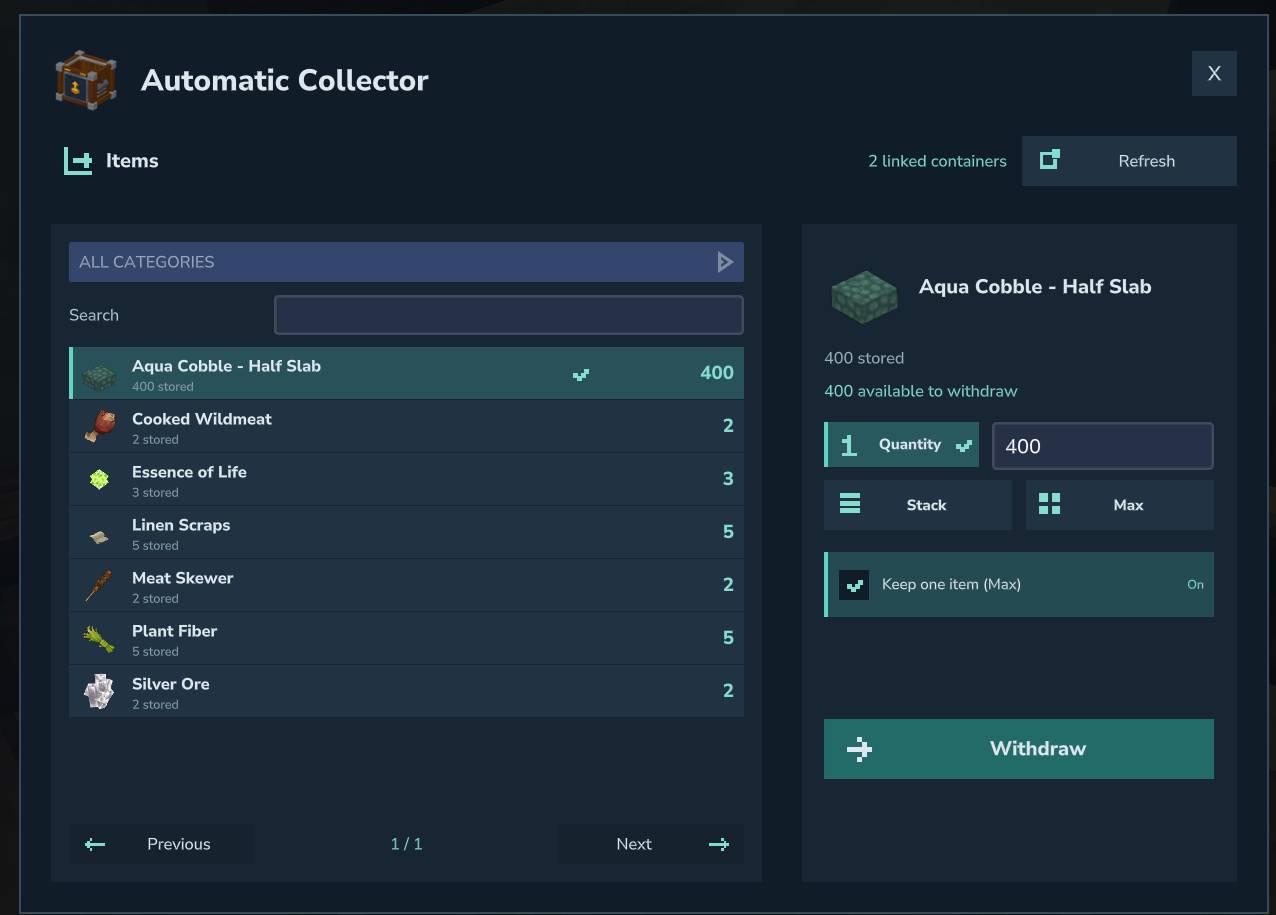
- Interact with the crate to browse items. Search, select an item, choose Quantity, Stack, or Max, then click Withdraw.
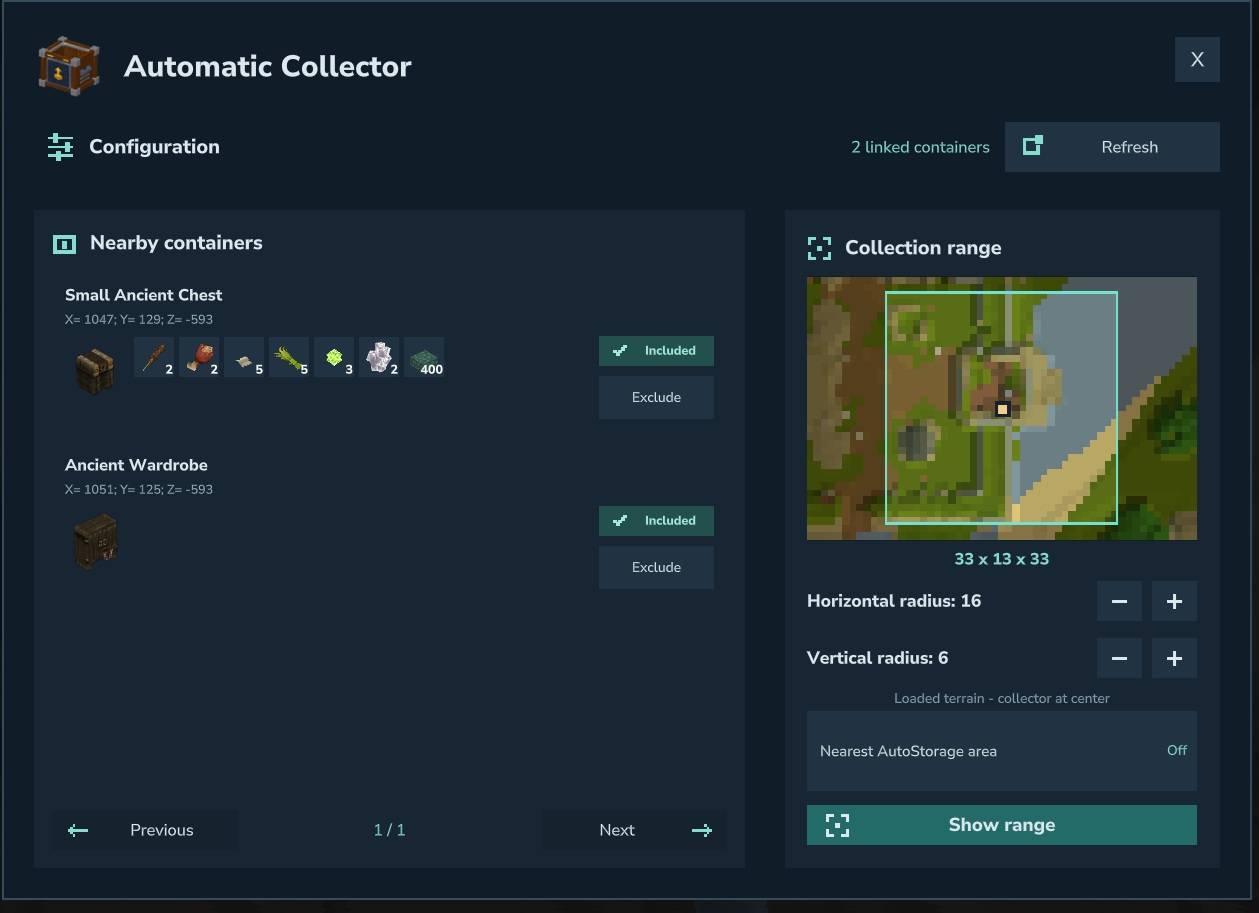
- Crouch + Interact to configure the range, nearby containers, and optional AutoStorage link.
Interact uses your configured key — F by default. The crafting recipe can be changed in the server configuration.
✨ Features
- 🔎 One item list for nearby storage, with category filtering and search results updated as you type.
- 📥 Three withdrawal modes: an exact quantity, one stack, or the maximum your inventory can hold.
- 💾 Remembered quantity settings: your active mode and manual quantity stay selected when switching items. Stack adapts to the new item's stack size.
- 🌱 Keep one item (Max): optionally leave one copy of the selected item in one container across the entire collection area.
- 🖥️ Two dedicated menus: Interact for collection; Crouch + Interact for configuration.
- 📏 Horizontal and vertical range controls, with server-defined minimum and maximum values displayed in the interface.
- 🗺️ Terrain map and in-world range preview, plus a count of linked containers.
- 🔗 Optional Automatic Storage integration, using the exact area of the nearest eligible AutoStorage crate.
- 🧩 Compatible native and modded storage, including custom container capacities and StorageDrawers integration.
- 🎛️ Per-collector container exclusions, plus server-wide include/exclude filters. Furnaces and other processing machines are excluded by default.
- 🛡️ SimpleClaims protection and access checks before withdrawal.
- 🌍 19 languages included, matching AutoStorage's language selection.
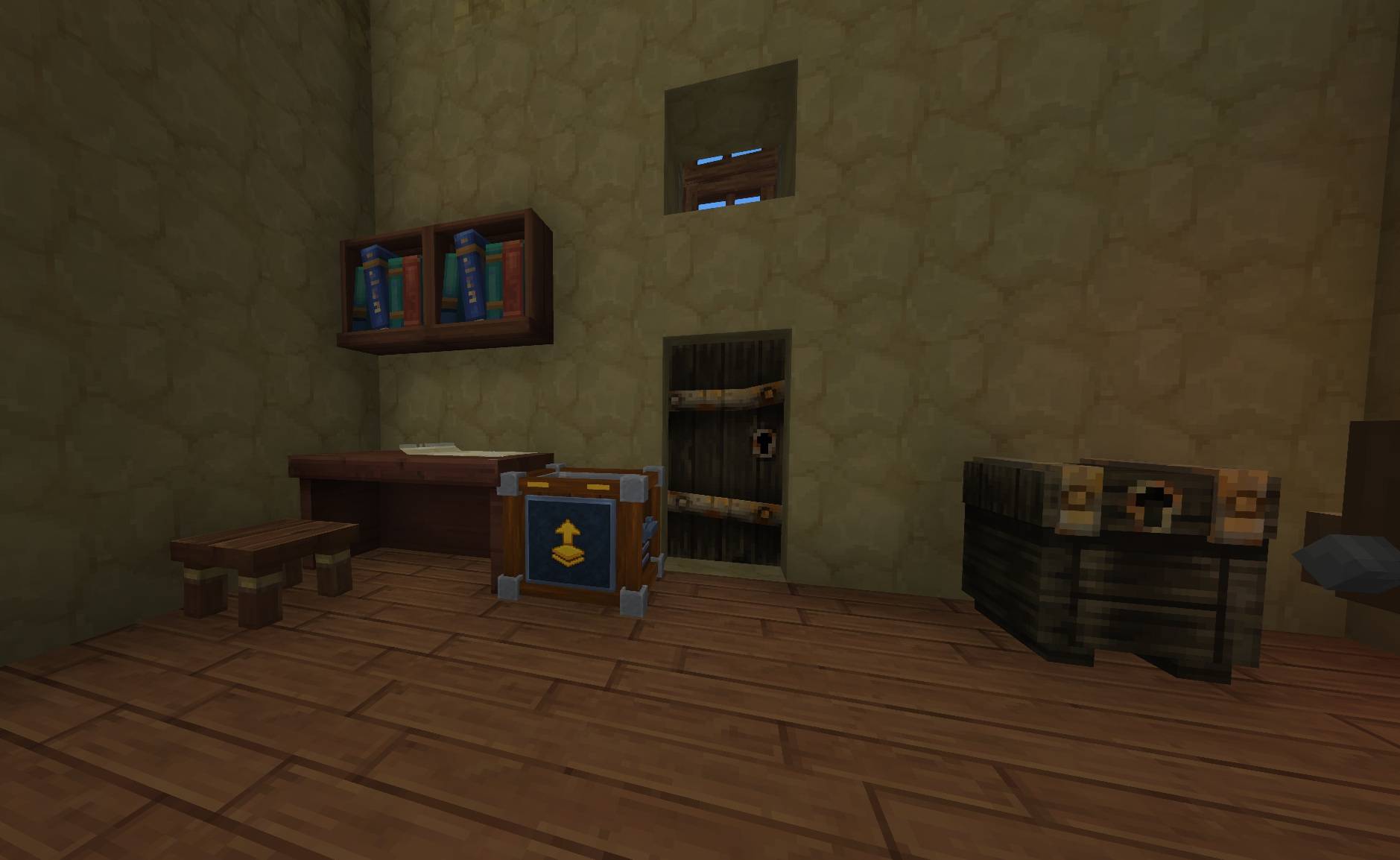
The Collector uses a matching AutoStorage-style crate with its own amber details and collection arrow.
🖥️ User Interface
📥 Collection — Interact
Search by item name or ID, filter by category, and select an item. The selected item and withdrawal mode are highlighted with colored backgrounds and check marks.
| Mode | What happens |
|---|---|
| Quantity | Withdraw the exact quantity you enter, subject to available stock and inventory space. |
| Stack | Withdraw up to one stack, using the selected item's own stack size. |
| Max | Withdraw as many items as your inventory can hold, filling compatible stacks and free slots. |
Your current mode and manual quantity are kept when changing items, including when returning to an item you viewed earlier.
Keep one item (Max) is a personal collection option, enabled by default. With Max, it leaves one copy of the selected item in one container across the whole area. It does not reserve one copy in every chest. Quantity and Stack can take the last copy.
⚙️ Configuration — Crouch + Interact
- Adjust horizontal and vertical radii with + and −.
- See the current radius / maximum, with the server's minimum and maximum underneath each axis.
- Include or exclude individual nearby containers.
- Enable or disable the Nearest AutoStorage area option when AutoStorage is available.
- Click Show range to display the collection volume. A chat message confirms the preview duration.
The owner configures the collector. Server administrators can grant permission to configure another player's crate.
🔗 Automatic Storage Integration
Automatic Storage is optional. When it is detected, Nearest AutoStorage area is enabled by default.
The Collector uses exactly the center, horizontal radius, and vertical radius of the nearest eligible, loaded AutoStorage in the same world. The item list, withdrawals, map, and range preview all follow that same area.
- Access restrictions and the Collector's server-defined range limits still apply.
- An AutoStorage in an inaccessible claim is ignored.
- If the nearest eligible AutoStorage's radii are outside the allowed limits, the Collector falls back to its manual area instead of trimming the linked area.
- Disable the link to return to your saved manual range.
- Without an available AutoStorage, the Collector works with its manual range.
The Collector keeps its own container exclusions and claim checks. Linking an area does not copy AutoStorage's sorting rules.
⚙️ Server Configuration
Configuration file: mods/MiniBox_AutomaticCollector/config.json
The file is created automatically. Restart the server after changing it. The sections below use the actual configuration key names and capitalization.
📏 Radius
| Key | Description | Default |
|---|---|---|
HorizontalRadiusMin |
Minimum horizontal radius | 1 |
HorizontalRadiusMax |
Maximum horizontal radius | 18 |
VerticalRadiusMin |
Minimum vertical radius | 1 |
VerticalRadiusMax |
Maximum vertical radius | 15 |
DefaultHorizontalRadius |
Initial radius for a new collector | 16 |
DefaultVerticalRadius |
Initial vertical radius for a new collector | 6 |
Radii can be configured within 1–200 blocks. Each axis includes both edges: a radius of 16 covers 33 blocks across. New crates receive the defaults; existing saved ranges are kept while valid and are adjusted if new server limits require it.
🎯 Containers
| Key | Description | Default |
|---|---|---|
OnlyIncluded |
Restrict collection to containers matching Include | false |
ExcludeProcessingBenches |
Exclude furnaces and other processing machines | true |
Include |
Explicitly include matching block/item IDs | [] |
Exclude |
Explicitly exclude matching block/item IDs | [] |
Empty Include does not disable chest detection. With OnlyIncluded set to false, compatible storage is detected automatically, without listing every chest or mod name.
Filters are case-insensitive and accept * and ? patterns. Exclude takes priority. Include can explicitly enable a processing container that would otherwise be excluded.
🛡️ Claims — SimpleClaims
| Key | Description | Default |
|---|---|---|
RequireOwnClaim |
Require ownership or membership of the claim's group | true |
RequireSameClaim |
Keep the Collector and source containers within the same group territory | true |
AllowUnclaimed |
Allow collection in unclaimed areas | false |
These rules apply when SimpleClaims is installed. With the defaults, the Collector cannot be used to withdraw from someone else's claim or collect across unrelated claims. Server options can relax this policy, while SimpleClaims access denials still apply.
🛠️ Item — Crafting and Stack Size
| Key | Description | Default |
|---|---|---|
MaxStack |
Maximum Collector crates per item stack | 1 |
Categories |
Item catalogue categories | ["Blocks.Utility"] |
CraftingEnabled |
Enable or disable the recipe | true |
Recipe.Input |
Ingredients and quantities | See recipe below |
Recipe.OutputQuantity |
Crates produced per craft | 1 |
Recipe.TimeSeconds |
Crafting time in seconds | 2 |
Recipe.BenchRequirement[].Id |
Required workbench | Workbench |
Recipe.BenchRequirement[].Categories |
Workbench tab | ["Workbench_Tinkering"] |
Recipe.BenchRequirement[].RequiredTierLevel |
Minimum workbench tier | 2 |
Recipe fields use Hytale's native format. Existing configured recipes remain in effect when updating the mod. Change Item.Recipe.Input to adopt the new default ingredients if your server already has an older recipe saved.
🧪 Default Crafting Recipe
Every recipe value can be changed by server owners.
| Property | Value |
|---|---|
| Workbench | Workbench → Tinkering tab, Tier 2 |
| Crafting time | 2 seconds |
| Output | 1 Automatic Collector |
| Maximum item stack | 1 |
📜 Ingredients
- 6× Concentrated Life Essence
- 24× Copper Bar
- 24× Iron Bar
- 2× Gold Bar
This follows AutoStorage's recipe with slightly higher costs.
🧩 Storage Compatibility
Automatic Collector detects storage through Hytale's native inventory components, including compatible modded chests with custom capacities and combined inventories. StorageDrawers has a dedicated integration for bulk storage.
Only already loaded areas are scanned. Inventory space, item stack limits, source access, and container exclusions are checked when withdrawing. Shared inventories are counted once.
A storage mod must also support your Hytale server version. Mods using private inventory systems may need a dedicated integration.
Requirements
- Version 1.0.0 targets Hytale 0.7.x. Hytale 0.8 support is not declared for this build.
- Java 25 on the server.
- Automatic Storage, SimpleClaims, and StorageDrawers are optional.
🔐 Permissions
| Permission | Purpose | Default |
|---|---|---|
automaticcollector.use |
Open and use an accessible collector | Allowed |
automaticcollector.config.any |
Configure collectors belonging to another player | Denied |
The crate owner can configure their own collector. Permissions do not remove source claim checks.
💾 Saved Settings
- Per collector: owner, horizontal and vertical radii, excluded containers, and AutoStorage linking preference.
- Per player: selected item, active withdrawal mode, manual quantity, and Keep one item preference.
Settings persist across normal server restarts.
🌍 Languages
The item name and interface follow your game language. 19 locales are included:
AR / BG / CS / DE / EL / EN / ES / PE / ET / FR / IT / NL / PL / PT / RU / SK / SV / TR / UK
Translations are AI-assisted; corrections are welcome!
🐞 Bug Reports & Suggestions
Found a bug or have an idea? Join my Discord and post in the appropriate channel.
🧩 Check Out My Other Mods
- 📦 Automatic Storage — distribute items to nearby storage.
- 🔥 Open Inventory & Inspect Gear
- ⛏️ Escape Rope: Quick Exit from a Cave
Credits
Based on the original Automatic Collector by Tulsene, continued and adapted by Exlcior / MiniBox. The Collector crate is adapted from AutoStorage with a dedicated texture.
Automatic Collector Team