

![Advanced Party System [ UI ] logo](https://media.forgecdn.net/avatars/thumbnails/1617/823/64/64/639041817649008343.png)
Advanced Party System [ UI ]
- By
Complete party system with real-time health tracking, compass markers, and dedicated party chat for seamless team coordination on Hytale servers.
Discord_EVbN0ivgMO.png
Discord_hYl3ad1sbb.png

Discord_DgqA6p9VZk.png
Description
🎉 PartyManager – Team Up & Play Together
PartyManager adds a full party system to Hytale servers, allowing players to group up, track party health in real time, and communicate privately — all without requiring OP permissions.
📌 Notes
⚠️ This plugin is a work in progress and may contain bugs.
Please report any issues or suggestions on the CurseForge page.
Requires: https://www.curseforge.com/hytale/mods/multiplehud
🔑 Core Features
- Party creation, invites, joining, leaving, and disbanding
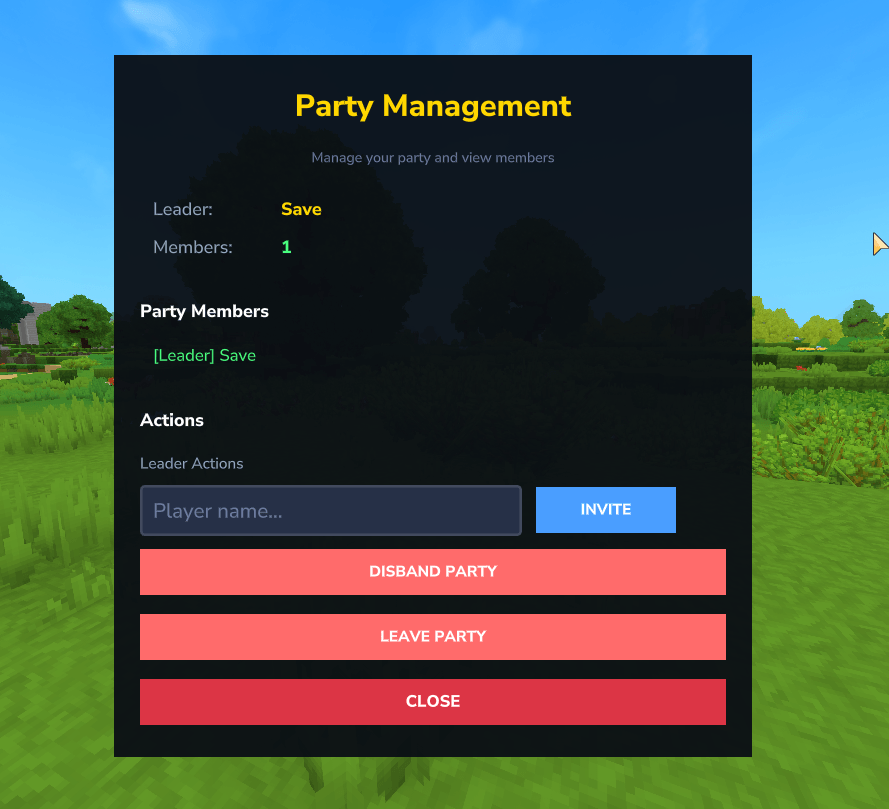
- Party leader controls (invite, kick, manage members)
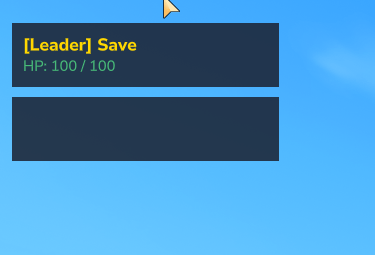
- Real-time party health HUD with color-coded health bars
- Dynamic UI supporting 2–8 party members
- Private party chat with quick and toggle modes
- Friendly fire protection (PvE or PvP support)
- Fully configurable permissions, colors, and limits via JSON
- Works for regular players (no OP required)
💬 Commands
Party Management
/party create– Create a party/partyinvite <player>– Invite a player/party accept– Accept an invite/party leave– Leave your party/party disband– Disband the party/party kick <player>– Remove a member/party info– View party members/party help– Show command help
Party Chat
/pc <message>– Send a party chat message ( only Party Members see these messages )/party toggle– Toggle party chat mode ( only Party Members see these messages )
Utility
/partyui– Manage your party through a UI
⚙️ Configuration
The plugin generates a config file on first startup at: plugins/PartyManager/config.json
You can customize:
- Friendly damage on/off
- Maximum party size (2–8 players)
- Command permissions (everyone, leader-only, admin-only)
- Chat colors, name prefixes, and health bar colors
Restart the server after making changes to apply them.
🙏 Credits
- TinyMsg by Zoltus for rich text and color formatting
- Licensed under the MIT License
Advanced Party System [ UI ] Team
