New Project.png
img.png
custom_join_leave.png

custom_nametag.png
map_list.png
Description
⚙ AdminUtils ⚙
Features
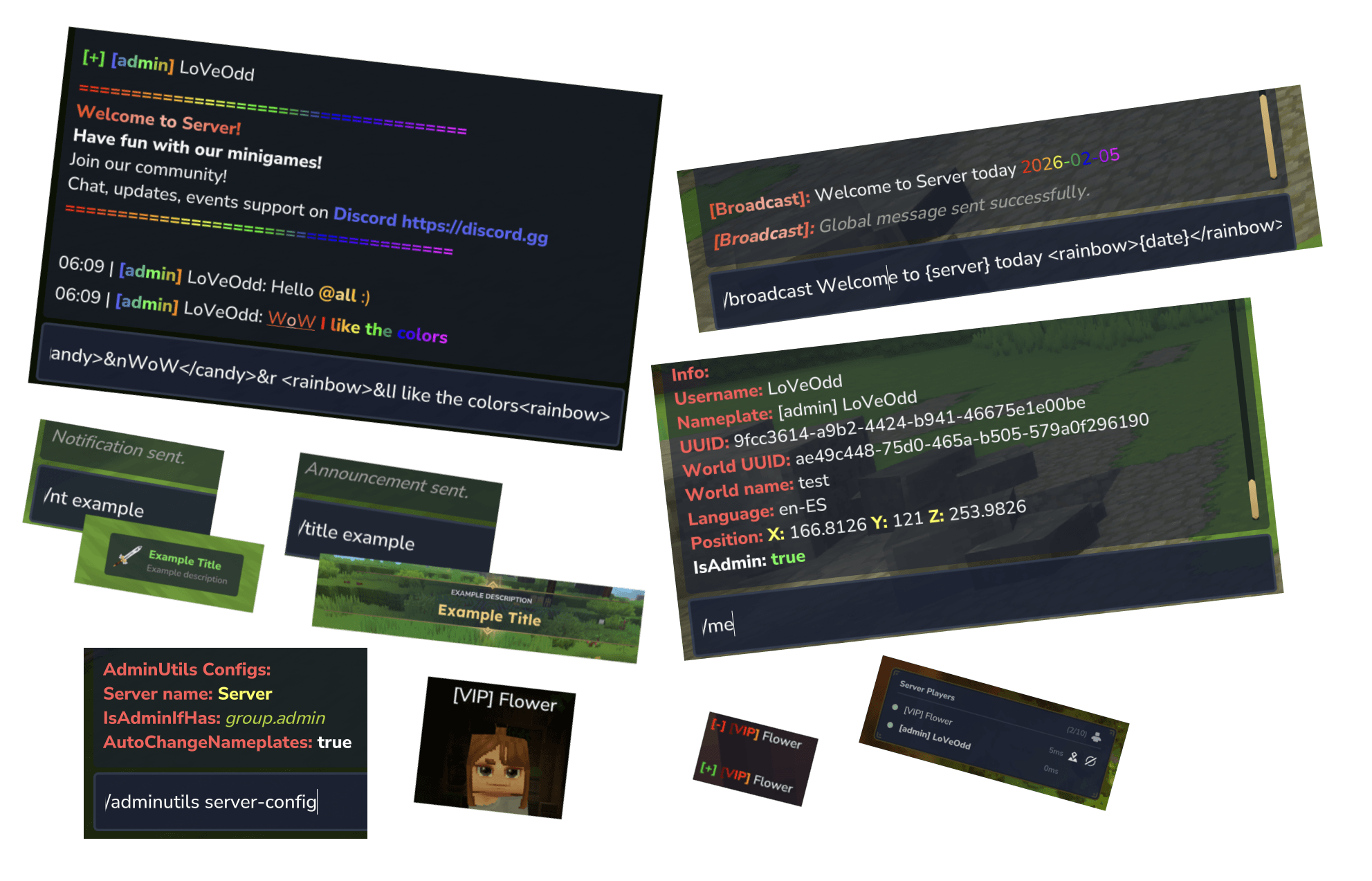
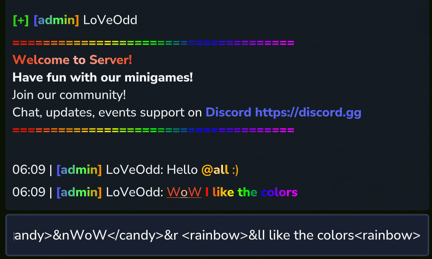
- 🌈 Rainbow & Gradient Text - Advanced color effects in all configuration messages
- 📢 Announcement System - Automated and manual announcements with scheduling, titles, sounds
- 📢 Custom Title and Notification System - Custom notifications and titles with, titles, sounds
- 👻 Vanish System - Staff members can become invisible to players for moderation
- 💬 Private Messages - Direct messages between players with reply function
- 💬 Chat Mention System - Mention a people and they will see it
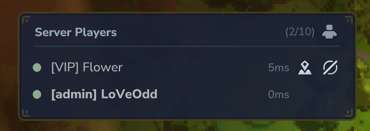
- 👥 Player List - Overview of all online players
- 🔧 Easy Configuration - JSON-based configuration files
- 🎨 Colored Messages - User-friendly, color-coded outputs
- 📢 Broadcast System - Send server-wide announcements with custom formatting
- ✈️ Fly Mode - Toggle fly mode for yourself or other players
- 🔧 Configurable Commands - Enable/disable commands to use via global (/msg) or no global (/adm chat msg)
- 🎫 LuckPerms Integration - You can use the prefix from your LuckPerms and react to permission or groups changes, you can disable or enable it
- 💬 Nametags Custom - Change, reset, show and hide the nameplates from other players
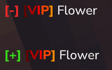
- 💬 Join/Leave Custom Messages Now you can watch who is joining or leaving easier
- 🚧 And more under develop
| Command | Alias | Description | Permission |
|---|---|---|---|
| Plugin Management | |||
/adminutils |
/au, adm, admutils, autils, adutils |
Shows general plugin information or base command. | adminutils.use |
/adminutils reload |
/au r |
Reloads the plugin configuration and all its data files. | adminutils.use.reload |
/adminutils help |
- | Displays the plugin help menu. | adminutils.use |
| Player Utilities | |||
/fly [--speed=10] |
- | Toggles flight mode. Optional speed (0.1 to 100.0). | adminutils.use.fly |
/vanish |
- | Makes you invisible to players without administrator permissions. | adminutils.use.players.vanish.self |
/me |
- | Displays detailed technical information about your user (UUID, Position, World, etc.). | adminutils.use.players.me |
/players |
/online, /plls |
Lists all connected players (shows real name and nickname). | adminutils.use.players.list |
/bheal <player> |
- | Fully heals (health and stamina) the specified player. | adminutils.use.players.heal.other |
/plugin |
/mods |
Shows the list of plugins/mods installed on the server. | adminutils.use.plugins.list |
/server-config |
- | Displays the current AdminUtils plugin configuration. | adminutils.use.players.serverconfig |
| Chat & Messaging | |||
/chat broadcast <message> |
/bdc |
Sends a global message to all players. | adminutils.use.chat.broadcast |
/chat message <player> <message> |
/msg, /tell, /w |
Sends a private message to a specific player. | adminutils.use.chat.message-chat |
/chat reply <message> |
/r |
Replies to the last private message received. | adminutils.use.chat.reply-message-chat |
/chat clearchat |
/cc |
Clear your chat. | adminutils.use.chat.clear |
/chat servermessage <player|all> <message> |
/smsg |
Sends a message from the console to the player (or everyone). | adminutils.use.chat.server-message-chat |
| NameTag Management | |||
/nametag custom <name> [--show-rank] |
/name custom |
Changes your own name tag. | adminutils.use.nametag.custom.self |
/nametag custom <player> <name> [--show-rank] |
- | Changes another player's name tag. | adminutils.use.nametag.custom.other |
/nametag reset |
/name reset |
Resets your name tag to the original. | adminutils.use.nametag.reset.self |
/nametag reset <player> |
- | Resets another player's name tag. | adminutils.use.nametag.reset.other |
/nametag hide |
/name hide |
Hides your name tag. | adminutils.use.nametag.hide.self |
/nametag hide <player> |
- | Hides another player's name tag. | adminutils.use.nametag.hide.other |
/nametag show |
/name show |
Shows your name tag. | adminutils.use.nametag.show.self |
/nametag show <player> |
- | Shows another player's name tag. | adminutils.use.nametag.show.other |
/nametag info <name> |
/name info |
Reveals the real name of a player with a custom name. | adminutils.use.nametag.info.all |
| Announcements (Chat) | |||
/announcement <id> |
/ann, /ads |
Sends a configured announcement to all players. | adminutils.use.announcement.all |
/announcement list |
/ann ls |
Lists available announcement IDs. | adminutils.use.announcements.list |
/announcement reload [--confirm] |
- | Reloads the announcements configuration. | adminutils.use.title.reload |
| Notifications (Pop-up) | |||
/notification <id> |
/nt |
Sends a pop-up notification to the entire server. | adminutils.use.notifications.all |
/notification <player> <id> |
- | Sends a pop-up notification to a specific player. | adminutils.use.notifications.player |
/notification list |
/nt ls |
Lists available notification IDs. | adminutils.use.notifications.list |
/notification reload [--confirm] |
- | Reloads the notifications configuration. | adminutils.use.notifications.reload |
| Titles (Screen) | |||
/title <id> |
- | Displays a title on screen to the entire server. | adminutils.use.title.all |
/title <world|player> <target_id> <title_id> |
- | Displays a title to a specific world or player. | adminutils.use.title.other |
/title list |
/title ls |
Lists available title IDs. | adminutils.use.title.list |
/title reload [--confirm] |
- | Reloads the titles configuration. | adminutils.use.title.reload |
Advanced Configuration
Global Command Usage (commands.json)
The commands.json file controls whether each command can be executed globally (without the /adminutils prefix).
- Property:
enableGlobalCommand(boolean) - Operation: If set to
true, you can use commands like/fly,/vanish, or/chatdirectly. If set tofalse, they must be executed as subcommands (e.g.,/adminutils fly).
Dynamic Content Configuration (.json)
Announcement, notification, and title commands read their content from individual .json files in their respective folders. The IDs used in commands correspond to the filename without the extension.
announcements/(Chat Announcements)
- Fields:
messages(list of lines, supports colors and gradients),intervalSeconds(0 for manual only; if a value is provided, it will broadcast automatically at that interval),enabled(enables/disables the announcement). - Reload:
/announcement reload --confirmapplies changes without restarting.
notifications/(Pop-up Notifications)
- Fields:
title,description,titleColorHex,descriptionColorHex,icon(Item/Icon ID). - Reload:
/notification reload --confirm.
titles/(Screen Titles)
- Fields:
title,description,icon,duration,fadeInDuration,fadeOutDuration. - Reload:
/title reload --confirm.
What does config.json influence?
The config.json file defines global plugin parameters:
serverName(string): The server name used in messages and info screens. Referenceable via the{server}placeholder.serverColorHex(string): Hex color associated with the server name.welcomeMessage(string[]): List of lines shown as a welcome message. Supports formatting (colors, bold, links).isAdminIfHasPermission(string[]): List of permissions that define a player as an "admin" for plugin logic (e.g., seeing vanished players).
Additional Data 🫰🏼
- Color Support: Advanced color systems via TinyMsg or
&codes. - Chat Mentions: Typing
@<username>or@allhighlights the name for the mentioned person and triggers a notification sound. - LuckPerms Integration: Automatically detects LuckPerms for prefixes and uses the defined admin permissions in
config.json. - DEVELOPMENT STATUS: The plugin is currently in development, so bugs may exist.
Roadmap 🗺️
- Email System: Players will be able to send and read emails.
- Teleport System: Commands like
/tpa,/tpaccept,/tpahere,/tpadeny,/tpacancel, and/rtp. - Custom Commands: Create aliases or custom commands that execute other commands (e.g.,
/test-tp->/tp world test). - UI Screens: Configuration and settings via in-game UI menus.
- Database Support: Support for external databases based on
config.jsoncredentials. - Mute and Chat Filters: Support for filter words and mute player for a time (30s, 10m, 1h, 30d)
- More content to come!
AdminUtils Team