WoodlandsQRMenu
- By
Woodlands ARK Cluster pause-menu tools: QR codes to the website and Discord, one-click FPS presets with Restore, and a branded in-game notification overlay for server restarts, wipes and events.
20260803225431.jpg
20260928015045.jpg
Description
Woodlands QR Menu & Notification Overlay
Adds Woodlands ARK Cluster branding and quality-of-life tools to the game: scannable QR codes and one-click FPS presets in the pause menu, and an in-game notification overlay that server staff can trigger for restarts, wipes, events and announcements.
Built for the Woodlands ARK Cluster. Crossplay friendly — no client-side setup.
QR codes in the pause menu
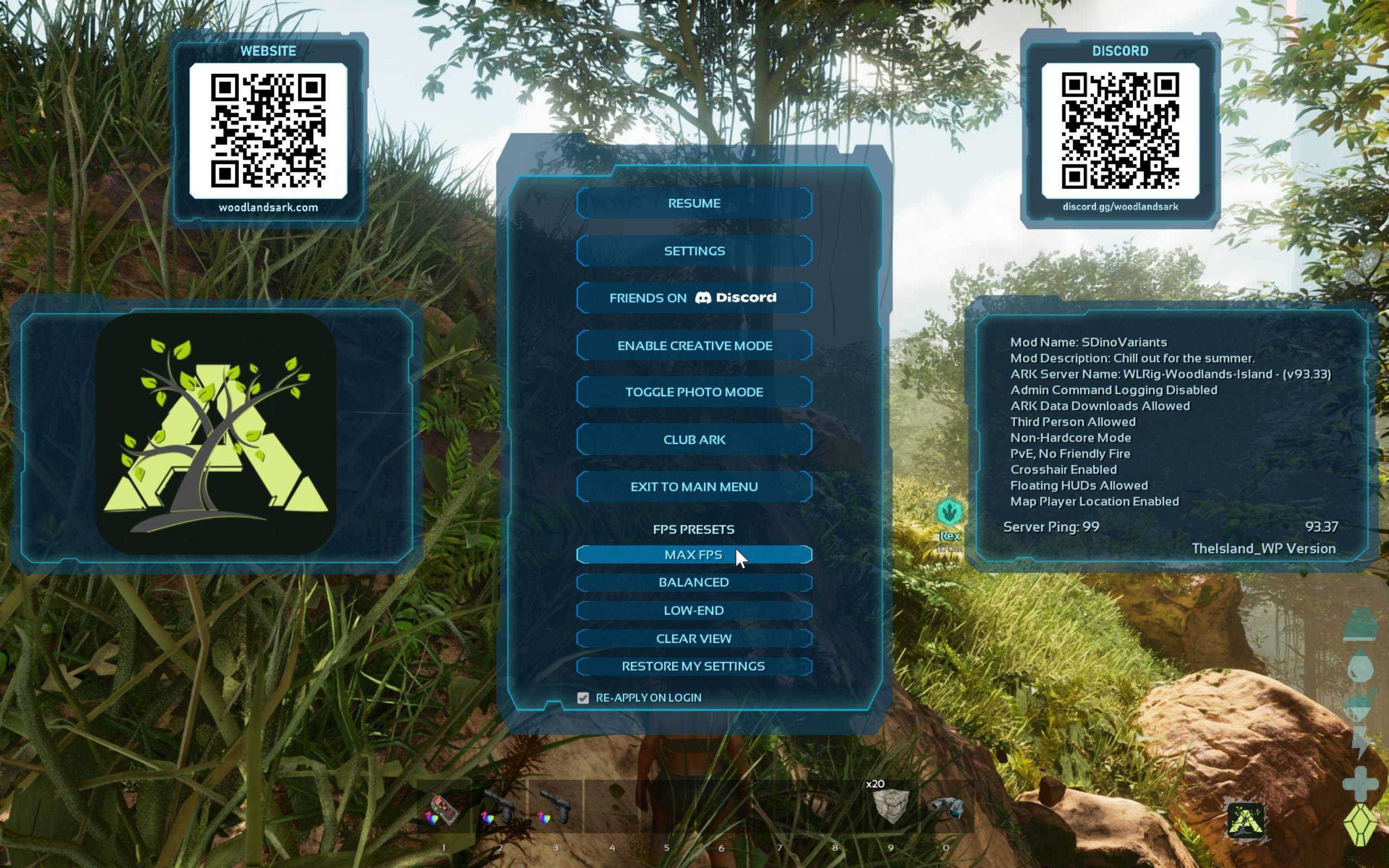
Press ESC and you'll see two QR cards in ARK's own menu style:
- Website — cluster info, rules, tools and shop
- Discord — the community Discord
Scan either with a phone to jump straight there without alt-tabbing or typing a URL. Handy on console, where leaving the game to look something up is a pain.
The Woodlands logo also shows in the pause menu's mod panel.
FPS presets in the pause menu
Under the normal pause-menu buttons you'll find an FPS Presets panel:
- Max FPS — turns off the heaviest effects (shadows, Lumen, fog, clouds, grass and more) for the biggest frame-rate gain
- Balanced — trims the expensive extras but keeps the game looking like ARK
- Low-End — everything in Max FPS plus a lower render resolution, for older hardware
- Clear View — removes fog, bloom and blur so you can see further and clearer
- Restore My Settings — puts your graphics back exactly how they were before you pressed any preset
- Re-apply on login — tick it and your last preset comes back automatically the next time you join
Presets never pile on top of each other: picking a new one restores your settings first, then applies the new set. Nothing touches your saved graphics options — the changes last until you press Restore or close the game.
Branded notification overlay
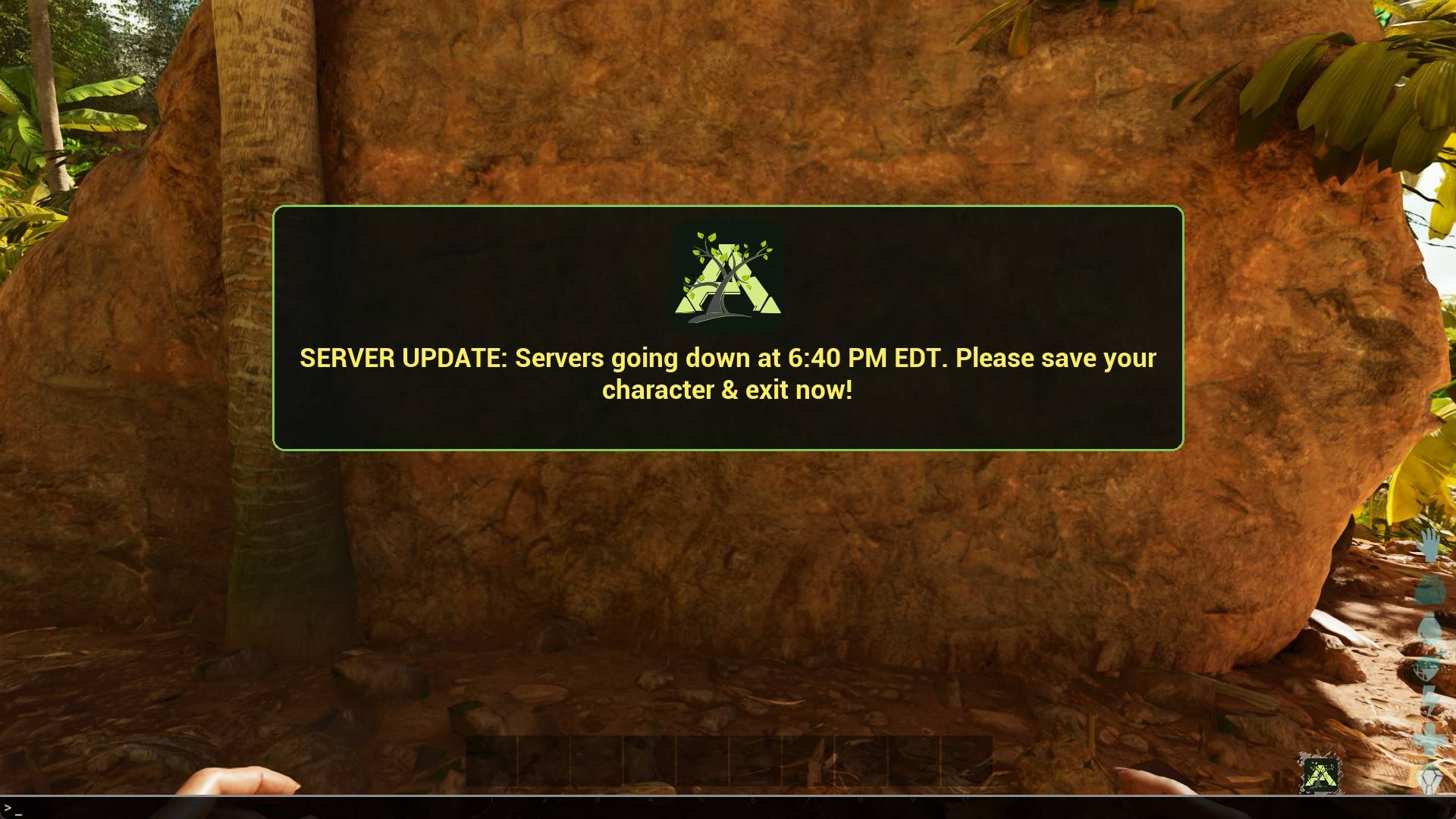
Server staff can push styled, on-screen messages to everyone online — no third-party broadcast plugin needed. Everything is drawn in the Woodlands look: dark rounded panels, green frame, cluster logo.
- Banner — a strip across the top for quick notices
- Centre panel — a framed announcement with headline and sub-line, for restarts and updates; long messages wrap automatically
- Countdown — a persistent clock in the corner that ticks down to a restart or a wild dino wipe, then holds a final message so players who stepped away still see it
- Colours — yellow, orange, red, green, cyan, white, plus
warnandalertstyles that colour themselves
The overlay is click-through and hides itself while the pause menu is open, so it never gets in the way. It uses ARK's splitscreen-aware UI scaling, so it renders correctly on console and in splitscreen.
For server owners
Messages are sent with a single console/RCON command, so any scheduler (TCAdmin, a bot, a web tool) can drive it:
scriptcommand woodlands;banner;30;Server restarting soon
scriptcommand woodlands;center;60;SERVER RESTART;30 minutes - log off safely
scriptcommand woodlands;warn;30;Wild dino wipe in 5 minutes
scriptcommand woodlands;alert;30;Wipe starting now
scriptcommand woodlands;countdown;900;SERVER RESTART
scriptcommand woodlands;clear;0;x
Format is always woodlands;<style>;<seconds>;<message> — four fields, separated by
semicolons. Add a colour as the first word of the message to override the default:
scriptcommand woodlands;banner;30;cyan;Event starting soon
The countdown accepts an optional end message:
scriptcommand woodlands;countdown;300;WILD DINO WIPE;WIPING NOW
Banner, centre panel and countdown are independent — you can run a countdown while sending announcements, and neither cancels the other.
Customising the FPS presets (optional)
The presets work out of the box. To change what a button does, add a [WoodlandsQR]
section to the server's GameUserSettings.ini — each key is a comma-separated list of
console commands. PC and console have separate lists:
[WoodlandsQR]
FPS_MaxFPS=r.VSync 0,r.ShadowQuality 0,grass.densityScale 0
FPS_Balanced=r.Shadow.DistanceScale 0.75,r.VolumetricFog 0
FPS_LowEnd=r.ScreenPercentage 70,r.ShadowQuality 0
FPS_Clear=r.Fog 0,r.BloomQuality 0
FPS_MaxFPS_Console=r.ShadowQuality 0,grass.densityScale 0
FPS_Balanced_Console=r.Shadow.DistanceScale 0.75
FPS_LowEnd_Console=r.ScreenPercentage 70,r.ShadowQuality 0
FPS_Clear_Console=r.Fog 0,r.VolumetricFog 0
Any key you leave out uses the built-in default.
Notes
- No client install steps; the INI section above is optional
- The only thing stored on a player's machine is a tiny save with their last FPS preset and the re-apply-on-login tick box
- Designed for the Woodlands cluster, so the QR links point to Woodlands
WoodlandsQRMenu Team