
pHnX Shop Mod
- By
A cross-platform shop for ARK: Survival Ascended with digital currency, item and creature bundles, quests, a player marketplace, and server-wide buffs.
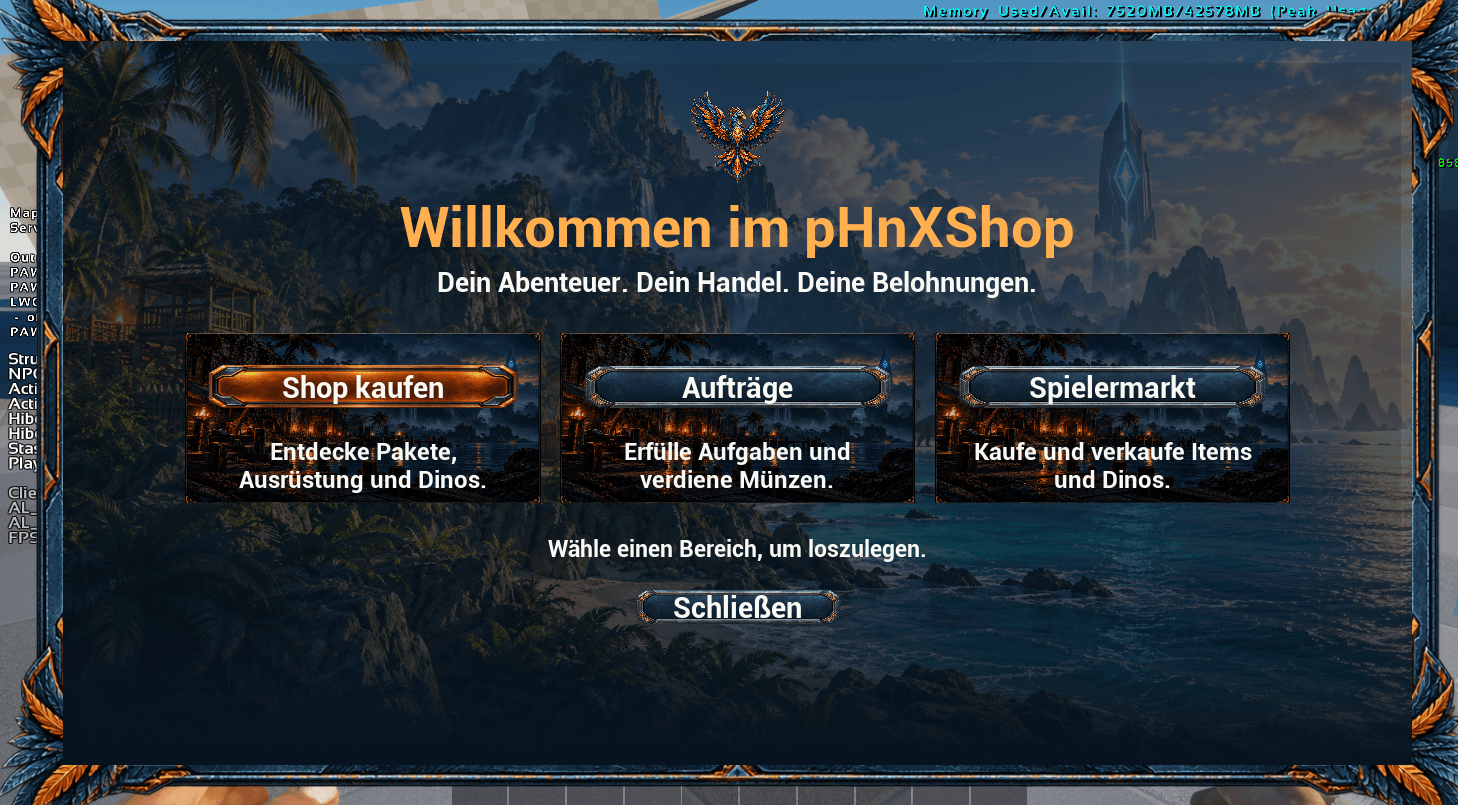
01-Startseite.png
Description
pHnX Shop Mod
pHnX Shop Mod adds an in-game shop and quest system to ARK: Survival Ascended. Earn digital points, spend them on item and creature bundles, or trade with other players on the marketplace.
- Shop and starter packs — Browse item and creature bundles. Each free starter pack can be claimed once per player on the server.
- Quests — Take on harvesting, hunting, taming, delivery, and exploration objectives. Track up to three active quests and claim digital points when you turn them in.
- Player marketplace — List items from your inventory and set your own price.
- World buffs — Purchase temporary effects for your server and check which buffs are active.
- Admin tools — Create and manage shop bundles and quests in-game. Admins can change package prices and creature levels in the shop editor.
Available for Windows, PlayStation 5, and Xbox Series X|S, with dedicated server support.
Real-money transactions: This mod does not enable or support real-money transactions. Its in-game currency is earned through gameplay and cannot be purchased with real money. Players can download and upload the currency when transferring their character between servers in a cluster.
Dedicated server configuration
- Stop the server. In AMP or your hosting panel, open the
GameUserSettings.iniused by that ASA server instance. - Add the block below. If the file already has a
[pSM]section, merge the settings into that section and keep each key only once. Place[pSM]on its own line outside[ServerSettings]. - Save the file and start the server again. Use
GameUserSettings.inifor these options.Game.inineeds no pHnX Shop Mod entries. Configure each server instance separately.
[pSM]
ShopEnabled=True
QuestsEnabled=True
PlayerMarketEnabled=True
DefaultPackagesEnabled=True
WorldBuffsEnabled=True

RewardsEnabled=True
UseINIRewardSettings=True
RewardIntervalSeconds=600
RewardAmount=10

ShopPurchasesEnabled=True
QuestAcceptEnabled=True
MarketNewListingsEnabled=True

MaxActiveListingsPerPlayer=20
MarketListingLifetimeSeconds=604800
MaxRequestsPerSecond=40
MaxServerRequestsPerSecond=256

EnablePackage_dino_rex=True
EnablePackage_starter_base_v1=True
EnablePackage_starter_tame_v1=True
EnablePackage_starter_clothing_v1=True
EnablePackage_starter_dinos_v1=True
EnablePackage_starter_resources_v1=True

WorldBuffEnabled_TAMINGSPEED_UP_EASY=True
WorldBuffPrice_TAMINGSPEED_UP_EASY=3000
WorldBuffEnabled_XP_UP_EASY=True
WorldBuffPrice_XP_UP_EASY=3000
WorldBuffEnabled_EGG_HATCH_UP_EASY=True
WorldBuffPrice_EGG_HATCH_UP_EASY=2500
WorldBuffEnabled_BABYMATURE_BOON_EASY=True
WorldBuffPrice_BABYMATURE_BOON_EASY=4000
WorldBuffEnabled_HARVEST_HEALTH_UP_EASY=True
WorldBuffPrice_HARVEST_HEALTH_UP_EASY=1500
WorldBuffEnabled_HEALTHREGEN_UP_EASY=True
WorldBuffPrice_HEALTHREGEN_UP_EASY=1000
WorldBuffEnabled_STAMDRAIN_DOWN_EASY=True
WorldBuffPrice_STAMDRAIN_DOWN_EASY=1000
WorldBuffEnabled_GROPGROWTH_UP_EASY=True
WorldBuffPrice_GROPGROWTH_UP_EASY=1200
Playtime rewards and currency
- The example credits 10 digital points every 600 seconds (10 minutes) of eligible online time.
UseINIRewardSettings=Truemakes the two reward values in the INI take priority over saved admin settings. Enter both values explicitly. WithFalse, or if the override switch is omitted, the mod uses the saved admin settings. A fresh configuration starts at 10 points every 600 seconds.RewardIntervalSecondsaccepts whole seconds from1to86400. For example,60is one minute.RewardAmountaccepts0to1000000points per interval. SetRewardsEnabled=Falseor useRewardAmount=0with the INI override to stop playtime payouts.- Playtime and quest rewards go directly to the digital balance. Physical coins are available through manual bank withdrawals and deposits. The old
RewardAsCoinsoption has no effect.
Feature and package switches
ShopEnabled=Falseblocks shop purchases and hides public package offers.ShopPurchasesEnabledis an additional purchase switch.QuestsEnabled=FalseorQuestAcceptEnabled=Falseblocks new quest acceptances. Players can still progress and turn in quests they already accepted.PlayerMarketEnabled=Falseblocks new listings and purchases. Sellers can still withdraw their offers.MarketNewListingsEnabled=Falseblocks new listings while leaving purchases available if the marketplace is enabled.DefaultPackagesEnabled=Falsehides the built-in paid creature packages as a group. Admin-created packages and the free starter packs can be controlled separately.- Use
EnablePackage_<package_id>=Falseto disable a single package. For example,EnablePackage_dino_rex=Falsedisables the Rex offer. An omitted package switch defaults toTrue. Setting it toTruestill respects the main shop switches and any package deactivation set by an admin. Disabling a starter pack preserves existing claim records.
Marketplace limits and World Buffs
MaxActiveListingsPerPlayeraccepts1to100and defaults to20.MarketListingLifetimeSecondsaccepts1to31536000and defaults to604800(seven days). The duration applies to newly created offers. Sellers can reclaim expired goods from My Offers.MaxRequestsPerSecondlimits requests per player and accepts1to500.MaxServerRequestsPerSecondlimits requests across the server and accepts1to2000.WorldBuffsEnabled=Falsedisables World Buff purchases. For an individual offer, set itsWorldBuffEnabled_<ID>switch toFalse.WorldBuffPrice_<ID>accepts a whole number from1to1000000000in digital points. An omitted or invalid price falls back to the built-in value shown above. Effects apply only to the server where they are activated.
Questions, feedback, or suggestions? Feel free to contact me on Discord.
crackhaed pls write in English or German thanks
pHnX Shop Mod Team
