


Screenshot 2026-08-20 180944.jpg
Screenshot 2026-08-20 204037.jpg
Screenshot 2026-08-20 191702.jpg
Screenshot 2026-08-20 192035.jpg
Screenshot 2026-08-20 192105.jpg
Description
Zhaohu's Decursive
Fast. Clear. Dependable dispelling for World of Warcraft 12.1.
Zhaohu's Decursive is a modernized version of Decursive designed around the restrictions and protected aura system introduced in modern World of Warcraft.
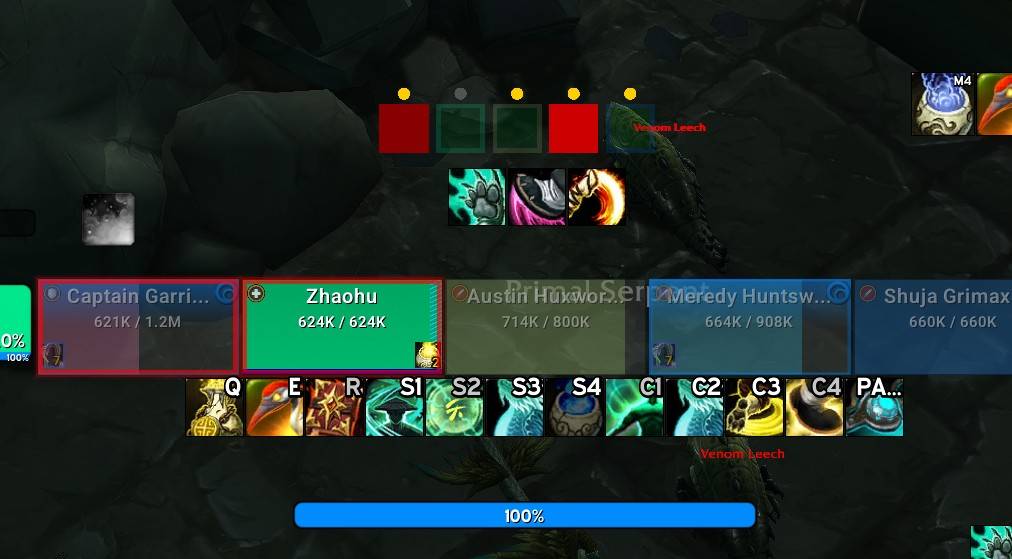
The addon provides compact Micro Unit Frames (MUFs) that immediately show which party or raid members require a dispel and allow you to cleanse them with a simple mouse click.
Native WoW 12.1 Detection
Zhaohu's Decursive now works natively with the Blizzard API.
DandersFrames is NOT required.
The addon uses Blizzard's protected aura system directly for dispel detection while preserving Decursive's fast, click-based workflow.
DandersFrames integration is still available for players who want to use it, but it is optional and disabled by default.
Detection Providers
Native Blizzard API — Default
- No external unit-frame addon required
- Protected WoW 12.1 dispel detection
- Native cure-range detection
- Native cooldown handling
- Native post-cure verification
- Works with Decursive's own MUFs
DandersFrames — Optional
When enabled under Integrations, DandersFrames can provide protected detection, range, and ordering information while Zhaohu's Decursive continues to control the MUFs, cure clicks, spell selection, cooldowns, profiles, and status indicators.
Micro Unit Frames
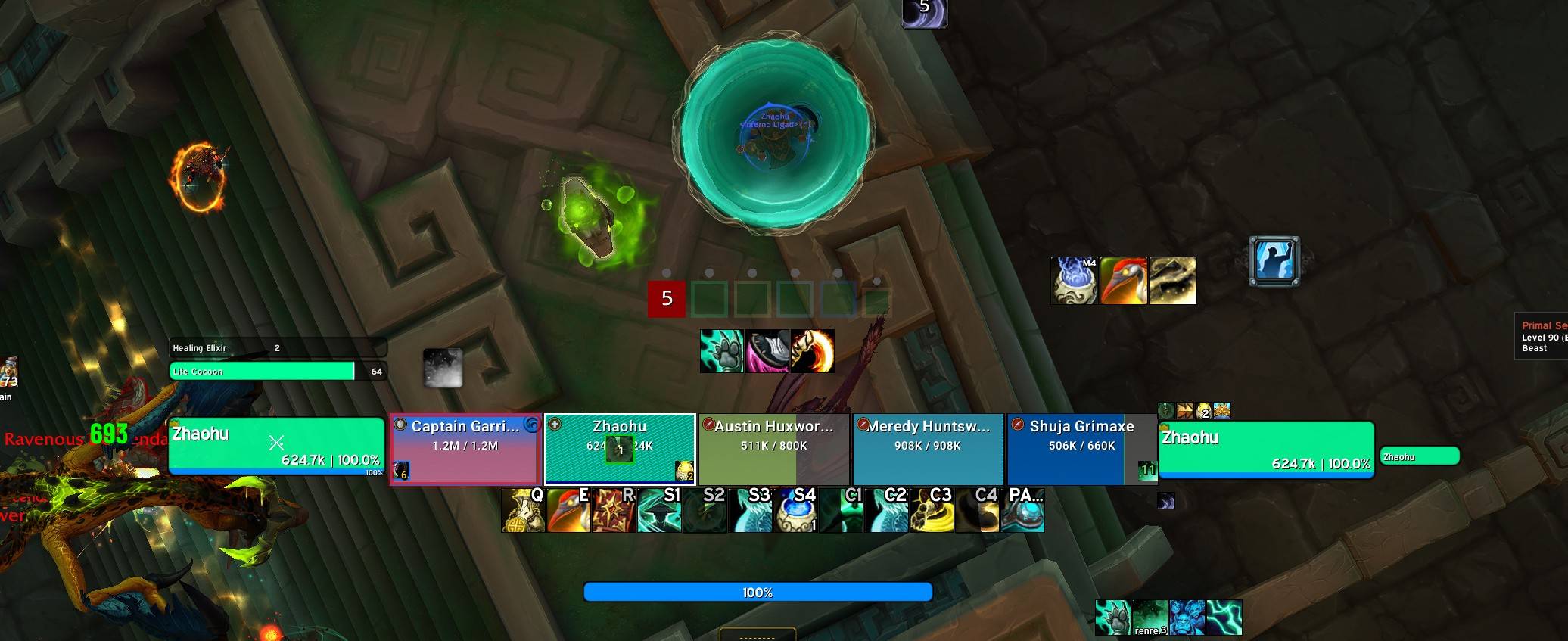
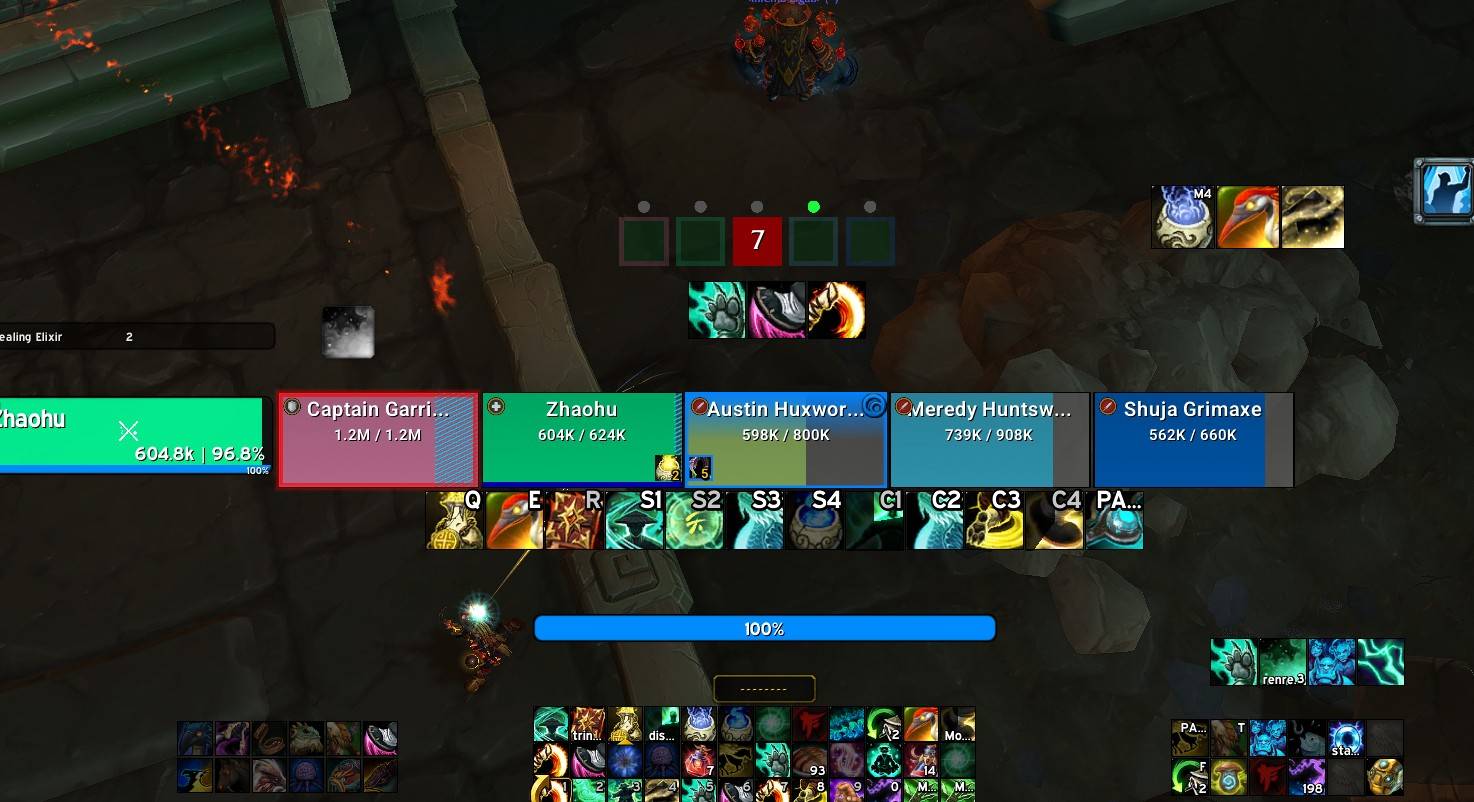
The small squares displayed by Zhaohu's Decursive are called Micro Unit Frames, or MUFs.
Each MUF represents a player or pet.
When someone has an affliction your character can remove, the MUF changes appearance to tell you that action is required.
Simply click the appropriate MUF to cast the configured dispel.
Zhaohu's Decursive automatically determines the dispels available to your current class, specialization, and talents.
Supported dispel types include:
- Magic
- Poison
- Disease
- Curse
- Charm
- Additional/custom cure types where supported
The system is designed for all classes and specializations capable of dispelling, rather than being tied to one healer or one spell.
What Are the Dots Above the MUFs?
Every visible MUF has a small status light centered directly above it.
These dots give you immediate feedback about whether that particular player can currently be cured and what happened after you attempted a dispel.
⚫ Gray — Ready
The MUF is in its normal state.
No known range or casting problem currently exists.
Think of gray as:
Ready to cure if needed.
🟡 Yellow — Out of Range
The player is currently outside the usable range of your configured dispel.
When the player comes back into range, the dot automatically returns to its normal state.
Yellow always takes visual priority.
For example, if a recent dispel succeeded but the player moves out of range, the dot will display yellow rather than green.
In Native mode, range is determined through Blizzard's spell-range API with Blizzard's unit-range system used as a fallback.
When the optional DandersFrames integration is enabled, its protected range information can be used instead.
🟢 Green — Dispel Successful
The dispel was cast and Zhaohu's Decursive verified that the matching dispellable condition cleared.
The green confirmation remains visible for approximately 3 seconds.
This makes it easy to know that your click actually accomplished what you expected without having to watch the player's debuff icons.
🔴 Red — Dispel Failed
A cure was attempted but was not successfully completed, or post-cast verification determined that the matching affliction was still present.
Examples can include:
- Interrupted or failed cast
- Line-of-sight failure
- Dispel did not remove the expected affliction
- Other failed cleanse conditions
The red warning remains visible for approximately 3 seconds.
Line of sight is intentionally shown as red only after an actual failed cure attempt, because WoW does not provide addons with a continuous reliable line-of-sight status check.
Status Dot Priority
The status system follows this visual priority:
Yellow Out of Range → Red/Green Result → Gray Ready
The dots are informational only.
They are not clickable and do not interfere with clicking the MUF underneath them.
Cooldown Feedback
After successfully cleansing a player, Zhaohu's Decursive can show the dispel cooldown on other MUFs that still require the same cure priority.
This helps answer an important question instantly:
"Who still needs this dispel while my spell is on cooldown?"
The system works with the native Blizzard detection provider and does not require DandersFrames.
Group and Raid Layout
Zhaohu's Decursive automatically adapts its MUF layout to your group.
Large raids can automatically reflow into a compact grid instead of becoming one extremely long row.
A full 40-player raid can be displayed in an efficient multi-row layout while preserving the individual status dot above every MUF.
Layout, spacing, size, growth direction, and other MUF behavior can be customized from the settings interface.
Environment Profiles
Different content requires different dispel behavior.
Zhaohu's Decursive includes dedicated environment modes for:
- Open World
- Dungeon / Follower Dungeon
- Mythic+
- Raid
- PvP
The active environment can automatically select the appropriate behavior profile.
Profiles allow you to customize how Decursive reacts depending on the content you are playing.
Profile management also includes:
- Active profile display
- Copy
- Reset
- Delete
- Import
- Export
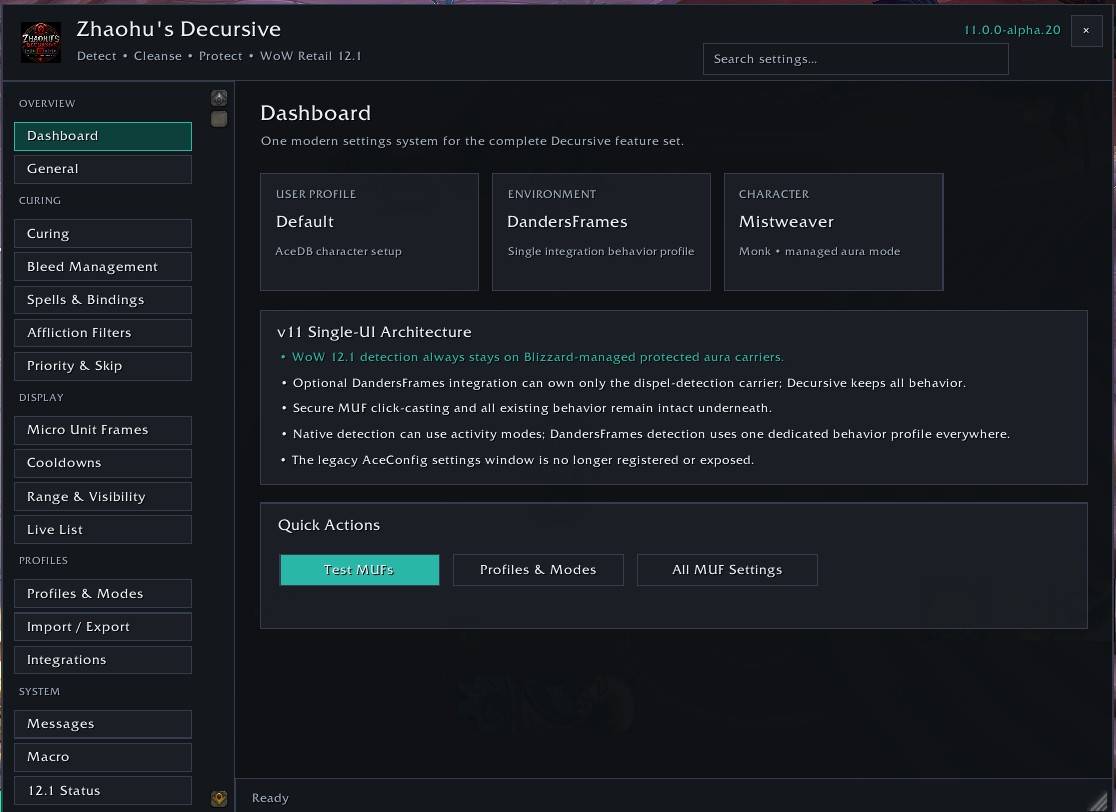
Settings
Type:
/decursive
to open the Zhaohu's Decursive configuration interface.
The same settings window can also be opened with:
/dcr
/zd
/zdecursive
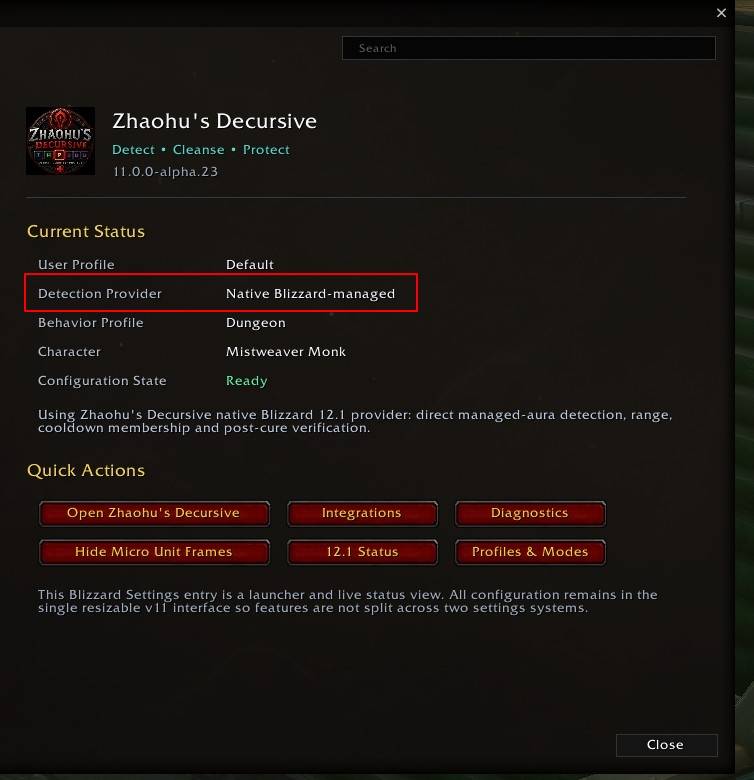
Zhaohu's Decursive also appears under:
Game Menu → Options → AddOns → Zhaohu's Decursive
The Blizzard AddOns page provides status information and quick access to the full configuration interface.
Slash Commands
The following commands are available in the current production release.
Settings
/decursive
Opens or closes the main Zhaohu's Decursive v11 settings window.
/dcr
Opens or closes the main Zhaohu's Decursive v11 settings window.
/zd
Short alias for opening the main settings window.
/zdecursive
Opens or closes the main settings window.
MUF / Window Commands
/dcrshow
Shows the main Decursive bar.
/dcrhide
Hides the main Decursive bar while allowing the Live List to remain available.
/dcrreset
Resets Decursive window positions. This is useful if a frame has accidentally been moved off-screen.
Priority List Commands
/dcrpradd
Adds your current target to the Priority List.
/dcrprclear
Clears the Priority List.
/dcrprshow
Opens or closes the Priority List management interface.
The Priority List can be used to make specific players appear earlier in Decursive's unit ordering.
Skip List Commands
/dcrskadd
Adds your current target to the Skip List.
/dcrskclear
Clears the Skip List.
/dcrskshow
Opens or closes the Skip List management interface.
The Skip List allows specific players to be excluded from normal Decursive handling.
Cure Information
/dcrshoworder
Displays Decursive's currently configured cure order.
This is useful for checking which dispel types and spells Decursive currently considers highest priority.
WoW 12.1 Status
/dcrstatus
Prints a compact WoW 12.1 compatibility/status report in chat.
This can include information such as the active detection provider and currently detected dispel configuration without exposing protected aura information.
Diagnostics
/dcrdiag
Runs Decursive's full self-diagnostic system.
Use this when troubleshooting a problem or when diagnostic information is requested for a bug report.
/dcrreport
Displays Decursive's debug report.
This is useful when collecting technical information for troubleshooting or reporting an issue.
Command Quick Reference
| Command | Function |
|---|---|
/decursive |
Open v11 settings |
/dcr |
Open v11 settings |
/zd |
Open v11 settings |
/zdecursive |
Open v11 settings |
/dcrshow |
Show Decursive bar |
/dcrhide |
Hide Decursive bar |
/dcrreset |
Reset window positions |
/dcrpradd |
Add target to Priority List |
/dcrprclear |
Clear Priority List |
/dcrprshow |
Show Priority List |
/dcrskadd |
Add target to Skip List |
/dcrskclear |
Clear Skip List |
/dcrskshow |
Show Skip List |
/dcrshoworder |
Show current cure order |
/dcrstatus |
Show WoW 12.1 status |
/dcrdiag |
Run self diagnostics |
/dcrreport |
Show debug report |
Slash commands are not case-sensitive.
Mouse Curing
The MUFs use secure WoW click-casting.
Mouse bindings can be customized and can include:
- Left Click
- Right Click
- Middle Click
- Mouse Button 4
- Mouse Button 5
- Ctrl modifiers
- Shift modifiers
- Alt modifiers
Zhaohu's Decursive determines which configured dispel should be used based on your cure priorities and available spells.
Spell and secure-click changes that WoW does not permit during combat are automatically handled according to Blizzard's combat restrictions.
Designed for WoW 12.1
Modern WoW restricts how addons can inspect certain aura and combat information.
Zhaohu's Decursive was rebuilt specifically around those restrictions rather than attempting to bypass them.
The addon uses Blizzard-supported protected systems to provide:
- Dispel detection
- Cure priority detection
- Range feedback
- Cooldown feedback
- Post-cure verification
- Secure click casting
The result is the familiar Decursive workflow rebuilt for the modern WoW addon environment.
Zhaohu's Decursive
See it. Click it. Cleanse it.
The Decursive 12.1 Compatibility Patch Team
