
ZeldaLoot Classic
- By
Description
ZeldaLoot Classic
Based on ZeldaLoot Extended (abandoned now) which was based on the original ZeldaLoot from Rickyk (abandoned), I used to love this addon so I decided to create a WoW Classic version. It will play zelda sounds when you loot an uncommon (green) or better item, may be useful after raid sessions to know if you have won or just as a sound enhancement. I do plan to upgrade the addon further.
New features summary
Version Support
We support every live client: Retail (Midnight), World of Warcraft: Forever, Mists of Pandaria Classic, Cataclysm Classic, Wrath of the Lich King Classic and Titan Reforged, The Burning Crusade Classic Anniversary, and Classic Era (including Hardcore and Season of Discovery).
Sounds
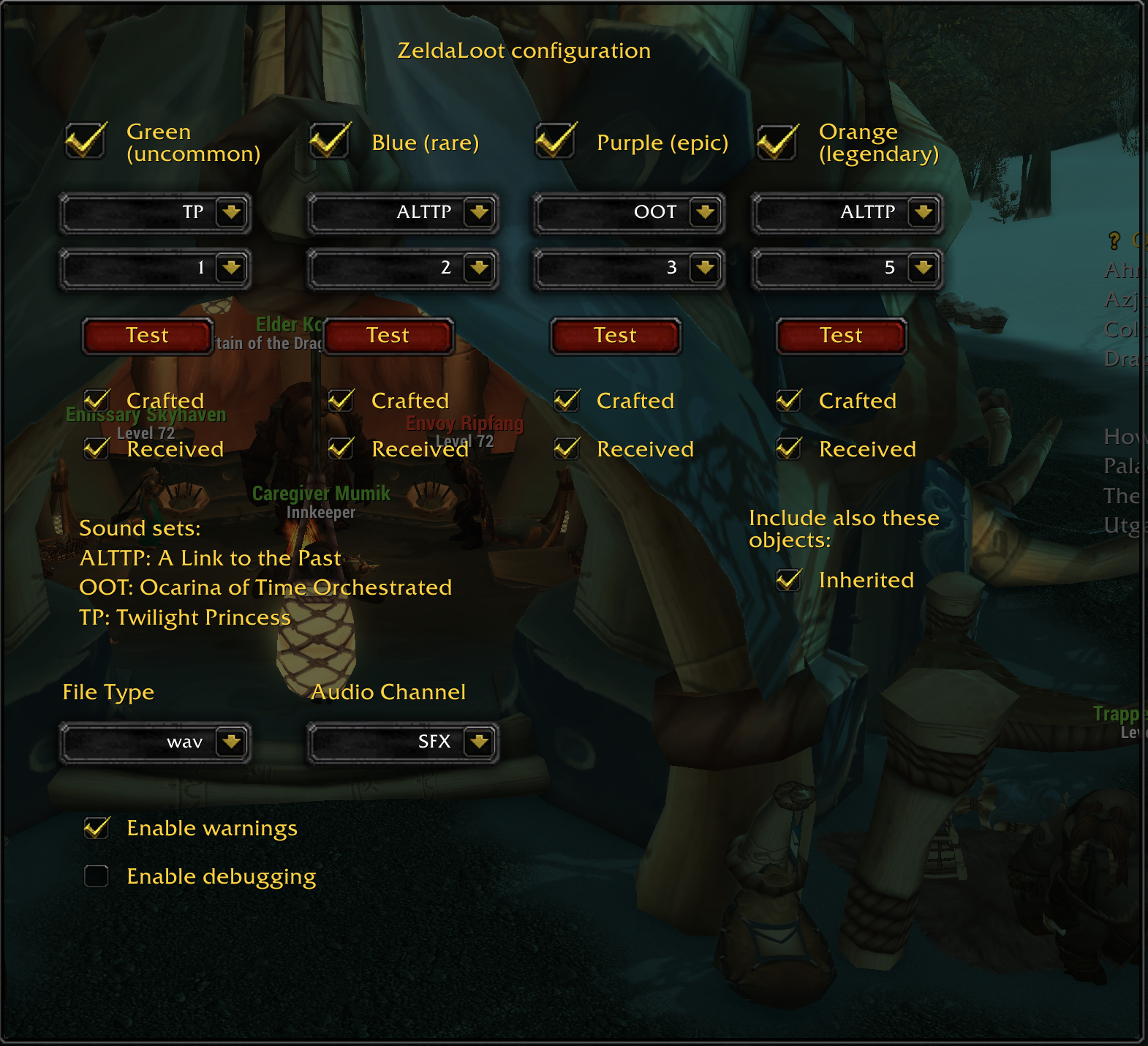
4 new sounds for different item qualities, from uncommon (green) to legendary (orange). Note inherited objects (linked to account) can play sound when received too (same as for legendaries items). Sounds provided by: Darth Killer, from Zelda Ocarina of Time (original from games), and Chrisgess, from Zelda Ocarina of Time Orchestrated album www.zreomusic.com, even higher sound quality!
The audio plays on the SFX audio channel.
Interface
Configure which sounds you want and when: loot from enemies, received (letterbox, seller, etc), crafted (professions and some special items like Eternal Water). Settings will be saved between sessions for all your characters. Type /zeldaloot or /zl for the settings menu.
Localization
English, French, German, Spanish (Spain and Mexico), Italian, Portuguese (Brazil), Russian, Korean, Simplified Chinese, and Traditional Chinese are supported. Loot detection uses the game's own text, so sounds work in every language; the translations only cover the settings panel, tooltips and chat messages.
Translations welcome! If you're a native speaker and spot a wording that's awkward or wrong, or a line that's still in English, please help improve it:
- Edit your language's file in the Locale folder (e.g.
ZL_deDE.lua) and open a pull request, or - Open an issue with the corrected text, or leave a comment on CurseForge.
If you play in a language that isn't listed, or sounds aren't playing for you in your language, please let me know.
Changes
Changes in 2.4.0
- Added support for World of Warcraft: Forever
- Updated for Midnight (Retail 12.1.0)
- Updated for Mists of Pandaria Classic (5.5.4)
- Updated for The Burning Crusade Classic Anniversary (2.5.6)
- Updated for Classic Era (1.15.9)
- Updated for Wrath of the Lich King Titan Reforged
- Fixed no sound playing for any loot on Retail since 11.1.5, which changed how item links mark their quality (also needed for WoW Forever)
- Fixed heirlooms not being detected on Retail; artifacts now play the legendary (orange) sound
- Fixed a Lua error on Midnight when looting during boss encounters, Mythic+ and PvP, where loot messages are hidden from addons; items you take from the loot window still play their sound there (items that go straight to your bags stay silent while messages are hidden)
- Bonus-roll loot plays its sound again
- Turning off "Received" now silences received items on French, Spanish and Portuguese clients even with "Crafted" on (they were being mistaken for crafted items)
- Added an adjustable volume setting (0-100%) with a slider in the config panel; it temporarily scales the chosen audio channel while a sound plays, then restores it without overriding any volume change you make in the meantime
- Loot detection now uses Blizzard's own localized strings, so it works in every language (including Korean and Russian grammar forms) instead of only English clients, and other players' loot no longer triggers your sounds on Korean clients
- The config panel's dropdowns are only built while the panel is open, avoiding interference with Blizzard's own dropdowns
/zlopens the ZeldaLoot settings page again instead of the game's Controls page/zl resetnow refreshes the config panel immediately if it is open- Fixed
/zl dumpthrowing a Lua error - Sound selection is now clamped to what the chosen sound set actually contains (e.g. OOT has 4 sounds)
- Scripts no longer load twice on login
- Removed dead code and duplicated logic; fixed TOC metadata (website link, BugGrabber name)
Changes in 2.3.0
- Added support for Midnight (Retail 12.0.1)
- Added support for Mists of Pandaria Classic (5.5.3)
- Updated for The War Within (Retail 11.2.7)
- Updated for Cataclysm Classic (4.4.2)
- Updated for Wrath of the Lich King Classic (3.4.5)
- Updated for The Burning Crusade Classic (2.5.5)
- Updated for Classic Era (1.15.8)
- Added localized descriptions and categories in TOC files
- Added language support for Korean, Italian, Portuguese, and Spanish (Mexico), Simplified Chinese, Traditional Chinese
- Fixed Control Panel initialization bugs
- Fixed sound not playing issue
Changes in 2.2.0
- Updated for The War Within (Retail 11.1.7)
- Updated for Classic Era (1.15.7)
- Updated for Cataclysm Classic (4.4.2)
- Fixed compatibility with new Settings API (InterfaceOptions_AddCategory was removed in 10.0)
- Added proper Cata.toc file for Cataclysm Classic
- Cleaned up the code
Changes in 2.1.0
- Added Locale text for the tooltips and all text sent to the console
Changes in 2.0.1
- Added support for Vanilla
Changes in 2.0.0
- Now with mp3 files
- The settings panel has been moved in to the interface settings for easier access
- The settings no longer need to be saved for them to take effect
- You can control the file types and the audio channel from the settings now
- The settings now has toggles for warnings and debug mode (VERY SPAMMY)
- /zl and /zeldaloot now take you to the new panel
- You can also default the settings from the new panel
- Added support for Russian
Changes in 1.3.0
- There are new warnings if the sound fails to play for any reason. You can disable these with /zl warnings.
- Use /zl ext to switch file types. This will be an actual settings option in the future.
- Use /zl channel <channel> to change the audio channel the sound effect plays on; the default is SFX (Sound). This will be an actual settings option in the future.
- Channel options:
- "Master"
- "SFX"
- "Music"
- "Ambience"
- "Dialog"
- Re-added old files to ensure all clients work
Changes in 1.2.5
- It will now prevent running multiple sounds at the same time.
- Reduced the size by correcting the sound files
- Files should be supported on all clients
Changes in 1.2.4
- Updated for version 3.4.0
- Changed the name from "ZeldaLoot BCC" to "ZeldaLoot Classic"
Changes in 1.2.3
- Updated for version 2.5.2
Changes in 1.2.2
- Converted the sound files from ogg to wav.
Changes in 1.2.1
- Added a help menu: /zeldaloot help or /zl help
- Added the ability to toggle debug mode: /zeldaloot debug or /zl debug
- Added the ability to reset the config: /zeldaloot reset or /zl reset
- Added the ability to dump the config: /zeldaloot dump or /zl dump
- Fixed a bug where the sounds wouldn't play due to old config.
Changes in 1.2.0
- Added more sounds from ZeldaLoot Extended by LegendaryHero20.
- Added the option to select which sound effect you want to use for each loot type.
Changes in 1.1.1
- Fixed a bug where you weren't able to open the settings.
Changes in 1.1.0
- You can now select which sound set to use for each of the item levels.
- You can also type /zl for the settings.
ZeldaLoot Classic Team
