XP Timer and Gold Tracker (version 2)
- By
Track time to next level and how much gold you are earning
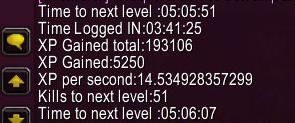
This is the output of the xpt command, the normal output is just the last line after a kill.
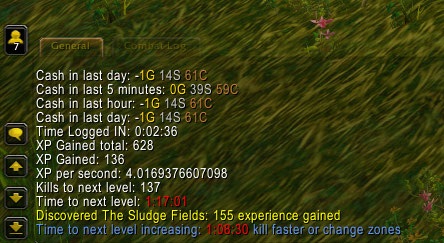
New version many new features
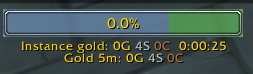
Screenshot 2026-03-03 143155.png
Description
⏱️ XP Timer and gold tracker
Always know when you'll reach the next level
About XP Timer
XP Timer is a lightweight World of Warcraft addon that answers one essential question: How long until I reach the next level?
The addon calculates your experience gain rate per second and provides an accurate estimate of the time needed to reach the next level. It's perfect for planning your gaming sessions and knowing exactly how much time you need to log in before the weekend to join guild activities.
✨ Key Features
- 📊 Real-time XP Tracking - Tracks your XP gain rate and calculates time to next level dynamically
- 🎨 Movable UI Bar - Draggable on-screen experience bar showing percentage and time estimate
- 💰 Gold Tracking - Monitor how much gold you've earned in the last 5 minutes, hour, or day
- 📈 Performance Monitoring - Alerts when your XP speed changes dramatically to help optimize playstyle
- 👥 Dungeon Grouping - Separate tracking for party/dungeon experiences
- 💱 Currency Tracking - Tracks various currencies earned in the last 5 minutes (experimental)
🎮 How to Use
Getting Started
Once installed, the addon will automatically start tracking your experience when you log in. A movable XP bar will appear on your screen showing your current level percentage and estimated time to the next level.
Main Commands
| Command | Description |
|---|---|
/xpt |
Display XP statistics including total XP gained, current rate, and time to next level |
/xpt help |
Show all available commands |
/xpt reset |
Reset the timer (great when entering a new zone or dungeon) |
/xpt hour |
Display XP gained per hour (requires 1+ hour of play) |
/xpt on / /xpt off |
Enable or disable status messages on XP gains |
Gold & Currency Tracking
| Command | Description |
|---|---|
/ct or /cash_timer |
Display gold earned in last 5 minutes, 1 hour, and 24 hours |
/ct [minutes] |
Show gold earned in the last X minutes (max 1440 minutes / 24 hours) |
/ct on / /ct off |
Enable or disable gold earning notifications |
Group & Dungeon Commands
| Command | Description |
|---|---|
/xpt party or /xpt group |
Display separate statistics for your current group session |
/xpt party_start |
Manually start group tracking |
/xpt party_end |
End group tracking and display summary |
🖱️ UI Bar Features
The floating XP bar that appears on your screen includes:
- Top Bar: Shows your current level progress as a percentage and estimated time to reach the next level
- Bottom Text: Displays gold and currency earned in the last 5 minutes, plus instance tracking information
- Draggable Design: Click and drag the bar to reposition it anywhere on your screen; position is saved automatically
- Smart Display: At maximum level, the XP bar hides while gold tracking continues
📥 Installation
- Download the addon
- Extract the
xp_timerfolder to your WoW addons directory:- Windows:
World of Warcraft\_retail_\Interface\AddOns\ - Mac:
World of Warcraft/_retail_/Interface/AddOns/
- Windows:
- Restart World of Warcraft
- Enable the addon in your AddOns menu at the character selection screen
- Log in and type
/xpt helpto get started
⚙️ Settings
Access the addon's settings through the Interface Options or Settings menu under "XP Timer":
- Show chat messages: Enable/disable messages in chat
- Show UI frame: Toggle the on-screen XP bar visibility
🔧 Compatibility
- Game Version: World of Warcraft Retail (Patch 12.0.1 + )
XP Timer with UI
Created by Jeff Jacob
For questions, suggestions, or feature requests:
📧 addon@phansoft.ca
XP Timer and Gold Tracker (version 2) Team


Owner