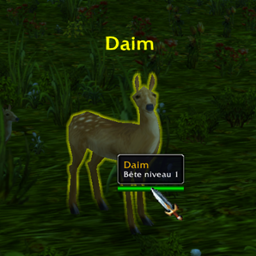
TooltipMouseoverClassic is a simple, lightweight addon that attaches the standard Tooltip directly to your mouse cursor.
Why use this addon? It is extremely light: No heavy libraries, no complex menus. Performance-focused, you can configure everything using simple chat commands.
Compatibility This addon works on Wow Classic, but a Retail version exists: https://www.curseforge.com/wow/addons/tooltip-mouseover-retail
Type /tmo in the chat to see your help menu and current settings:
Positioning & Scale
/tmo x [arg] : Moves the tooltip left or right (Default: 30 | Range: Any number)
/tmo y [arg] : Moves the tooltip up or down (Default: -100 | Range: Any number)
/tmo alpha [arg] : Sets tooltip opacity (Default: 1.0 | Range: 0.1 - 1.0)
/tmo scale [arg] : Changes the overall tooltip size (Default: 1.0 | Range: 0.2 - 5.0)
/tmo weight [arg] : Adjusts the width of the border (Default: 1.0 | Range: 0.5 - 3.0)
Colors & Identification
/tmo border [on/off] : NPC Border colors based on reaction (Hostile/Neutral/Friendly) (Default: OFF)
/tmo class [on/off] : Class border colors based on player class (Mage, Rogue, etc.) (Default: ON)
/tmo attack [on/off] : Forces a Red border if the target is in combat or hostile (Default: ON)
/tmo tot [on/off] : Adds a line showing who your target is targeting (Default: ON)
Behavior & System
/tmo msg [on/off] : Toggles the addon welcome message in chat (Default: ON)
/tmo reset [arg/all] : Reset specific settings or everything (Choices: x, y, alpha, scale, weight, border, class, attack, tot, combat, msg, all)
/tmo combat [on/off/default] : How the tooltip behaves in battle (Default: ON)
on: Follows cursor.
off: Hidden during combat.
default: Reverts to original Blizzard anchored position.
About me
Feel free to fork, just mention me in the project @Volfera
Feel free to donate if the addon is helpful to you: Buy Me a Coffee