Gear Journey
- By
Spec-aware leveling gear wishlist for WoW Classic Era — see the gear worth chasing next and where it drops, right on your Titan Panel.
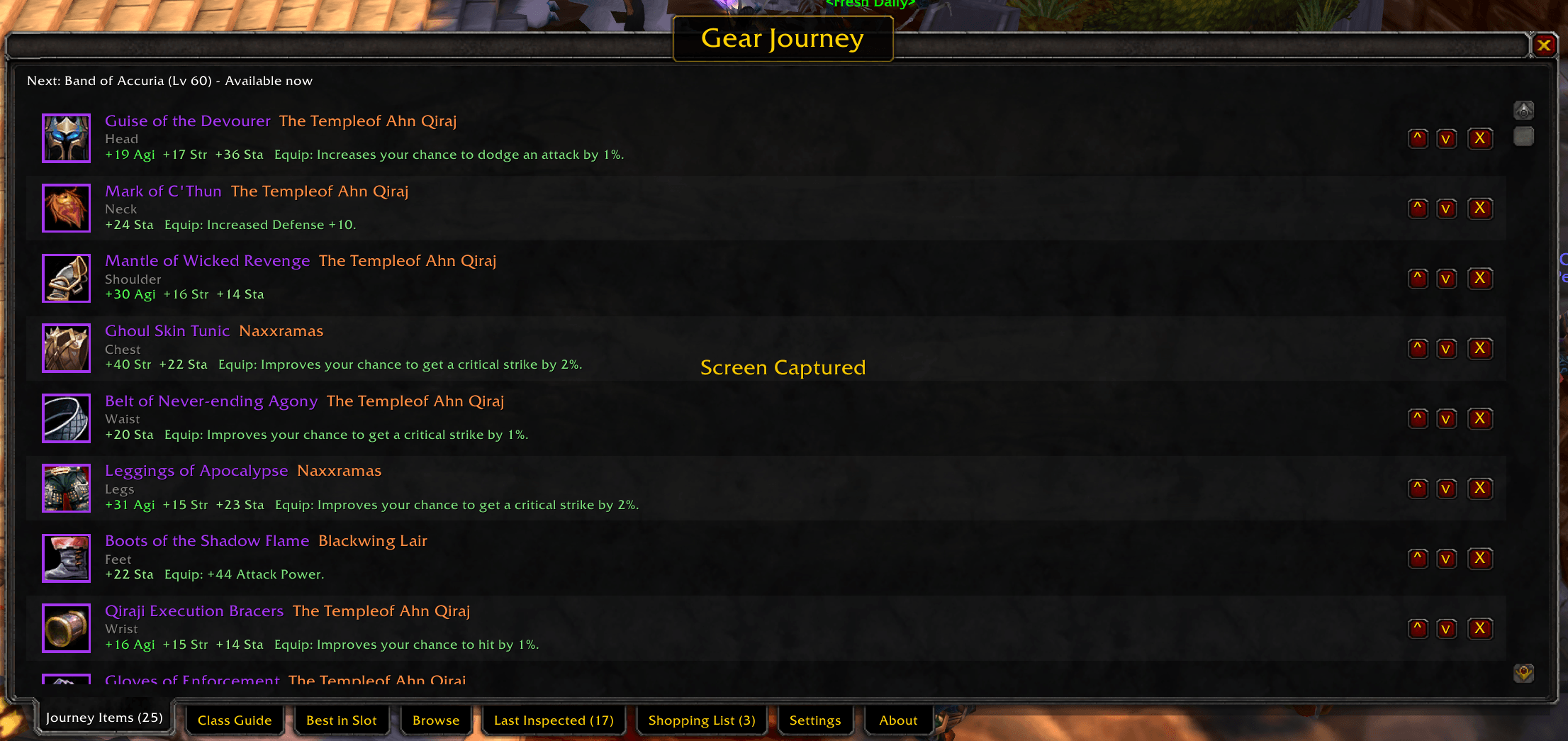
JourneyItemsList.png
Browse.png
LastInspected.png
ShoppingList.png
Description
🧭 Gear Journey







"Stop alt-tabbing to Wowhead mid-level."
Gear Journey is a leveling gear wishlist for World of Warcraft Classic Era and Retail. It shows the gear worth chasing next for your class and spec, where it drops, and how many levels away you are from wearing it.
Your next goal sits on any LibDataBroker display (Titan Panel, Bazooka, ElvUI and friends) or on its own minimap button. Click it to open the window: build a Journey List, browse every weapon and armor piece in the game, or check what a class should be wearing. Ignore it and it stays one line of text on your bar.
✨ At a glance
| | Feature | What it does | |:-:|---|---| | 🎯 | Next goal on your bar | Your nearest Journey List item, its level, and Available now or how many levels away it is. | | 📋 | Journey List | A personal, reorderable wishlist per character, with an owned marker for gear you already have. | | 🔎 | Browse & search | Every weapon and armor piece, filtered by slot, dungeon, source and rarity, with an item-detail preview. | | 📖 | Class Guide | Curated weapon and armor picks for your class, spec and race. | | 🏆 | Best in Slot | Best-in-slot lists by spec. | | 🔍 | Last Inspected | Keeps the gear of the last player you inspected so you can copy their picks. | | 🧮 | Spec-aware scoring | Items are scored with stat weights for your spec, so off-spec gear is flagged. |
🎯 Your next goal, always visible
Gear Journey publishes a LibDataBroker data object, so any display addon can host it. No Titan Panel or other dependency is required: with no display installed, it uses its own minimap button. You can also turn on a small floating bar from the right-click menu.
- Left-click opens the Gear Journey window.
- Right-click opens a menu: Show Gear Journey bar, Show minimap button and About.
- Hover lists your Journey List with each item's level and how close it is.
The button text updates on login and every time you level, since the lookahead window moves with you.
📋 Journey List
The Journey Items tab shows your saved list in order, with each item's level and a coloured cue for how reachable it is: green if you can use it now, gold if it is a few levels away, red if it is further out. Reorder with the ^ and v buttons, remove with X. The nearest unowned item becomes your next goal. Items you already own get a small green dot.
Hover any item for the full game tooltip, and hold Shift to compare it with what you are wearing.
🔎 Browse & search
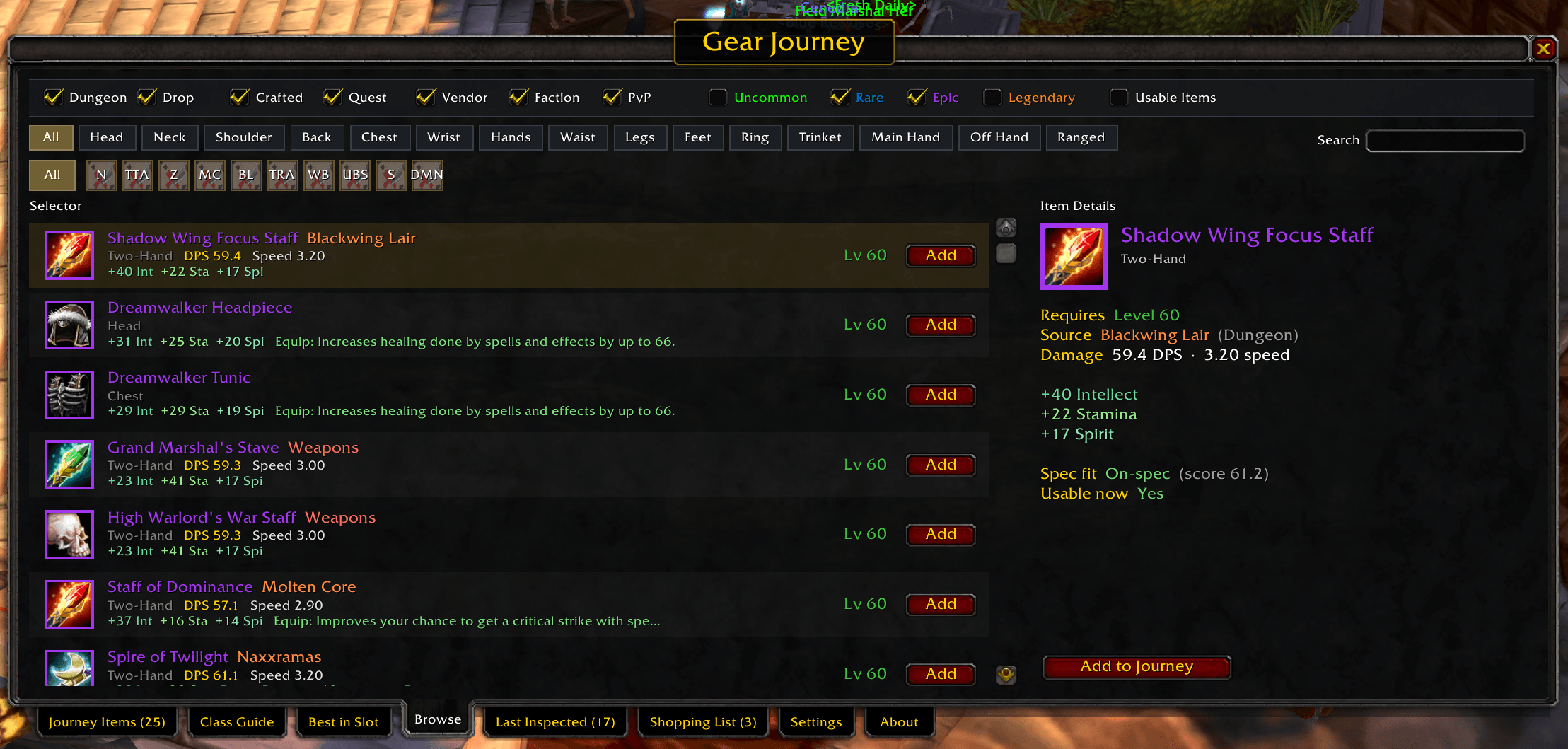
The Browse tab is a two-pane view: a long list on the left, details for the item you click on the right.
| Filter | Options |
|---|---|
| 🧱 Source | Dungeon · Drop · Crafted · Quest · Vendor · Faction · PvP |
| 💎 Rarity | Uncommon · Rare · Epic · Legendary |
| 🎽 Slot chips | All, then each equipment slot |
| 🏰 Dungeon chips | Solo one dungeon to see only what it drops |
| ✅ Usable Items | Keep only gear your character can equip now |
Type in Search to scan the full index by name: 9,180 items on Classic Era, 9,540 on Retail. Searching overrides the slot filter, and results are not hidden by your source filters.
Item Details (the right-hand third of the tab) shows, for the item you click:
- icon with quality border, name, slot and armor type;
- required level, coloured by whether you can reach it;
- full source name and type, weapon DPS and speed;
- every stat on its own line and the complete effect text;
- Spec fit: on-spec or off-spec for your build, with its score;
- Usable now, class restrictions, and whether you already own it;
- an Add to Journey / Remove from Journey button.
📖 Class Guide & 🏆 Best in Slot
The Class Guide has Weapons and Armor lanes with a spec chip for each spec, so you can preview another spec without respeccing. Lists are curated per class, spec and race: 27 specs across 9 classes and 8 races (120 lists). They are built from the Classic Era dataset.
Best in Slot gives lists per spec for 6 classes (18 spec lists).
🔍 Last Inspected
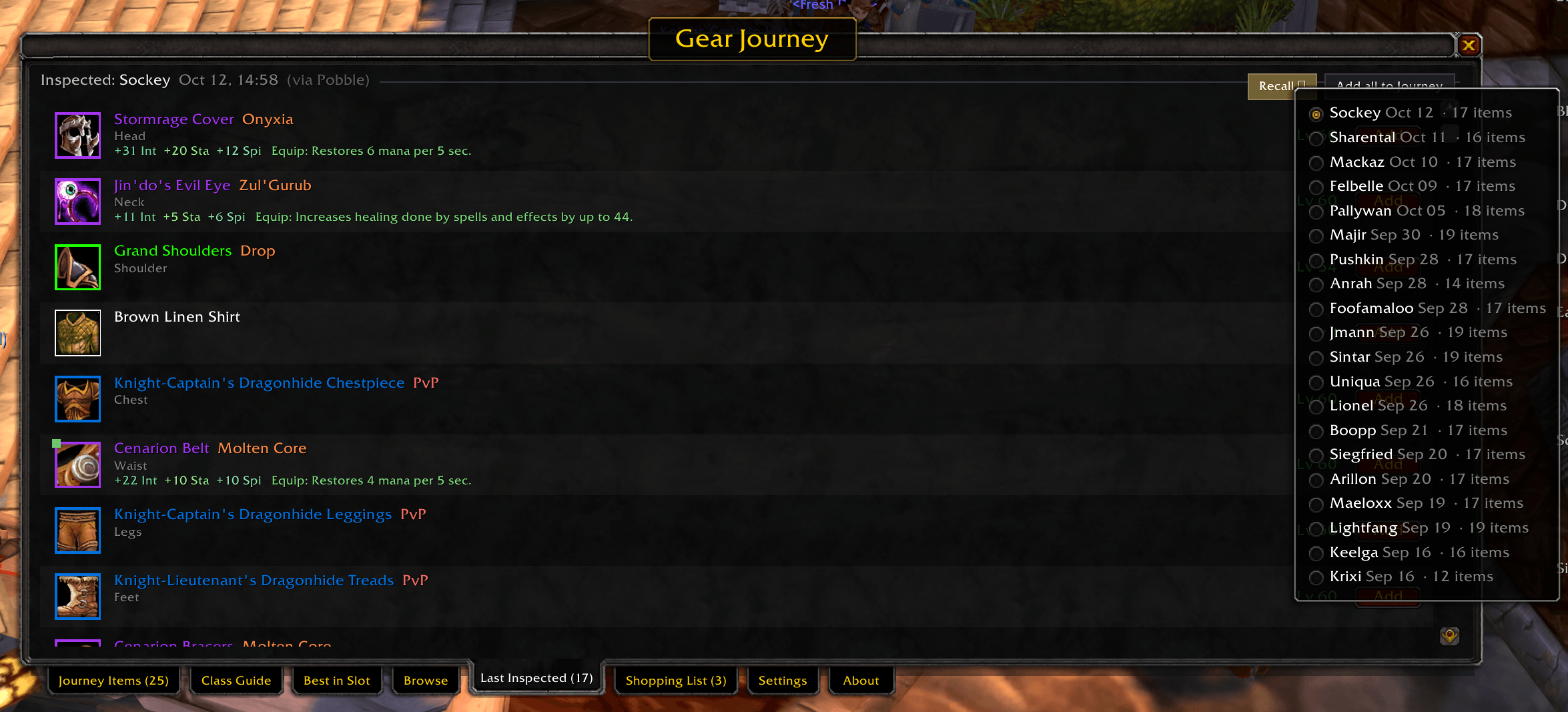
Inspect another player and Gear Journey remembers their gear. The Last Inspected tab lists it with the tab's item count, so you can add any piece to your own Journey List.
🧮 How items are scored
Each spec has stat weights, so a Fury Warrior and a Protection Warrior are not shown the same chest. Gear is flagged off-spec when it is the wrong school for your build, for example Intellect-only cloth for a physical spec. On Retail the scoring also understands Crit, Haste, Mastery and Versatility.
⌨️ Commands
There are no keybinds. Everything opens from the button or the slash command.
| Command | What it does |
|---|---|
/gearjourney or /tj |
Open or close the Gear Journey window |
/gearjourney run-testing-scenarios |
Run the in-client behaviour tests (an optional tag runs a subset) |
⚙️ Settings
The Settings tab holds a Run Tests button for the in-client behaviour scenarios. Your filters (sources, rarities) and your Journey List are saved per account.
🧪 Status & feedback


Verified: the pure scoring, filtering and list logic is covered by an offline test suite (33 test files, all passing).
Not yet: the curated Class Guide and Best in Slot lists come from the Classic Era dataset, so treat them as Classic-first. Browse and search use each flavour's own item index.
Found a bug? Report it with your flavour (Classic Era or Retail), your class and spec, the tab
you were on, and any Lua error text (turn on /console scriptErrors 1).
Made with ❤️ by Honour Bound Game Studios
🌐 honourbound.games · 🎮 Steam Curator
Gear Journey Team