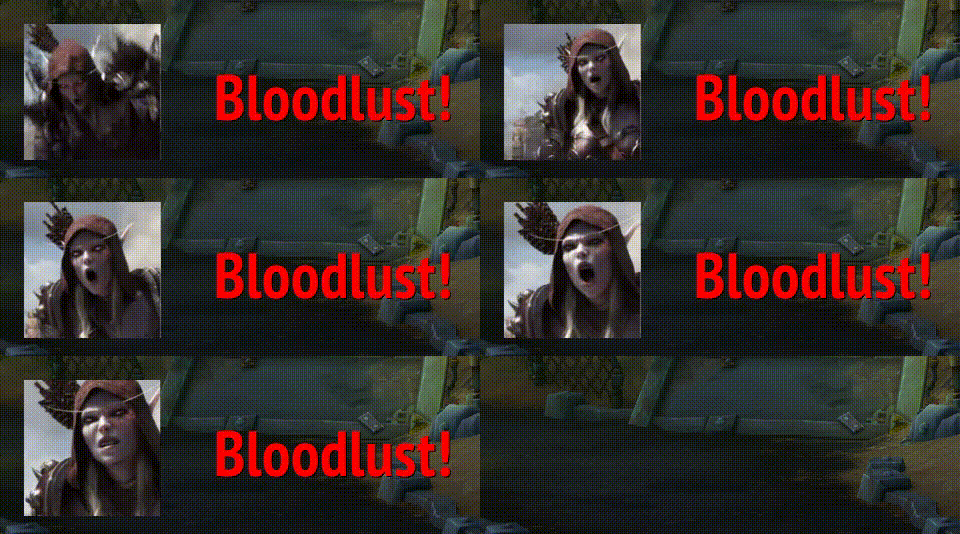
Bloodlust alert
Description
OwlPack 🦉
Everything a druid's or moonkin's heart desires — and quite a bit more.
OwlPack is a toolbox for World of Warcraft: Forever. It started as a sound and texture pack and grew into the set of windows, nameplate displays and small comforts one owl kept wanting while playing: what the season asks of you, what dropped and who got it, what you caught, how much of the threat you are holding, and where your combo points are — without looking away from the fight.
Everything sits in one place: Esc → Options → AddOns → OwlPack, with a page per feature. Nothing here replaces your UI, and nothing turns itself on behind your back: the features that touch Blizzard's own frames start switched off.
- Native Blizzard UI throughout — no Ace libraries, no second settings window to learn
- One window overview, one set of movable anchors, one options page
- Built for Forever's protected combat values: the displays keep working inside dungeons and raids, where most addons go quiet
Windows
Open any of them from the minimap icon, the window overview, or /owl <name>. Size and
position are remembered per character.
| Window | What it shows |
|---|---|
| Currencies | The stones, crests and marks of the current season, grouped, with the amounts of your other characters remembered |
| Renown | Where you stand with the major factions, and a quiet "+rep" note while the window is open |
| Farming | Trade goods with auction-house and vendor prices (Auctionator used when present), wood, your containers as clickable buttons, the total value of the lot, and gold per hour |
| Achievements | A curated list with criteria you can expand, and a switch for hiding what you already have |
| Group loot | Five tabs: the rolls that are running, a summary of the run, every item that dropped, your roll luck across runs, and a wishlist |
| Fishing | Four tabs: this session, your zones and their areas, everything caught so far, and the hours of the day you actually fish |
| Latency | Your latency and bandwidth, refreshed while you watch |
| What's new | The release notes, once after every update |
On your nameplates
Both of these are off until you switch them on, and both keep working where threat and combat values are hidden from addons.
Combo points
Your combo points on your target's health bar — or at a fixed spot above your character, if you would rather keep your eyes in one place.
- Seven styles: Classic, Silver, Square, Glow, Flat, Diamond, or Blizzard's own art
- Any color you like, above or below the bar, your size and spacing
- An optional pulse or gold dots when you hit your maximum
- Points left on another enemy stay visible on that enemy, because Forever keeps them there until you spend one elsewhere
- Works whether Blizzard draws your nameplates or Plater, ElvUI, EllesmereUI or Platynator does
Threat
How much of the threat lead you hold, on every enemy you are fighting — or only on your target.
- A percentage and a small green / yellow / red dot, each on the side of the bar you choose
- Which color means what follows your group role: for a tank green is holding the threat, for everyone else it is not holding it
- Colors are yours to pick
Fishing
Equip a rod and a small bar appears with your fishing skill, how long your lure still holds, a button for every lure in your bags and one for fishing food with its buff timer.
- Easy casting: a double right-click casts Fishing, and a plain right-click reels the bobber in without aiming at it. Keys for both can be set in Blizzard's key bindings
- Apply a lure first: cast with an empty rod and it applies your strongest usable lure, then casts on the next click
- Every cast and catch recorded: catch rate, seconds per catch, fish per hour
- Your zones, down to each area, with the loot table you fished there and drop rates
- Everything caught so far, split into fish, treasure and junk, plus the lures you burned
- The hours you fish, as a graph across the day
- Share your stats or your fishing skill in chat with one click
Group loot
- Roll Need / Greed / Pass straight from the window, or with a key binding
- See who chose what, who won, and with which roll
- A hint when an item beats what you are wearing
- A filter for the roll spam in your chat, and optional sounds when a roll starts or is about to run out
- A recap of every run: each item, each winner, and a per-player summary
- Loot luck across runs: your average roll, your best and worst, your dry streak
- A wishlist: star an item and it is highlighted the moment it drops again, with a count of how often you have tried for it
- A summary in your chat when a dungeon ends, and an optional post to your group
Alerts and anchors
- Bloodlust / Heroism, level up and boss killed — sound, text and a short animation, each switchable, each with a test button
- Pick whether Bloodlust greets you in Horde or Alliance colors, or follows your faction
- Every alert, message and bar sits on a movable anchor:
/owl anchorsmakes them visible, drag them where you want them, and they stay there. Blizzard's own edit mode shows them too
Small comforts
- Mana bar for shapeshift forms — while shifted the player frame shows rage or energy, so a druid cannot see the mana left for a heal. This bar docks under the player frame's mana bar, or anywhere you put it
- Always ready — confirms the ready check for you
- Auto queue — accepts the role check for you
- Oldman cursor — a ring in your class color around the mouse pointer, for when you lose it
- Simple action bars — drops the frames around the action bars
- IDs in tooltips — spell, item, quest, unit and more, switchable per kind
- Minimap icon and addon compartment — left click for currencies, right click for the window overview, middle click for the settings
Sounds and textures for your other addons
The original reason this addon exists, and still here. OwlPack registers everything it ships in LibSharedMedia, the shared media library most addons use, so its files turn up in their dropdowns without you installing or configuring anything.
- 🎵 Sounds — for anything that plays one on a trigger
- 🖼 Status bar textures — for health bars, cast bars, resource bars
- 📹 Stop-motion spritesheets, used by the alerts above
How to use them: anywhere an addon lets you pick a sound or a bar texture, look for the
entries starting with OwlPack: in the dropdown. That covers aura and notification addons,
unit frame and nameplate addons, damage meters — anything that reads LibSharedMedia.
Commands
| Command | Effect |
|---|---|
/owl |
Open the settings |
/owl anchors |
Show and hide the movable anchors |
/owl currency · farming · achievement · reputation · loot · fishing · latency · manager · changelog |
Toggle that window |
/owl debug |
State of the loot, combo point and threat modules, for bug reports |
/owlpack works everywhere /owl does.
Key bindings live under Esc → Options → Keybindings → AddOns → OwlPack: Need, Greed and Pass on the top item still waiting for your roll, cast Fishing, and reel the bobber in.
Bugs and ideas
Forever is a moving target and its interface changes between builds. If something stops
working, type /owl debug, grab the output together with a screenshot, and open an issue.
License: BSD-3-Clause. Author: Elschnagoo (Astrastar-Blackhand-EU).
The Owl Pack Team