íë©´ ìº¡ì² 2026-04-21 190102.png
íë©´ ìº¡ì² 2026-04-21 190133.png
Description
# SequenceHelper
> **5-man Black Morass dungeon helper** for WoW Anniversary / Classic clients.
> One designated **Announcer** clicks the mic button once, and SequenceHelper handles **the entire run's chat**: the beacon order broadcast, the wave 13–17 portal call-outs, and the wave 6/12/18 boss alerts — automatically into party chat.
**Version**: matches `## Version` in `SequenceHelper.toc` (every change recorded in `CHANGELOG.md`).
**Client**: WoW Anniversary / Classic family — verified on Interface `20504` / `20505`. Should run on any Classic flavor whose `## Interface` matches.
---
## Highlights
- **Auto beacon order** — One mic-button click broadcasts `[Beacon order] 1. NameA / 2. NameB / …` to party chat.
- **Auto rift call-outs** — When portals open in waves 13–17, SequenceHelper sends `◆ [Next rift 16] Name - use beacon!` (real raid-target diamond icon up front).
- **Auto boss alerts** — Just before waves 6/12/18 (Deja / Temporus / Aeonus) it announces `💀 [BOSS] Aeonus - loot fast and move out!` (real raid-target skull icon).
- **Beacon number badges on unit frames** — Each of the 5 party members shows their beacon number (1–5) on their unit frame.
- **Live rift counter** — `Rift open : 12/18` shown on the helper panel, kept in sync via a triple-redundant detection system (combat log + UI widget event + 1 s widget poller).
- **Announcer conflict guard** — If two SequenceHelper users in the same party both turn Announcer ON, a one-shot warning prints to chat. (Cannot detect non-SequenceHelper sources, e.g. WeakAuras.)
- **Simulation mode** — Outside the dungeon you can fake-run waves 1→18 to verify behaviour. All output previewed to your own chat only.
- **Standard Interface Options panel** — All settings and a full how-to live under ESC → Interface → AddOns → SequenceHelper.
---
## Install
1. Drop the entire `SequenceHelper` folder into your AddOns directory:
- WoW Anniversary: `World of Warcraft\_anniversary_\Interface\AddOns\`
- Classic Era: `World of Warcraft\_classic_era_\Interface\AddOns\`
- Other Classic flavors: same `Interface\AddOns\` location.
2. On the character-select screen, open **AddOns** and tick `SequenceHelper`.
3. Once in game, the mic button next to the minimap confirms the install.
---
## Quick start (3 steps)
1. **Form your 5-man party** → the helper window lists you + your 4 party members in beacon order 1–5.
2. **Enter Black Morass** → one player **left-clicks the mic button** in the helper window. That player becomes the Announcer and the beacon order is sent to party chat immediately.
3. **Run as normal** — every portal opens, every boss spawns, the right alert is in party chat automatically. The Announcer just plays the beacon.
> ⚠️ **Only one Announcer.** Two or more = duplicate chat lines. SequenceHelper **auto-resets the Announcer to OFF on instance enter / leave / reload** so the group must consciously pick one player to mic-click after entering.
---
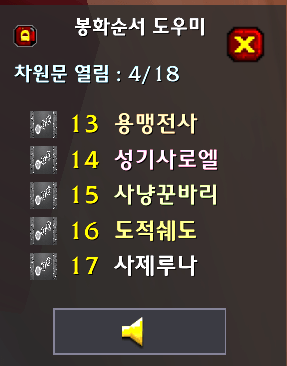
## Helper panel (minimap right-click)
- **Title**: `Sequence Helper`
- **Rift counter** (only inside Black Morass): `Rift open : N/18`
- **Beacon order list**: `1. Name` … `5. Name` (current Announcer gets a green outline next to their icon)
- **Mic button** (centered at the bottom)
- **Left-click** — Announcer ON + send beacon order now (re-click to re-broadcast).
- **Right-click** — Announcer OFF immediately.
- Active when: inside Black Morass / 5-man party is full / sim mode. Greyed out otherwise.
---
## Minimap button
| Action | Result |
|---|---|
| **Left-click** | Open/close the Interface Options → SequenceHelper panel |
| **Right-click** | Open/close the helper window |
| **Shift + drag** | Move the minimap button around the minimap edge |
---
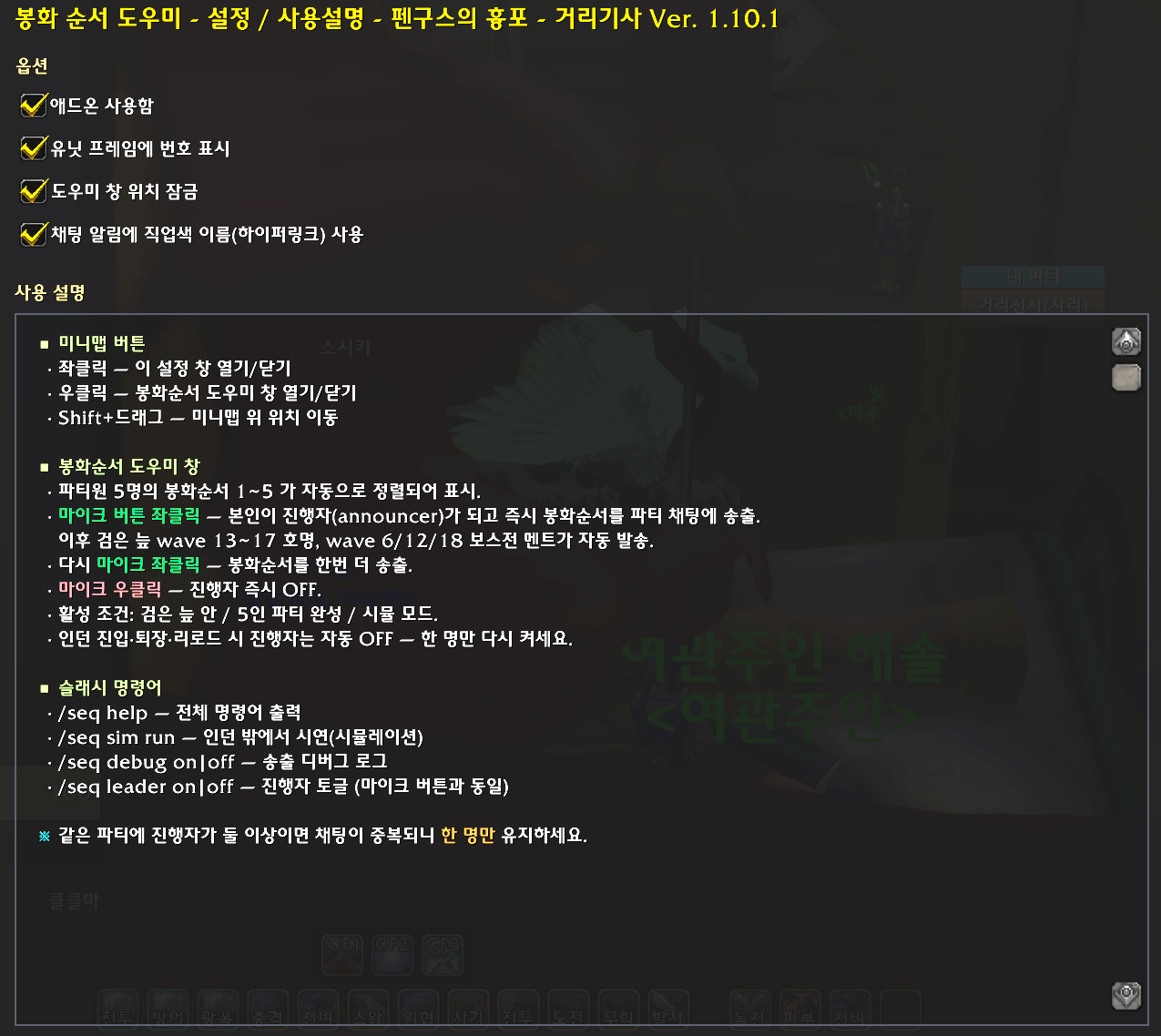
## Interface Options panel
ESC → Interface → AddOns → SequenceHelper:
- **Four option checkboxes**
- Addon enabled
- Show numbers on unit frames
- Lock helper panel position
- Use class-colored player hyperlinks in chat
- **Scrollable how-to body** — minimap shortcuts, mic button usage, Announcer auto-OFF timing, slash command summary.
---
## Slash commands
`/seq` (also `/sequencehelper`, `/pse`, `/psequence`):
| Command | Description |
|---|---|
| `/seq` or `/seq help` | Print command help |
| `/seq settings` (`config`, `options`) | Toggle the Interface Options panel |
| `/seq show` / `hide` / `toggle` | Helper window visibility |
| `/seq on` / `off` | Enable/disable the addon |
| `/seq announce` | Send beacon order to party chat now |
| `/seq leader on` / `off` / `status` | Toggle Announcer (same as the mic button) |
| `/seq bm on` / `off` | Black Morass auto-call on/off (default on) |
| `/seq links on` / `off` | Toggle class-colored player hyperlinks in chat |
| `/seq peers` | Report other SequenceHelper users in your party |
| `/seq sim on` / `off` / `set <N>` / `next` / `run [sec]` / `stop` / `chat on\|off` | Simulation mode |
| `/seq debug on` / `off` | Send-path debug log |
| `/seq reset` | Reset helper window position |
| `/seq probe` | Print Black Morass diagnostics (trigger counters, widget state) |
---
## Black Morass auto-announce — exact behaviour
| Wave | Trigger | Party-chat message |
|---|---|---|
| 1–5 | (silent) | Beacon users 1–5 don't need calling — only the panel `N/18` counter updates |
| **6** | Deja spawn | `💀 [BOSS] Deja - loot fast and move out!` |
| 7–11 | (silent) | Counter updates only |
| **12** | Temporus spawn | `💀 [BOSS] Temporus - loot fast and move out!` |
| **13–17** | Portal opens | `◆ [Next rift N] Name - use beacon!` |
| **18** | Aeonus spawn | `💀 [BOSS] Aeonus - loot fast and move out!` |
> The `◆` and `💀` glyphs are real WoW raid-target marker tokens (`{rt3}` / `{rt8}`). They render as actual icons on every receiver's client, making the call-outs visually distinct from regular chatter. SequenceHelper sends **plain text plus raid-target tokens** only — color codes and a few BMP-outside glyphs are silently dropped by the Anniversary client's `SendChatMessage` (see CHANGELOG entries 1.9.2 / 1.9.3 for the full diagnosis).
### Triple-redundant detection
To make sure portal advances are never missed by a single bug, three triggers run in parallel:
1. **Combat log event** — match the rift channel spell IDs.
2. **UI widget event** — react when the in-game 12/18 counter widget changes.
3. **1-second widget poller** — even if both events miss, the next poll catches the change within 1 s.
Any one of the three keeps the call-outs flowing. `/seq probe` prints how many times each path fired.
### Announcer auto-OFF timing (safety default)
SequenceHelper deliberately resets the Announcer to false at every one of these moments, so the group must re-pick one Announcer per run and chat duplication stays at zero:
- Login / `/reload`
- Black Morass enter (outside → inside)
- Black Morass leave (inside → outside)
- Simulation end (when outside the dungeon)
- Mic right-click / `/seq leader off`
---
## Simulation mode
Useful for demoing the addon outside Black Morass or for video capture. Output previews **only to your own chat** with a `[SIM]` prefix (party chat is not touched).
```
/seq sim on # start sim — show 5 fake party members
/seq sim run # auto-walk waves 1→18 every 1 s
/seq sim run 2.5 # walk every 2.5 s
/seq sim set 13 # jump rift counter to 13
/seq sim next # advance one wave
/seq sim stop # stop the auto walker
/seq sim chat on # ⚠️ send sim lines to real party chat (be careful)
/seq sim off # leave sim mode
```
---
## Compatibility / known limits
- **Disabled in raids** — this is a 5-man helper. Inside a raid the helper window and chat alerts go quiet.
- **WeakAuras / other auto-callers**: SequenceHelper detects Announcer conflicts only between SequenceHelper users. If somebody else's WeakAuras is also broadcasting the same call-outs, SequenceHelper has no way to see it — chat will duplicate. **Run only one auto-caller per party.**
- **Anniversary `SendChatMessage` silent-drop**: messages containing color codes (`|cXXXXXXXX|r`) or certain non-BMP glyphs (`◈`, `»`, `—`) silently disappear after returning OK. SequenceHelper scrubs all outgoing chat to plain text + raid-target tokens to work around this (see `scrubChatLineForSend`).
- **`|T...|t` texture escapes are rejected** by the same path. That's why icons are expressed as `{다이아몬드}` / `{해골}` / `{rt3}` / `{rt8}` raid-target tokens instead of texture inlines.
---
## Icons / artwork (CurseForge etc.)
- **CurseForge project icon**: `Art/SequenceHelper-CurseForge-400.png` — must be **400 × 400 px, 1:1 aspect**. The repo file matches this spec.
- **In-game minimap icon**: `Textures/MinimapIcon.png` (referenced by `## IconTexture` in the TOC).
- If your client refuses PNG and only accepts TGA/BLP, convert the same image, drop it under `Textures/`, and point `IconTexture` at it.
---
## SavedVariables
`WTF\Account\<account>\SavedVariables\SequenceHelper.lua`
- **Current**: `SequenceHelperDB`.
- **Legacy migration**: users coming from the old `PSequenceHelper` keep their data — `PSequenceHelperDB` is migrated into `SequenceHelperDB` once when the new SavedVariables file is empty.
Stored keys: `enabled`, `showOverlay`, `showList`, `locked`, `point/x/y` (helper window position), `minimap.angle/hide`, `announcePlayerLinks`, `autoAnnounceBlackMorass`, `iAmAnnouncer`, `debug`.
---
## Debugging / triage
If the auto-announce stops feeling reliable:
1. `/seq debug on` — turns on send-path logging in your own chat (party not affected).
2. If portals open but no debug line shows up → run `/seq probe` to see trigger counters.
3. `widgetEvents = 0` means the UI widget event isn't firing → the 1-second poller fallback should still keep it going.
4. `iAmAnnouncer = false` means you're not the Announcer → mic left-click or `/seq leader on`.
5. If debug shows `SendChatMessage(PARTY) OK` but the line never reaches your `[Party]` log → likely a new silent-drop glyph (see CHANGELOG 1.9.2 for the diagnostic protocol).
Full diagnostic history lives in `CHANGELOG.md` entries 1.9.1 / 1.9.2 / 1.9.3.
---
## Version history (milestones)
`CHANGELOG.md` carries every version (Korean + English side by side). Headline milestones:
- **1.9.1** — Fixed the `local DB` scoping bug that kept `featureOn` permanently false. Auto-announce paths come back to life.
- **1.9.2** — Diagnosed and worked around Anniversary `SendChatMessage` silent-drop (`scrubChatLineForSend`).
- **1.9.3** — Added raid-target tokens (`{다이아몬드}` / `{해골}` / `{rt3}` / `{rt8}`) to wave-call and boss lines — plain text but real icons render on every client.
- **1.9.4** — Removed the duplicate colored echo from the announcer's own chat (kept behind `/seq debug on`).
- **1.9.5** — Reorganized minimap left/right click roles, removed the helper-panel refresh button, added a settings window.
- **1.9.6** — Replaced the standalone settings window with a standard Interface Options category.
- **1.10.0** — Compacted the mic button tooltip.
- **1.10.1** — ElvUI-style backdrop, no border on the helper window.
---
## License & credits
- Practical helper for the 5-man Black Morass dungeon. Use, fork, redistribute freely.
- Locales shipped: Korean (`koKR`) and English (`enUS`) auto-call templates.
- Author notes (especially the post-mortem on the 1.9.1 `local DB` scoping bug) live at the top of `SequenceHelper.lua`.
---
# 한국어 (Korean)
> **검은 늪(Black Morass) 5인 던전 전용** 봉화 순서 + 자동 호명/보스전 알림 애드온입니다.
> **5명이 1~5번 봉화를 순서대로 사용**해야 하는 와중에, 진행자(announcer) 한 명이 마이크 버튼만 한 번 누르면 — 봉화 순서 공지부터 wave 13~17 호명, wave 6/12/18 보스전 멘트까지 — **전부 자동으로 파티 채팅에 발송**됩니다.
**버전**: `SequenceHelper.toc` 의 `## Version` 과 동일 (`CHANGELOG.md` 에 매 변경 기록).
**클라이언트**: WoW Anniversary / Classic 계열 (Interface `20504` / `20505` 검증). `## Interface` 가 맞으면 다른 Classic 패치에서도 동작.
## 한눈에 보는 핵심
- **자동 봉화순서 안내** — 마이크 버튼 한 번이면 `[봉화순서] 1. 두닥 / 2. 거리전사 / …` 가 파티 채팅으로 발송.
- **차원문 호명 자동화** — wave 13~17 차원문이 열리면 `◆ [다음 차원문 16] 두닥 님 - 봉화 사용!` 메시지 자동 송출 (앞에 진짜 보라 다이아몬드 공격대 표시 아이콘).
- **보스전 자동 멘트** — wave 6/12/18 (데자 / 템퍼루스 / 아에누스) 진입 직전 `💀 [보스] 아에누스 - 전투준비!` 알림 자동 송출 (앞에 진짜 흰 해골 아이콘).
- **유닛 프레임 번호 뱃지** — 본인 + 파티원 4명의 봉화 번호(1~5) 가 각자 프레임 위에 항상 표시.
- **차원문 카운터** — 도우미 창에 `차원문 열림 : 12/18` 실시간 표시 (3중 감지: 전투로그 + UI 위젯 이벤트 + 1초 폴러).
- **진행자 충돌 보호** — 같은 파티에 진행자가 둘 이상이면 채팅 중복 경고 1회 출력 (단, 같은 SequenceHelper 사용자끼리만 감지).
- **시뮬레이션 모드** — 인던 밖에서도 wave 1→18 을 가짜로 진행시켜 본인 채팅창 미리보기로 동작 검증 가능.
- **인터페이스 옵션 통합** — ESC → 인터페이스 → 애드온 → SequenceHelper 에 옵션 + 사용설명 한 화면.
## 설치
1. 이 폴더 (`SequenceHelper`) 를 통째로 다음 경로에 복사:
- WoW Anniversary: `World of Warcraft\_anniversary_\Interface\AddOns\`
- Classic Era: `World of Warcraft\_classic_era_\Interface\AddOns\`
- 기타 Classic flavor 도 동일 (`Interface\AddOns\` 아래)
2. 게임 내 캐릭터 선택 화면에서 **애드온** → `SequenceHelper` 체크.
3. 게임 진입 후 미니맵 옆에 마이크 모양 버튼이 뜨면 정상 설치.
## 빠른 사용법 (3단계)
1. **5인 파티 완성** → 도우미 창에 본인 + 파티원 4명이 봉화 1~5번으로 정렬되어 표시됨.
2. **검은 늪 입장** → 한 명이 도우미 창의 **마이크 버튼 좌클릭** → 그 사람이 진행자가 됨 + 봉화순서가 즉시 파티 채팅에 발송.
3. **그대로 진행** — wave 마다 차원문이 열리고 보스가 등장할 때마다 자동으로 알림이 파티 채팅에 떠오름. 진행자는 봉화 사용에만 집중하면 됨.
> ⚠️ **진행자는 한 명만**. 두 명 이상이 마이크를 누르면 같은 메시지가 중복 송출되어 채팅 스팸이 됩니다. 인던 진입 시점에 **자동으로 OFF 로 초기화**되므로, 입장 후 합의된 한 명만 다시 누르세요.
## 도우미 창 (미니맵 우클릭)
- **타이틀**: `봉화순서 도우미`
- **차원문 카운터** (검은 늪 안에서만 표시): `차원문 열림 : N/18`
- **봉화 순서 목록**: `1. 닉네임` ~ `5. 닉네임` (현재 진행자 옆에는 초록 테두리)
- **마이크 버튼** (가운데 아래)
- **좌클릭** — 진행자 ON + 봉화순서 즉시 송출 (이미 ON 이면 봉화순서 재송출)
- **우클릭** — 진행자 즉시 OFF
- 활성 조건: 검은 늪 안 / 5인 파티 완성 / 시뮬 모드. 외에는 회색으로 비활성.
## 미니맵 버튼
| 동작 | 결과 |
|---|---|
| **좌클릭** | 인터페이스 옵션 → SequenceHelper 패널 열기/닫기 |
| **우클릭** | 봉화순서 도우미 창 열기/닫기 |
| **Shift + 드래그** | 미니맵 주변 위치(각도) 조정 |
## 인터페이스 옵션 패널
ESC → 인터페이스 → 애드온 → SequenceHelper:
- **옵션 체크박스 4종**
- 애드온 사용함
- 유닛 프레임에 번호 표시
- 도우미 창 위치 잠금
- 채팅 알림에 직업색 이름(하이퍼링크) 사용
- **사용 설명 본문** (스크롤) — 미니맵 단축키, 마이크 버튼 사용법, 진행자 자동 OFF 시점, 슬래시 명령어 요약
## 슬래시 명령어
`/seq` (또는 `/sequencehelper`, `/pse`, `/psequence`) 로 모든 명령 사용 가능.
| 명령 | 설명 |
|---|---|
| `/seq` 또는 `/seq help` | 명령어 도움말 출력 |
| `/seq settings` (`config`, `options`) | 인터페이스 옵션 패널 토글 |
| `/seq show` / `hide` / `toggle` | 도우미 창 표시/숨김 |
| `/seq on` / `off` | 애드온 사용함/사용안함 |
| `/seq announce` | 봉화 순서를 파티 채팅에 즉시 송출 |
| `/seq leader on` / `off` / `status` | 진행자 토글 (마이크 버튼과 동일) |
| `/seq bm on` / `off` | 검은 늪 자동 안내 on/off (기본 on) |
| `/seq links on` / `off` | 채팅 알림에 직업색 하이퍼링크 사용 토글 |
| `/seq peers` | 같은 파티의 SequenceHelper 사용자 보고 |
| `/seq sim on` / `off` / `set <N>` / `next` / `run [초]` / `stop` / `chat on\|off` | 시뮬레이션 모드 |
| `/seq debug on` / `off` | 송출 경로 디버그 로그 |
| `/seq reset` | 도우미 창 위치 초기화 |
| `/seq probe` | 검은 늪 진단 정보 (트리거 카운터, 위젯 상태 등) 출력 |
## 검은 늪 자동 안내 — 정확한 동작
| Wave | 트리거 | 파티 채팅으로 발송되는 메시지 |
|---|---|---|
| 1~5 | (침묵) | 봉화 사용자만 호명할 필요가 없음 — 패널의 N/18 카운트만 갱신 |
| **6** | 데자 등장 | `💀 [보스] 데자 - 전투준비! 충분히 탐하고 이동!` |
| 7~11 | (침묵) | 카운트만 갱신 |
| **12** | 템퍼루스 등장 | `💀 [보스] 템퍼루스 - 전투준비! 충분히 탐하고 이동!` |
| **13~17** | 차원문 열림 | `◆ [다음 차원문 N] 닉네임 님 - 봉화 사용!` |
| **18** | 아에누스 등장 | `💀 [보스] 아에누스 - 전투준비! 충분히 탐하고 이동!` |
> `◆` `💀` 는 WoW 공격대 표시(raid target marker) 아이콘 — 모든 파티원의 화면에 진짜 아이콘으로 렌더링되어 일반 채팅과 시각적으로 명확히 구분됩니다. 색상 코드와 일부 특수 문자가 Anniversary 클라의 `SendChatMessage` 에서 silent-drop 되는 문제(1.9.2 ~ 1.9.3 참조)를 우회하기 위해, 채팅으로 나가는 메시지는 **평문 + 공격대 표시 토큰**만 사용합니다.
### 3중 감지 시스템
차원문 진행이 어떤 단일 이벤트에 의존하지 않도록 **세 가지 트리거**를 동시에 운영:
1. **Combat Log Event** — 차원문 채널링 spell ID 매칭
2. **UI Widget Event** — 게임 내 UI 의 12/18 카운터가 바뀔 때
3. **1초 Widget Poller** — 위 두 이벤트가 모두 누락되어도 1초 안에 카운터 변경 감지
세 경로 중 어느 하나라도 살아있으면 호명/보스 멘트가 빠지지 않음. `/seq probe` 로 어느 경로가 몇 번 발화했는지 확인 가능.
### 진행자 자동 OFF 시점 (안전 기본값)
다음 모든 시점에 진행자 상태가 자동으로 false 로 초기화됩니다 — 인던마다 한 명만 다시 마이크를 누르도록 강제해 채팅 중복을 방지:
- 로그인 / `/reload`
- 검은 늪 인스턴스 진입 (밖 → 안)
- 검은 늪 인스턴스 퇴장 (안 → 밖)
- 시뮬레이션 종료 (인던 밖에서)
- 마이크 우클릭 / `/seq leader off`
## 시뮬레이션 모드
인던 밖에서 동작을 시연하거나 영상 캡처할 때 유용. **본인 채팅창에만** `[SIM]` prefix 붙은 미리보기로 출력 (파티에는 안 나감).
```
/seq sim on # 시뮬 시작 — 가짜 파티원 5명 표시
/seq sim run # wave 1 → 18 까지 1초 간격으로 자동 진행
/seq sim run 2.5 # 2.5초 간격으로 진행
/seq sim set 13 # 차원문 카운트 임의로 13 으로 설정
/seq sim next # wave 1 진행
/seq sim stop # 자동 진행 중단
/seq sim chat on # ⚠️ 시뮬 결과를 진짜 파티 채팅으로 송출 (주의!)
/seq sim off # 시뮬 종료
```
## 호환성 / 알려진 제약
- **공격대(Raid) 진입 시 비활성** — 5인 파티 전용 도우미라, 공대 편성 중에는 도우미 창과 채팅 알림이 동작하지 않음.
- **WeakAuras 등 다른 자동 안내와의 충돌**: SequenceHelper 는 같은 SequenceHelper 사용자끼리만 진행자 충돌을 감지합니다. WeakAuras / 타 애드온이 같은 메시지를 송출 중이면 SequenceHelper 가 그 사실을 알지 못해 채팅이 중복될 수 있음. 한 파티에서는 **하나의 자동 안내 도구만** 켜는 것을 권장.
- **Anniversary `SendChatMessage` 의 silent-drop**: 색상 코드(`|cXXXXXXXX|r`) 와 일부 BMP-외곽 글리프(`◈`, `»`, `—`) 가 들어간 메시지는 OK 를 받고도 서버에서 누락됨 (1.9.2 진단·우회). 채팅으로 나가는 모든 자동 안내는 평문 + 공격대 표시 토큰으로만 송출하도록 강제 (`scrubChatLineForSend`).
- **`|T...|t` 텍스처 escape 거부**: 같은 silent-drop 계열로 텍스처 인라인 escape 도 거부됨 — 그래서 아이콘 표현은 `{다이아몬드}` / `{해골}` 공격대 표시 토큰으로 우회.
## 아이콘 / 아트워크 (CurseForge 등)
- **CurseForge 프로젝트 아이콘**: `Art/SequenceHelper-CurseForge-400.png` — **1:1 비율, 400 × 400 픽셀** 필수. 저장소 파일이 이 규격으로 준비되어 있음.
- **게임 내 미니맵 아이콘**: `Textures/MinimapIcon.png` (`SequenceHelper.toc` 의 `## IconTexture` 가 가리킴).
- 클라이언트가 PNG 를 거부하고 TGA/BLP 만 허용하면, 동일 이미지를 변환 후 `Textures/` 에 두고 `IconTexture` 경로만 맞추세요.
## 저장소 (SavedVariables)
`WTF\Account\<계정>\SavedVariables\SequenceHelper.lua`
- **현재**: `SequenceHelperDB`
- **구버전 호환**: 이전 `PSequenceHelper` 사용자는 기존 `PSequenceHelperDB` 가 자동으로 `SequenceHelperDB` 로 마이그레이션됨 (새 SavedVariables 가 비어있을 때 1회).
저장 항목: `enabled`, `showOverlay`, `showList`, `locked`, `point/x/y` (도우미 창 위치), `minimap.angle/hide`, `announcePlayerLinks`, `autoAnnounceBlackMorass`, `iAmAnnouncer`, `debug`.
## 디버깅 / 문제 진단
자동 안내가 안 나가는 것 같으면:
1. `/seq debug on` — 송출 경로 디버그 로그를 본인 채팅창에 출력 (파티에는 안 나감).
2. 차원문이 열려도 디버그 로그가 안 뜨면 → `/seq probe` 로 트리거 카운터 확인.
3. `widgetEvents=0` 이면 UI 위젯 이벤트가 안 옴 → 폴러가 fallback 으로 동작 중인지 확인.
4. `iAmAnnouncer=false` 면 진행자 토글이 OFF — 마이크 좌클릭 / `/seq leader on`.
5. `SendChatMessage(PARTY) OK` 가 디버그에 찍히는데 본인 [파티] 에 줄이 안 보이면 → 메시지에 새 silent-drop 글리프 가능성 (1.9.2 진단 메모 참조).
자세한 진단 흐름은 `CHANGELOG.md` 의 1.9.1 / 1.9.2 / 1.9.3 항목 참고.
## 변경 이력
`CHANGELOG.md` 에 모든 버전이 기록되어 있습니다 (한국어 + English 병기). 주요 마일스톤:
- **1.9.1** — `local DB` 스코핑 버그(featureOn 영구 false) 수정. 자동 송출 경로 부활.
- **1.9.2** — Anniversary `SendChatMessage` 의 silent-drop 진단·우회 (`scrubChatLineForSend`).
- **1.9.3** — wave 호명/보스 줄에 공격대 표시 토큰(`{다이아몬드}` / `{해골}`) 추가 — 평문이지만 진짜 아이콘으로 렌더.
- **1.9.4** — 본인 채팅창 중복 echo 제거 (debug 모드에서만 echo).
- **1.9.5** — 미니맵 버튼 좌/우클릭 재배치, 새로고침 버튼 제거, 자체 설정 창 신설.
- **1.9.6** — 자체 설정 창을 폐기하고 표준 인터페이스 옵션 패널 카테고리로 등록.
- **1.10.0** — 마이크 버튼 툴팁 간소화.
- **1.10.1** — ElvUI 톤 backdrop, 테두리 제거.
## License & Credits
- WoW 5인 던전 검은 늪 진행 도구. 자유 사용/수정/배포 환영.
- 현재 자동 안내 템플릿: 한국어(`koKR`) + 영어(`enUS`).
- 작성자 메모는 `SequenceHelper.lua` 상단 주석에 상세히 기록 (특히 1.9.1 의 `local DB` 스코핑 버그 회고).
The SequenceHelper Team