RedUnderwearHelper QoL
- By
An all-in-one WoW Retail addon: party interrupt and defensive trackers on your party frames, low-health defensive alerts, buff and debuff displays, rotation guidance, Mythic+ run summaries, and an online guild roster with keystones.
en-001.png
Description
Red Underwear Helper
English
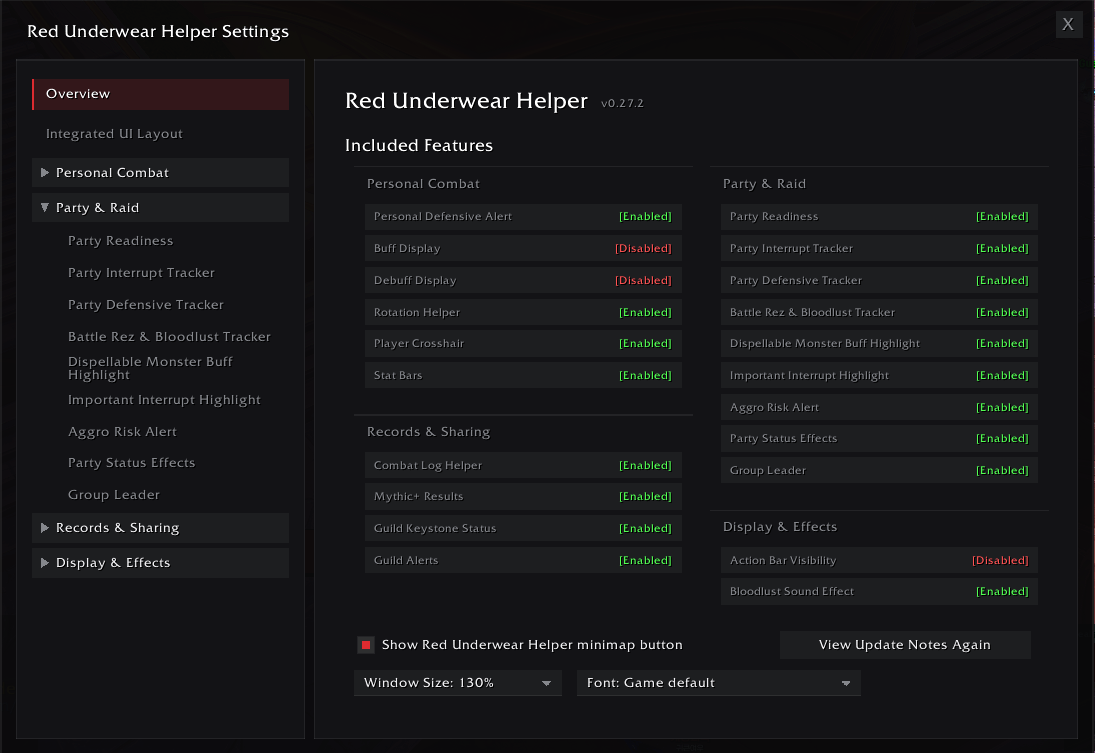
An integrated World of Warcraft Retail addon: personal combat alerts, party utility tracking, aura displays, a player crosshair, action bar visibility rules, and dungeon and raid conveniences in one package.
Every feature can be enabled and configured independently. English and Korean are supported.
Main Features
Personal Defensive Alert and Low-Health Warning
- Below a health threshold you set, shows a defensive you can actually use, with its keybind and cooldown.
- Suggests the workhorse defensive first rather than the long-cooldown button you want to save.
- A red vignette warning can be shown independently.
- Separate thresholds for open world, Delves, dungeons and raids.
Buff and Debuff Displays
- Track chosen buffs and debuffs on yourself by spell ID or spell link.
- Layout, size and tracked list are stored per specialization.
- Suggestion lists cover current-season Mythic+, raids, PvP and common dangerous effects.
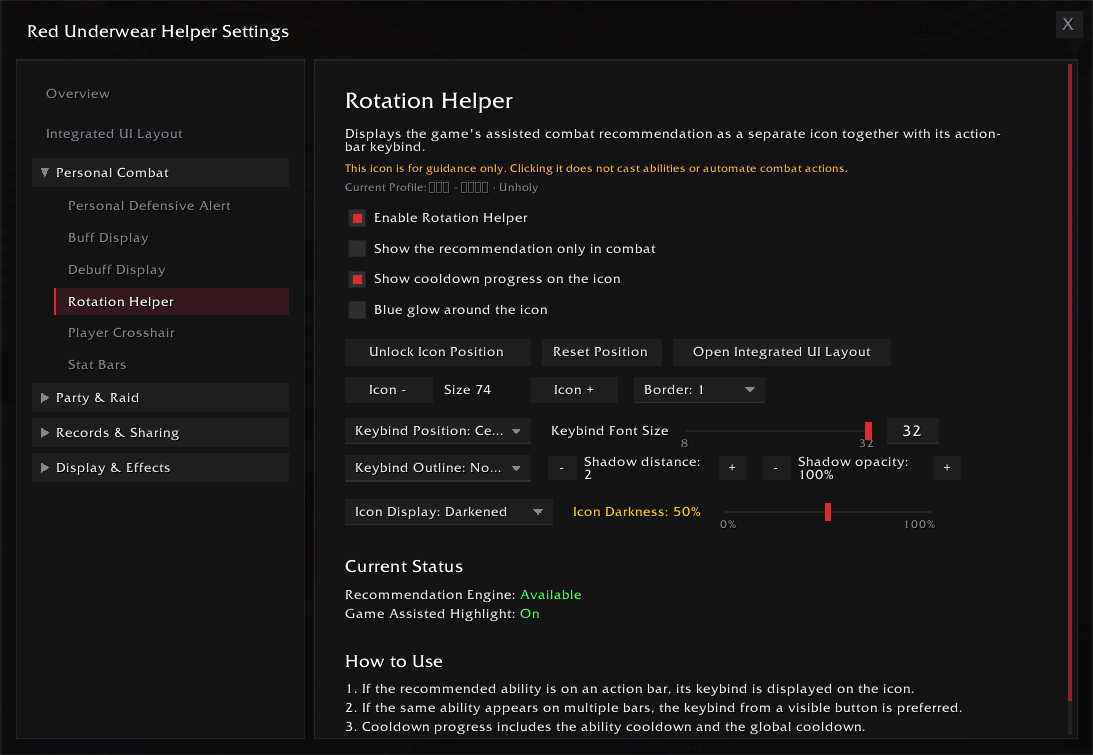
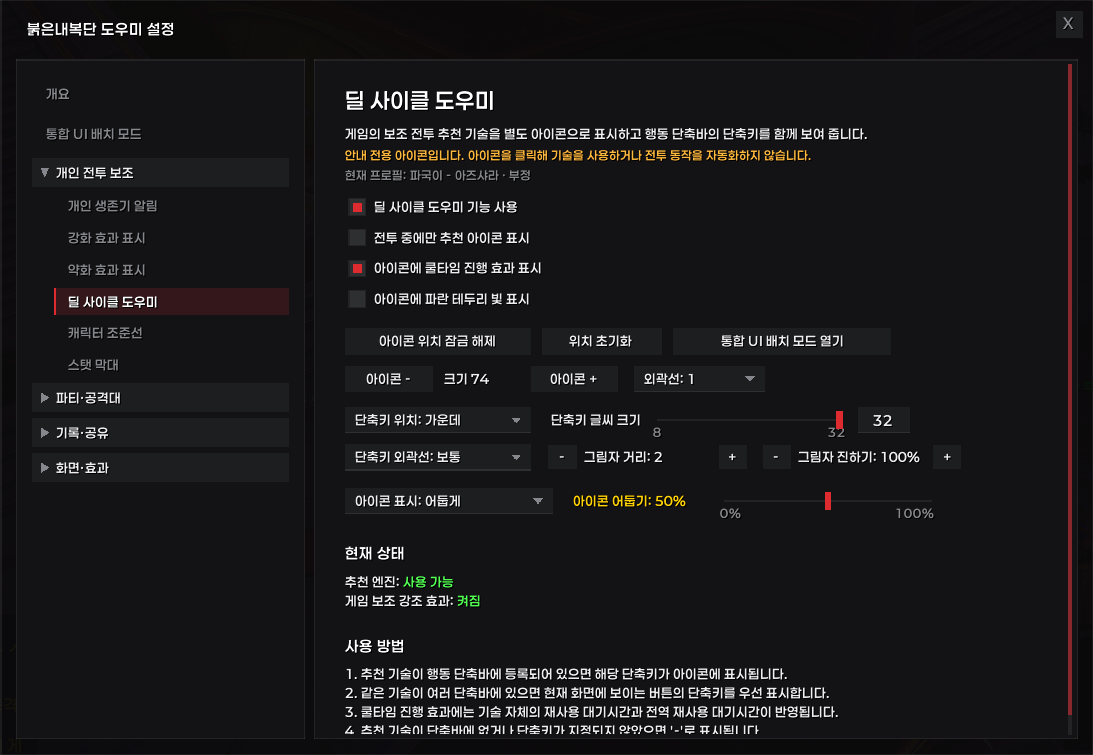
Rotation Helper
- Shows the next ability from Blizzard's Assisted Combat Highlight, with its keybind.
- Works with Blizzard action bars and EllesmereUIActionBars.
- The blue glow around the icon can be turned off, so you keep just one when your action bar already glows.
- Guidance only; it never casts anything.
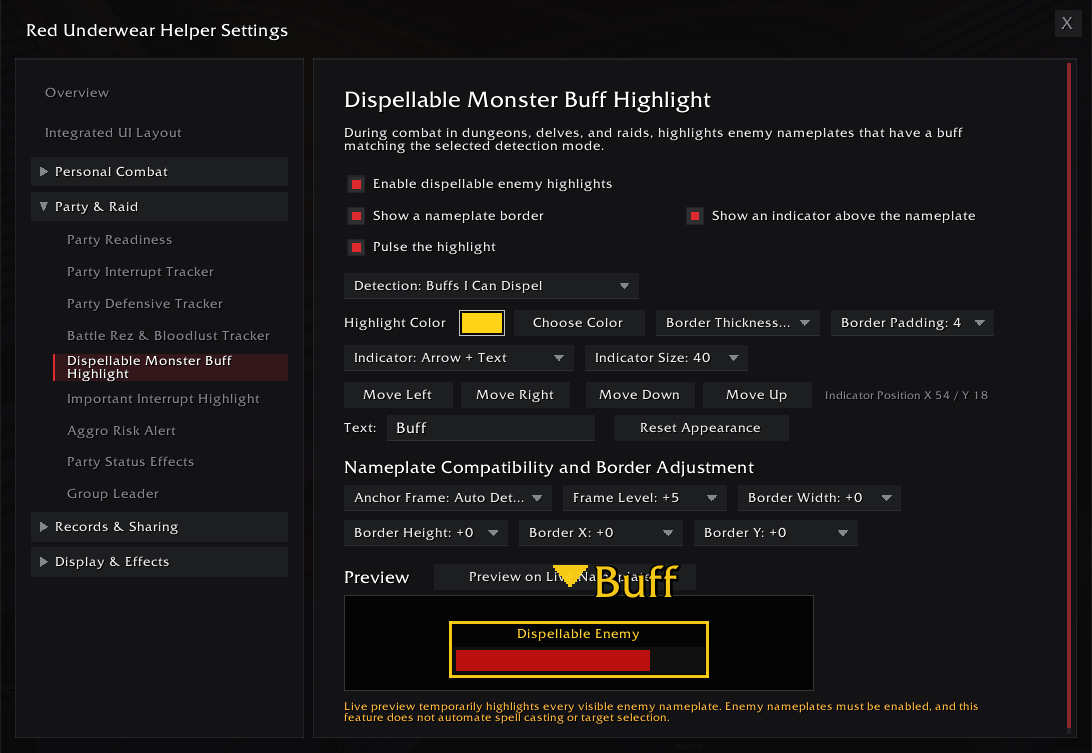
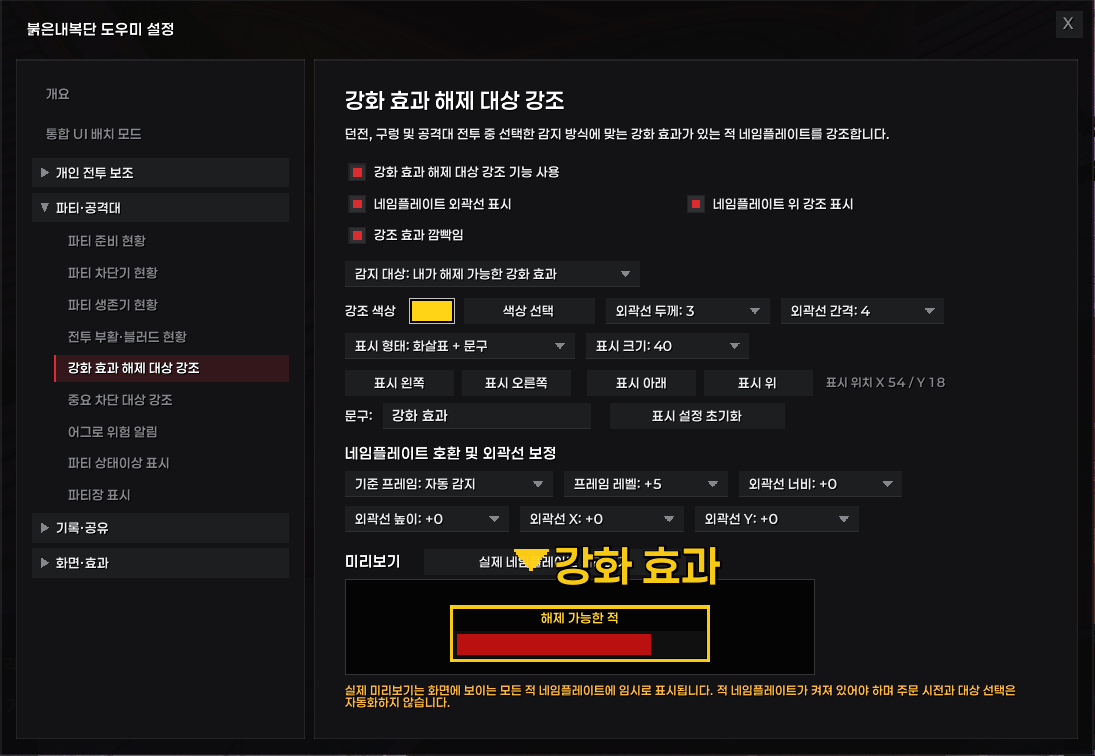
Dispellable Enemy Buff Highlight
- Highlights enemy nameplates carrying a removable beneficial effect.
- Can be limited to effects your character can actually remove.
- Border, arrow and text indicators with full colour and position control.
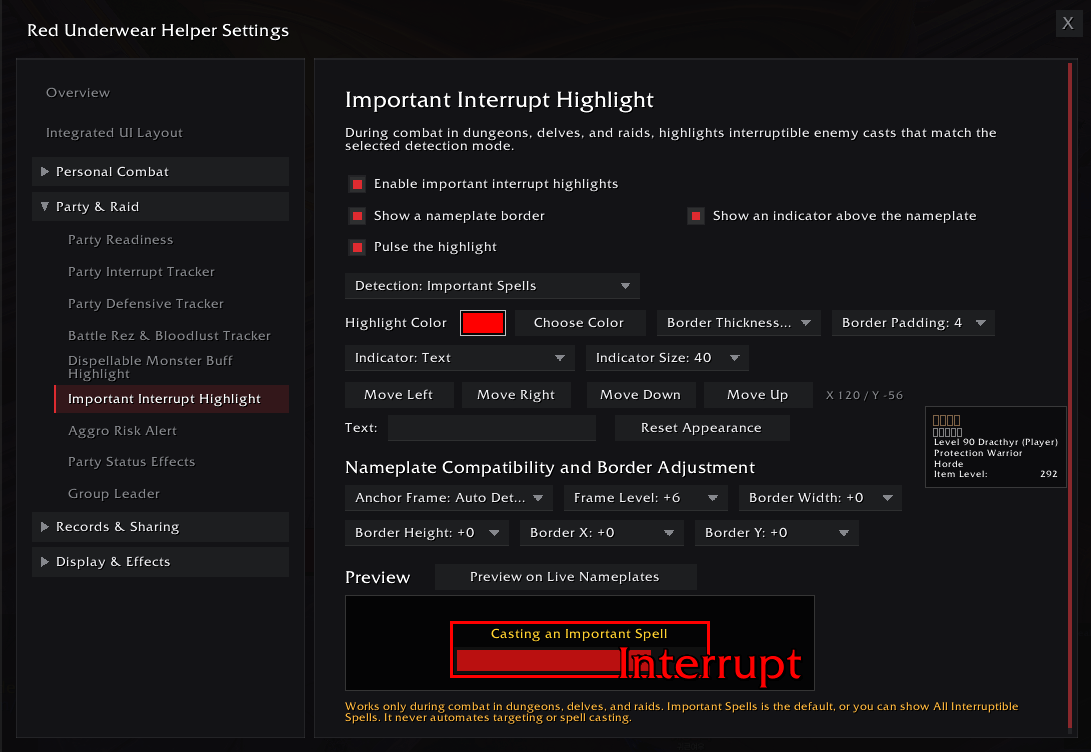
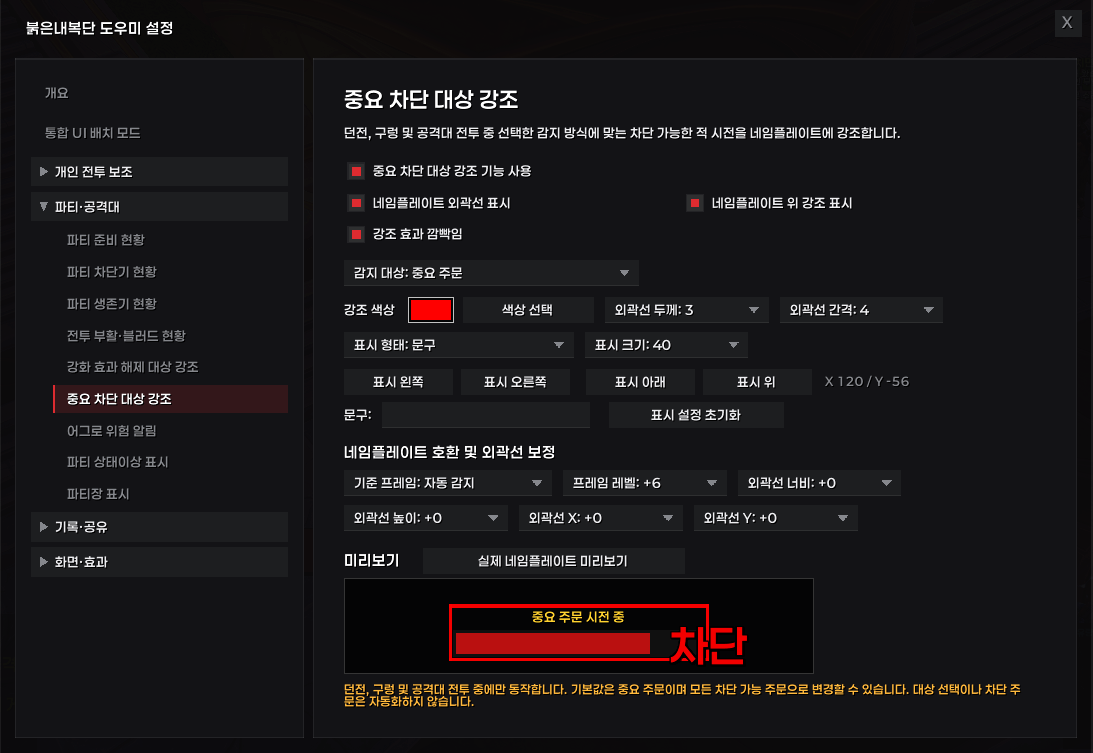
Important Interrupt Highlight
- Highlights interruptible enemy casts, defaulting to spells Blizzard marks as important.
- No manual spell list needed.
- Border, arrow and label indicators, each independently configurable.
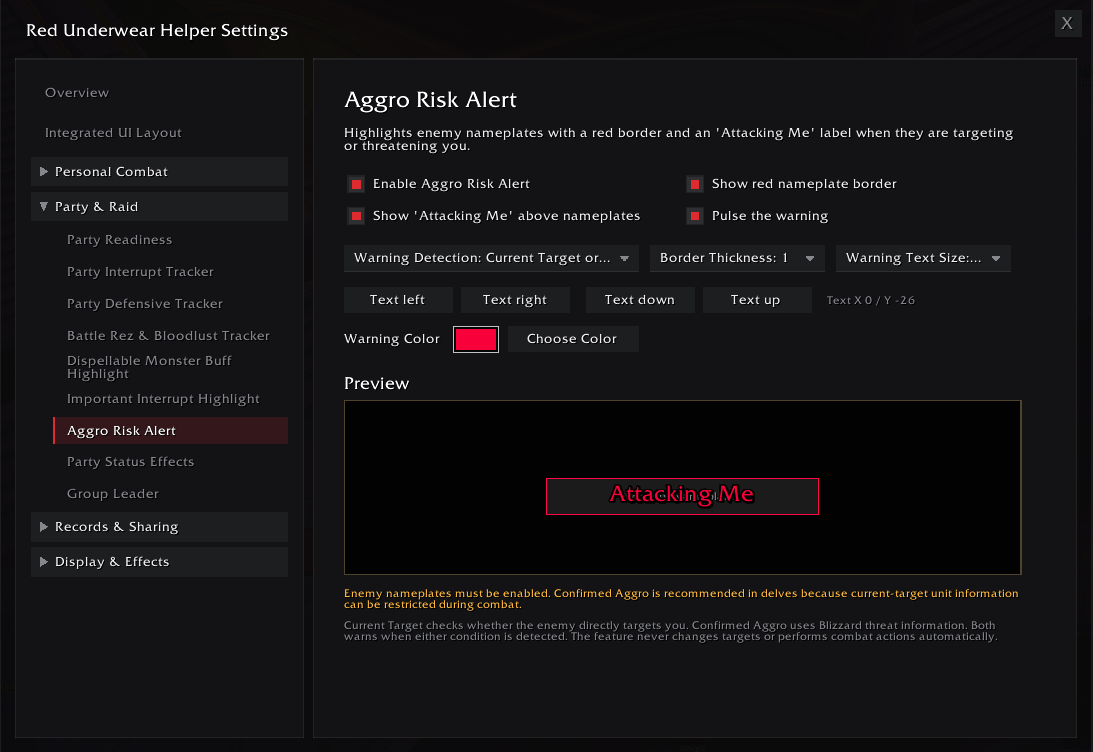
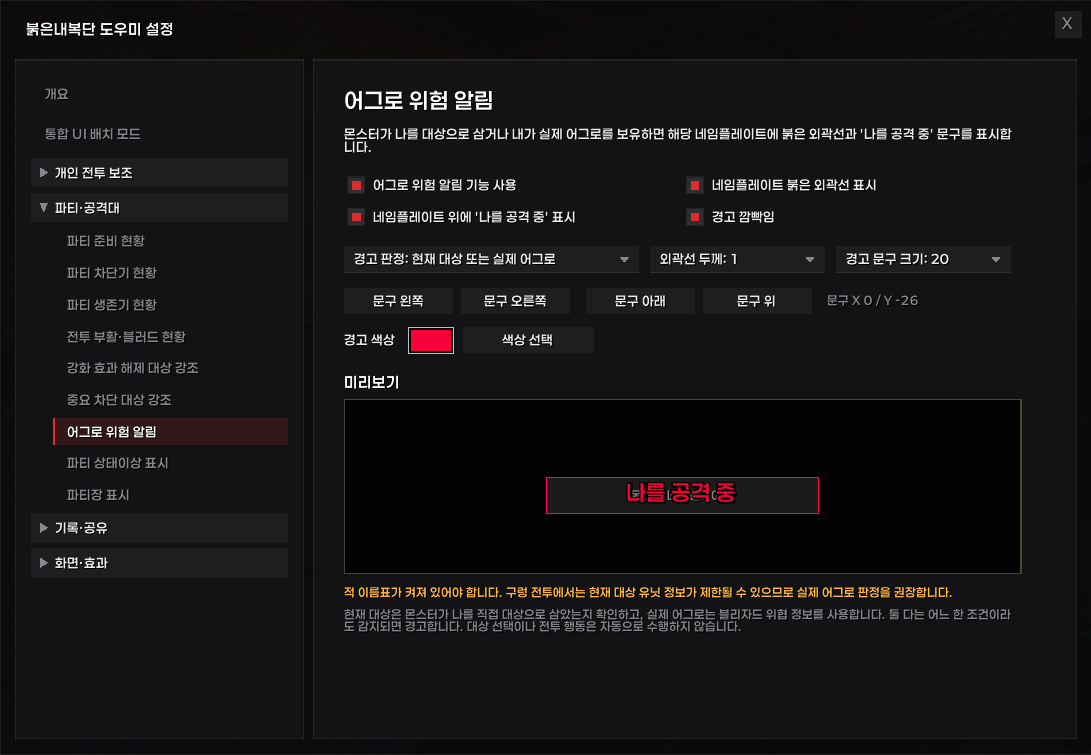
Aggro Risk Alert
- Marks the enemy nameplate when an enemy targets you or you hold its threat.
- Falls back to confirmed threat when target information is restricted in instance combat.
- Configurable border, warning text and pulse.
Party Interrupt Tracker
- Shows each party member's interrupt, whether it is ready, and the time remaining.
- Attaches to the party frames or floats as its own window, which can be narrowed to just icon and name.
- Works fully only between Red Underwear Helper users; others show a placeholder that explains why.
Party Defensive Tracker
- Shows each party member's personal defensives with cooldown state, using per-specialization lists for 12.1.
- Attaches to the party frames or floats as its own window. When both trackers use the same side they never overlap.
- Works fully only between Red Underwear Helper users; others show a placeholder that explains why.
Party Status Effects
- Shows crowd control and removable effects as text on the real party and raid frames.
- Separate size, anchor and colour settings for party and raid frames.
- Some classifications are hidden by Blizzard during combat and cannot be shown.
Group Leader
- Marks the leader's crown on the real party and raid frames, whichever unit frame addon you use.
- Raid assistants get their own mark; an optional label can sit beside the icon.
- Separate icon size and position for party and raid frames.
Battle Resurrection and Bloodlust Status
- Shared battle-resurrection charges and progress toward the next one.
- Bloodlust availability, active duration and the roughly ten-minute exhaustion window.
- Full or compact icon-only display.
Party Readiness
- Checks whether the party has battle resurrection and Bloodlust providers.
- Checks your food, flask, weapon enchant and augment rune, and warns about low durability.
- Can open automatically when you enter a dungeon or raid.
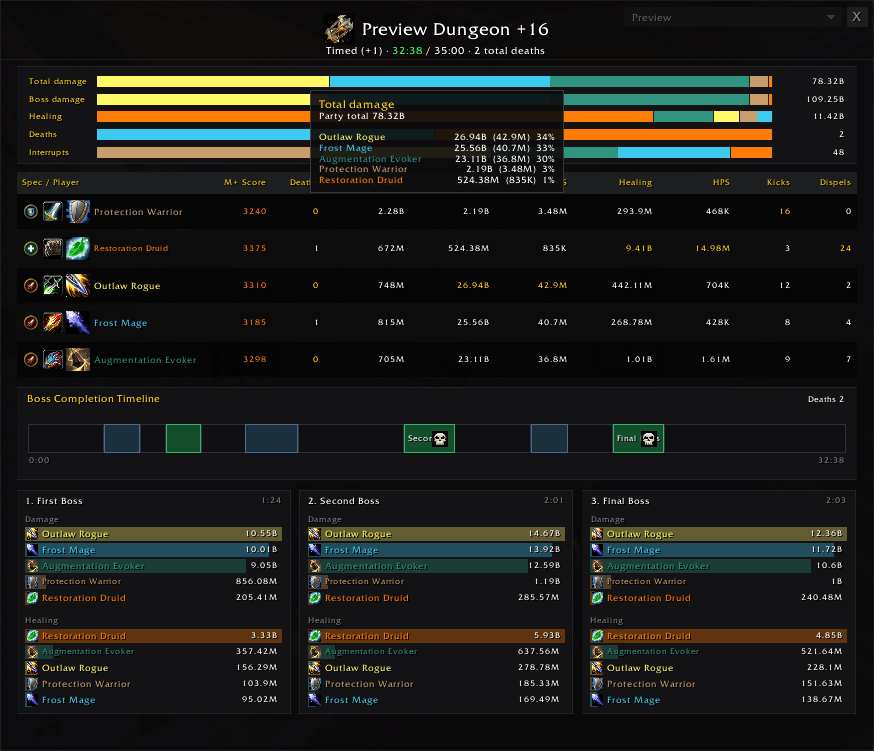
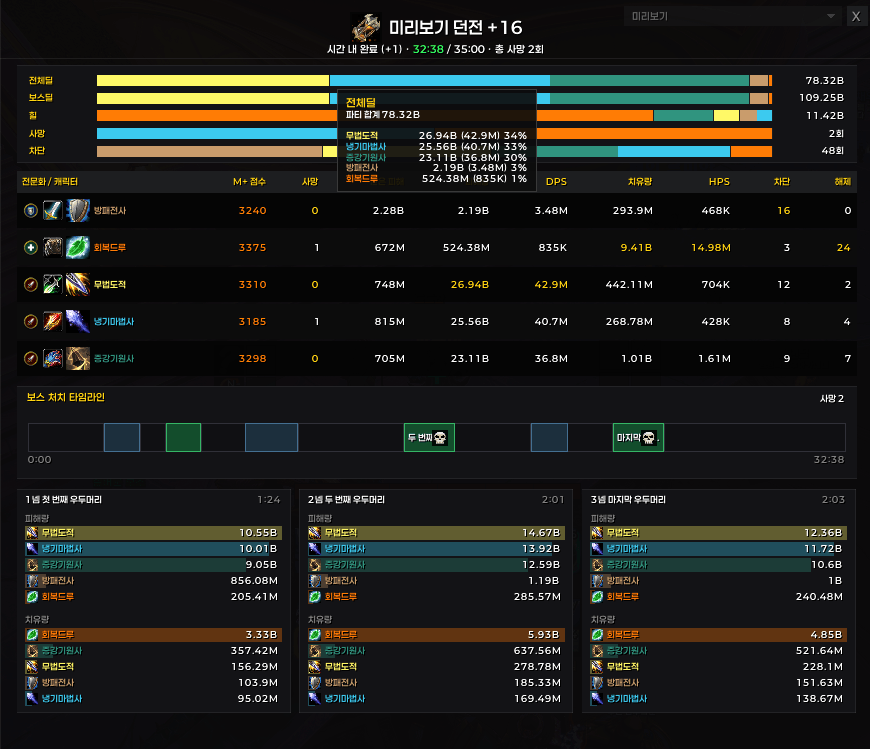
Mythic+ Results
- After a run: dungeon, level, time, deaths, and per-member damage, healing, interrupts and dispels.
- Timeline of boss kills against the time limit, with per-spell breakdowns on hover.
- Uses Blizzard's own run statistics; no other damage meter required. Keeps the last 20 runs.
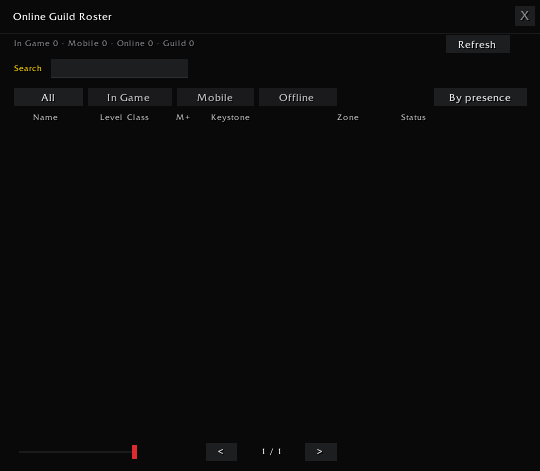
Guild Keystone Status
- Addon users share their keystones with the guild automatically.
- Collected keystones appear in the Online Guild Roster, not a separate panel.
Guild Alerts
- Announces guild logins and logouts with class icon and colour.
- Detects your name, nicknames or keywords in guild and officer chat.
- Send plain or important guild notices from the guild frame.
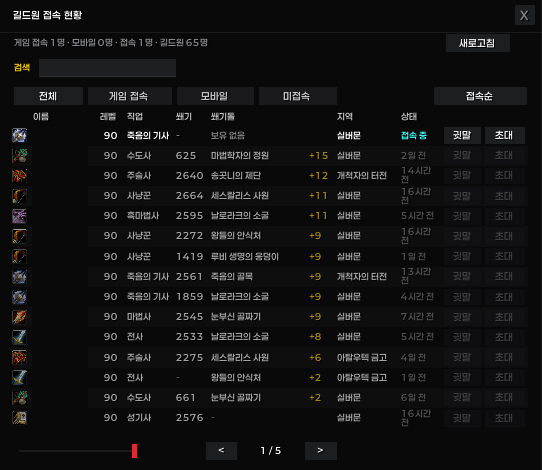
Online Guild Roster
- Online and offline members in one list with zone, status, M+ score and keystone. Offline members show how long ago they were last online.
- Filters, search, two sort orders, and note tooltips.
- Whisper and invite buttons; opens beside the guild frame automatically.
Bloodlust Sound Effect
- Plays a sound when a Bloodlust-type effect lands on you.
- One built-in sound plus up to ten of your own, kept outside the AddOns folder so updates never delete them.
- Place files in
[WoW folder]\_retail_\Interface\RedUnderwearHelper\.
Combat Log Helper
- Start and stop WoWCombatLog.txt recording from an in-game panel.
- Optional automatic start on entering an instance and stop on leaving or completing.
Action Bar Visibility
- Per-bar rules for the main bar and bars 2 through 8.
- Combine combat, mount and group conditions, with an optional show-on-hover override.
- Per-bar opacity; keybinds keep working while a bar is hidden.
Player Crosshair
- A crosshair near screen centre so you can find your character in a busy fight.
- Cross, diagonal, circle and square shapes with full colour and outline control.
- Can turn red when your target is out of your specialization's usual range.
Stat Bars
- Secondary stats, item level, framerate, latency, durability, watched reputation and a clock, each as its own bar. The primary stat is named for your specialization: Strength, Agility or Intellect.
- Pick which rows appear and in what order; size, spacing, font and opacity are all adjustable. Stack them vertically or lay them out in a row, split the name and value onto two lines, and drag the corner to resize.
- Where the game hides stat values (dungeons, keystone runs, combat) the last reading is kept instead of blanking out.
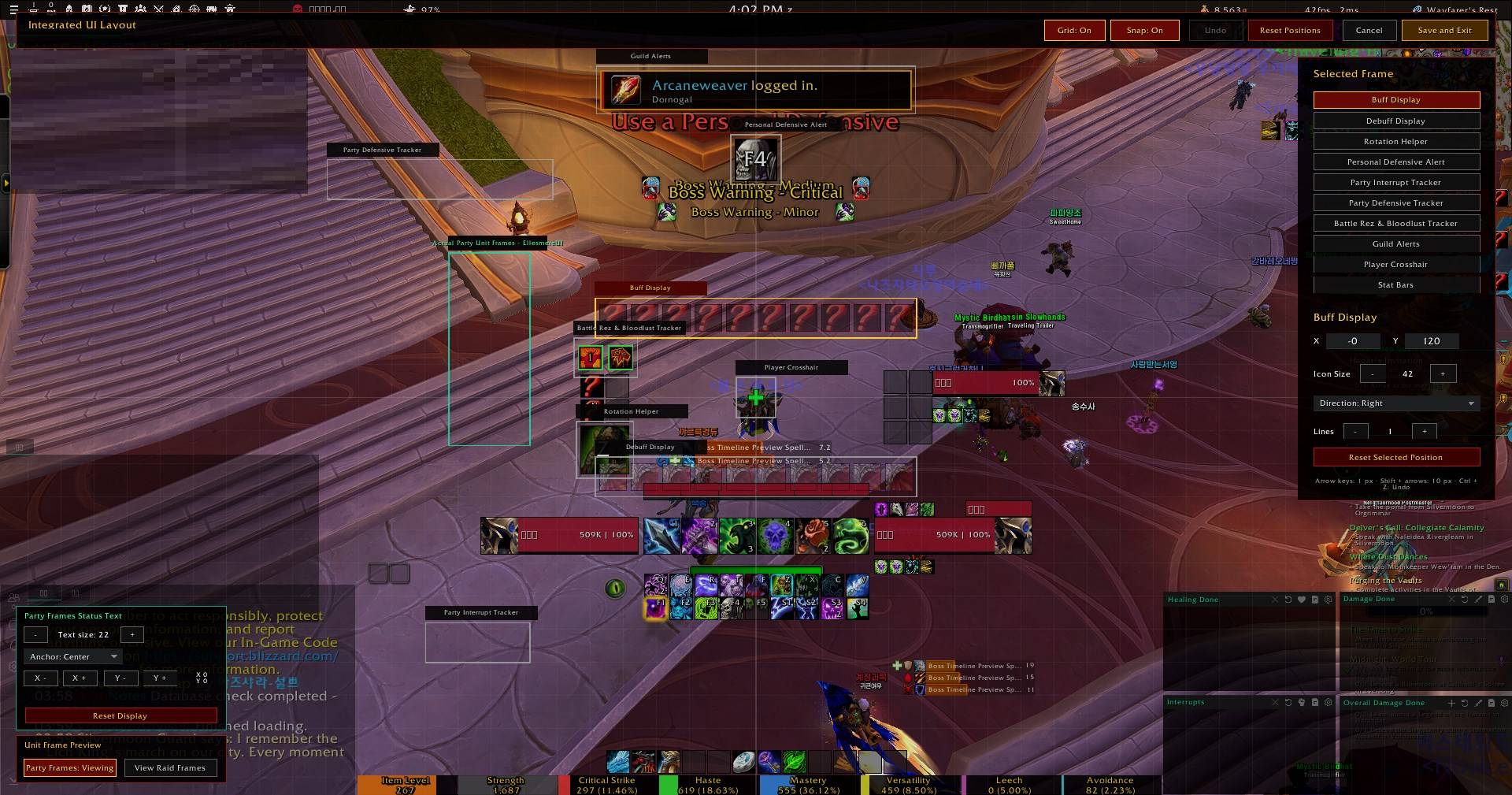
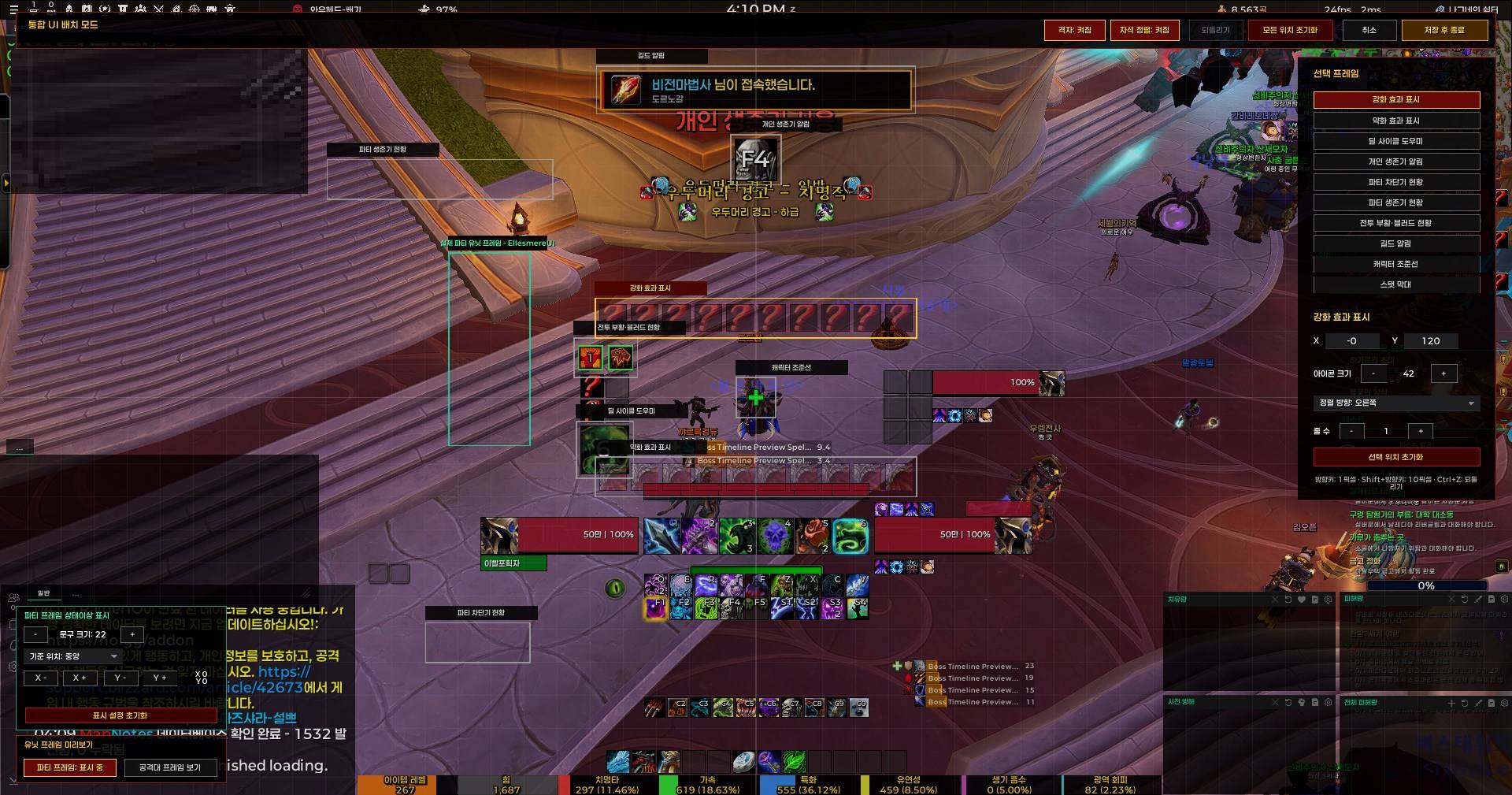
Integrated UI Layout Mode
- Position every display of this addon on one screen.
- Drag, arrow-key nudging, grid, snapping and direct coordinate entry.
- Up to 20 undo steps; saves safely and exits when combat starts.
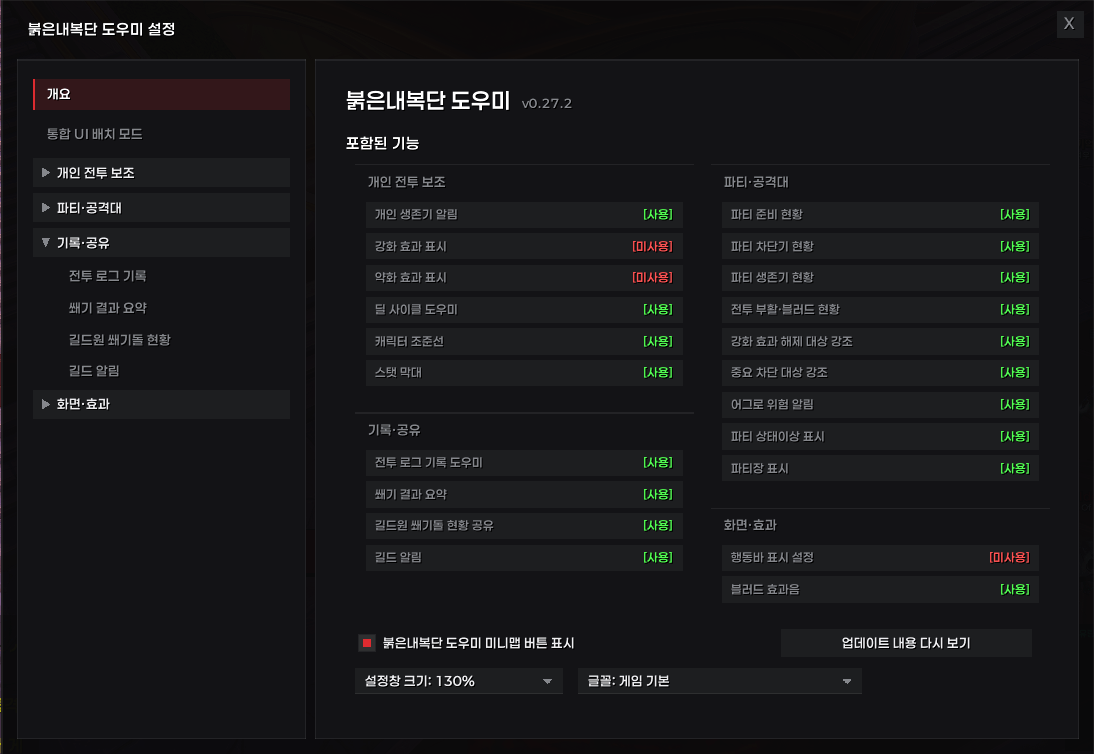
Settings and Commands
Open the settings window from the minimap button, Game Menu > Options > AddOns > Red Underwear Helper, or /ruh.
Each page has its own command, for example /ruh health, /ruh interrupts, /ruh defensives, /ruh result, /ruh roster, /ruh layout. /ruh update reopens the version notes. Sub-commands live under the same name: /ruh combat start, /ruh key send, /ruh health test.
Important Notes
- This addon only shows information. It never casts, dispels, targets, or acts for you.
- Unexpected data makes one feature go quiet rather than raising a Lua error, and other addons' error reporting is left alone.
- The first occurrence is announced in chat, /ruh errdebug lists where and how often, and /ruh errors switches to passing errors through so BugSack and similar capture them normally.
- Since 12.1 the game hides most information about other players from addons. Party interrupt and defensive tracking therefore works fully only when the other members also run Red Underwear Helper; otherwise their state is shown as unknown rather than guessed.
- Custom sound files may need
/reloador a client restart after being added.
한국어
개인 전투 알림, 파티 지원 기술 현황, 강화·약화 효과 표시, 캐릭터 조준선, 행동바 표시 조건과 던전·공격대 편의 기능을 하나로 묶은 월드 오브 워크래프트 리테일 애드온입니다.
각 기능은 독립적으로 켜고 끌 수 있으며 영어와 한국어를 지원합니다.
주요 기능
개인 생존기 알림과 저체력 화면 경고
- 설정한 체력 아래로 떨어지면 지금 쓸 수 있는 생존기를 단축키·쿨타임과 함께 보여줍니다.
- 아껴 둘 대형 생존기 대신 주력 생존기를 먼저 권합니다.
- 붉은 비네트 화면 경고는 따로 켜고 끌 수 있습니다.
- 일반·구렁·던전·공격대별로 기준을 나눠 설정합니다.
강화 효과와 약화 효과 표시
- 주문 ID나 주문 링크로 내 강화·약화 효과를 등록해 표시합니다.
- 등록 목록과 배치, 크기를 전문화별로 저장합니다.
- 현재 시즌 쐐기, 공격대, PvP와 공통 위험 효과를 목록에서 골라 추가할 수 있습니다.
딜 사이클 도우미
- 블리자드의 전투 보조 강조가 알려주는 다음 기술을 단축키와 함께 보여줍니다.
- 블리자드 기본 행동바와 엘스미어UI 행동바를 지원합니다.
- 아이콘의 파란 테두리 빛은 끌 수 있습니다. 행동바에서 이미 같은 빛이 난다면 하나만 남기면 됩니다.
- 안내만 하며 기술을 대신 쓰지 않습니다.
강화 효과 해제 대상 강조
- 해제 가능한 이로운 효과를 가진 적의 이름표를 강조합니다.
- 내 캐릭터가 실제로 해제할 수 있는 것만 보도록 제한할 수 있습니다.
- 테두리·화살표·문구 표시와 색상, 위치를 설정합니다.
중요 차단 대상 강조
- 차단 가능한 적의 시전을 강조합니다. 기본은 블리자드가 중요하다고 분류한 주문입니다.
- 주문 목록을 직접 관리할 필요가 없습니다.
- 테두리·화살표·문구를 각각 켜고 끌 수 있습니다.
어그로 위험 알림
- 적이 나를 노리거나 내가 그 적의 위협을 쥐고 있으면 이름표를 붉게 표시합니다.
- 인스턴스 전투 중 대상 정보가 제한되면 실제 위협 정보로 판단합니다.
- 테두리, 경고 문구, 깜빡임을 설정할 수 있습니다.
파티 차단기 현황
- 파티원별 차단기와 준비 여부, 남은 시간을 보여줍니다.
- 파티 프레임에 붙이거나 독립 창으로 볼 수 있습니다. 독립 창은 아이콘과 캐릭터명만 남기는 간략 표시를 고를 수 있습니다.
- 파티원도 붉은내복단 도우미를 써야 상태가 보입니다. 쓰지 않는 파티원은 자리 표시와 함께 이유를 알려줍니다.
파티 생존기 현황
- 파티원별 생존기와 쿨타임을 12.1 전문화별 목록으로 보여줍니다.
- 파티 프레임에 붙이거나 독립 창으로 볼 수 있습니다. 차단기와 같은 쪽에 붙여도 서로 겹치지 않습니다.
- 파티원도 붉은내복단 도우미를 써야 상태가 보입니다. 쓰지 않는 파티원은 자리 표시와 함께 이유를 알려줍니다.
파티 상태이상 표시
- 군중제어와 해제 가능한 효과를 실제 파티·공격대 프레임에 문구로 표시합니다.
- 파티 프레임과 공격대 프레임의 크기·위치·색을 따로 설정합니다.
- 전투 중 블리자드가 감추는 분류는 표시할 수 없습니다.
파티장 표시
- 어떤 유닛 프레임 애드온을 쓰더라도 실제 파티·공격대 프레임에 파티장 왕관을 붙입니다.
- 공격대 보조는 따로 표시하며, 아이콘 옆에 문구도 넣을 수 있습니다.
- 파티 프레임과 공격대 프레임의 아이콘 크기·위치를 따로 설정합니다.
전투 부활·블러드 현황
- 공유 전투 부활 충전 수와 다음 충전까지의 진행을 보여줍니다.
- 블러드 사용 가능 여부, 남은 지속시간과 약 10분의 재적용 제한을 표시합니다.
- 일반 표시와 아이콘만 쓰는 간략 표시를 고를 수 있습니다.
파티 준비 현황
- 파티에 전투 부활과 블러드 제공 직업이 있는지 확인합니다.
- 음식, 영약, 무기 강화, 증강 룬과 장비 내구도를 점검합니다.
- 던전이나 공격대에 들어갈 때 자동으로 열 수 있습니다.
쐐기 결과 요약
- 던전, 단계, 소요 시간, 사망과 파티원별 피해량·치유량·차단·해제를 보여줍니다.
- 보스 처치 시점을 제한 시간과 함께 타임라인으로 보여주고, 마우스를 올리면 주문별 내역이 나옵니다.
- 블리자드가 주는 기록을 쓰므로 다른 전투 분석 애드온이 필요 없습니다. 최근 20회를 저장합니다.
길드원 쐐기돌 현황
- 애드온을 쓰는 길드원끼리 보유 쐐기돌을 자동으로 공유합니다.
- 모인 쐐기돌은 별도 창이 아니라 길드원 접속 현황의 쐐기돌 열에 나옵니다.
길드 알림
- 길드원 접속과 접속 종료를 직업 아이콘과 직업 색상으로 알립니다.
- 길드·관리자 채팅에서 내 이름, 별명, 키워드를 감지합니다.
- 길드창에서 일반 또는 중요 길드 공지를 작성해 보낼 수 있습니다.
길드원 접속 현황
- 접속·미접속 길드원을 한 목록에서 보고 지역, 상태, 쐐기 점수, 보유 쐐기돌을 함께 확인합니다. 미접속 길드원은 마지막 접속이 얼마나 지났는지 보여줍니다.
- 필터와 검색, 두 가지 정렬, 메모 툴팁을 제공합니다.
- 귓속말·초대 버튼이 있고 길드창을 열면 옆에 함께 열립니다.
블러드 효과음
- 내 캐릭터에게 블러드 계열 효과가 걸리면 효과음을 한 번 재생합니다.
- 기본 효과음 1개와 사용자 효과음 최대 10개를 지원하며, AddOns 폴더 밖에 두므로 업데이트에도 지워지지 않습니다.
- 파일은
[WoW 설치 폴더]\_retail_\Interface\RedUnderwearHelper\에 넣습니다.
전투 로그 기록 도우미
- 인게임 패널에서 WoWCombatLog.txt 기록을 시작하고 종료합니다.
- 인스턴스 입장 시 자동 시작, 이탈이나 완료 시 자동 종료를 설정할 수 있습니다.
행동바 표시 설정
- 기본 행동바와 2~8번 행동바의 표시 조건을 각각 정합니다.
- 전투·탈것·그룹 조건을 조합하고, 조건에 안 맞아도 마우스를 올리면 보이게 할 수 있습니다.
- 행동바별 투명도를 정할 수 있고, 숨겨져 있어도 단축키는 그대로 작동합니다.
캐릭터 조준선
- 정신없는 전투 중에 내 위치를 찾을 수 있도록 화면 중앙 부근에 조준선을 그립니다.
- 십자, 대각선, 원형, 사각형 모양과 색·두께·외곽선을 설정합니다.
- 대상이 내 전문화의 대표 사거리 밖이면 붉게 바꿀 수 있습니다.
스탯 막대
- 2차 스탯과 아이템 레벨, 프레임, 지연시간, 내구도, 주시 중인 평판, 시계를 각각 막대로 보여줍니다. 주스탯은 전문화에 맞춰 힘·민첩성·지능으로 표시됩니다.
- 표시할 항목과 순서를 고르고 크기·간격·글자·투명도를 조절합니다. 세로로 쌓거나 가로로 늘어놓을 수 있고, 이름과 값을 두 줄로 나눌 수 있으며, 창 모서리를 끌어 크기를 바꿉니다.
- 던전·쐐기·전투 중처럼 게임이 값을 가리는 동안에는 비우지 않고 마지막으로 읽은 값을 그대로 유지합니다.
통합 UI 배치 모드
- 이 애드온의 모든 표시를 한 화면에서 배치합니다.
- 드래그, 방향키 미세 이동, 격자, 자석 정렬, 좌표 직접 입력을 지원합니다.
- 20단계까지 되돌릴 수 있고, 전투가 시작되면 안전하게 저장하고 종료합니다.
설정과 명령어
미니맵 버튼, 게임 메뉴 > 옵션 > 애드온 > 붉은내복단 도우미, 또는 /ruh 로 설정창을 엽니다.
각 페이지마다 명령어가 있습니다. 예를 들어 /ruh health, /ruh interrupts, /ruh defensives, /ruh result, /ruh roster, /ruh layout 입니다. /ruh update 는 업데이트 안내를 다시 엽니다. 하위 명령도 같은 이름 아래에 있습니다. /ruh combat start, /ruh key send, /ruh health test 처럼 씁니다.
참고 사항
- 이 애드온은 정보를 보여주기만 합니다. 기술을 대신 쓰거나 해제하거나 대상을 바꾸지 않습니다.
- 예상 못 한 값이 들어와도 게임에 오류를 올리지 않고 그 기능만 조용히 넘어갑니다. 다른 애드온의 오류 표시는 건드리지 않습니다.
- 넘어간 오류는 처음 한 번 알려 주고, /ruh errdebug 에서 발생 위치와 횟수를 확인할 수 있습니다. /ruh errors 로 오류를 그대로 표시하게 바꾸면 BugSack 같은 애드온에서 평소처럼 잡힙니다.
- 12.1 부터 게임이 다른 플레이어에 관한 정보를 대부분 애드온에 알려주지 않습니다. 그래서 파티 차단기·생존기 현황은 파티원도 붉은내복단 도우미를 쓸 때만 온전히 동작하며, 그렇지 않으면 추측하지 않고 상태 미확인으로 둡니다.
- 사용자 효과음 파일을 추가한 뒤에는
/reload나 게임 재시작이 필요할 수 있습니다.
The RedUnderwearHelper QoL Team