No Quest Hints
- By
Screenshot 2026-11-07 192432.png
Screenshot 2026-11-07 185613.png
Screenshot 2026-11-07 185650.png
Screenshot 2026-11-07 190018.png
Screenshot 2026-11-07 190034.png
Description
No Quest Hints
Explore Azeroth. Not your quest markers.
✨ Features at a Glance
Thirteen independent, optional controls:
- 🌄 Hide Minimap — Explore without the corner map; keep the world map available.
- 📊 Hide Experience Bar — Clear the XP bar while keeping reputation bars.
- 🗺️ Hide Quest Map Hints — Remove quest markers, blue objective areas and navigation guidance.
- ⏱️ Hide Quest Timers — Keep Blizzard’s timer visible with a hidden tracker, or hide it independently.
- 📜 Hide Objective Tracker — Clear the on-screen quest list while keeping your journal and quest progress.
- 💬 Hide Quest Tooltip Hints — Remove quest names and objective counters from NPC and object tooltips.
- 🎯 Hide Quest NPC Names — Hide floating names that reveal quest targets.
- 💰 Hide Item Sell Prices — Hide vendor values outside trading and at auction with two independent options.
- 🔕 Hide Quest Progress Popups — Remove yellow objective updates while keeping other game messages.
- 🔢 Hide Quest Levels — Remove numeric level prefixes from journal and tracker titles.
- 🎨 Hide Difficulty Colors — Show quest titles in ordinary yellow instead of difficulty colors.
- 🎒 Hide Quest Item Borders — Remove yellow quest-item borders from Blizzard's bags.
All controls are optional and saved per character. Nothing changes until you choose a playstyle or enable an option. Existing users keep their choices.
🧭 Need Help? Reveal Just One Quest.
- Hide the default quest guidance.
- Read your quest journal and explore the world.
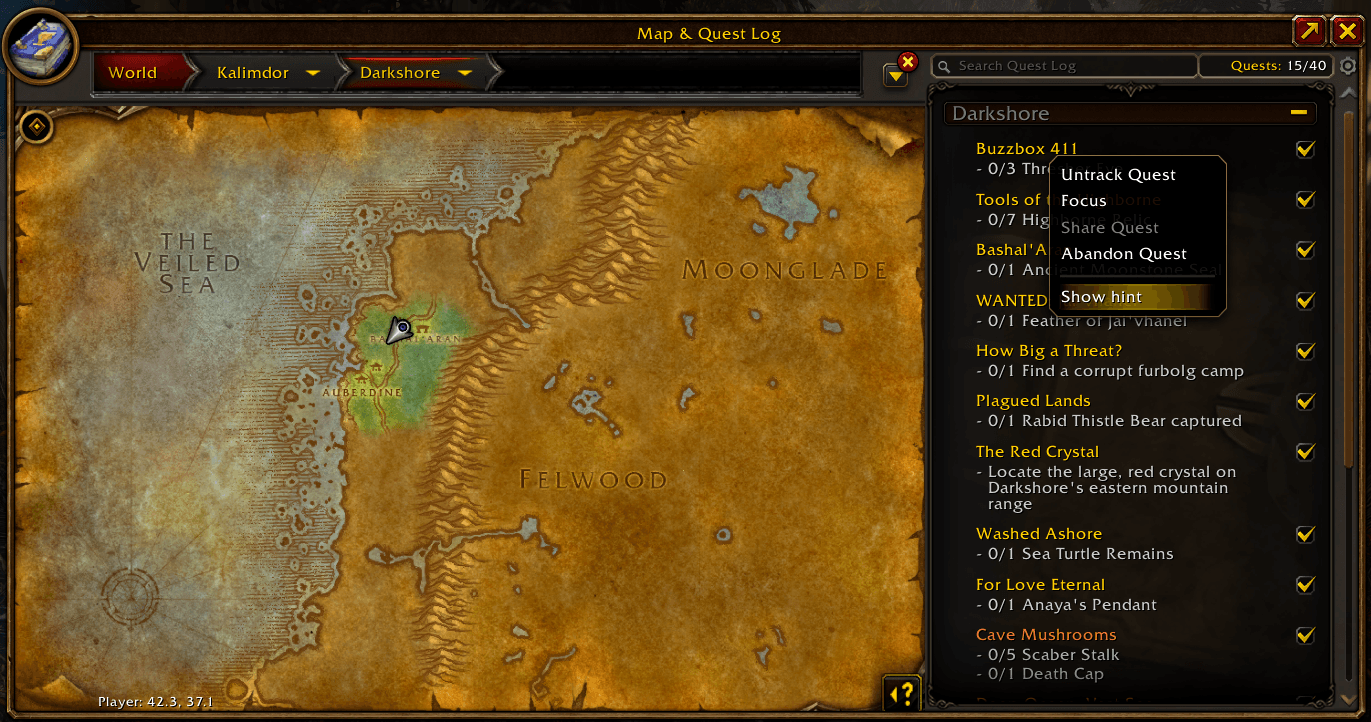
- If you're stuck, select Show hint for that quest in your journal or its right-click menu.
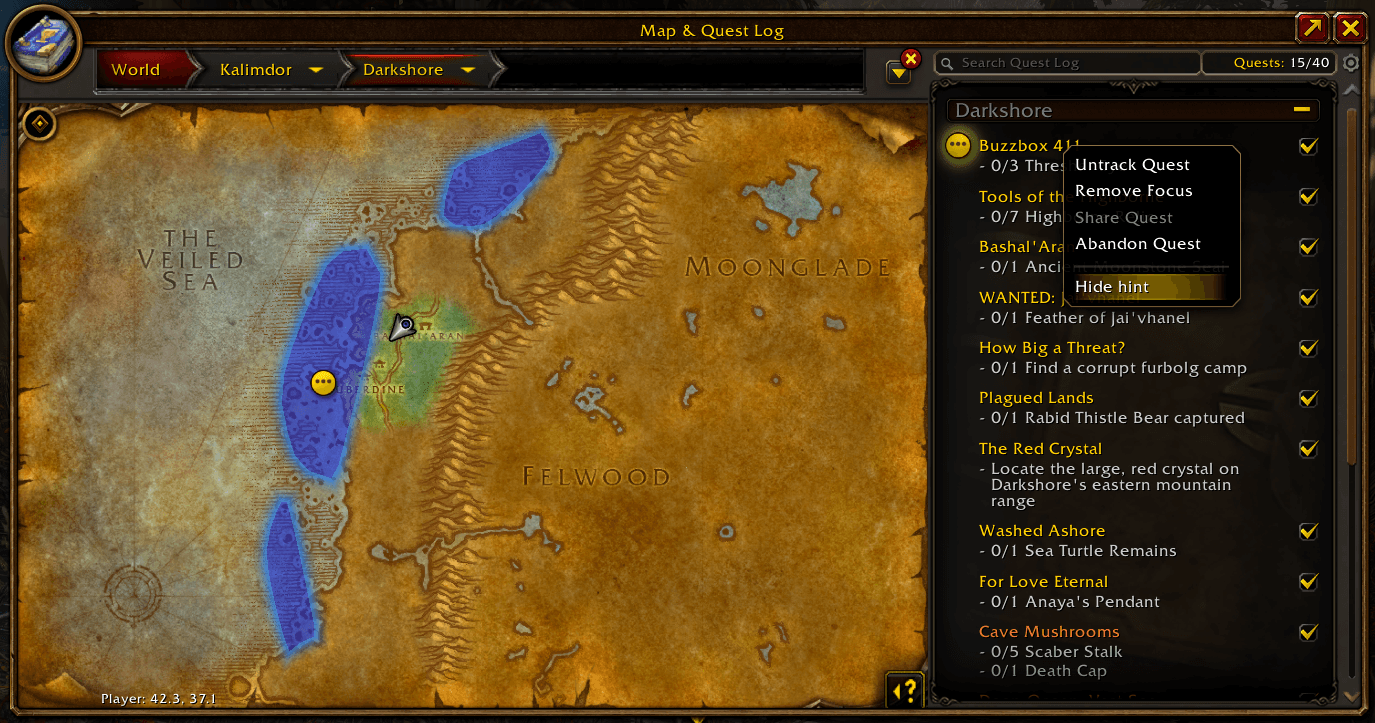
The game restores its original guidance for the selected quest, where available:
- Blue highlighted objective areas
- Native quest markers
- In-world navigation and distance
- Native quest indicators in the journal and objective tracker
Select Hide hint when you no longer need help. You can reveal multiple quests independently. Permissions are cleared when those quests are turned in or removed during play.
No external quest database. Just Blizzard's own guidance, under your control.
🌍 Choose Your Adventure
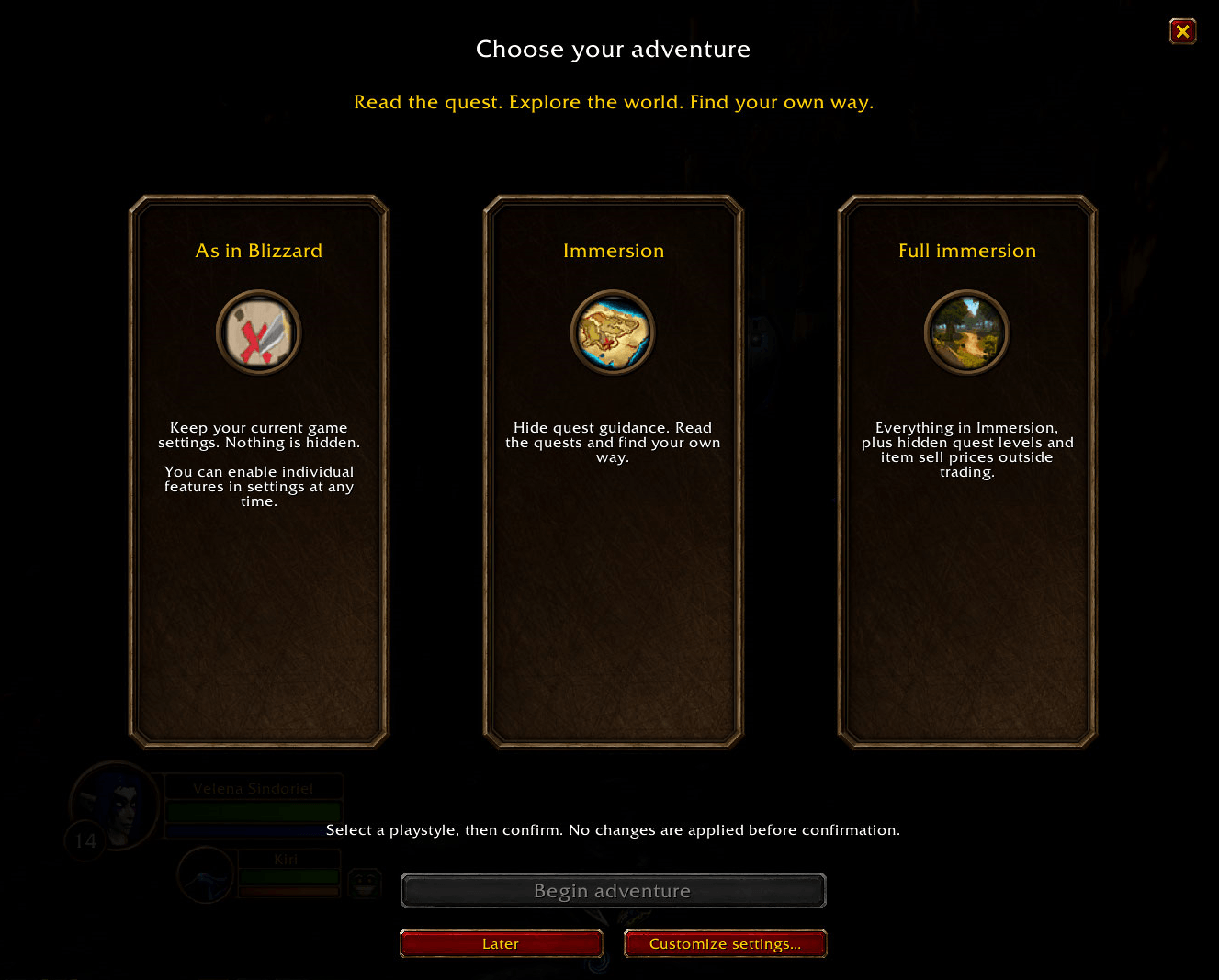
After the loading screen finishes, choose a playstyle on first setup, or reopen the chooser with /nqh welcome:
- As in Blizzard: keep your current game settings; nothing is hidden.
- Immersion: hide the five forms of quest guidance.
- Full immersion: everything in Immersion, plus hidden numeric quest levels and item sell prices outside trading.
Select a card and confirm to apply it. Customize any option afterward. Difficulty colors, auction prices and quest-item borders remain visible in every preset unless you hide them manually.
⏱️ Timed Quests
Hiding the objective tracker no longer has to hide your quest countdown. Keep Blizzard’s original timer, hover over the time for the quest title, or click it to open the quest. Drag the header to reposition it; placement is saved per character.
Enable Hide quest timers if you prefer to follow the urgency in the quest text. This option controls the on-screen timer independently of the tracker and is OFF in all playstyle presets. The full quest journal keeps its native presentation.
Pre-acceptance warnings depend on client metadata and are not reliable for every timed quest. The addon does not guess from quest text. Actual time limits and behavior while offline remain controlled by the game.
🌄 A Quieter HUD
Under Interface, independently enable Hide experience bar or Hide minimap. Both are OFF by default and in every playstyle preset, and your choices are saved per character.
Action-bar spacing follows the game’s next native layout update, so a temporary gap can remain after hiding XP. Reputation bars and actual XP gain are unchanged. Minimap hiding includes its frame and attached buttons, while the world map and quest timer stay available. Changes wait until combat ends. These controls target Blizzard’s native HUD, not replacement interfaces from other addons.
🎮 Native Gamepad Beta
The playstyle chooser currently uses mouse input, including with Gamepad Beta enabled. Native controller navigation inside the chooser is not currently supported. Revealed quest pins show quest details under the map crosshair; select or focus those quests through the journal. Mouse interactions remain available in the normal mouse interface.
The map-close/movement warning was checked with Gamepad Beta enabled and mouse/keyboard. Physical controller testing is ongoing.
⚙️ Settings
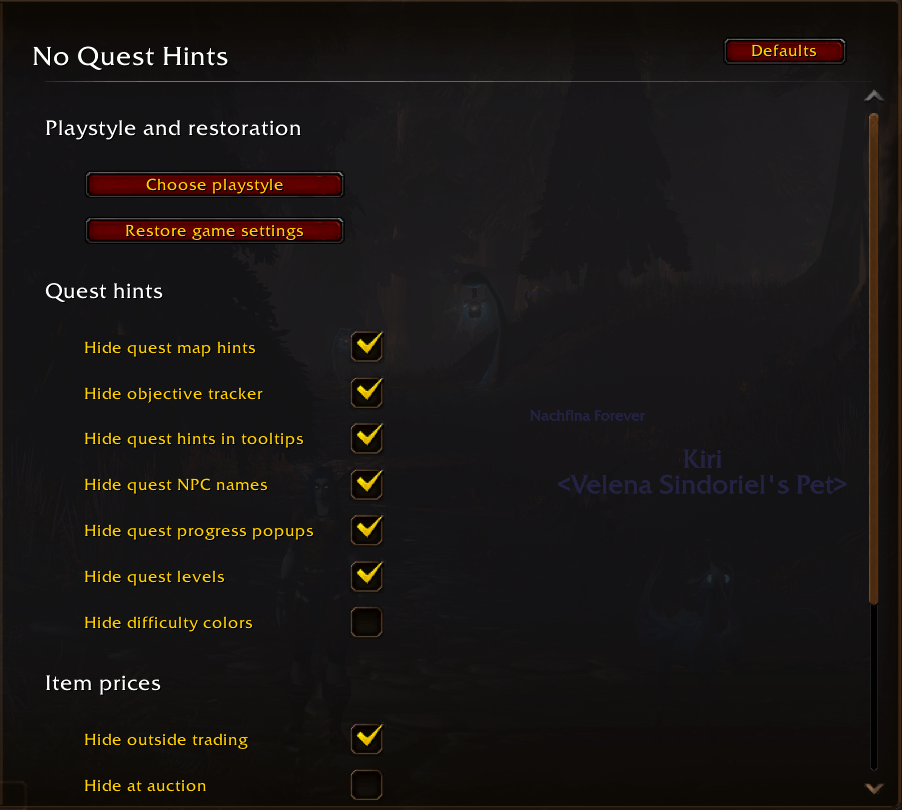
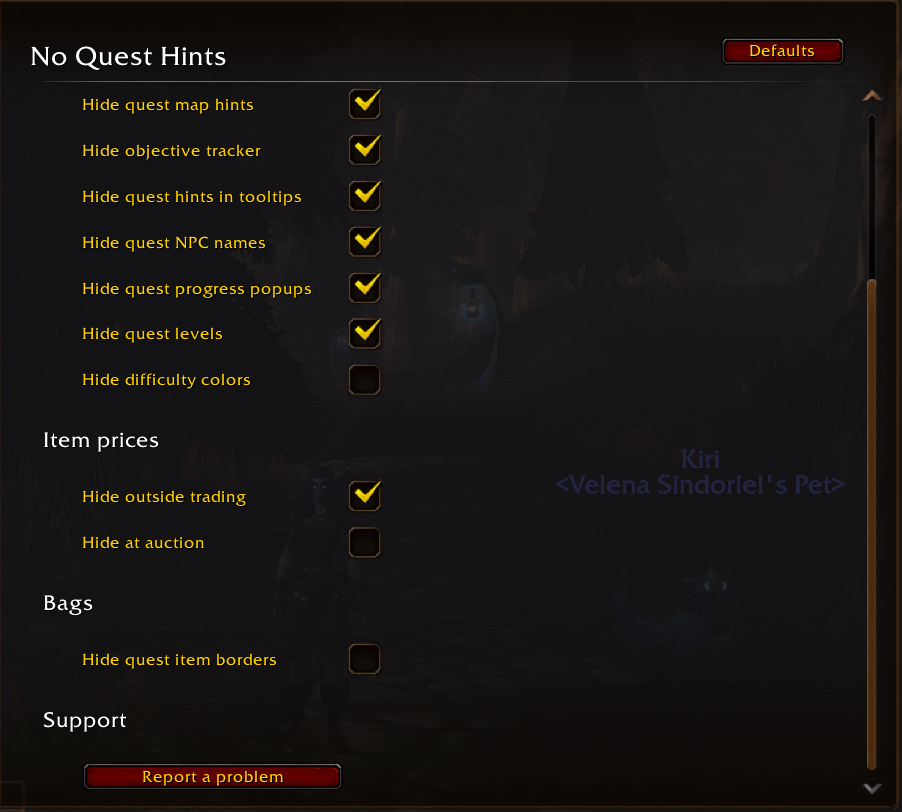
Open Options → AddOns → No Quest Hints with /nqh. All controls appear directly on that page, with explanations on hover. Playstyle and restoration are at the top; support is at the bottom.
| Command | Action |
|---|---|
/nqh |
Open addon settings |
/nqh welcome |
Reopen the playstyle chooser |
/nqh restore |
Immediately turn off all restrictions and restore saved original game settings |
/nqh status |
Show current settings and diagnostics |
The Restore game settings button asks for confirmation. Cancel or Escape keeps your configuration. Use restoration before disabling or removing the addon. It restores your saved personal values; cleanup cannot be guaranteed after a crash or once the addon is unloaded.
Upgrade messages appear after loading and distinguish new features from fixes. Newly added checkboxes carry Blizzard's native New marker until viewed.
ℹ️ Good to Know
- Designed specifically for World of Warcraft: Forever.
- Automatically supports English, Russian, German, French, Spanish, Italian, Brazilian Portuguese, Korean, Simplified Chinese and Traditional Chinese, including both English and Spanish client variants.
- Preserves the geographical map, quest text, quest progress and quest-giver exclamation marks.
- Merchants always show native vendor sell values. The price controls do not change auction-market prices or selling mechanics.
- Bag-border hiding preserves quality colors, new-item highlights and quest-start exclamation marks.
- Some special NPC names may also be hidden because Blizzard groups them with quest NPC names.
- Custom bag borders and price overlays from other addons remain under those addons' control.
Update 1.7.0: Experience-bar and minimap hiding return after the rollback, with addon-triggered action-bar layout removed. Spacing follows the game’s next native layout update, so a temporary XP gap can remain. Both controls are OFF in every preset; existing saved choices are retained. Earlier waypoint report: Issue #3.
Report a Bug or Suggest a Feature
Click New issue to report a problem or share an idea. For bug reports, include your Forever build, addon version and steps to reproduce.
Read the quest. Explore the world. Find your own way.
No Quest Hints Team