Mythic Dungeon Casts (Cast Bars + Targeted Spells)
- By
Enemy mobs & boss cast tracker for Mythic+ dungeons. Shows Targeted Spells.
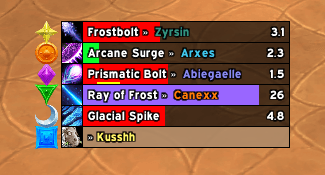
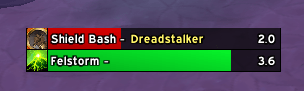
fgegi8ghe.png
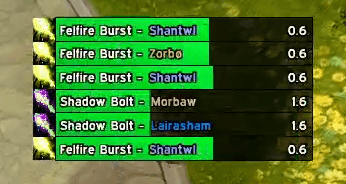
tifjef9fje.png
Description
The rebirth of DungeonCasts + the Targeted Spells WeakAura — rebuilt from the ground up as an addon.
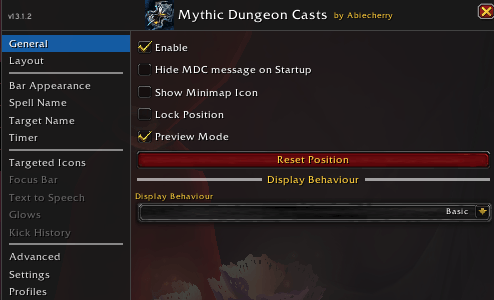
Mythic Dungeon Casts tracks every enemy and boss cast in Mythic+ and lays them out as a clean, readable group of cast bars — so you always know what's being cast, who it's aimed at, and whether it can be kicked. Built for shotcalling, high keys, and MDI-style play, it turns the chaos of a big pull into information you can act on at a glance.
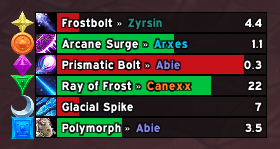
Enemy Cast Bars + Targeted Spells: Every enemy cast in the dungeon shown as bars, grouped together and sorted so you can read a whole pull at once. Every bar shows the targeted party member by name and in their class colour, so you instantly know who needs help. Also shows raid target icons next to the bars or focus bar, with adjustable size and positions.
Highly Custom: Fine-tune nearly everything: Textures, colours, fonts, dimensions, timers, symbols, and more to match your UI perfectly. Works with every UI addon & Nameplates out there.
Preview everything: Preview mode including all the features of the addon so you can change everything to your liking before stepping in dungeons!
More Features
Focus Bar: A dedicated, cast bar for your focus target — with its own settings for when you need to lock onto one specific mob.

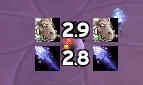
Targeted Icons: Weakaura like spell icons that show which spell is targeting you specifically, with flexible settings.
Kick History: When an enemy cast is interrupted, the bar briefly shows who interrupted it, in their class colour — perfect for VOD review and calling out kick rotations.

Glows: Highlight the casts that matter with fully customizable glows — for targeted casts, your target, your focus, important casts, enemies targeting you, and more, each with its own colour.
Text-to-Speech & Blizzard Audio Assist Settings: Hear everything! A built-in TTS system that announces spells and targets for accessibility and awareness, plus in-panel control of some of Blizzard's own Combat Audio Alert settings for more control.
Shareable Profiles: Export and import your setup to share with friends, your push group, or your whole community.
Multi-Language Support: The interface is available in multiple languages
- English (enUS )
- Français/French (FR)
- Deutsch/German (deDE)
- 简体中文/Chinese (zhCN)
- Русский/Russian (ruRU)
- Português/Portuguese (ptBR)
- Italiano/Italian (itIT)
- Español/Spanish (esES)
- 한국어/Korean (koKR)
- Nederlands/Dutch (nlNL)
- Svenska/Swedish (svSE)
Commands
- Type /mdc to open the settings window.
- You can also open the settings from the in-game AddOns options menu or the mini-map icon.
Feedback & Bugs
Please leave a comment here or message me on Discord (Abiecherry) if you have ideas for features or run into any bugs. I read everything!
Known Issues
Border display for other types of borders (Non-Full Square White/Solid) is currently not properly supported due to the early border implementation. Will come in a future update of mdc.
Special Thanks
- ExWind
- Zyrsin
- Mariosnek
- Lairas
- Kush
- Zaelia
- Khaelt
- Vickman
- Stove
- Pancake
- Chaseyka
- Crims
A huge thank you to everyone who commented, reported bugs, and suggested features !!
Legal
All Rights Reserved
Mythic Dungeon Casts (Cast Bars + Targeted Spells) Team