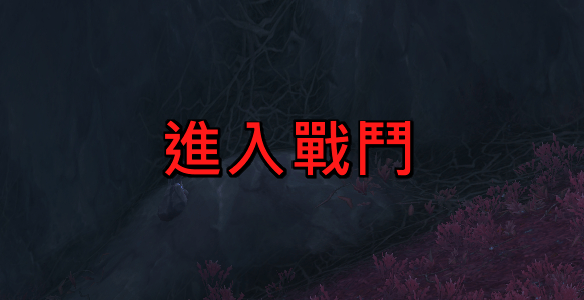
income.png
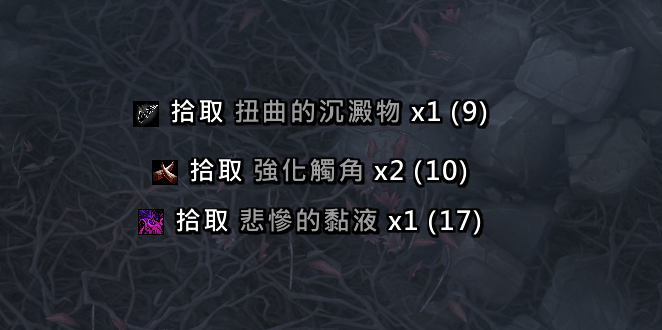
loot.png
Description
# LootG

**LootG** is a lightweight World of Warcraft addon for loot notification and combat state display. Recommended to use with Leatrix_Plus's "disable banner" feature.
## Features
### Loot Notification
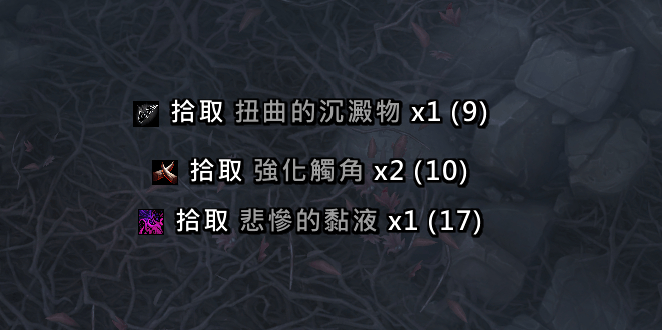
- **Scrolling Loot Display** - Looted items scroll with smooth animation
- **Item Quality Colors** - Items are displayed with their quality colors (Common, Uncommon, Rare, Epic, Legendary)
- **Item Icons** - Shows item icons alongside the item name
- **Bag Count** - Displays the total count of the item in your bags (only when > 0)
- **Currency & Gold Support** - Also displays looted currency and gold
- **Customizable Position** - Drag the blue anchor to position the display anywhere on screen
- **Clean Interface** - Only shows YOUR loot, not party/raid members
### Combat State
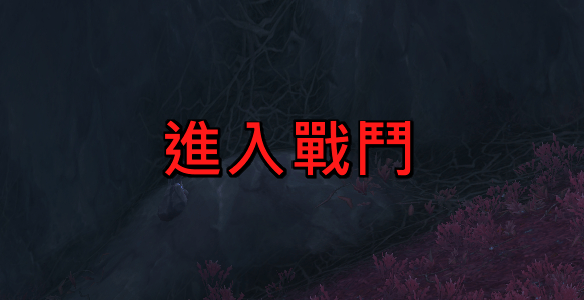
- **Enter/Leave Combat Flash** - Displays flash text when entering or leaving combat
- **Scroll & Static Modes** - Choose between scrolling animation or static display
- **4-Direction Scrolling** - Scroll Up, Down, Left, or Right
- **Custom Text** - Set your own enter/leave combat text, or use localized defaults
- **Independent Anchor** - Drag the red anchor to position combat text separately from loot
### Shared
- **Independent Font Settings** - Each module has its own font, size, outline, and shadow settings
- **Multi-Language** - Supports English, Simplified Chinese (zhCN), and Traditional Chinese (zhTW)
## Installation
1. Download and extract the `LootG` folder
2. Place it in your `World of Warcraft\_retail_\Interface\AddOns\` directory
3. Restart WoW or reload your UI (`/reload`)
## Usage
### Commands
- `/lootg` - Open settings panel
- `/lootg test` - Display a test loot message
### Settings
Access settings through:
- Type `/lootg` in chat
- Click the LootG icon in the Addon Compartment (minimap button)
- Go to Game Menu → Options → AddOns → LootG
The settings panel is organized into:
- **LootG** (main page) - Plugin intro and description
- **Loot Notification** (subcategory) - All loot display settings
- **Combat State** (subcategory) - All combat flash text settings
### Loot Notification Settings
| Setting | Description |
|---------|-------------|
| **Enabled** | Enable/disable loot notifications |
| **Lock Position** | Lock/unlock the blue anchor for positioning |
| **Show Icon** | Toggle item icon display |
| **X/Y Coordinate** | Fine-tune the display position |
| **Display Duration** | How long messages stay visible (0.5-10s) |
| **Scroll Time** | Animation speed (0.1-5s) |
| **Fade Speed** | Fade out duration (0.1-2s) |
| **Scroll Direction** | Up or Down |
| **Font Size** | Text size (8-48) |
| **Font** | Standard, Chat, Damage, or Quest |
| **Font Outline** | None, Thin, Thick, or Monochrome |
| **Font Shadow** | Enable/disable text shadow |
### Combat State Settings
| Setting | Description |
|---------|-------------|
| **Enabled** | Enable/disable combat state flash |
| **Lock Position** | Lock/unlock the red anchor for positioning |
| **X/Y Coordinate** | Fine-tune the display position |
| **Display Mode** | Scroll or Static |
| **Scroll Direction** | Up, Down, Left, or Right |
| **Flash Duration** | How long the text is displayed (0.1-3s) |
| **Fade Time** | Fade out duration (0.1-3s) |
| **Scroll Speed** | Animation speed multiplier (0.1-5) |
| **Font Size** | Text size (8-72) |
| **Font** | Standard, Chat, Damage, or Quest |
| **Font Outline** | None, Thin, Thick, or Monochrome |
| **Font Shadow** | Enable/disable text shadow |
| **Enter Combat Text** | Custom text (empty = localized default) |
| **Leave Combat Text** | Custom text (empty = localized default) |
## Display Format
### Loot
```
[Icon] Loot ItemName x1 (BagCount)
```
### Combat State
```
Enter Combat (red flash text)
Leave Combat (green flash text)
```
## Screenshots
*Coming soon*
Changelog
### v1.1.1
- Bug fix
### v1.1.0
- Added Combat State flash text module with Scroll/Static modes and 4-direction scrolling
- Subcategory settings, independent anchors and font settings per module
- Merged into single LootG.lua, continuous scrolling, localized UI labels
### v1.0.0
- Initial release
- Scrolling loot display with animation
- Item quality colors
- Customizable fonts and positioning
- Settings panel integration
## License
This addon is free to use and modify.
## Author
**Claude** (AI Assistant by Anthropic)
---
*Made with ❤️ for the WoW community*
The LootG Team